# After hours of google still cant create a CSV?
**URL:** https://discourse.nodered.org/t/after-hours-of-google-still-cant-create-a-csv/70626
**Category:** General
**Created:** [15 November 2022 08:05 UTC](https://discourse.nodered.org/t/after-hours-of-google-still-cant-create-a-csv/70626 "2022-11-15T08:05:56Z")
**Posts on this page:** 6
**Page:** 1
### Author:  [@Duncan](https://discourse.nodered.org/u/Duncan)
#### Post date: [15 November 2022 08:05 UTC](https://discourse.nodered.org/t/after-hours-of-google-still-cant-create-a-csv/70626/1 "2022-11-15T08:05:56Z")
I have looked at examples but cant seem te get this CSV node. Please help.

[test.json](https://discourse.nodered.org/uploads/short-url/AcpnuRnfnl1KxL0sn96SVE72WbW.json) (6.9 KB)
I hope I can post this correctly. Anyway, I have an object that looks like this:
15-11-2022 08:46:31[node: 95a25ac4a18fb729](http://10.31.30.73:1880/#)
msg : Object
object
timestamp: 1668498391365
MeterId: "HKL1-main\_KW"
Value: 390937.3
Unit: "KW"
Type: "energy"
\_msgid: "ad1e75f72c956c37"
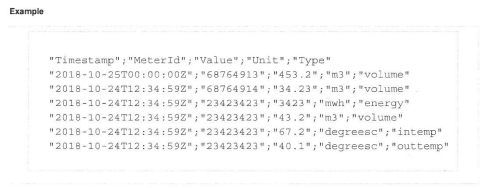
This gets refreshed with different MeterId and the corrosponding values. I want to create a CSV where these values get in rows.
---
### Author:  [@E1cid](https://discourse.nodered.org/u/E1cid)
#### Post date: [15 November 2022 08:30 UTC](https://discourse.nodered.org/t/after-hours-of-google-still-cant-create-a-csv/70626/2 "2022-11-15T08:30:46Z")
something like this should work, I see no need for the function.
```auto
[{"id":"081f859720887260","type":"inject","z":"452103ea51141731","name":"","props":[{"p":"payload"},{"p":"topic","vt":"str"}],"repeat":"","crontab":"","once":false,"onceDelay":0.1,"topic":"","payload":"20","payloadType":"num","x":610,"y":4220,"wires":[["202cb4e226711627"]]},{"id":"202cb4e226711627","type":"change","z":"452103ea51141731","name":"HKL1-main_KW","rules":[{"t":"move","p":"payload","pt":"msg","to":"payload.value","tot":"msg"},{"t":"set","p":"payload.timestamp","pt":"msg","to":"$now()","tot":"jsonata"},{"t":"set","p":"payload.MeterId","pt":"msg","to":"HKL1-main_KW","tot":"str"},{"t":"set","p":"payload.Unit","pt":"msg","to":"KW","tot":"str"},{"t":"set","p":"payload.Type","pt":"msg","to":"energy","tot":"str"},{"t":"set","p":"columns","pt":"msg","to":"$join($keys($$.payload),\",\")","tot":"jsonata"}],"action":"","property":"","from":"","to":"","reg":false,"x":780,"y":4220,"wires":[["f74dcac77d74f590"]]},{"id":"f74dcac77d74f590","type":"csv","z":"452103ea51141731","name":"test_csv","sep":",","hdrin":true,"hdrout":"once","multi":"one","ret":"\\n","temp":"","skip":"0","strings":true,"include_empty_strings":false,"include_null_values":false,"x":1000,"y":4220,"wires":[["33de82cd26ec61be","dd5a4a107ea99ebb"]]},{"id":"33de82cd26ec61be","type":"debug","z":"452103ea51141731","name":"","active":true,"tosidebar":true,"console":false,"tostatus":false,"complete":"payload","targetType":"msg","statusVal":"","statusType":"auto","x":1030,"y":4140,"wires":[]},{"id":"dd5a4a107ea99ebb","type":"file","z":"452103ea51141731","name":"","filename":"test.txt","filenameType":"str","appendNewline":false,"createDir":true,"overwriteFile":"false","encoding":"none","x":980,"y":4280,"wires":[[]]}]
```

Just add change nodes for each reading
Text file

---
### Author:  [@Duncan](https://discourse.nodered.org/u/Duncan)
#### Post date: [15 November 2022 09:49 UTC](https://discourse.nodered.org/t/after-hours-of-google-still-cant-create-a-csv/70626/3 "2022-11-15T09:49:24Z")
thanks for your help, much appreciated! I got it all working.
Just one question, why is it if I move the timestamp to the first position I get the following error.
"Cannot set property of non-object type: payload.timestamp"
---
### Author:  [@E1cid](https://discourse.nodered.org/u/E1cid)
#### Post date: [15 November 2022 09:57 UTC](https://discourse.nodered.org/t/after-hours-of-google-still-cant-create-a-csv/70626/4 "2022-11-15T09:57:32Z")
Because the incoming msg.payload is a number, the first rule in the change node moves it to payload.value, thus making msg.payload an object, which you can now add other properties to.
If you want to have timestamp first then you would need to move payload to a temp property, then set payload to an object, then move the temp property to payload.value.
e.g.
```auto
[{"id":"202cb4e226711627","type":"change","z":"452103ea51141731","name":"HKL1-main_KW","rules":[{"t":"move","p":"payload","pt":"msg","to":"temp","tot":"msg"},{"t":"set","p":"payload","pt":"msg","to":"{}","tot":"json"},{"t":"set","p":"payload.timestamp","pt":"msg","to":"$now()","tot":"jsonata"},{"t":"set","p":"payload.MeterId","pt":"msg","to":"HKL1-main_KW","tot":"str"},{"t":"move","p":"temp","pt":"msg","to":"payload.value","tot":"msg"},{"t":"set","p":"payload.Unit","pt":"msg","to":"KW","tot":"str"},{"t":"set","p":"payload.Type","pt":"msg","to":"energy","tot":"str"},{"t":"set","p":"columns","pt":"msg","to":"$join($keys($$.payload),\",\")","tot":"jsonata"}],"action":"","property":"","from":"","to":"","reg":false,"x":780,"y":4220,"wires":[["f74dcac77d74f590"]]}]
```
---
### Author:  [@Duncan](https://discourse.nodered.org/u/Duncan)
#### Post date: [15 November 2022 11:33 UTC](https://discourse.nodered.org/t/after-hours-of-google-still-cant-create-a-csv/70626/5 "2022-11-15T11:33:55Z")
@E1cid , thanks so much for you help. It works like a charm. Something extra to add to my box of tricks.
---
### Author:  [@system](https://discourse.nodered.org/u/system)
#### Post date: [29 November 2022 11:34 UTC](https://discourse.nodered.org/t/after-hours-of-google-still-cant-create-a-csv/70626/6 "2022-11-29T11:34:30Z")
This topic was automatically closed 14 days after the last reply. New replies are no longer allowed.