# \[beta testing\] nodes for live streaming mp4
**URL:** https://discourse.nodered.org/t/beta-testing-nodes-for-live-streaming-mp4/33743
**Category:** Share Your Nodes
**Created:** [4 October 2020 23:35 UTC](https://discourse.nodered.org/t/beta-testing-nodes-for-live-streaming-mp4/33743 "2020-10-04T23:35:12Z")
**Posts on this page:** 20
**Page:** 5
### Author:  [@krambriw](https://discourse.nodered.org/u/krambriw)
#### Post date: [19 October 2020 05:54 UTC](https://discourse.nodered.org/t/beta-testing-nodes-for-live-streaming-mp4/33743/81 "2020-10-19T05:54:51Z")
@kevinGodell
I think I found something related to why the presentation in browsers suddenly stops
When looking at the network traffic you can see how the segments are received. Then suddenly, a segment with zero content arrives (status cancelled). This makes the presentation in the browser to stop. A random number of hls.m3u8 sequences then follows until a new good sequence is received and the presentation recovers. Then a new zero content sequence arrives and it happens again...
Just a question: I tried to debug the messages coming out from the mp4frag node to get the correct link to test with VLC but it seems nothing is sent? Actually it works as before even if I remove the wire between the mp4frag and the ui\_mp4frag nodes, How is this possible? And how to get the link to be used in VLC?
Best regards, Walter
No debug info shown
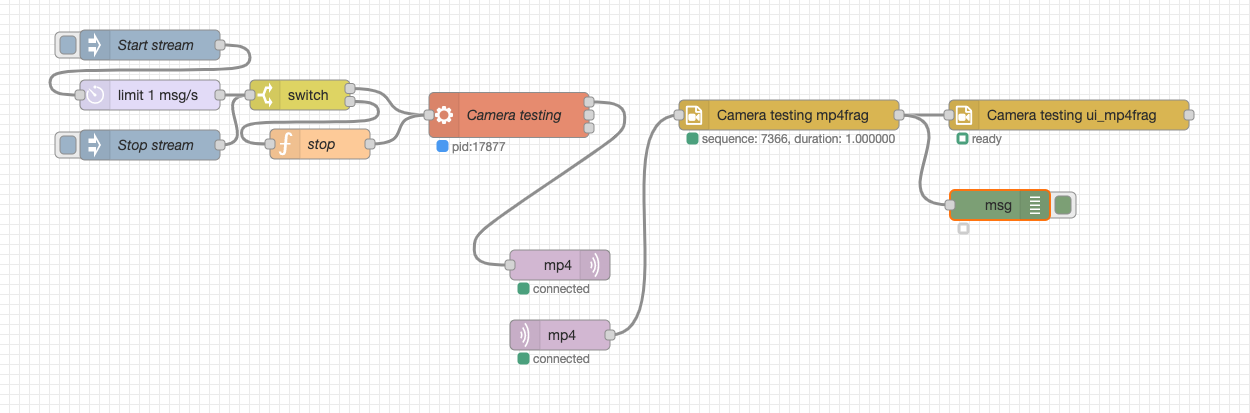
This works without a wire


---
### Author:  [@krambriw](https://discourse.nodered.org/u/krambriw)
#### Post date: [19 October 2020 06:06 UTC](https://discourse.nodered.org/t/beta-testing-nodes-for-live-streaming-mp4/33743/82 "2020-10-19T06:06:28Z")
Good point, I think this is valid also for normal browsers running on other platforms, makes no sense to send live data unless someone is watching. When I run my browsers with a number of live camera views on my mac I notice the fan speeds up due to the increased cpu load (maybe mp4 would be better from cpu load perspective than the current http streams I use but my usb cameras does not provide h.264. The conversion I tried with ffmpeg works but does not really give me the same picture quality. So far at least)
---
### Author:  [@SuperNinja](https://discourse.nodered.org/u/SuperNinja)
#### Post date: [19 October 2020 07:09 UTC](https://discourse.nodered.org/t/beta-testing-nodes-for-live-streaming-mp4/33743/83 "2020-10-19T07:09:18Z")
> [@BartButenaers](#):
>
> I think that dashboard client-side widget should let the server-side know when it becomes (in)visible. So that the server kan start/stop throttling...
To overcome this, I display my cameras in tabs (groups): when I deploy the tab the flow is started. When I close the tab, the stream is killed. Managed by "ui\_control node" which detects when a group changes state.
I don't have any streaming running in the background.
---
### Author:  [@SuperNinja](https://discourse.nodered.org/u/SuperNinja)
#### Post date: [19 October 2020 08:35 UTC](https://discourse.nodered.org/t/beta-testing-nodes-for-live-streaming-mp4/33743/84 "2020-10-19T08:35:36Z")
> [@kevinGodell](#):
>
> Can you try connecting VLC to your hls.m3u8 playlist and see how that compares to the browse

_there is almost no delay between Node Red and VLC on my hls.m3u8 playlist_
**5min after ...**

After 5 minutes of streaming, I get a 5 minute delay in the VLC player
**[EDIT] 1h after ...**

_streaming was interrupted on both_
**While the node continues to "read" the playlist :**


_With a beautiful green stripe 😁_
---
### Author:  [@krambriw](https://discourse.nodered.org/u/krambriw)
#### Post date: [19 October 2020 09:06 UTC](https://discourse.nodered.org/t/beta-testing-nodes-for-live-streaming-mp4/33743/85 "2020-10-19T09:06:57Z")
How did you configure VLC to pick up the playlist? I would like to test here as well
Best regards, Walter
EDIT: sorry, figured it out, for me it worked with [http://192.168.0.241:1880/mp4frag/sdsfds/hls.m3u8](http://192.168.0.241:1880/mp4frag/sdsfds/hls.m3u8)
---
### Author:  [@BartButenaers](https://discourse.nodered.org/u/BartButenaers)
#### Post date: [19 October 2020 09:28 UTC](https://discourse.nodered.org/t/beta-testing-nodes-for-live-streaming-mp4/33743/86 "2020-10-19T09:28:50Z")
> [@SuperNinja](#):
>
> To overcome this, I display my cameras in tabs (groups): when I deploy the tab the flow is started. When I close the tab, the stream is killed. Managed by "ui\_control node" which detects when a group changes state.
That is indeed a nice solution. But if we are building a UI node, it would be nice IMHO to have this functionality in the node. Because that keeps our flows simple. I mean a checkbox _"don't push data if widget not visible"_. Then you can keep sending messages (containing m4 fragments) to the UI node, but they won't be pushed to the dashboard when the widget is not visible at the moment.
Although I'm not sure (I'm not at my computer) whether it is possible currently - in the server side `beforeEmit` function - to stop a message from being send to the client. See the feedback from @dceejayin this [discussion](https://discourse.nodered.org/t/validate-input-message-in-ui-node/11393/5), where is advised to send a message containing e.g. null in those cases. But perhaps that is possible meanwhile...
Anyway perhaps I'm going too much of topic now. If my proposal makes sense (and need further discussion), we better split this into a separate topic...
---
### Author:  [@kevinGodell](https://discourse.nodered.org/u/kevinGodell)
#### Post date: [20 October 2020 03:18 UTC](https://discourse.nodered.org/t/beta-testing-nodes-for-live-streaming-mp4/33743/87 "2020-10-20T03:18:20Z")
Sorry for not being obvious, but I think there might be a little confusion about how the nodes are talking to each other. The mp4frag node receives buffer data and turns that into playable fragmented mp4 and then serves it to any player that can play it such as a browser implementation of hls.js or external app such as VLC. Video segments are **NOT** sent between mp4frag to ui\_mp4frag using the builtin messaging system. The main communication that it give it just telling it where the playlist will be and when it is available. It is then up to the player to play the video or not by consuming it from the http server route where the hls.m3u8 is served.
As for the closing of un-watched videos, that is on my list and I was playing with that today. It will involve a combination of [IntersectionObserver](https://developer.mozilla.org/en-US/docs/Web/API/Intersection_Observer_API) and [document.visibilityState](https://developer.mozilla.org/en-US/docs/Web/API/Document/visibilityState). I had it working pretty good by shutting off video that scrolled out of position or tab minimized and turning video back on that scrolled back into position when tab is visible. There problem is that the 3 browsers that I was testing on seemed to want something different from me. I am trying to find a way to please them all. Had to give up for tonight.
---
### Author:  [@kevinGodell](https://discourse.nodered.org/u/kevinGodell)
#### Post date: [20 October 2020 03:25 UTC](https://discourse.nodered.org/t/beta-testing-nodes-for-live-streaming-mp4/33743/88 "2020-10-20T03:25:47Z")
> [@SuperNinja](#):
>
> With a beautiful green stripe
The green will definitely be from the cam video source itself. Since we are using -c:v copy, ffmpeg is copying the source and sending it out as is. If compatible, do you have tcp set for the rtsp input `-rtsp_transport tcp`?
---
### Author:  [@SuperNinja](https://discourse.nodered.org/u/SuperNinja)
#### Post date: [20 October 2020 06:22 UTC](https://discourse.nodered.org/t/beta-testing-nodes-for-live-streaming-mp4/33743/89 "2020-10-20T06:22:12Z")
yes there is the EXEC command :
`ffmpeg -loglevel quiet -rtsp_transport tcp -i rtsp://192.168.1.7:554 .....`
---
### Author:  [@wb666greene](https://discourse.nodered.org/u/wb666greene)
#### Post date: [24 October 2020 14:03 UTC](https://discourse.nodered.org/t/beta-testing-nodes-for-live-streaming-mp4/33743/90 "2020-10-24T14:03:24Z")
I've done quite a lot with MQTT and security cameras to feed an AI sub-system. It works fantastic on i5 or better class systems, but multiple HD cameras choke IOT class hardware. It seems to be the issues in the networking layer where large backlogs build up.
For security images I don't think you want to "sacrifice quality" at all. If you remember the Micheal Brown riots in the US, looters were found "not guilty" as the VHS quality security camera images were not deemed "beyond a reasonable doubt" in image quality for identification.
---
### Author:  [@ristomatti](https://discourse.nodered.org/u/ristomatti)
#### Post date: [25 October 2020 16:59 UTC](https://discourse.nodered.org/t/beta-testing-nodes-for-live-streaming-mp4/33743/91 "2020-10-25T16:59:30Z")
> [@SuperNinja](#):
>
> With a beautiful green stripe 😁
I don't know about that but above it - is that a swimming pool... ON TOP OF A HILL? 🤯
---
### Author:  [@SuperNinja](https://discourse.nodered.org/u/SuperNinja)
#### Post date: [25 October 2020 18:42 UTC](https://discourse.nodered.org/t/beta-testing-nodes-for-live-streaming-mp4/33743/92 "2020-10-25T18:42:04Z")
yes with an overflow. You feel like you're swimming in the sky 😆
---
### Author:  [@ristomatti](https://discourse.nodered.org/u/ristomatti)
#### Post date: [25 October 2020 18:53 UTC](https://discourse.nodered.org/t/beta-testing-nodes-for-live-streaming-mp4/33743/93 "2020-10-25T18:53:51Z")
Must be amazing at night also! Congrats! 🙂
---
### Author:  [@kevinGodell](https://discourse.nodered.org/u/kevinGodell)
#### Post date: [26 October 2020 12:07 UTC](https://discourse.nodered.org/t/beta-testing-nodes-for-live-streaming-mp4/33743/94 "2020-10-26T12:07:36Z")
I was finally able to push an update using a custom video player that relies on socket\_io instead of hls.js over http.
It was tricky to incorporate with the lifecycle of node-red. Seems to have some issues connecting using a custom **path** and **namespace** without using `forceNew: true`. The trick for that was to use the **ws://** url with `forceNew: false` as to not make a bunch of extra socket connections.
Added the feature that if document visibility changes, it will load or unload the video source.
Ran out of time to detect when a video scrolls out of view to toggle it via load/unload.
If you want to try the newer version,
```auto
cd .node-red
npm update
```
- **node-red-contrib-ui-mp4frag**
There is a new option for picking your preferred video playback. Right now it is a crude array that is used to check your preferences in the listed order and see what is supported in the browser and available from the playlists given from the server payload. The following will try socket\_io first, then hls.js, native hls (for mobile safari), then mp4 file if available:
```auto
["socket.io","hls.js","hls","mp4"]
```
If you only wanted to use hls.js and fallback to native hls:
```auto
["hls.js","hls"]
```
If you only wanted to use socket\_io and have no fallback option:
```auto
["socket.io"]
```
I need to figure out how to make the option into a re-orderable list that can only add my selected options in the node-red settings panel.
- **node-red-contrib-mp4frag**
The server side msg.payload passed to the ui player now includes the extra data for the front end to consume:
```auto
{
"hlsPlaylist":"/mp4frag/some.name/hls.m3u8",
"socketIo": {
"path": "/mp4frag/socket.io",
"namespace": "/some.name"
}
}
```
---
### Author:  [@krambriw](https://discourse.nodered.org/u/krambriw)
#### Post date: [26 October 2020 14:13 UTC](https://discourse.nodered.org/t/beta-testing-nodes-for-live-streaming-mp4/33743/95 "2020-10-26T14:13:18Z")
Wow, my first impression, this is very impressive!!!
More impressions to come, just need more viewing experience 😉
Very nice and smooth so far
---
### Author:  [@BartButenaers](https://discourse.nodered.org/u/BartButenaers)
#### Post date: [26 October 2020 14:25 UTC](https://discourse.nodered.org/t/beta-testing-nodes-for-live-streaming-mp4/33743/96 "2020-10-26T14:25:00Z")
> [@kevinGodell](#):
>
> I need to figure out how to make the option into a re-orderable list that can only add my selected options in the node-red settings panel.
I assume you should use an editableList. If you want my help for that, just shout...
---
### Author:  [@krambriw](https://discourse.nodered.org/u/krambriw)
#### Post date: [26 October 2020 17:03 UTC](https://discourse.nodered.org/t/beta-testing-nodes-for-live-streaming-mp4/33743/97 "2020-10-26T17:03:28Z")
Amazing, exceptional picture quality, virtually no load on the cpu (is now down to 2,5%) in a RPi3B+, is that possible!!!? I don't have cameras with h.264 support but it must be great to stream video from them with this solution!!
Next thing on my mind is to feed the stream into an AI analyzer for object detection. I assume that the feed needs to be disassembled frame-by-frame somehow but it should not be a huge problem
Picture below is from Safari but it works just as good with Chrome (tested on mac and windows)

---
### Author:  [@SuperNinja](https://discourse.nodered.org/u/SuperNinja)
#### Post date: [27 October 2020 11:12 UTC](https://discourse.nodered.org/t/beta-testing-nodes-for-live-streaming-mp4/33743/98 "2020-10-27T11:12:53Z")
Great job, I notice much less delay with the live.
The RPI 3B consumes 20% of power with 3 CAM-IP in HD (640x360): I validate! 😃
On the other hand, I don't know if it's a bug, but when I switch to PIP mode, I leave it open for several tens of seconds, and I return to normal mode, the streamming is stopped BUT an image changes every 6s about. You must press the arrow to resume normal playback.
Reading has fallen behind and is not catching up.
Is there a possibility to make up for the delay automatically, or with a command or an arrow "forward"? 🤔
---
### Author:  [@kevinGodell](https://discourse.nodered.org/u/kevinGodell)
#### Post date: [28 October 2020 12:23 UTC](https://discourse.nodered.org/t/beta-testing-nodes-for-live-streaming-mp4/33743/99 "2020-10-28T12:23:09Z")
> [@SuperNinja](#):
>
> On the other hand, I don't know if it's a bug, but when I switch to PIP mode, I leave it open for several tens of seconds, and I return to normal mode, the streamming is stopped BUT an image changes every 6s about. You must press the arrow to resume normal playback.
I was trying out the pip in 3 browsers on mac: chrome, firefox, and safari. I can only duplicate your issue if I press the **x** button instead of the **return to non-pip** button. Are you pressing the X? That is your browsers behavior to trigger a pause if pressing the x, but simply return to regular viewing if pressing the other button.
> [@krambriw](#):
>
> Amazing, exceptional picture quality, virtually no load on the cpu (is now down to 2,5%) in a RPi3B+, is that possible!!!? I don't have cameras with h.264 support but it must be great to stream video from them with this solution!!
That sounds great, but I hate to get excited until I know that your are passing the video through ffmpeg in exec node and node-red-contrib-mp4frag or is it just using the ui-mp4frag? For my personal experience running 14 cams, it seems that relaying the video on [socket.io](http://socket.io) server actually runs **much worse** than using regular http via hls.js, but it is true that I am deliberately beating up the pi to see what breaks by having several browsers open at the same time live streaming 3 X 14 cams. I have read that [socket.io](http://socket.io) has bad performace, so I may also add a regular websockets feature to move away from [socket.io](http://socket.io).
> [@BartButenaers](#):
>
> I assume you should use an editableList. If you want my help for that, just shout...
I will definitely need your help with that. I only hope that the editable list can do what I want. I really need an **ordered** editable list that will only use my available options. So, depending on the types of video we will support, there has to be the options for the user preference of which ones to try and in what order to try them, so order will be an important part of the list.
> [@SuperNinja](#):
>
> Is there a possibility to make up for the delay automatically, or with a command or an arrow "forward"?
Right now, with the [socket.io](http://socket.io) implentation, I keep track of the buffered segments by constantly feeding them to the mediasource. I have to monitor its duration and remove old media buffere so that your browser does not consume too much memory. The tricky part is determining how much buffer to keep to allow for smooth playback. This will eventually be a setting that you can tweak. Right now, I use a minimum of 10 seconds or 3.3 x the duration of the last segment received (3 segments duration plus 10%), whichever is greater. This seemed like a good balance for my videos not to freeze while waiting for the next segment. Also, I move the play head forward if it ends up being less than the current buffered video after removing old pieces. That's why you see the video update and skip forward while paused.
---
### Author:  [@SuperNinja](https://discourse.nodered.org/u/SuperNinja)
#### Post date: [28 October 2020 14:00 UTC](https://discourse.nodered.org/t/beta-testing-nodes-for-live-streaming-mp4/33743/100 "2020-10-28T14:00:18Z")
> [@kevinGodell](#):
>
> Are you pressing the X
yes exactely , ok, now i know i would only use the back arrow.
Come on, last note, these 2 icons are a bit small, but hey it's just to say something. 😜
> [@kevinGodell](#):
>
> That's why you see the video update and skip forward while paused.
It's perfect, I have nothing more to say while good work !
[Previous page](https://discourse.nodered.org/t/beta-testing-nodes-for-live-streaming-mp4/33743.md?page=4)
[Next page](https://discourse.nodered.org/t/beta-testing-nodes-for-live-streaming-mp4/33743.md?page=6)