# \[beta testing\] nodes for live streaming mp4
**URL:** https://discourse.nodered.org/t/beta-testing-nodes-for-live-streaming-mp4/33743
**Category:** Share Your Nodes
**Created:** [4 October 2020 23:35 UTC](https://discourse.nodered.org/t/beta-testing-nodes-for-live-streaming-mp4/33743 "2020-10-04T23:35:12Z")
**Posts on this page:** 20
**Page:** 6
### Author:  [@krambriw](https://discourse.nodered.org/u/krambriw)
#### Post date: [28 October 2020 14:23 UTC](https://discourse.nodered.org/t/beta-testing-nodes-for-live-streaming-mp4/33743/101 "2020-10-28T14:23:39Z")
> [@kevinGodell](#):
>
> until I know that your are passing the video through ffmpeg in exec node and node-red-contrib-mp4frag or is it just using the ui-mp4frag?
Sorry, in that test, yes, I pushed playlists directly to 6 ui\_mp4frag nodes. But also pushing the whole way from exec node with ffmpeg -\> mp4frag -\> ui-mp4frag feels very efficient. I have no idea which player is actually used since I have all four of them in the array. Should I try with only one of them?
Just testing with a regular simple usb camera via ffmpeg (including the conversion from yuv420p to mp4 using the GPU) -\> mp4frag -\> ui\_mp4frag shows a cpu load of 5-7% on my RPi3, when browsing from my mac or windows pc. CPU load slightly increasing when I start to introduce more movement in front of the camera it seems, if so I think it is understandable (Isn't mp4 the standard where only changed pixels are transferred?)
---
### Author:  [@krambriw](https://discourse.nodered.org/u/krambriw)
#### Post date: [29 October 2020 06:44 UTC](https://discourse.nodered.org/t/beta-testing-nodes-for-live-streaming-mp4/33743/102 "2020-10-29T06:44:17Z")
@kevinGodell
Hi Kevin,
I did a little test trying to open & read the streams from the mp4frag node using the popular OpenCV software. Behind the scene OpenCV uses GStreamer. The sample flow below streams France 24 television using ffmpeg and the streaming works fine if I open the playlist (from mp4frag) in VLC but if I try OpenCV/GStreamer I get error messages as below
If I open & read the original France 24 playlist directly in OpenCV/GStreamer it works fine
Reason for my question is that I would like to use OpenCV to open & read your playlists created by the mp4frag nodes. Have I missed something?
EDIT: Using the latest OpenCV (4.5.0) that I just built (compiling from source) on the RPi3 using the guide here: [https://www.pyimagesearch.com/2019/09/16/install-opencv-4-on-raspberry-pi-4-and-raspbian-buster/](https://www.pyimagesearch.com/2019/09/16/install-opencv-4-on-raspberry-pi-4-and-raspbian-buster/)
Best regards, Walter
Error message from GStreamer when opening a playlist created by mp4frag:
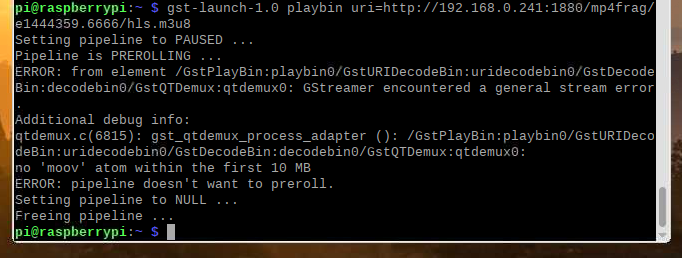
GStreamer successfully opening original playlist for France 24:

My test flow for streaming France 24:

```auto
[{"id":"5ff09174.7d234","type":"inject","z":"252b9369.44a80c","name":"Start stream","props":[{"p":"payload"}],"repeat":"","crontab":"","once":false,"onceDelay":"1","topic":"","payload":"true","payloadType":"bool","x":200,"y":3290,"wires":[["51de2ba.1631ed4"]]},{"id":"660f8eb.53e927","type":"inject","z":"252b9369.44a80c","name":"Stop stream","props":[{"p":"payload"}],"repeat":"","crontab":"","once":false,"onceDelay":0.1,"topic":"","payload":"false","payloadType":"bool","x":200,"y":3336,"wires":[["51de2ba.1631ed4"]]},{"id":"51de2ba.1631ed4","type":"switch","z":"252b9369.44a80c","name":"","property":"payload","propertyType":"msg","rules":[{"t":"true"},{"t":"false"}],"checkall":"true","repair":false,"outputs":2,"x":351,"y":3290,"wires":[["929c2d49.4cf99"],["33ee1e61.f21cf2"]]},{"id":"33ee1e61.f21cf2","type":"function","z":"252b9369.44a80c","name":"stop","func":"msg = {\n kill:'SIGKILL',\n payload : 'SIGKILL' \n}\n\nreturn msg;","outputs":1,"noerr":0,"initialize":"","finalize":"","x":371,"y":3339,"wires":[["929c2d49.4cf99"]]},{"id":"929c2d49.4cf99","type":"exec","z":"252b9369.44a80c","command":"ffmpeg -i http://f24hls-i.akamaihd.net/hls/live/221147/F24_EN_HI_HLS/master_2000.m3u8 -c:v copy -f mp4 -movflags +frag_keyframe+empty_moov+default_base_moof pipe:1","addpay":false,"append":"","useSpawn":"true","timer":"","oldrc":false,"name":"France 24","x":540,"y":3310,"wires":[["9602446f.4a4d68"],[],["9602446f.4a4d68"]]},{"id":"9602446f.4a4d68","type":"mp4frag","z":"252b9369.44a80c","name":"France 24 mp4frag","hlsPlaylistSize":"10","hlsPlaylistExtra":"5","basePath":"e1444359.6666","x":820,"y":3310,"wires":[[]]}]
```
---
### Author:  [@krambriw](https://discourse.nodered.org/u/krambriw)
#### Post date: [29 October 2020 07:11 UTC](https://discourse.nodered.org/t/beta-testing-nodes-for-live-streaming-mp4/33743/103 "2020-10-29T07:11:02Z")
Running the original playlist stream through my AI detector in a NVIDIA Jetson Nano

> **[Skärminspelning 2020-10-29 kl. 08.44.58.mov (video)](https://drive.google.com/file/d/1kTv2-Ihklx_R5g7wRAERSYvaubjAlFcG/view?usp=sharing)**
>
> Google Drive file.
---
### Author:  [@SuperNinja](https://discourse.nodered.org/u/SuperNinja)
#### Post date: [29 October 2020 13:23 UTC](https://discourse.nodered.org/t/beta-testing-nodes-for-live-streaming-mp4/33743/104 "2020-10-29T13:23:07Z")
it is not bad at all ! 👍
---
### Author:  [@SuperNinja](https://discourse.nodered.org/u/SuperNinja)
#### Post date: [29 October 2020 13:28 UTC](https://discourse.nodered.org/t/beta-testing-nodes-for-live-streaming-mp4/33743/105 "2020-10-29T13:28:14Z")
> [@SuperNinja](#):
>
> It's perfect, I have nothing more to say while good work !
@kevinGodell I can only get the EXEC node to work on the Raspberry Pi (possibly on a Linux distribution, but I haven't tried). On Windows 10, this node does not work (or so I did not find the trick for). The next challenge would be to do without this node to stream video regardless of which OS is running Node-Red.
Do you think doable?
[EDIT] I have "double streamming" problems: for example the streamming is running, if I modify my Flow or if I lose the connection with the Node-Red server, and that I did not kill before the deployment of the Flow, when the Flow restarts, the EXEC node continues to run (PID blue point under the EXEC node) and a second streamming is added to the first!
(Prosessor consumption increases and the image is jerky.)
`kill: 'SIGHUP', payload: 'SIGHUP'` or `kill: 'SIGTERM', payload: 'SIGTERM'` does nothing at all: the streamming continues to run.
[EDIT 2] :
> [@kevinGodell](#):
>
> Added the feature that if document visibility changes, it will load or unload the video source.
>
> Ran out of time to detect when a video scrolls out of view to toggle it via load/unload.
Indeed, I encounter this concern:
The same camera can be displayed, either on my home page, with other cameras under tabs, or in another dedicated page than for this camera.
When I start streaming the camera on the dashboard, whether the tab is open or closed, I am consuming bandwidth. It's too bad.
If I go to another window the consumption drops.

I can kill the streaming but it takes away instant playback when I open or close the tab. 😢
---
### Author:  [@kevinGodell](https://discourse.nodered.org/u/kevinGodell)
#### Post date: [30 October 2020 14:29 UTC](https://discourse.nodered.org/t/beta-testing-nodes-for-live-streaming-mp4/33743/106 "2020-10-30T14:29:35Z")
> [@krambriw](#):
>
> isn't mp4 the standard where only changed pixels are transferred?
Yes. Since you are already encoding mp4, you can tweak the settings affecting compression and browser compatibility. I think that would be setting **profile** (low, main, high, etc) and **level** (3.0, 3.1, 4.0, 4.1, 4.2, etc). The lower profile and lower level offer greater playback compatibility at the price of being less compressed.
> [@krambriw](#):
>
> Reason for my question is that I would like to use OpenCV to open & read your playlists created by the mp4frag nodes. Have I missed something?
I took a quick look at the format of your working news feed and see that it is **mpegts** , not **fragmented mp4**. gstreamer may not have been updated to support the new standard from a few things I found online. Unfortunately, I can never support mpegts since it would require alot of wasted energy remuxing video and causing a burden on both the server and client side. I have focused on a format that is cross browser compatible. But, the good news is that I can provide a live mp4 http route from node-red-contrib-mp4frag that gstreamer may be able to consume at a path such as **/mp4frag/e1444359.6666/video.mp4**. Will let you know when i add that server side route for you to try. I was hesitant to initially add that route since it can only be played by chrome and firefox as a never ending mp4. Safari can only read it doing byte range requests which I found to be impossible since it is live. But if an external app can use it, then I will add it.
> [@SuperNinja](#):
>
> I can only get the EXEC node to work on the Raspberry Pi (possibly on a Linux distribution, but I haven't tried). On Windows 10, this node does not work (or so I did not find the trick for). The next challenge would be to do without this node to stream video regardless of which OS is running Node-Red.
> Do you think doable?
>
> [EDIT] I have "double streamming" problems: for example the streamming is running, if I modify my Flow or if I lose the connection with the Node-Red server, and that I did not kill before the deployment of the Flow, when the Flow restarts, the EXEC node continues to run (PID blue point under the EXEC node) and a second streamming is added to the first!
> (Prosessor consumption increases and the image is jerky.)
I have found that the exec node does not do exactly what I need, as you have also found. When set to spawn mode, it should really only keep 1 process running, but I am not here to make demands of the devs. I do have plans to make a dedicated ffmpeg spawn node that will solve the issues of double spawning, system compatibility, automatic respawn on crash, limited piping output, etc., just haven't found the time since the front end video player is very demanding to make cross browser compatible with the many features required. At some point, I will have to stop the video player development and make it **good enough for general use** so that I can move on to the other nodes.
> [@SuperNinja](#):
>
> When I start streaming the camera on the dashboard, whether the tab is open or closed, I am consuming bandwidth. It's too bad.
> If I go to another window the consumption drops.
I see in your video clip that toggling the visibility of the cam does not stop it loading but when changing tabs it does. I am not sure if there is an event to listen for to detect the toggling of its view. Maybe the IntersectionObserver api will detect that. Will let you know when I add the feature that detects if element if visible or not to trigger load/unload.
> [@SuperNinja](#):
>
> I can kill the streaming but it takes away instant playback when I open or close the tab.
Yes, that will be the tradeoff. Either have instant playback and keep consuming bandwidth, or stop the bandwidth and require it to restart each time you need to view it. That will eventually be a setting that you can pick.
EDIT: I just did a quick test by making a group collapsible. Toggling it open and closed does get detect by IntersectionObserver and correctly loads/unloads video.
---
### Author:  [@BartButenaers](https://discourse.nodered.org/u/BartButenaers)
#### Post date: [30 October 2020 15:07 UTC](https://discourse.nodered.org/t/beta-testing-nodes-for-live-streaming-mp4/33743/107 "2020-10-30T15:07:46Z")
> [@BartButenaers](#):
>
> I assume you should use an editableList.
I mean something like in the animated gif that you can see [here](https://discourse.nodered.org/t/announce-node-red-contrib-button-events-beta-preview/33668/17). Then you can add/remove/reorder items... Not sure if that is 100% what you are looking for?
---
### Author:  [@SuperNinja](https://discourse.nodered.org/u/SuperNinja)
#### Post date: [30 October 2020 17:40 UTC](https://discourse.nodered.org/t/beta-testing-nodes-for-live-streaming-mp4/33743/108 "2020-10-30T17:40:45Z")
> [@kevinGodell](#):
>
> I am not sure if there is an event to listen for to detect the toggling of its view.
I am using the "ui control" node 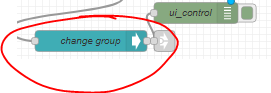 which generates the following payload when i open or close a tab :

this is how I detect if a tab is open or closed, and kill the stream of corresponding camera.
**But I would prefer that one of your _magic tricks_ more intelligently detects the display or not, of the video.** 😉
> [@kevinGodell](#):
>
> EDIT: I just did a quick test by making a group collapsible. Toggling it open and closed does get detect by **IntersectionObserver** and correctly loads/unloads video.
Nice ! Is this something that you can add in your mp4frag node or that I can add myself in Node-Red?
---
### Author:  [@dceejay](https://discourse.nodered.org/u/dceejay)
#### Post date: [30 October 2020 19:40 UTC](https://discourse.nodered.org/t/beta-testing-nodes-for-live-streaming-mp4/33743/109 "2020-10-30T19:40:33Z")
Hi can you expand/explain the comment re exec node ? How can we recreate the dual process issue as that sounds like a bug rather than working as designed.
---
### Author:  [@Steve-Mcl](https://discourse.nodered.org/u/Steve-Mcl)
#### Post date: [30 October 2020 19:52 UTC](https://discourse.nodered.org/t/beta-testing-nodes-for-live-streaming-mp4/33743/110 "2020-10-30T19:52:48Z")
@dceejay the way i interpreted that was similar to the thread Colin had a couple of months back (related to spawning child processes not being killed) ([the thread](https://discourse.nodered.org/t/exec-node-timeout-not-working-in-exec-mode/28040/2))
---
### Author:  [@dceejay](https://discourse.nodered.org/u/dceejay)
#### Post date: [30 October 2020 19:53 UTC](https://discourse.nodered.org/t/beta-testing-nodes-for-live-streaming-mp4/33743/111 "2020-10-30T19:53:37Z")
Ah right. Yes tricky.
---
### Author:  [@Steve-Mcl](https://discourse.nodered.org/u/Steve-Mcl)
#### Post date: [30 October 2020 19:53 UTC](https://discourse.nodered.org/t/beta-testing-nodes-for-live-streaming-mp4/33743/112 "2020-10-30T19:53:59Z")
and this one [A conundrum with exec node and kill](https://discourse.nodered.org/t/a-conundrum-with-exec-node-and-kill/27981/2)
---
### Author:  [@kevinGodell](https://discourse.nodered.org/u/kevinGodell)
#### Post date: [30 October 2020 21:00 UTC](https://discourse.nodered.org/t/beta-testing-nodes-for-live-streaming-mp4/33743/113 "2020-10-30T21:00:51Z")
I didn't have a chance to read the other thread, but from what I remember when I peaked at the source code of exec to try to understand it a little better, the spawned processes were kept in an array. If you wanted to later kill one of the processes (if more than one), you had to pass the pid and kill command. I never found a way to get the pid from the node's output to later use with a kill command.
Being that spawn mode is for a long running process, I would think there would be a failsafe to only allow 1 process to run (either kill the previous or prevent the new) since multiple processes will be pushing to the same output.
If you are making any changes to it, is there any chance to support additional piped outputs, such as stdio[3] and up? I envision it something like the function node that lets me pick the number of outputs which could then be mapped to the stdio pipes. The first output would be the pid on start and then the return code on close. The additional outputs (stdio[1] and higher) would be mapped to the pipes. Being that ffmpeg is good for piping many things at once, I use more than the stdin, stdout, and stderr. I would love to not have to make an ffmpeg specific node. 😊
---
### Author:  [@kevinGodell](https://discourse.nodered.org/u/kevinGodell)
#### Post date: [1 November 2020 21:39 UTC](https://discourse.nodered.org/t/beta-testing-nodes-for-live-streaming-mp4/33743/114 "2020-11-01T21:39:24Z")
> [@krambriw](#):
>
> Reason for my question is that I would like to use OpenCV to open & read your playlists created by the mp4frag nodes. Have I missed something?
I added the mp4 video route to the latest update of node-red-contrib-mp4frag. You can now access a live mp4 file. It is a similar route as the others, **/mp4frag/e1444359.6666/video.mp4**. I was able to view this video directly in chrome and firefox and vlc. Let me know if your opencv can consume the video.
> [@SuperNinja](#):
>
> On Windows 10, this node does not work
I was thinking that maybe ffmpeg in not in path on your system. Can you access ffmpeg in the command line on the window 10 box? In all of my old nodejs tests involving ffmpeg, I never had any trouble making it work on any system.
For node-red-contrib-ui-mp4frag, I added some more code to detect when a video is hidden in an attempt to unload video feeds if not being watched. Still not perfect due to the various browser implementations and lack of conformity. Does not properly support pip mode yet.
---
### Author:  [@krambriw](https://discourse.nodered.org/u/krambriw)
#### Post date: [2 November 2020 09:11 UTC](https://discourse.nodered.org/t/beta-testing-nodes-for-live-streaming-mp4/33743/115 "2020-11-02T09:11:21Z")
> [@kevinGodell](#):
>
> Let me know if your opencv can consume the video
YES!!! Works fine now! Two things I have noticed
1. It's very easy during testing, by accident, to start more than one ffmpeg processes if you use an inject node like I do. Therefore I simply added a rate limit like in picture below
2. I have problems sometimes to restart the stream again. It seems the mp4frag node is keeping the url "hanging" so to say. If I change/deploy and change it back/deploy it works again. Sometimes it also works to restart the stream multiple times without any problems
Below just a sample using your latest mp4frag mp4 video sent through my AI analyzer
[https://drive.google.com/file/d/16bJ\_CzLauLa8s0fOp-9pJ48pb-LdDxqg/view?usp=sharing](https://drive.google.com/file/d/16bJ_CzLauLa8s0fOp-9pJ48pb-LdDxqg/view?usp=sharing)
Link to the original video (beautiful underwater dance, just 6 minutes, worth viewing):
[https://vimeo.com/259539583](https://vimeo.com/259539583)
---
### Author:  [@kevinGodell](https://discourse.nodered.org/u/kevinGodell)
#### Post date: [2 November 2020 13:13 UTC](https://discourse.nodered.org/t/beta-testing-nodes-for-live-streaming-mp4/33743/116 "2020-11-02T13:13:33Z")
> [@krambriw](#):
>
> It's very easy during testing, by accident, to start more than one ffmpeg processes if you use an inject node like I do. Therefore I simply added a rate limit like in picture below
Yes, I have also noticed that issue. @SuperNinja mentioned something similar.
> [@krambriw](#):
>
> I have problems sometimes to restart the stream again. It seems the mp4frag node is keeping the url "hanging" so to say. If I change/deploy and change it back/deploy it works again. Sometimes it also works to restart the stream multiple times without any problems
Can you be more specific on the trouble so I can try to duplicate it. Is this when using the video.mp4 path or just viewing in browser using socket io or hls.js? This might also be the issue of double starting the ffmpeg process and mp4frag receives 2 streams at the same time.
Since mp4frag is buffering video chunks to serve via http or socket io, it has to be notified when it should reset itself and clear the buffer. Currently, it is tightly coupled to listening for a **code** or **signal** from exec to know when the ffmpeg process has stopped and it can ready itself to listen to a fresh new mp4 stream. If it never gets that signal, it will still be trying to receive fragmented mp4 pieces.
Seems more and more likely that we will need an ffmpeg dedicated node that properly gives out its status/progress and kills/restarts the process as needed, etc.
---
### Author:  [@SuperNinja](https://discourse.nodered.org/u/SuperNinja)
#### Post date: [2 November 2020 13:15 UTC](https://discourse.nodered.org/t/beta-testing-nodes-for-live-streaming-mp4/33743/117 "2020-11-02T13:15:02Z")
> [@kevinGodell](#):
>
> Seems more and more likely that we will need an ffmpeg dedicated node that properly gives out its status/progress and kills/restarts the process as needed, etc.
👍 agree
> [@kevinGodell](#):
>
> For node-red-contrib-ui-mp4frag, I added some more code to detect when a video is hidden in an attempt to unload video feeds if not being watched. Still not perfect due to the various browser implementations and lack of conformity. Does not properly support pip mode yet.
Same like you .there is no more network consumption when video hidden, and the PIP mode does not work. Wait for next round.
---
### Author:  [@krambriw](https://discourse.nodered.org/u/krambriw)
#### Post date: [2 November 2020 14:37 UTC](https://discourse.nodered.org/t/beta-testing-nodes-for-live-streaming-mp4/33743/118 "2020-11-02T14:37:37Z")
> [@kevinGodell](#):
>
> Can you be more specific on the trouble so I can try to duplicate it
I am not 100% sure about how to recreate, I have to test more to see if I can reproduce consistently. So far I have just seen this a couple of times. The ffmpeg starts correctly and pushes data but nothing comes out from the mp4frag and there is only one instance of ffmpeg running (checked with ps aux). Suspicious if the consuming process could influence this somehow by not correctly release some pipeline, handle or so. One way to recover is to rename the url in the mp4frag and try to stream again, then it works

---
### Author:  [@kevinGodell](https://discourse.nodered.org/u/kevinGodell)
#### Post date: [6 November 2020 12:25 UTC](https://discourse.nodered.org/t/beta-testing-nodes-for-live-streaming-mp4/33743/119 "2020-11-06T12:25:23Z")
I updated the settings page of ui\_mp4frag to use an editable list to pick the order of video playback type. For example, if the mp4frag node passes a payload with multiple types of video source(hls, socket io, mp4), the playback attempt will be in the selected order. It will iterate the list( in order ) and check if that video source is available and also compatible with the browser.

The image shown is my preferred setting, although where **[socket.io](http://socket.io)** player is compatible, so will be **hls.js** because they are both dependent on the browser's _[mediasource](https://developer.mozilla.org/en-US/docs/Web/API/MediaSource)_ api. I have **hls** ( meaning native hls as opposed to hls.js ) as a 3rd option as a fallback when mediasource is not available, such as mobile safari. I have not yet incorporated the basic mp4 playback as that is my least preferred. The problem with using a basic mp4 file for live streaming is browser compatibility. Since it uses a persistent http connection, chrome will limit it to 6 streams, firefox can do more streams if you tweak its settings, and desktop safari will only do byte range requests for mp4, which I found to be nearly impossible for a live mp4 that does not have a predetermined size.
---
### Author:  [@krambriw](https://discourse.nodered.org/u/krambriw)
#### Post date: [7 November 2020 06:44 UTC](https://discourse.nodered.org/t/beta-testing-nodes-for-live-streaming-mp4/33743/120 "2020-11-07T06:44:47Z")
EDIT: removed my post, found fault on my side 😉
[Previous page](https://discourse.nodered.org/t/beta-testing-nodes-for-live-streaming-mp4/33743.md?page=5)
[Next page](https://discourse.nodered.org/t/beta-testing-nodes-for-live-streaming-mp4/33743.md?page=7)