# Can not play any audio triggerd via Node Red "EXEC"
**URL:** https://discourse.nodered.org/t/can-not-play-any-audio-triggerd-via-node-red-exec/90820
**Category:** General
**Tags:** node-red-dashboard, exec
**Created:** [9 September 2024 19:00 UTC](https://discourse.nodered.org/t/can-not-play-any-audio-triggerd-via-node-red-exec/90820 "2024-09-09T19:00:10Z")
**Posts on this page:** 11
**Page:** 1
### Author:  [@FurkanVG](https://discourse.nodered.org/u/FurkanVG)
#### Post date: [9 September 2024 19:00 UTC](https://discourse.nodered.org/t/can-not-play-any-audio-triggerd-via-node-red-exec/90820/1 "2024-09-09T19:00:10Z")
Hello all,
I have updated my Raspi OS from Buster to Bookworm with a fresh install, and with this update, a feature in node-red has died.
The feature is quite simple. I click a button on my Node-Red Dashboard, which then triggers to play a live .mp3 file. The .mp3 file is run via mpg123 (or mplayer or mpv, same issue!).
The test flow:
```auto
[
{
"id": "ca64f76d9cc7d5ae",
"type": "ui_button",
"z": "357d40f1.45eaa",
"name": "",
"group": "fcacb831.881f68",
"order": 8,
"width": 0,
"height": 0,
"passthru": false,
"label": "Test Button 4 Audio",
"tooltip": "",
"color": "",
"bgcolor": "",
"className": "",
"icon": "",
"payload": "",
"payloadType": "str",
"topic": "topic",
"topicType": "msg",
"x": 890,
"y": 660,
"wires": [
[
"8a0525c5b378d6ce"
]
]
},
{
"id": "8a0525c5b378d6ce",
"type": "exec",
"z": "357d40f1.45eaa",
"command": "mpg123 http://wdr-1live-diggi.icecast.wdr.de/wdr/1live/diggi/mp3/128/stream.mp3",
"addpay": "",
"append": "",
"useSpawn": "false",
"timer": "",
"winHide": false,
"oldrc": false,
"name": "Play Rladio Test",
"x": 1180,
"y": 660,
"wires": [
[],
[],
[
"c1285ce033814488"
]
]
},
{
"id": "c1285ce033814488",
"type": "debug",
"z": "357d40f1.45eaa",
"name": "debug 1",
"active": true,
"tosidebar": true,
"console": false,
"tostatus": false,
"complete": "false",
"statusVal": "",
"statusType": "auto",
"x": 1420,
"y": 660,
"wires": []
},
{
"id": "fcacb831.881f68",
"type": "ui_group",
"name": "Radio",
"tab": "4e926670.4a0028",
"order": 1,
"disp": false,
"width": "30",
"collapse": false,
"className": ""
},
{
"id": "4e926670.4a0028",
"type": "ui_tab",
"name": "Home",
"icon": "dashboard",
"disabled": false,
"hidden": false
}
]
```
Visually:

The debug error:
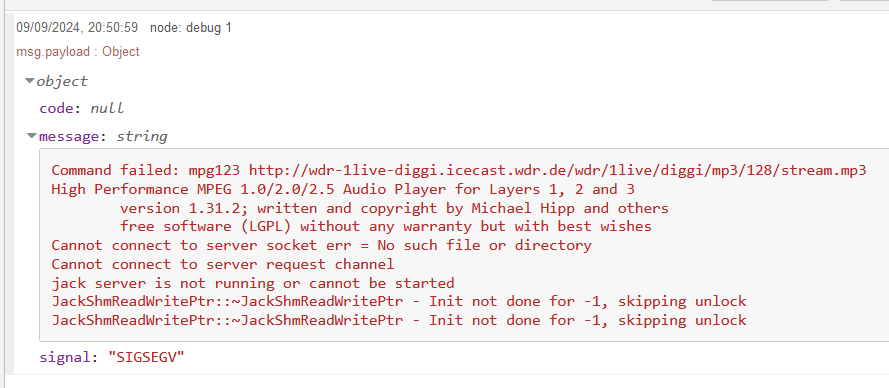
Now i did already some debugging and I found the issue!
Even tho the command i entered is `mpg123 http://wdr-1live-diggi.icecast.wdr.de/wdr/1live/diggi/mp3/128/stream.mp3`, Node-Red EXEC Node is trying to run it as "sudo" aka root?! I am guessing this because when i run the same command with sudo on my Terminal, i get the same error:
```auto
pi@raspberrypi:~/.node-red $ sudo mpg123 http://wdr-1live-diggi.icecast.wdr.de/wdr/1live/diggi/mp3/128/stream.mp3
High Performance MPEG 1.0/2.0/2.5 Audio Player for Layers 1, 2 and 3
version 1.31.2; written and copyright by Michael Hipp and others
free software (LGPL) without any warranty but with best wishes
Cannot connect to server socket err = No such file or directory
Cannot connect to server request channel
jack server is not running or cannot be started
JackShmReadWritePtr::~JackShmReadWritePtr - Init not done for -1, skipping unlock
JackShmReadWritePtr::~JackShmReadWritePtr - Init not done for -1, skipping unlock
Segmentation fault
```
So it looks like, Node-Red is trying to run this as sudo, which is breaking this player feature. the same case is with all mp3 players like mpv, mplayer, vlc, mpg123. So this isnt a player issue, than rather a node-red issue.
As info, im running my Node-Red as the pi user, and not ROOT user. So why is root the default case?!
node-red version: 4.0.2
npm version: 10.8.2
Thanks!
---
### Author:  [@Colin](https://discourse.nodered.org/u/Colin)
#### Post date: [9 September 2024 20:09 UTC](https://discourse.nodered.org/t/can-not-play-any-audio-triggerd-via-node-red-exec/90820/2 "2024-09-09T20:09:13Z")
Assuming that you are running node-red as a service, if you stop it (`node-red-stop`) and start it in a command window using just the command
`node-red`
does it then play? If so then it is due to a difference in the environment when run as a service.
Just because you get the same error message does not mean that the cause is the same (sudo).
---
### Author:  [@FurkanVG](https://discourse.nodered.org/u/FurkanVG)
#### Post date: [9 September 2024 20:29 UTC](https://discourse.nodered.org/t/can-not-play-any-audio-triggerd-via-node-red-exec/90820/3 "2024-09-09T20:29:12Z")
oh wow, this fixes it..
i could fix this by removing the system autostart as service and then do a cronjob which auto starts node-red as user?
I guess this is intended?
Thanks!
---
### Author:  [@Colin](https://discourse.nodered.org/u/Colin)
#### Post date: [9 September 2024 20:40 UTC](https://discourse.nodered.org/t/can-not-play-any-audio-triggerd-via-node-red-exec/90820/4 "2024-09-09T20:40:34Z")
> [@FurkanVG](#):
>
> I guess this is intended?
No, it just means that when running as a service it does not have access to the Jack server. This is probably due to a change in Bookworm, but I don't know how to solve it.
---
### Author:  [@FurkanVG](https://discourse.nodered.org/u/FurkanVG)
#### Post date: [9 September 2024 20:45 UTC](https://discourse.nodered.org/t/can-not-play-any-audio-triggerd-via-node-red-exec/90820/5 "2024-09-09T20:45:25Z")
Aight thanks.
What do you recommend how to start node-red if i dont want to run it as service?
---
### Author:  [@FurkanVG](https://discourse.nodered.org/u/FurkanVG)
#### Post date: [9 September 2024 20:57 UTC](https://discourse.nodered.org/t/can-not-play-any-audio-triggerd-via-node-red-exec/90820/6 "2024-09-09T20:57:35Z")
Ok so a cronjob doesnt work, even if the cronjob is made on user side (no sudo)...
---
### Author:  [@Colin](https://discourse.nodered.org/u/Colin)
#### Post date: [9 September 2024 21:10 UTC](https://discourse.nodered.org/t/can-not-play-any-audio-triggerd-via-node-red-exec/90820/7 "2024-09-09T21:10:14Z")
You need to find out why the jack server is not accessible from a service. Perhaps someone on a pi forum may be able to help. I did a quick Google but nothing obvious appeared.
---
### Author:  [@FurkanVG](https://discourse.nodered.org/u/FurkanVG)
#### Post date: [9 September 2024 21:11 UTC](https://discourse.nodered.org/t/can-not-play-any-audio-triggerd-via-node-red-exec/90820/8 "2024-09-09T21:11:06Z")
Yea i guess. I just would love to work around this tho... 😃
---
### Author:  [@FurkanVG](https://discourse.nodered.org/u/FurkanVG)
#### Post date: [9 September 2024 21:14 UTC](https://discourse.nodered.org/t/can-not-play-any-audio-triggerd-via-node-red-exec/90820/9 "2024-09-09T21:14:52Z")
[https://forums.raspberrypi.com/viewtopic.php?t=376439](https://forums.raspberrypi.com/viewtopic.php?t=376439)
made a post. If u have any ideas, just lmk 🙂 ty
---
### Author:  [@Colin](https://discourse.nodered.org/u/Colin)
#### Post date: [10 September 2024 07:35 UTC](https://discourse.nodered.org/t/can-not-play-any-audio-triggerd-via-node-red-exec/90820/10 "2024-09-10T07:35:34Z")
It is not running as root. It is running as user pi in a service.
---
### Author:  [@system](https://discourse.nodered.org/u/system)
#### Post date: [9 December 2024 07:35 UTC](https://discourse.nodered.org/t/can-not-play-any-audio-triggerd-via-node-red-exec/90820/11 "2024-12-09T07:35:42Z")
This topic was automatically closed 90 days after the last reply. New replies are no longer allowed.