# Cannot install from script
**URL:** https://discourse.nodered.org/t/cannot-install-from-script/65198
**Category:** General
**Created:** [17 July 2022 02:39 UTC](https://discourse.nodered.org/t/cannot-install-from-script/65198 "2022-07-17T02:39:07Z")
**Posts on this page:** 20
**Page:** 1
### Author:  [@grant1](https://discourse.nodered.org/u/grant1)
#### Post date: [17 July 2022 02:39 UTC](https://discourse.nodered.org/t/cannot-install-from-script/65198/1 "2022-07-17T02:39:07Z")
I had an old Sony Vaio desktop PC that had (gasp!) Windows Vista on it. I installed [Raspberry Pi Desktop](https://www.raspberrypi.com/software/raspberry-pi-desktop/) with no issues. Specs are:
- Release date: July 1st 2022
- System: 32-bit
- Kernel version: 5.10
- Debian version: 11 (bullseye)
After getting it installed, I was surprised to find that it does not have Node-RED in the program menu. When I tried to install using [the script,](https://nodered.org/docs/getting-started/raspberrypi) and adding --node16, I run into the `Bad install: Node.js v12.22.12 Npm missing - Exit`
Attached is the log file if that helps. I am very clueless when it comes to nodeJS, NPM, etc. In the past, on all my Raspberry Pi's and Debian systems, the script "just works".
[nodered-install.log](https://discourse.nodered.org/uploads/short-url/6b5EEGeq4zVN6r20T0aznTort8f.log) (9.1 KB)
---
### Author:  [@Colin](https://discourse.nodered.org/u/Colin)
#### Post date: [17 July 2022 07:36 UTC](https://discourse.nodered.org/t/cannot-install-from-script/65198/2 "2022-07-17T07:36:52Z")
From the end of the log:
Versions: node:v12.22.12 npm:missing
Which is odd as nodejs 16 should now be installed.
What does this command show
`apt policy nodejs`
Also
`which node`
---
### Author:  [@Steve-Mcl](https://discourse.nodered.org/u/Steve-Mcl)
#### Post date: [17 July 2022 07:56 UTC](https://discourse.nodered.org/t/cannot-install-from-script/65198/3 "2022-07-17T07:56:32Z")
Also, are you using a node manager like `nvm` or `n` - I seem to remember reading about issues between them and the script installation.
---
### Author:  [@Colin](https://discourse.nodered.org/u/Colin)
#### Post date: [17 July 2022 09:34 UTC](https://discourse.nodered.org/t/cannot-install-from-script/65198/4 "2022-07-17T09:34:33Z")
> [@Steve-Mcl](#):
>
> are you using a node manager
That is what I thought, but the script checks for that, at least it used to I think.
@grant1 is there a folder `.nvm` in your home directory?
---
### Author:  [@dceejay](https://discourse.nodered.org/u/dceejay)
#### Post date: [17 July 2022 09:55 UTC](https://discourse.nodered.org/t/cannot-install-from-script/65198/5 "2022-07-17T09:55:01Z")
Hi - can you also retry the script with --node14 instead of 16...
---
### Author:  [@grant1](https://discourse.nodered.org/u/grant1)
#### Post date: [17 July 2022 12:51 UTC](https://discourse.nodered.org/t/cannot-install-from-script/65198/6 "2022-07-17T12:51:20Z")
Thank you for the feedback.
Answers should be shown in these screenshots. I do not see a folder called .nvm in the home directory. Only thing there is a folder called sonyvaio that was likely created when I installed the OS and created the username. I do not believe I am using a node manager like nvm or n.


---
### Author:  [@Colin](https://discourse.nodered.org/u/Colin)
#### Post date: [17 July 2022 13:04 UTC](https://discourse.nodered.org/t/cannot-install-from-script/65198/7 "2022-07-17T13:04:46Z")
Please copy/paste text where possible, by posting a screenshot I cannot copy the relevant bits for commenting on.
The fact that al shows v12 is very strange.
Have a look in `/etc/apt/sources.list` and see if there is any reference to the nodesource repository. If there is then delete it, or initially copy/paste the file as it is for us to comment on. Also check that there is a file `/etc/apt/sources.d/nodesource.list` and copy/paste the contents here.
Then run
`sudo apt update`
and
`apt policy nodejs`
and paste the output from both here.
---
### Author:  [@grant1](https://discourse.nodered.org/u/grant1)
#### Post date: [17 July 2022 13:42 UTC](https://discourse.nodered.org/t/cannot-install-from-script/65198/8 "2022-07-17T13:42:35Z")
Thanks @Colin
Here is the content of /`etc/apt/sources.list`
```auto
deb http://deb.debian.org/debian bullseye main contrib non-free
deb http://deb.debian.org/debian-security/ bullseye-security main contrib non-free
deb http://deb.debian.org/debian bullseye-updates main
# Uncomment lines below then 'apt-get update' to enable 'apt-get source'
# deb-src http://deb.debian.org/debian bullseye main contrib non-free
# deb-src http://deb.debian.org/debian-security/ bullseye-security main contrib non-free
# deb-src http://deb.debian.org/debian bullseye-updates main
# This system was installed using small removable media
# (e.g. netinst, live or single CD). The matching "deb cdrom"
# entries were disabled at the end of the installation process.
# For information about how to configure apt package sources,
# see the sources.list(5) manual.
```
(there is also a file called source.list.save)
In the folder `/etc/apt/sources.list.d` are two files (nodesource.list and nodesource.list.save). Content of each is as follows:
nodesource.list
```auto
deb [signed-by=/usr/share/keyrings/nodesource.gpg] https://deb.nodesource.com/node_16.x bullseye main
deb-src [signed-by=/usr/share/keyrings/nodesource.gpg] https://deb.nodesource.com/node_16.x bullseye main
```
nodesource.list.save
```auto
deb [signed-by=/usr/share/keyrings/nodesource.gpg] https://deb.nodesource.com/node_16.x bullseye main
deb-src [signed-by=/usr/share/keyrings/nodesource.gpg] https://deb.nodesource.com/node_16.x bullseye main
```
There is / was no file called `/etc/apt/sources.d/nodesource.list` (the .d being the difference of what I posted above)
I then deleted `/etc/apt/sources.list.d/nodesource.list` and `/etc/apt/sources.list.d/nodesource.list.save` and ran the commands you listed.
Output from `sudo apt update`
```auto
sonyvaio@raspberry:/home $ sudo apt update
Hit:1 http://archive.raspberrypi.org/debian bullseye InRelease
Hit:2 http://deb.debian.org/debian bullseye InRelease
Hit:3 http://deb.debian.org/debian-security bullseye-security InRelease
Hit:4 http://deb.debian.org/debian bullseye-updates InRelease
Ign:5 http://ppa.launchpad.net/peek-developers/stable/ubuntu kinetic InRelease
Err:6 http://ppa.launchpad.net/peek-developers/stable/ubuntu kinetic Release
404 Not Found [IP: 185.125.190.52 80]
Reading package lists... Done
E: The repository 'http://ppa.launchpad.net/peek-developers/stable/ubuntu kinetic Release' does not have a Release file.
N: Updating from such a repository can't be done securely, and is therefore disabled by default.
N: See apt-secure(8) manpage for repository creation and user configuration details.
```
(the peek program was what I installed to create some screenshots)
output from `apt policy nodejs`
```auto
sonyvaio@raspberry:/home $ apt policy nodejs
nodejs:
Installed: 12.22.12~dfsg-1~deb11u1
Candidate: 12.22.12~dfsg-1~deb11u1
Version table:
*** 12.22.12~dfsg-1~deb11u1 500
500 http://deb.debian.org/debian-security bullseye-security/main i386 Packages
100 /var/lib/dpkg/status
12.22.5~dfsg-2~11u1 500
500 http://deb.debian.org/debian bullseye/main i386 Packages
```
---
### Author:  [@Colin](https://discourse.nodered.org/u/Colin)
#### Post date: [17 July 2022 16:18 UTC](https://discourse.nodered.org/t/cannot-install-from-script/65198/9 "2022-07-17T16:18:34Z")
> [@grant1](#):
>
> There is / was no file called `/etc/apt/sources.d/nodesource.list`
My error, it should be /etc/apt/sources.list.d/nodesource.list, as you correctly worked out.
> [@grant1](#):
>
> I then deleted `/etc/apt/sources.list.d/nodesource.list`
Why? It is that file that pulls in nodejs 16.
> [@grant1](#):
>
> ```auto
> Ign:5 http://ppa.launchpad.net/peek-developers/stable/ubuntu kinetic InRelease
> Err:6 http://ppa.launchpad.net/peek-developers/stable/ubuntu kinetic Release
> 404 Not Found [IP: 185.125.190.52 80]
> Reading package lists... Done
> E: The repository 'http://ppa.launchpad.net/peek-developers/stable/ubuntu kinetic Release' does not have a Release file.
> N: Updating from such a repository can't be done securely, and is therefore disabled by default.
> N: See apt-secure(8) manpage for repository creation and user configuration details.
>
> ```
That is at least part of the problem. It can't find that repository. Though I don't understand where it is coming from, as it doesn't appear in sources.list or sources.list.d
Whatever you did to install peek is messing things up. You need to get to a position where
`sudo apt update`
works without throwing an error, and then run the install script again.
---
### Author:  [@grant1](https://discourse.nodered.org/u/grant1)
#### Post date: [17 July 2022 16:33 UTC](https://discourse.nodered.org/t/cannot-install-from-script/65198/10 "2022-07-17T16:33:57Z")
Thank you. I only installed peek this morning (well after my original post), but I agree that that is not helping.
You have all given me enough to run with. The OS install only took \< 10 minutes, so I am going to blow it away and start with a fresh install, then make sure sudo apt update does not throw any errors.
---
### Author:  [@grant1](https://discourse.nodered.org/u/grant1)
#### Post date: [17 July 2022 19:20 UTC](https://discourse.nodered.org/t/cannot-install-from-script/65198/11 "2022-07-17T19:20:33Z")
OK, so completely fresh install of Raspberry Pi Desktop OS. Before doing anything, this is what I checked out...
```auto
sonyvaio@raspberry:~ $ apt policy nodejs
nodejs:
Installed: (none)
Candidate: 12.22.12~dfsg-1~deb11u1
Version table:
12.22.12~dfsg-1~deb11u1 500
500 http://deb.debian.org/debian-security bullseye-security/main i386 Packages
12.22.5~dfsg-2~11u1 500
500 http://deb.debian.org/debian bullseye/main i386 Packages
sonyvaio@raspberry:~ $ sudo apt update
Hit:1 http://deb.debian.org/debian bullseye InRelease
Hit:2 http://deb.debian.org/debian-security bullseye-security InRelease
Hit:3 http://deb.debian.org/debian bullseye-updates InRelease
Hit:4 http://archive.raspberrypi.org/debian bullseye InRelease
Reading package lists... Done
Building dependency tree... Done
Reading state information... Done
93 packages can be upgraded. Run 'apt list --upgradable' to see them.
```
Should I run the script with --node14 on the end?
---
### Author:  [@Steve-Mcl](https://discourse.nodered.org/u/Steve-Mcl)
#### Post date: [17 July 2022 19:26 UTC](https://discourse.nodered.org/t/cannot-install-from-script/65198/12 "2022-07-17T19:26:43Z")
> [@grant1](#):
>
> Should I run the script with --node14 on the end?
I'd go with ` --node16`
---
### Author:  [@grant1](https://discourse.nodered.org/u/grant1)
#### Post date: [17 July 2022 20:45 UTC](https://discourse.nodered.org/t/cannot-install-from-script/65198/13 "2022-07-17T20:45:50Z")
I ran the script with --node16 and got the same error as before,
```auto
Install Node.js 16 LTS ✘ Bad install: Node.js v12.22.12 Npm missing - Exit
```
Attached is the nodered-install.log
[nodered-install.log](https://discourse.nodered.org/uploads/short-url/lqlvMRsJyfUiNTDVB819gPOXkfH.log) (7.0 KB)
Upon the fresh install, the `apt policy nodejs` said `Installed: (none)`, whereas now it shows `12.22.12~dfsg-1~deb11u1`
```auto
sonyvaio@raspberry:~ $ apt policy nodejs
odejs:
Installed: 12.22.12~dfsg-1~deb11u1
Candidate: 12.22.12~dfsg-1~deb11u1
Version table:
*** 12.22.12~dfsg-1~deb11u1 500
500 http://deb.debian.org/debian-security bullseye-security/main i386 Packages
100 /var/lib/dpkg/status
12.22.5~dfsg-2~11u1 500
500 http://deb.debian.org/debian bullseye/main i386 Packages
```
And some more info, after the failed script:
```auto
sonyvaio@raspberry:~ $ which node
/usr/bin/node
sonyvaio@raspberry:~ $ sudo apt update
Hit:1 http://deb.debian.org/debian bullseye InRelease
Hit:2 http://deb.debian.org/debian-security bullseye-security InRelease
Get:3 http://deb.debian.org/debian bullseye-updates InRelease [39.4 kB]
Hit:4 https://deb.nodesource.com/node_16.x bullseye InRelease
Hit:5 http://archive.raspberrypi.org/debian bullseye InRelease
Fetched 39.4 kB in 1s (35.5 kB/s)
Reading package lists... Done
Building dependency tree... Done
Reading state information... Done
93 packages can be upgraded. Run 'apt list --upgradable' to see them.
```
---
### Author:  [@Colin](https://discourse.nodered.org/u/Colin)
#### Post date: [17 July 2022 21:12 UTC](https://discourse.nodered.org/t/cannot-install-from-script/65198/14 "2022-07-17T21:12:06Z")
That doesn't make sense. Try it with --node14.
---
### Author:  [@grant1](https://discourse.nodered.org/u/grant1)
#### Post date: [17 July 2022 21:20 UTC](https://discourse.nodered.org/t/cannot-install-from-script/65198/15 "2022-07-17T21:20:20Z")
Tried with --node14 and got the same error as previously mentioned.
```auto
Install Node.js 14 LTS ✘ Bad install: Node.js v12.22.12 Npm missing - Exit
```
Attached is the log.
[nodered-install.log](https://discourse.nodered.org/uploads/short-url/rpHUDG9sSJOowkhlsdnb2nfjV3.log) (16.1 KB)
---
### Author:  [@grant1](https://discourse.nodered.org/u/grant1)
#### Post date: [17 July 2022 22:17 UTC](https://discourse.nodered.org/t/cannot-install-from-script/65198/16 "2022-07-17T22:17:24Z")
I have not done anything further, but this dawned on me...
The OS that I installed is [Raspberry Pi Desktop](https://www.raspberrypi.com/software/raspberry-pi-desktop). Notice that it's 32-bit.
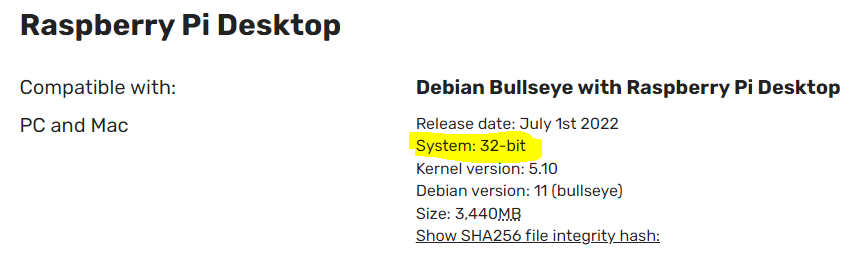
I see on the [Node.js download page](https://nodejs.org/en/download/) that there is no 32-bit option for Linux:

If this is indeed a problem, it appears that I could build / install Node.js for 32-bit systems following something [like this](https://stackoverflow.com/questions/68859327/install-node-js-on-linux-32-bit).
---
### Author:  [@dceejay](https://discourse.nodered.org/u/dceejay)
#### Post date: [17 July 2022 22:43 UTC](https://discourse.nodered.org/t/cannot-install-from-script/65198/17 "2022-07-17T22:43:04Z")
There is an un-official build - that the script should try to install...
the relevant commands the script runs (having uninstalled and remove node12) are
```auto
curl -sSL -o /tmp/node.tgz https://unofficial-builds.nodejs.org/download/release/v16.16.0/node-v16.16.0-linux-x86.tar.gz
# unpack it into the correct places
mkdir -p /tmp/nodejs
sudo tar -zxof /tmp/node.tgz --strip-components=1 -C /tmp/nodejs
sudo chown -R root:root /tmp/nodejs
sudo cp -PR /tmp/nodejs/* /usr
# remove the download
rm /tmp/node.tgz
```
Which should get node16 installed
If that works (ie `node -v` reports 16) then maybe run the script (without the extra --nodexx parameter as the script should then leave the installed version in place)
---
### Author:  [@grant1](https://discourse.nodered.org/u/grant1)
#### Post date: [17 July 2022 22:51 UTC](https://discourse.nodered.org/t/cannot-install-from-script/65198/18 "2022-07-17T22:51:24Z")
Thank you @dceejay
The commands worked...
```auto
sonyvaio@raspberry:~ $ curl -sSL -o /tmp/node.tgz https://unofficial-builds.nodejs.org/download/release/v16.16.0/node-v16.16.0-linux-x86.tar.gz
sonyvaio@raspberry:~ $ mkdir -p /tmp/nodejs
sonyvaio@raspberry:~ $ sudo tar -zxof /tmp/node.tgz --strip-components=1 -C /tmp/nodejs
sonyvaio@raspberry:~ $ sudo chown -R root:root /tmp/nodejs
sonyvaio@raspberry:~ $ sudo cp -PR /tmp/nodejs/* /usr
sonyvaio@raspberry:~ $ rm /tmp/node.tgz
sonyvaio@raspberry:~ $ node -v
v16.16.0
```
I will run the script now without the extra --nodexx parameter
---
### Author:  [@dceejay](https://discourse.nodered.org/u/dceejay)
#### Post date: [17 July 2022 22:53 UTC](https://discourse.nodered.org/t/cannot-install-from-script/65198/19 "2022-07-17T22:53:28Z")
Can you tell me what `uname -m` reports ? thanks
---
### Author:  [@grant1](https://discourse.nodered.org/u/grant1)
#### Post date: [17 July 2022 22:57 UTC](https://discourse.nodered.org/t/cannot-install-from-script/65198/20 "2022-07-17T22:57:36Z")
`uname - m` reports x86\_64
Node-RED appears to have been installed correctly. Thank you!
```auto
Running Node-RED update for user sonyvaio at /home/sonyvaio on debian
This can take 20-30 minutes on the slower Pi versions - please wait.
Stop Node-RED ✔
Remove old version of Node-RED ✔
Node option not specified : --node14, --node16, or --node18
Leave existing Node.js : v16.16.0 Npm 8.11.0
Clean npm cache -
npm WARN config global `--global`, `--local` are deprecated. Use `--location=global` instead.
Install Node-RED core ✔ 3.0.0
Move global nodes to local -
Leave existing nodes -
Install extra Pi nodes -
Add shortcut commands ✔
Update systemd script ✔
Any errors will be logged to /var/log/nodered-install.log
All done.
You can now start Node-RED with the command node-red-start
or using the icon under Menu / Programming / Node-RED
Then point your browser to localhost:1880 or http://{your_pi_ip-address}:1880
Started : Sun 17 Jul 2022 06:51:48 PM EDT
Finished: Sun 17 Jul 2022 06:52:31 PM EDT
You may want to run node-red admin init
to configure your initial options and settings.
```
[Next page](https://discourse.nodered.org/t/cannot-install-from-script/65198.md?page=2)