# Can't make a 16x2 LCD Display work with Node-RED
**URL:** https://discourse.nodered.org/t/cant-make-a-16x2-lcd-display-work-with-node-red/37400
**Category:** General
**Created:** [12 December 2020 14:54 UTC](https://discourse.nodered.org/t/cant-make-a-16x2-lcd-display-work-with-node-red/37400 "2020-12-12T14:54:44Z")
**Posts on this page:** 4
**Page:** 1
### Author:  [@danilo-lorenzo](https://discourse.nodered.org/u/danilo-lorenzo)
#### Post date: [12 December 2020 14:54 UTC](https://discourse.nodered.org/t/cant-make-a-16x2-lcd-display-work-with-node-red/37400/1 "2020-12-12T14:54:44Z")
Hello guys,
I'm new to this Node-RED world and i'm simply in love with it 🙂. However i really need some help.
I would like to use a 1602 display with my Raspberry via Node-RED. I've tried doing this with three libraries:
1. [node-red-contrib-i2clcd](https://github.com/johnty/node-red-contrib-i2clcd)
2. [node-red-contrib-i2c-lcd-adafruit-sainsmart](https://flows.nodered.org/node/node-red-contrib-i2c-lcd-adafruit-sainsmart)
3. [node-red-contrib-lcd](https://flows.nodered.org/node/node-red-contrib-lcd)
The first library didn't work at all for me, i did exactly the steps mentioned in the " Install Instructions:", but the node doesn't appear in my Node-RED nodes
The second library uses I²C Serial communication, and i used a 1602 display with a I²C module with it. I know that the hardware is OK because i can easily program it with C++ or Python. However, in Node Red the following happens

When I deploy the code everything seams fine. No erros appear. In the debug output the msg.payload of the first line is shown. But as i look in the Display two diferrent things happen

When i set the manufacture to "adafruit". The light of the display becomes very dark and nothing is written:

When i set the manufacture to "sainsmart" the opossite occur:

For the last library. I get two sorts of error. First when i send a string:
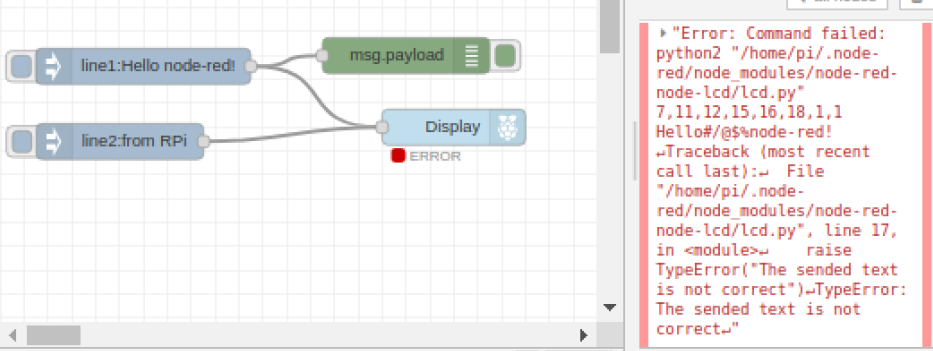

And also when i send a number:


The Display node is configured as following:

This is my first Topic so i apollogize for the long post; i tried to explain every thing that happened to me. Hope anyone has a clue. Thank you very much for your attention.
P.S. For the last library example i used another 16x2 Display (without the I²C module)
---
### Author:  [@Brew](https://discourse.nodered.org/u/Brew)
#### Post date: [12 December 2020 22:22 UTC](https://discourse.nodered.org/t/cant-make-a-16x2-lcd-display-work-with-node-red/37400/2 "2020-12-12T22:22:53Z")
Can you prove it by putting your python example scrip on a python function node?
Or can you run the example code from an Exec node to get your self a little step closer?
---
### Author:  [@danilo-lorenzo](https://discourse.nodered.org/u/danilo-lorenzo)
#### Post date: [13 December 2020 14:37 UTC](https://discourse.nodered.org/t/cant-make-a-16x2-lcd-display-work-with-node-red/37400/3 "2020-12-13T14:37:52Z")
Hello @Brew i can't thank you enough, this worked like a charm 🙂
I put a step by step tutorial in my Github repository so that other people don't waste so much time in this awsome project
> **[danilo-lorenzo/I-C-16x2-Display-with-Node-RED](https://github.com/danilo-lorenzo/I-C-16x2-Display-with-Node-RED)**
>
> Learn how to run a Python code inside Node-RED to write stuff in a 1602 Display
---
### Author:  [@system](https://discourse.nodered.org/u/system)
#### Post date: [27 December 2020 14:38 UTC](https://discourse.nodered.org/t/cant-make-a-16x2-lcd-display-work-with-node-red/37400/4 "2020-12-27T14:38:06Z")
This topic was automatically closed 14 days after the last reply. New replies are no longer allowed.