# Create/append file on dashboard
**URL:** https://discourse.nodered.org/t/create-append-file-on-dashboard/24560
**Category:** General
**Created:** [10 April 2020 04:07 UTC](https://discourse.nodered.org/t/create-append-file-on-dashboard/24560 "2020-04-10T04:07:39Z")
**Posts on this page:** 10
**Page:** 1
### Author:  [@lalo](https://discourse.nodered.org/u/lalo)
#### Post date: [10 April 2020 04:07 UTC](https://discourse.nodered.org/t/create-append-file-on-dashboard/24560/1 "2020-04-10T04:07:39Z")
Hi, I already ask this before but nobody answered I'm trying to create files or databases since the dashboard i was looking for some information about it so i found a function `msg.filename` so this file will have the information off 20 sensors and they will send information each minute i really don't care if this file is a txt, csv, or sql I just need to have a file to export it to excel or other software that i could use, so basically I want this to create a new file with a name that i could change and this because I'm going to generate data maybe each day and i want to have a control of this and have different files to compare and to have a control. So the code that I have is this i hope someone could help me. Also I think that I could do it with the exec node to enter nano vnc.csv or something like that
```auto
[{"id":"39a501c1.a0078e","type":"file in","z":"96a28eb1.36f2f","name":"","filename":"","format":"utf8","chunk":false,"sendError":false,"encoding":"none","x":490,"y":380,"wires":[[]]},{"id":"88acf8db.a47978","type":"function","z":"96a28eb1.36f2f","name":"","func":"let d = new Date().toISOString().slice(0, 10);\nlet f = '/home/pi/Sensor/earth_leakage/earth_leakage_'+d+'.csv';\nreturn {filename:f};","outputs":1,"noerr":0,"x":336,"y":358,"wires":[["f9001490.1a6a38","39a501c1.a0078e"]]},{"id":"f9001490.1a6a38","type":"debug","z":"96a28eb1.36f2f","name":"","active":true,"tosidebar":true,"console":false,"tostatus":false,"complete":"true","targetType":"full","x":490,"y":336,"wires":[]},{"id":"31118e6.7887672","type":"inject","z":"96a28eb1.36f2f","name":"set filename","topic":"","payload":"","payloadType":"date","repeat":"","crontab":"","once":false,"onceDelay":0.1,"x":180,"y":358,"wires":[["88acf8db.a47978"]]},{"id":"586cd627.a31098","type":"ui_text_input","z":"96a28eb1.36f2f","name":"","label":"","tooltip":"","group":"217797c3.a63418","order":0,"width":0,"height":0,"passthru":true,"mode":"text","delay":300,"topic":"","x":180,"y":260,"wires":[["88acf8db.a47978"]]},{"id":"217797c3.a63418","type":"ui_group","z":"","name":"set filename","tab":"d11400b7.ceac4","disp":true,"width":"6","collapse":false},{"id":"d11400b7.ceac4","type":"ui_tab","z":"","name":"Home","icon":"dashboard","disabled":false,"hidden":false}]
```
---
### Author:  [@zenofmud](https://discourse.nodered.org/u/zenofmud)
#### Post date: [10 April 2020 07:42 UTC](https://discourse.nodered.org/t/create-append-file-on-dashboard/24560/2 "2020-04-10T07:42:37Z")
Why do you think `msg.filename` is a function? It is not, it is just part of a msg object.
try adding a `catch` node connected to a `debug` node (set to "Complete msg object) and see what happens.
Also when describing an issue, please don't use run on sentences which are very hard to understand. Thanks,
---
### Author:  [@Steve-Mcl](https://discourse.nodered.org/u/Steve-Mcl)
#### Post date: [10 April 2020 08:08 UTC](https://discourse.nodered.org/t/create-append-file-on-dashboard/24560/3 "2020-04-10T08:08:46Z")
Hi.
#### Firstly
I have to ask, your post title says "Create/append file on dashboard" - what does this post have to do with `dashboard`? Do you mean in "node-red"? Do you appreciate that node-red runs server side (so has access to the file system & sensor network) where as dashboard runs client side (i.e. in a web browser only, with potentially no access to the sensor network or server file system).
Your title should refect your need - e.g. "Save data from 20 sensors to file for later comparison in Excel" or "Store multiple sensors values in a file" - something that describes you current issue.
#### Regarding the writing of data to CSV...
If you simply want data you can compare yourself then you could simply generate a filename based on the Sensor ID and the DATE (e.g. `sensor1-2020-04-10.csv`) & use the `CSV` node to append data to a CSV file. There are plenty of examples in the [flow library](https://flows.nodered.org/search?term=csv). Also, the CSV node it pretty simple - give it a go.
Alternatively, choose a database (something like SQLite) and begin exploring that - when you get stuck, come and ask questions about SQLite
#### Personal Opinion...
While today you simply want data in a file so you can use Excel to compare to, I'm certain there will be a point where YOU get sick of manually comparing and wish your data was in a database & the comparisons were automated. On that thought, you might wish to consider a database sooner rather than later.
#### Lastly,
I'm gonna back up what @zenofmud said - please try to break your posts up into headings/paragraphs/sentences - I too found it fairly difficult to read (and I DO appreciate English may not be your first language - but its not difficult to write shorter sentences and throw in the occasional paragraph or heading 🙂 )
> [@lalo](#):
>
> i really don't care if this file is a txt, csv, or sql I just need to have a file to export it to excel
Please choose & proceed down one path. When you get stuck, you ask for help on one topic.
> [@lalo](#):
>
> Also I think that I could do it with the exec node to enter nano vnc.csv or something like that
That is a terrible idea - dont do that when you have so many options to consider first.
---
### Author:  [@lalo](https://discourse.nodered.org/u/lalo)
#### Post date: [10 April 2020 18:50 UTC](https://discourse.nodered.org/t/create-append-file-on-dashboard/24560/4 "2020-04-10T18:50:10Z")
@zenofmud Paul @Steve-Mcl Steve sorry, i get what you said, I will try to explain it with images.
So the 1st step is:
Since dashboard set a namefile to append a new file.
 .
I'm Trying with the text input node.
Step 2 is:

Create a function and with the payload from the text input append or create a new file. Then use this file to save my data. I will have all my sensors, in all the examples that I'd seen on Tutorials, I thought that is posible to use the path of the file that I created, and save my data on differents files. But if you said that is better a database, I could try it. But I need to explain how I will use my data, basically I'm going to export my data to excel. I am going to analyze this information with prediction models and I would like to have a control of different files, on the dates that I do tests with the sensors because it may take readings two or three times a day with different parameters such as temperature, humidity, in addition to this I could be changing some settings on the computers so having a database seems a bit complicated to me, I have only seen some videos of how to use sqlite in nodered but managing a control like the one I want, seems very difficult to do on my own without help.
---
### Author:  [@Steve-Mcl](https://discourse.nodered.org/u/Steve-Mcl)
#### Post date: [10 April 2020 19:15 UTC](https://discourse.nodered.org/t/create-append-file-on-dashboard/24560/5 "2020-04-10T19:15:26Z")
Hi, much better explanation.
So...
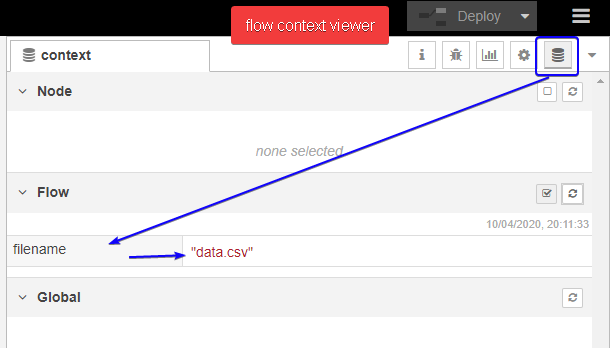
1. you need to store the file name setting somewhere (i suggest flow.context) so when sensor data arrives, your file node knows where to write data to.
2. next, when sensor data arrives, get the filename from flow.context & set that in msg.filename
3. If filename is empty, make an error OR if filename is NOT empty, write the data to file.
example...


```auto
[{"id":"222a87bb.f404a8","type":"ui_text_input","z":"b248614f.c1369","name":"","label":"","tooltip":"","group":"48e0ec17.290ba4","order":0,"width":0,"height":0,"passthru":true,"mode":"text","delay":300,"topic":"","x":100,"y":120,"wires":[["4ff83c96.dcaed4"]]},{"id":"4ff83c96.dcaed4","type":"change","z":"b248614f.c1369","name":"","rules":[{"t":"set","p":"filename","pt":"flow","to":"payload","tot":"msg"}],"action":"","property":"","from":"","to":"","reg":false,"x":290,"y":120,"wires":[[]]},{"id":"37f35d58.4dab42","type":"change","z":"b248614f.c1369","name":"get filename from flow","rules":[{"t":"set","p":"filename","pt":"msg","to":"filename","tot":"flow"}],"action":"","property":"","from":"","to":"","reg":false,"x":180,"y":320,"wires":[["6e0990af.ffd42"]]},{"id":"9475eee9.750aa","type":"inject","z":"b248614f.c1369","name":"generate sample data","topic":"","payload":"","payloadType":"date","repeat":"","crontab":"","once":false,"onceDelay":0.1,"x":140,"y":200,"wires":[["d237b0b6.fcd61"]]},{"id":"d237b0b6.fcd61","type":"function","z":"b248614f.c1369","name":"random data (fake sensor data)","func":"var min = 11.0, max = 19.9999\n\nmsg.payload = Math.random() * (max - min) + min;\n\nreturn msg","outputs":1,"noerr":0,"x":390,"y":200,"wires":[["37f35d58.4dab42","a59797c6.d8bae8"]]},{"id":"6e0990af.ffd42","type":"switch","z":"b248614f.c1369","name":"check filename","property":"filename","propertyType":"msg","rules":[{"t":"nempty"},{"t":"else"}],"checkall":"true","repair":false,"outputs":2,"x":380,"y":320,"wires":[["b8cafa31.1ec468","daa5a22.9ef736"],["20ac677d.a76908","a6192de1.29a75"]]},{"id":"20ac677d.a76908","type":"function","z":"b248614f.c1369","name":"generate error","func":"node.error(\"filename not set!\");\n\nreturn null;","outputs":1,"noerr":0,"x":660,"y":360,"wires":[[]]},{"id":"b8cafa31.1ec468","type":"file","z":"b248614f.c1369","name":"update file","filename":"","appendNewline":true,"createDir":false,"overwriteFile":"false","encoding":"none","x":650,"y":300,"wires":[[]]},{"id":"a6192de1.29a75","type":"debug","z":"b248614f.c1369","name":"","active":true,"tosidebar":true,"console":false,"tostatus":false,"complete":"true","targetType":"full","x":630,"y":400,"wires":[]},{"id":"daa5a22.9ef736","type":"debug","z":"b248614f.c1369","name":"","active":false,"tosidebar":true,"console":false,"tostatus":false,"complete":"true","targetType":"full","x":630,"y":260,"wires":[]},{"id":"a59797c6.d8bae8","type":"debug","z":"b248614f.c1369","name":"","active":false,"tosidebar":true,"console":false,"tostatus":false,"complete":"true","targetType":"full","x":630,"y":200,"wires":[]},{"id":"48e0ec17.290ba4","type":"ui_group","z":"","name":"set filename","tab":"3630702e.558a7","disp":true,"width":"6","collapse":false},{"id":"3630702e.558a7","type":"ui_tab","z":"","name":"Home","icon":"dashboard","disabled":false,"hidden":false}]
```
---
### Author:  [@zenofmud](https://discourse.nodered.org/u/zenofmud)
#### Post date: [10 April 2020 19:35 UTC](https://discourse.nodered.org/t/create-append-file-on-dashboard/24560/6 "2020-04-10T19:35:27Z")
> [@lalo](#):
>
> But I need to explain how I will use my data, basically I'm going to export my data to excel. I am going to analyze this information with prediction models and I would like to have a control of different files, on the dates that I do tests with the sensors because it may take readings two or three times a day with different parameters such as temperature, humidity, in addition to this I could be changing some settings on the computers so having a database seems a bit complicated to me
So how many files will you create on a typical day where you do multiple tests? Is the structure of the files going to be different? i.e. for test one will you be storing A, B, C and D but for test two you will want to save A, B X and Z? If so your file creation logic will be 'interesting'
If there will just be one file format, that will be easer, but if you want to create multiple files each day I still think you should store the data in a data base and then have a seperate flow to query the database, based oy your criteria and then create the file for excel.
You would create a definition for a row like
index (automatically added)
date
time
test name
variable 1
variable 2
...
variable x
Then you could select the data for date = 2002/04/10 and test name = "test 1" and get back all the records for that test on that day. One bonus of this is that if you ran 'test 1' on multiple dates, you could retreive all the results for all the days or all the results to date1 thru date5 etc.
But the choice is yours.
---
### Author:  [@lalo](https://discourse.nodered.org/u/lalo)
#### Post date: [11 April 2020 04:26 UTC](https://discourse.nodered.org/t/create-append-file-on-dashboard/24560/7 "2020-04-11T04:26:10Z")
> [@Steve-Mcl](#):
>
> ```auto
> [{"id":"222a87bb.f404a8","type":"ui_text_input","z":"b248614f.c1369","name":"","label":"","tooltip":"","group":"48e0ec17.290ba4","order":0,"width":0,"height":0,"passthru":true,"mode":"text","delay":300,"topic":"","x":100,"y":120,"wires":[["4ff83c96.dcaed4"]]},{"id":"4ff83c96.dcaed4","type":"change","z":"b248614f.c1369","name":"","rules":[{"t":"set","p":"filename","pt":"flow","to":"payload","tot":"msg"}],"action":"","property":"","from":"","to":"","reg":false,"x":290,"y":120,"wires":[[]]},{"id":"37f35d58.4dab42","type":"change","z":"b248614f.c1369","name":"get filename from flow","rules":[{"t":"set","p":"filename","pt":"msg","to":"filename","tot":"flow"}],"action":"","property":"","from":"","to":"","reg":false,"x":180,"y":320,"wires":[["6e0990af.ffd42"]]},{"id":"9475eee9.750aa","type":"inject","z":"b248614f.c1369","name":"generate sample data","topic":"","payload":"","payloadType":"date","repeat":"","crontab":"","once":false,"onceDelay":0.1,"x":140,"y":200,"wires":[["d237b0b6.fcd61"]]},{"id":"d237b0b6.fcd61","type":"function","z":"b248614f.c1369","name":"random data (fake sensor data)","func":"var min = 11.0, max = 19.9999\n\nmsg.payload = Math.random() * (max - min) + min;\n\nreturn msg","outputs":1,"noerr":0,"x":390,"y":200,"wires":[["37f35d58.4dab42","a59797c6.d8bae8"]]},{"id":"6e0990af.ffd42","type":"switch","z":"b248614f.c1369","name":"check filename","property":"filename","propertyType":"msg","rules":[{"t":"nempty"},{"t":"else"}],"checkall":"true","repair":false,"outputs":2,"x":380,"y":320,"wires":[["b8cafa31.1ec468","daa5a22.9ef736"],["20ac677d.a76908","a6192de1.29a75"]]},{"id":"20ac677d.a76908","type":"function","z":"b248614f.c1369","name":"generate error","func":"node.error(\"filename not set!\");\n\nreturn null;","outputs":1,"noerr":0,"x":660,"y":360,"wires":[[]]},{"id":"b8cafa31.1ec468","type":"file","z":"b248614f.c1369","name":"update file","filename":"","appendNewline":true,"createDir":false,"overwriteFile":"false","encoding":"none","x":650,"y":300,"wires":[[]]},{"id":"a6192de1.29a75","type":"debug","z":"b248614f.c1369","name":"","active":true,"tosidebar":true,"console":false,"tostatus":false,"complete":"true","targetType":"full","x":630,"y":400,"wires":[]},{"id":"daa5a22.9ef736","type":"debug","z":"b248614f.c1369","name":"","active":false,"tosidebar":true,"console":false,"tostatus":false,"complete":"true","targetType":"full","x":630,"y":260,"wires":[]},{"id":"a59797c6.d8bae8","type":"debug","z":"b248614f.c1369","name":"","active":false,"tosidebar":true,"console":false,"tostatus":false,"complete":"true","targetType":"full","x":630,"y":200,"wires":[]},{"id":"48e0ec17.290ba4","type":"ui_group","z":"","name":"set filename","tab":"3630702e.558a7","disp":true,"width":"6","collapse":false},{"id":"3630702e.558a7","type":"ui_tab","z":"","name":"Home","icon":"dashboard","disabled":false,"hidden":false}]
>
> ```
This is exactly what I wanted, thank you very much, I just have a question I was testing to see if at the time of entering any name of a file created before it generated an alert, but apparently not. Is there a way to generate an if in case the file existed and generate a message? before I used other nodes to generate files and when introducing an append with the same name it generated an error because it already existed
---
### Author:  [@JGKK](https://discourse.nodered.org/u/JGKK)
#### Post date: [11 April 2020 05:07 UTC](https://discourse.nodered.org/t/create-append-file-on-dashboard/24560/8 "2020-04-11T05:07:19Z")
You can use a an exec node with the bash command `[-e yourpath/yourfilename] && echo "true" || echo "false"`to check if the file exists if your under linux This example flow tests if the file in the filename flow variable exists by building this command with the template node inserting the value of flow.filename:

```auto
[{"id":"4153aaa4.e0854c","type":"exec","z":"f954564f.03e718","command":"","addpay":true,"append":"","useSpawn":"false","timer":"","oldrc":false,"name":"execute test command","x":810,"y":1060,"wires":[["63000497.d4ecbc"],[],[]]},{"id":"63000497.d4ecbc","type":"debug","z":"f954564f.03e718","name":"","active":true,"tosidebar":true,"console":false,"tostatus":false,"complete":"false","x":1030,"y":1060,"wires":[]},{"id":"ca601444.80499","type":"template","z":"f954564f.03e718","name":"make test command","field":"payload","fieldType":"msg","format":"handlebars","syntax":"mustache","template":"[-e {{{flow.filename}}}] && echo \"true\" || echo \"false\"","output":"str","x":560,"y":1060,"wires":[["4153aaa4.e0854c"]]},{"id":"652555c5.2e8cbc","type":"inject","z":"f954564f.03e718","name":"","topic":"","payload":"","payloadType":"date","repeat":"","crontab":"","once":false,"onceDelay":0.1,"x":360,"y":1060,"wires":[["ca601444.80499"]]}]
```
---
### Author:  [@Steve-Mcl](https://discourse.nodered.org/u/Steve-Mcl)
#### Post date: [11 April 2020 07:20 UTC](https://discourse.nodered.org/t/create-append-file-on-dashboard/24560/9 "2020-04-11T07:20:14Z")
Install `fs-ops` nodes & use the `file-exist` node.
If file exists, use the ui\_notify to generate an alert for the user on the dashboard.
Ps,
I would recommend you rearrange things Add a button & trigger the whole operation when pressed. (otherwise you're checking everyone you type)
---
### Author:  [@system](https://discourse.nodered.org/u/system)
#### Post date: [25 April 2020 07:20 UTC](https://discourse.nodered.org/t/create-append-file-on-dashboard/24560/10 "2020-04-25T07:20:18Z")
This topic was automatically closed 14 days after the last reply. New replies are no longer allowed.