# Dashboard visitor counter
**URL:** https://discourse.nodered.org/t/dashboard-visitor-counter/3463
**Category:** Dashboard
**Created:** [26 September 2018 13:06 UTC](https://discourse.nodered.org/t/dashboard-visitor-counter/3463 "2018-09-26T13:06:54Z")
**Posts on this page:** 14
**Page:** 1
### Author:  [@b35b5dad43ea282b65d0](https://discourse.nodered.org/u/b35b5dad43ea282b65d0)
#### Post date: [26 September 2018 13:06 UTC](https://discourse.nodered.org/t/dashboard-visitor-counter/3463/1 "2018-09-26T13:06:54Z")
Hi,
I want to ask if you know a way how to make a counter for the Dashboard.
So every user who visits the dashboard counts up.
Thanks
---
### Author:  [@Balouzard](https://discourse.nodered.org/u/Balouzard)
#### Post date: [26 September 2018 13:22 UTC](https://discourse.nodered.org/t/dashboard-visitor-counter/3463/2 "2018-09-26T13:22:12Z")
Hello there,
There are some ways to do that.
When you say "user" you mean different people or for each visit increment the counter ?
---
### Author:  [@b35b5dad43ea282b65d0](https://discourse.nodered.org/u/b35b5dad43ea282b65d0)
#### Post date: [26 September 2018 13:30 UTC](https://discourse.nodered.org/t/dashboard-visitor-counter/3463/3 "2018-09-26T13:30:22Z")
Yes 😉
Sorry i mean visitors not user.
---
### Author:  [@b35b5dad43ea282b65d0](https://discourse.nodered.org/u/b35b5dad43ea282b65d0)
#### Post date: [26 September 2018 13:45 UTC](https://discourse.nodered.org/t/dashboard-visitor-counter/3463/4 "2018-09-26T13:45:39Z")
Is there a good tutorial anywhere, i can not find anything for node-red.
Is it for example possible to analyse the datas with google analytics?
---
### Author:  [@dceejay](https://discourse.nodered.org/u/dceejay)
#### Post date: [26 September 2018 15:18 UTC](https://discourse.nodered.org/t/dashboard-visitor-counter/3463/5 "2018-09-26T15:18:23Z")
depends how accurate you want it... - the ui\_control node does provide an output for every browser connection (and disconnection etc) - so you could use that to trigger a count - but the same browser doing a full refesh will also count as a new connection so may over count.... but hey may be close enough.
---
### Author:  [@knolleary](https://discourse.nodered.org/u/knolleary)
#### Post date: [26 September 2018 15:25 UTC](https://discourse.nodered.org/t/dashboard-visitor-counter/3463/6 "2018-09-26T15:25:49Z")
You mention Google Analytics - you can embed the necessary GA code via a ui\_template node to inject it in the head of the page. No need to build anything in NR itself.
---
### Author:  [@b35b5dad43ea282b65d0](https://discourse.nodered.org/u/b35b5dad43ea282b65d0)
#### Post date: [28 September 2018 07:08 UTC](https://discourse.nodered.org/t/dashboard-visitor-counter/3463/7 "2018-09-28T07:08:42Z")
So you think i can copy paste the code from google analytics gtag.js into the ui\_template.js and the it should work?
---
### Author:  [@Balouzard](https://discourse.nodered.org/u/Balouzard)
#### Post date: [28 September 2018 08:13 UTC](https://discourse.nodered.org/t/dashboard-visitor-counter/3463/8 "2018-09-28T08:13:38Z")
That's what the man said 😄
Try it and let us know how it turned out
---
### Author:  [@b35b5dad43ea282b65d0](https://discourse.nodered.org/u/b35b5dad43ea282b65d0)
#### Post date: [28 September 2018 08:30 UTC](https://discourse.nodered.org/t/dashboard-visitor-counter/3463/9 "2018-09-28T08:30:37Z")
I tried it with the template.js & template.html but both of them didnt work.
---
### Author:  [@knolleary](https://discourse.nodered.org/u/knolleary)
#### Post date: [28 September 2018 08:40 UTC](https://discourse.nodered.org/t/dashboard-visitor-counter/3463/10 "2018-09-28T08:40:55Z")
What exactly do you mean when you say you pasted it in `ui_template.js` ? Do you mean you literally edited the file?
The suggestion is you drag a ui\_template node into your flow and paste the GA code into the contents of the ui\_template node so it gets added to your dashboard.
---
### Author:  [@Balouzard](https://discourse.nodered.org/u/Balouzard)
#### Post date: [28 September 2018 08:51 UTC](https://discourse.nodered.org/t/dashboard-visitor-counter/3463/11 "2018-09-28T08:51:38Z")
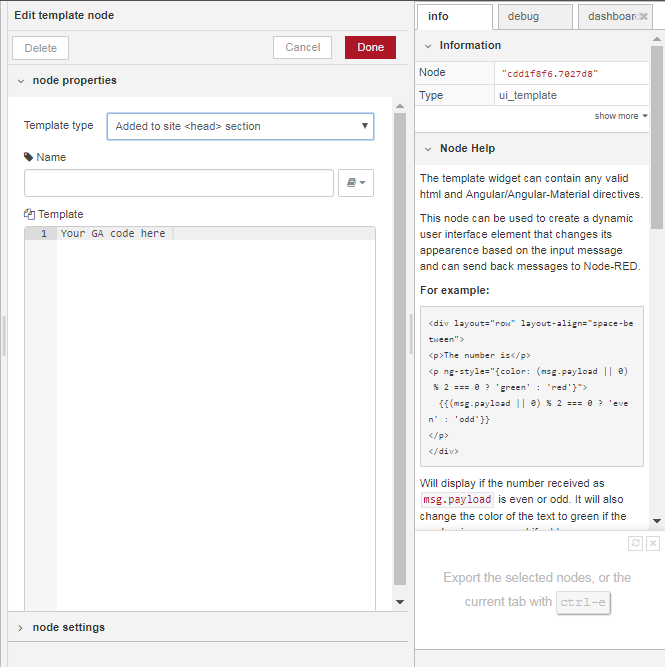
This is what @knolleary meant
---
### Author:  [@b35b5dad43ea282b65d0](https://discourse.nodered.org/u/b35b5dad43ea282b65d0)
#### Post date: [28 September 2018 08:52 UTC](https://discourse.nodered.org/t/dashboard-visitor-counter/3463/12 "2018-09-28T08:52:06Z")
Ah.
I thought i need to edit the file.
How exactly do i need to implement the ui\_template into my flow.
Because i made 3 different flows for the same dashboard.
@Balouzard
Thanks now it works.
---
### Author:  [@Balouzard](https://discourse.nodered.org/u/Balouzard)
#### Post date: [28 September 2018 08:54 UTC](https://discourse.nodered.org/t/dashboard-visitor-counter/3463/13 "2018-09-28T08:54:13Z")
the `ui_template` node will refer to the dashboard ``part of the code, doesn't matter how many flows you have created nor how many flows your dashboard refers to
---
### Author:  [@b35b5dad43ea282b65d0](https://discourse.nodered.org/u/b35b5dad43ea282b65d0)
#### Post date: [28 September 2018 08:59 UTC](https://discourse.nodered.org/t/dashboard-visitor-counter/3463/14 "2018-09-28T08:59:56Z")
So its really easy to implement Google Analytics to the Node-Red dashboard.


Thanks for your help.