### Author:  [@Vittorio](https://discourse.nodered.org/u/Vittorio)
#### Post date: [9 January 2020 23:28 UTC](https://discourse.nodered.org/t/failing-installing-node-mcp23017/20144/1 "2020-01-09T23:28:28Z")
Hello everyone !,
I've been trying to install **node-red-contrib-mcp23017** on a freshly installed instance of node red, via the suggested script for raspberry pi (3b+) running the latest raspbian.
Node.js version is v12.14.1
Npm version is Npm 6.13.4
and I keep getting build errors i can't understand, in the installation progress of it's pre-requisite **node-mcp23017**
this is the output i get: (I'm trimming it because of the character limit)
```auto
pi@raspberrypi:~ $ cd .node-red/
pi@raspberrypi:~/.node-red $ npm install node-mcp23017
npm WARN deprecated coffee-script@1.9.1: CoffeeScript on NPM has moved to "coffeescript" (no hyphen)
> i2c@0.2.3 install /home/pi/.node-red/node_modules/i2c
> node-gyp rebuild
...
/home/pi/.cache/node-gyp/12.14.1/include/node/v8.h: In instantiation of ‘void v8::PersistentBase::SetWeak(P*, typename v8::WeakCallbackInfo::Callback, v8::WeakCallbackType) [with P = Nan::ObjectWrap; T = v8::Object; typename v8::WeakCallbackInfo
::Callback = void (*)(const v8::WeakCallbackInfo&)]’:
../node_modules/nan/nan_object_wrap.h:66:61: required from here
/home/pi/.cache/node-gyp/12.14.1/include/node/v8.h:10004:16: warning: cast between incompatible function types from ‘v8::WeakCallbackInfo::Callback’ {aka ‘void (*)(const v8::WeakCallbackInfo&)’} to ‘Callback’ {aka ‘void (*)(const v8::WeakCallbackInfo&)’} [-Wcast-function-type]
make: *** [i2c.target.mk:107: Release/obj.target/i2c/src/i2c.o] Error 1
make: Leaving directory '/home/pi/.node-red/node_modules/i2c/build'
gyp ERR! build error
gyp ERR! stack Error: `make` failed with exit code: 2
gyp ERR! stack at ChildProcess.onExit (/usr/lib/node_modules/npm/node_modules/node-gyp/lib/build.js:194:23)
gyp ERR! stack at ChildProcess.emit (events.js:223:5)
gyp ERR! stack at Process.ChildProcess._handle.onexit (internal/child_process.js:272:12)
gyp ERR! System Linux 4.19.75-v7+
gyp ERR! command "/usr/bin/node" "/usr/lib/node_modules/npm/node_modules/node-gyp/bin/node-gyp.js" "rebuild"
gyp ERR! cwd /home/pi/.node-red/node_modules/i2c
gyp ERR! node -v v12.14.1
gyp ERR! node-gyp -v v5.0.5
gyp ERR! not ok
npm WARN node-red-project@0.0.1 No repository field.
npm WARN node-red-project@0.0.1 No license field.
npm ERR! code ELIFECYCLE
npm ERR! errno 1
npm ERR! i2c@0.2.3 install: `node-gyp rebuild`
npm ERR! Exit status 1
npm ERR!
npm ERR! Failed at the i2c@0.2.3 install script.
npm ERR! This is probably not a problem with npm. There is likely additional logging output above.
npm ERR! A complete log of this run can be found in:
npm ERR! /home/pi/.npm/_logs/2020-01-09T23_10_48_409Z-debug.log
```
I googled around, the "npm ERR!" lines, and here and there people had issues with either node or npm versions, so I tried installing various combination of them, with the only result of getting really frustrated and making random attempts with versions I don't even remember.
I've also been reading [this post](https://discourse.nodered.org/t/how-to-install-and-usse-node-red-contrib-mcp23017/5930/7) having appearently the exact same issue, but everything suggestion there, didn't help me anyway.
Before I get lost again in yet another semi-blind attempt to guess the right combination, could any of you help me make sense of these errors or better, if you had any success, pointing me to the right packages to install in order to make it work ?
Thank you all, and if you require more informations, please don't hesitate to ask.
---
### Author:  [@Vittorio](https://discourse.nodered.org/u/Vittorio)
#### Post date: [9 January 2020 23:48 UTC](https://discourse.nodered.org/t/failing-installing-node-mcp23017/20144/2 "2020-01-09T23:48:44Z")
There is one more thing I'm confused about.
I know I need to install node red modules, inside **.node-red** folder, but I have no idea, and there is no indication in the documentation, on where to install **node-mcp23017** that is a nodejs module instead. Should I install it elsewhere or in the same node-red folder ?
also, isn't reverting to an older node/npm version going to mess with compatibility for nodes i'll install later ?
sorry, I'm so very confused
---
### Author:  [@bakman2](https://discourse.nodered.org/u/bakman2)
#### Post date: [10 January 2020 06:55 UTC](https://discourse.nodered.org/t/failing-installing-node-mcp23017/20144/3 "2020-01-10T06:55:54Z")
The mcp23017 node installs the i2c node, but the incorrect version. [See this topic.](https://discourse.nodered.org/t/node-red-contrib-i2c-fails-to-install/18774/38)
Try installing i2c first:
```auto
cd /home/pi/.node-red
npm install https://github.com/nielsnl68/node-red-contrib-i2c.git
```
Hold on from here:
You want to install `node-red-contrib-mcp23017`
But you typed: `npm install node-mcp23017`
2 different things.
1 is a node-red-node,
1 is the nodejs package - which is the one you tried to install.
However, `node-red-contrib-mcp23017` has not been updated for 4 years. Perhaps you need to try a more recent version as there are more nodes that support the mcp23017.
May I suggest you use the editor first, it is easier: hamburger menu -\> manage palette -\> install tab -\> search for mcp23017 -\> install.
---
### Author:  [@Vittorio](https://discourse.nodered.org/u/Vittorio)
#### Post date: [10 January 2020 08:49 UTC](https://discourse.nodered.org/t/failing-installing-node-mcp23017/20144/4 "2020-01-10T08:49:00Z")
Hi bakman2, thank for steppin in 🙂
I want to install `node-red-contrib-mcp23017` (or any other node red module giving me control over mcp23017) but it's prerequisite is `node-mcp23017` (which is a nodejs module)
I'll try installing i2c first, thanks !
---
### Author:  [@Vittorio](https://discourse.nodered.org/u/Vittorio)
#### Post date: [10 January 2020 09:20 UTC](https://discourse.nodered.org/t/failing-installing-node-mcp23017/20144/5 "2020-01-10T09:20:27Z")
I could install the i2c library you linked, but when I try to install `node-mcp23017` first, it fails with this error
```auto
gyp
ERR! build error gyp ERR!
stack Error: `make` failed with exit code: 2gyp ERR! stack
at ChildProcess.onExit (/usr/lib/node_modules/npm/node_modules/node-gyp/lib/build.js:194:23)
gyp ERR!
stack at ChildProcess.emit (events.js:223:5)
gyp
ERR! stack at Process.ChildProcess._handle.onexit (internal/child_process.js:272:12)gyp ERR!
System Linux 4.19.75-v7+gyp ERR!
command "/usr/bin/node" "/usr/lib/node_modules/npm/node_modules/node-gyp/bin/node-gyp.js" "rebuild"
gyp ERR! cwd
/home/pi/.node-red/node_modules/i2c
gyp
ERR! node -v v12.14.1
gyp ERR!
node-gyp -v v5.0.5
gyp ERR! not ok [......] \ install: info lifecycle i2c@0.2.3~install: Failed to exec install script
[......] \ install: info lifecycle i2c@0.2.3~install: Failed to exec install script
npm
WARN node-red-project@0.0.1 No repository field.
npm WARN node-red-project@0.0.1 No license field.
npm ERR!
code ELIFECYCLE
npm
ERR! errno 1npm ERR!
i2c@0.2.3 install: `node-gyp rebuild`
npm
ERR! Exit status 1
npm ERR! npm ERR!
Failed at the i2c@0.2.3 install script.
npm ERR!
This is probably not a problem with npm. There is likely additional logging output above.
npm
ERR! A complete log of this run can be found in:
npm ERR!
/home/pi/.npm/_logs/2020-01-10T09_13_37_353Z-debug.log
```
I also tried installing mcp23017 nodes from the palette manager, but they also fail, it still seams because of i2c.
I can't pinpoint what the error is telling me, so I have no idea on what to check
---
### Author:  [@bakman2](https://discourse.nodered.org/u/bakman2)
#### Post date: [10 January 2020 09:41 UTC](https://discourse.nodered.org/t/failing-installing-node-mcp23017/20144/6 "2020-01-10T09:41:54Z")
Try this one instead

---
### Author:  [@Vittorio](https://discourse.nodered.org/u/Vittorio)
#### Post date: [10 January 2020 09:51 UTC](https://discourse.nodered.org/t/failing-installing-node-mcp23017/20144/7 "2020-01-10T09:51:47Z")
yup it also failed, but I didn't save the log, now i'm in the process of a clean reinstall of node-red, since I have no idea about the leftovers of these attempts, will get back to you as soon as I try again, or have a log of the failure 🙂
---
### Author:  [@Vittorio](https://discourse.nodered.org/u/Vittorio)
#### Post date: [10 January 2020 09:54 UTC](https://discourse.nodered.org/t/failing-installing-node-mcp23017/20144/8 "2020-01-10T09:54:13Z")
...aaand there it is
```auto
2020-01-10T09:52:55.155Z [err] make: *** [i2c.target.mk:111: Release/obj.target/i2c/src/i2c.o] Error 1
2020-01-10T09:52:55.156Z [out] make: Leaving directory '/home/pi/.node-red/node_modules/i2c-bus/build'
2020-01-10T09:52:55.157Z [err] gyp
2020-01-10T09:52:55.158Z [err] ERR!
2020-01-10T09:52:55.158Z [err] build error
2020-01-10T09:52:55.160Z [err] gyp
2020-01-10T09:52:55.161Z [err] ERR! stack Error: `make` failed with exit code: 2
2020-01-10T09:52:55.161Z [err] gyp
2020-01-10T09:52:55.161Z [err] ERR! stack at ChildProcess.onExit (/opt/nodejs/lib/node_modules/npm/node_modules/node-gyp/lib/build.js:194:23)
2020-01-10T09:52:55.161Z [err] gyp ERR!
2020-01-10T09:52:55.161Z [err] stack at ChildProcess.emit (events.js:321:20)
2020-01-10T09:52:55.161Z [err] gyp ERR!
2020-01-10T09:52:55.161Z [err] stack at Process.ChildProcess._handle.onexit (internal/child_process.js:275:12)
2020-01-10T09:52:55.162Z [err] gyp
2020-01-10T09:52:55.162Z [err] ERR! System Linux 4.19.75-v7+
2020-01-10T09:52:55.163Z [err] gyp ERR!
2020-01-10T09:52:55.163Z [err] command "/opt/nodejs/bin/node" "/opt/nodejs/lib/node_modules/npm/node_modules/node-gyp/bin/node-gyp.js" "rebuild"
2020-01-10T09:52:55.163Z [err] gyp
2020-01-10T09:52:55.163Z [err] ERR! cwd /home/pi/.node-red/node_modules/i2c-bus
2020-01-10T09:52:55.163Z [err] gyp ERR!
2020-01-10T09:52:55.163Z [err] node -v v13.6.0
2020-01-10T09:52:55.163Z [err] gyp
2020-01-10T09:52:55.164Z [err] ERR! node-gyp -v v5.0.5
2020-01-10T09:52:55.164Z [err] gyp ERR! not ok
2020-01-10T09:52:55.164Z [err]
2020-01-10T09:52:55.376Z [err] npm
2020-01-10T09:52:55.376Z [err] ERR! code ELIFECYCLE
2020-01-10T09:52:55.377Z [err] npm ERR!
2020-01-10T09:52:55.377Z [err] errno 1
2020-01-10T09:52:55.380Z [err] npm
2020-01-10T09:52:55.381Z [err] ERR! i2c-bus@1.2.5 install: `node-gyp rebuild`
2020-01-10T09:52:55.381Z [err] npm ERR! Exit status 1
2020-01-10T09:52:55.381Z [err] npm ERR!
2020-01-10T09:52:55.381Z [err]
2020-01-10T09:52:55.381Z [err] npm ERR!
2020-01-10T09:52:55.381Z [err] Failed at the i2c-bus@1.2.5 install script.
2020-01-10T09:52:55.381Z [err] npm ERR!
2020-01-10T09:52:55.382Z [err] This is probably not a problem with npm. There is likely additional logging output above.
2020-01-10T09:52:55.415Z [err]
2020-01-10T09:52:55.415Z [err] npm ERR! A complete log of this run can be found in:
2020-01-10T09:52:55.415Z [err] npm
2020-01-10T09:52:55.416Z [err] ERR! /home/pi/.npm/_logs/2020-01-10T09_52_55_386Z-debug.log
2020-01-10T09:52:55.433Z rc=1
```
---
### Author:  [@bakman2](https://discourse.nodered.org/u/bakman2)
#### Post date: [10 January 2020 09:56 UTC](https://discourse.nodered.org/t/failing-installing-node-mcp23017/20144/9 "2020-01-10T09:56:07Z")
Same issue, it tries to install i2c-bus 1.2.5 while the current version lives on 5.x
---
### Author:  [@Vittorio](https://discourse.nodered.org/u/Vittorio)
#### Post date: [10 January 2020 09:59 UTC](https://discourse.nodered.org/t/failing-installing-node-mcp23017/20144/10 "2020-01-10T09:59:13Z")
that's interesting, do you think i should try to make 1.2.5 work, or edit _something_ to work with 5.x ?
---
### Author:  [@bakman2](https://discourse.nodered.org/u/bakman2)
#### Post date: [10 January 2020 10:02 UTC](https://discourse.nodered.org/t/failing-installing-node-mcp23017/20144/11 "2020-01-10T10:02:00Z")
I'm no nodejs hero, i believe you can change the contents of package.json which describe the requirements, but how to do that I am not sure, perhaps @TotallyInformation could assist.
---
### Author:  [@Vittorio](https://discourse.nodered.org/u/Vittorio)
#### Post date: [10 January 2020 10:03 UTC](https://discourse.nodered.org/t/failing-installing-node-mcp23017/20144/12 "2020-01-10T10:03:06Z")
Yes, I'm trying that, I'm not sure either how to do that, but thanks for pointing me in this direction !
---
### Author:  [@cymplecy](https://discourse.nodered.org/u/cymplecy)
#### Post date: [10 January 2020 15:48 UTC](https://discourse.nodered.org/t/failing-installing-node-mcp23017/20144/13 "2020-01-10T15:48:53Z")
I've had a bit of play including forking the node and changing dependencies but its a large rabbit hole and I ran out of air ☹
I think someone is going to have to start again on a new hierarchy of nodes to make i2c stuff work on a Pi again
For using an MCP23017 as an output device, its might be possible to use an exec node to talk to a python prog - I might try doing that
---
### Author:  [@Vittorio](https://discourse.nodered.org/u/Vittorio)
#### Post date: [10 January 2020 16:14 UTC](https://discourse.nodered.org/t/failing-installing-node-mcp23017/20144/14 "2020-01-10T16:14:39Z")
Hi cymplecy,
thanks, I feel better know knowing that 🙂
I thought to give up and using an exec node to talk to the MCP23017, but I also need it for inputs, besides the fact that I would love to have everything neat and tidy and manage my flows without too many "black boxes I'll forget the workings" 🙂
Did you manage in the end to find the correct versions of modules to work together ?
Moreover is it a bad practice to revert to older versions of modules/nodejs/nodered/npm for security/compatibility or other reasons ? Because I think so, but searching around for solutions to this i2c bedlam, a lot of people adviced to use such and such version.
---
### Author:  [@cymplecy](https://discourse.nodered.org/u/cymplecy)
#### Post date: [10 January 2020 16:18 UTC](https://discourse.nodered.org/t/failing-installing-node-mcp23017/20144/15 "2020-01-10T16:18:28Z")
> [@Vittorio](#):
>
> Did you manage in the end to find the correct versions of modules to work together ?
No - I gave up
---
### Author:  [@Vittorio](https://discourse.nodered.org/u/Vittorio)
#### Post date: [10 January 2020 16:25 UTC](https://discourse.nodered.org/t/failing-installing-node-mcp23017/20144/16 "2020-01-10T16:25:40Z")
I'll let you know if something comes out of the rabbit hole
---
### Author:  [@vlturner](https://discourse.nodered.org/u/vlturner)
#### Post date: [12 January 2020 04:44 UTC](https://discourse.nodered.org/t/failing-installing-node-mcp23017/20144/17 "2020-01-12T04:44:38Z")
I am using MCP23017 but had t do a lot to get it working.
The best way to get it working is that you have to be in the directory node-red is installed on,
My directory is /hom/pi/.node-red
npm install i2c-bus@5.1.0
├─┬ i2c-bus@5.1.0
│ ├── bindings@1.5.0 deduped
│ └── nan@2.14.0 deduped (git+https://github.com/nodejs/nan.git#60e86a9d4c4536fbbd2a76814470edd66b23114e)
├── nan@2.14.0 (git+https://github.com/nodejs/nan.git#60e86a9d4c4536fbbd2a76814470edd66b23114e)
You can see I also loaded the latest version of nan@2.14.0 to fix some warnings.
Also install ncd-red-comm@1.6.9 because they all link to it.
This installs all the NCD nodes
npm i $(npm search --parseable ncd-red | cut -f 1)
Once all the packages are installed remember to run npm dedupe and npm rebuild
Once that's done you reboot the system so node-red pulls in the local node\_modules files and it should show up in the admin console.

I can help if you get stuck.
---
### Author:  [@Vittorio](https://discourse.nodered.org/u/Vittorio)
#### Post date: [13 January 2020 17:12 UTC](https://discourse.nodered.org/t/failing-installing-node-mcp23017/20144/18 "2020-01-13T17:12:56Z")
Oh wow, thanks [vlturner](https://discourse.nodered.org/u/vlturner), I'll give this a try as soon as I have some time.
meanwhile, I tried forking the **node-mcp23017** and changed it's prerequisite i2c-bus version to the one I was able to install (~5.1.0) and the installation was successful.
Too bad I haven't tried yet with proper hardware connected, will keep you all posted !
---
### Author:  [@cymplecy](https://discourse.nodered.org/u/cymplecy)
#### Post date: [13 January 2020 22:22 UTC](https://discourse.nodered.org/t/failing-installing-node-mcp23017/20144/19 "2020-01-13T22:22:28Z")
> [@vlturner](#):
>
> ncd-red-comm
Thanks for finding this 🙂
I decided to see if I could get my MCP23017 working as simple as possible without having to install all the other stuff
so i tried
```auto
npm install i2c-bus
```
and
```auto
npm install ncd-red-mcp23017
```
and luckily it worked (after messing around a lot with the settings) and I could switch a LED on/off connected to GPIOA0 (or channel\_1 as ncd-red-mcp23017 calls it)

```auto
[{"id":"176f6d3d.fddbe3","type":"ncd-mcp23017","z":"70adda38.244c24","name":"","connection":"793838ae.fb2198","addr":"32","interval":"1000","onchange":true,"send_init":true,"outputs":1,"output_all":false,"io_1":1,"io_2":1,"io_3":1,"io_4":1,"io_5":1,"io_6":1,"io_7":1,"io_8":1,"io_9":1,"io_10":1,"io_11":1,"io_12":1,"io_13":1,"io_14":1,"io_15":1,"io_16":1,"persist":"","startup":"","x":850,"y":520,"wires":[["5d1c64a9.34e54c"]]},{"id":"d79aa5fb.a203c8","type":"inject","z":"70adda38.244c24","name":"","topic":"channel_1","payload":"1","payloadType":"num","repeat":"","crontab":"","once":false,"onceDelay":0.1,"x":570,"y":500,"wires":[["176f6d3d.fddbe3"]]},{"id":"e17b0c38.325b5","type":"inject","z":"70adda38.244c24","name":"","topic":"channel_1","payload":"0","payloadType":"num","repeat":"","crontab":"","once":false,"onceDelay":0.1,"x":570,"y":560,"wires":[["176f6d3d.fddbe3"]]},{"id":"5d1c64a9.34e54c","type":"debug","z":"70adda38.244c24","name":"","active":true,"tosidebar":true,"console":false,"tostatus":false,"complete":"false","x":1180,"y":540,"wires":[]},{"id":"793838ae.fb2198","type":"ncd-comm","z":"","name":"","bus":"i2c-1","commType":"standard","addr":"0","useMux":false,"muxAddr":"112","muxPort":"0"}]
```
---
### Author:  [@cymplecy](https://discourse.nodered.org/u/cymplecy)
#### Post date: [15 January 2020 20:12 UTC](https://discourse.nodered.org/t/failing-installing-node-mcp23017/20144/20 "2020-01-15T20:12:49Z")
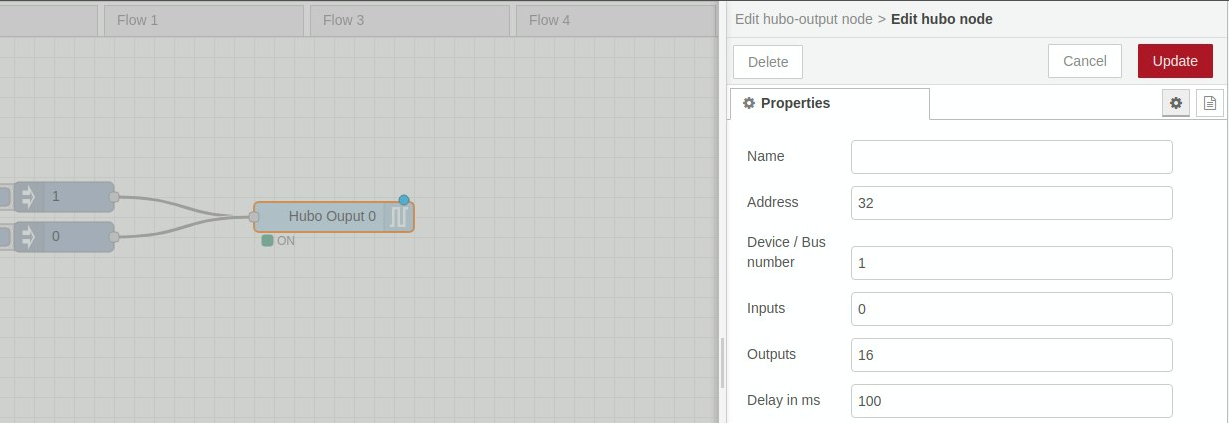
Just noticed this node appear
> **[node-red-contrib-hubo](https://flows.nodered.org/node/node-red-contrib-hubo)**
>
> Node-RED nodes to read/write digital inputs/outputs of raspberry pi Hubo/MCP23017
Works for me (this is on the same Pi as above)
[Next page](https://discourse.nodered.org/t/failing-installing-node-mcp23017/20144.md?page=2)