# Google Spreasheet zu Node Red
**URL:** https://discourse.nodered.org/t/google-spreasheet-zu-node-red/23608
**Category:** Share Your Projects
**Created:** [25 March 2020 10:58 UTC](https://discourse.nodered.org/t/google-spreasheet-zu-node-red/23608 "2020-03-25T10:58:14Z")
**Posts on this page:** 14
**Page:** 1
### Author:  [@ERAStephan](https://discourse.nodered.org/u/ERAStephan)
#### Post date: [25 March 2020 10:58 UTC](https://discourse.nodered.org/t/google-spreasheet-zu-node-red/23608/1 "2020-03-25T10:58:14Z")
Guten tag allerseits,
hoffe das ihr in Tagen wie diesen Gesund zu Hause sitzt.
Mein Projekt ist eine Poolsteuerung(RaspberryPi) mit externer Messeinheit Names Blue Riiot. Ev. kann der eine oder andere mir bei meinem Problem helfen.
Bis dato habe ich im Netz Anleitungen gefunden wie man von Node Red zu Google Sheets übertragen kann. Ich würde es aber genau umgekehrt benötigen.
Folgender Sachverhalt.
Habe im Pool einen Blue Riiot. Dieser gibt an die App Werte wie
Temperatur, Chlorwert, PH Wert, Leitfähigkeit an. Diese ist ein geschlossenes App System. Nun habe ich es geschafft mit IFTTT diese Daten in eine google spreadsheet datei zu schreiben.
Dies funktioniert wunderbar.
Jetzt ist meine Spezialfrage:
Wie bekomme ich die Exel-Daten die in dieser Datei sind ins node red?
ev. hat dies jemand mit anderen Daten schon hinbekommen und
kann mir Tipps dazu geben. Besten dank und bleibt gesund.
mfg
steph
---
### Author:  [@ERAStephan](https://discourse.nodered.org/u/ERAStephan)
#### Post date: [25 March 2020 12:07 UTC](https://discourse.nodered.org/t/google-spreasheet-zu-node-red/23608/4 "2020-03-25T12:07:48Z")
danke für die antwort. das google übersetzt bei mir das forum automatisch ins deutsche.
mein fehler. werde mir den node heute noch ansehen
---
### Author:  [@JGKK](https://discourse.nodered.org/u/JGKK)
#### Post date: [25 March 2020 12:15 UTC](https://discourse.nodered.org/t/google-spreasheet-zu-node-red/23608/5 "2020-03-25T12:15:46Z")
So hier ein kleines Howto:
Just to show you a basic example using a public test sheet i made(on linux):


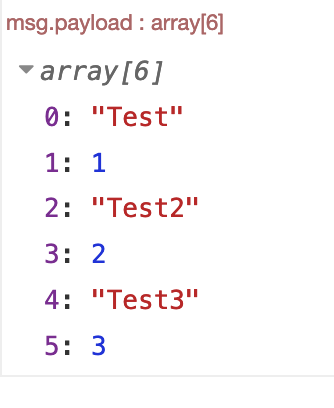
```auto
[{"id":"a8e4d82d.4283b8","type":"exec","z":"f954564f.03e718","command":"wget --no-check-certificate 'https://docs.google.com/spreadsheets/d/1jsfwZ9DyFVL4LsbnywQNRNMHGrZrWpjSOlgf7dmmOt4/export?format=xlsx' -O test.xlsx","addpay":false,"append":"","useSpawn":"false","timer":"","oldrc":false,"name":"","x":1000,"y":1840,"wires":[["b78a0f69.a293c"],[],[]]},{"id":"b7ccdfa9.eadac8","type":"inject","z":"f954564f.03e718","name":"","topic":"","payload":"","payloadType":"date","repeat":"","crontab":"","once":false,"onceDelay":0.1,"x":350,"y":1840,"wires":[["a8e4d82d.4283b8"]]},{"id":"b78a0f69.a293c","type":"file in","z":"f954564f.03e718","name":"","filename":"test.xlsx","format":"","chunk":false,"sendError":false,"encoding":"none","x":1660,"y":1840,"wires":[["f8344caa.47fd"]]},{"id":"f8344caa.47fd","type":"book","z":"f954564f.03e718","name":"","x":1810,"y":1840,"wires":[["1c82a3b3.3aaec4"]]},{"id":"1c82a3b3.3aaec4","type":"function","z":"f954564f.03e718","name":"extract values","func":"const raw = msg.payload.Sheets.Tabellenblatt1;\nconst values = Object.values(raw);\nlet results = [];\nvalues.forEach(value => {\n if(typeof value == \"object\") results.push(value.v);\n})\nmsg.payload = results;\nreturn msg;","outputs":1,"noerr":0,"x":2000,"y":1840,"wires":[["78cb5b81.583e44"]]},{"id":"78cb5b81.583e44","type":"debug","z":"f954564f.03e718","name":"","active":true,"tosidebar":true,"console":false,"tostatus":false,"complete":"payload","targetType":"msg","x":2190,"y":1840,"wires":[]}]
```
1-install:
> **[node-red-contrib-spreadsheet-in](https://flows.nodered.org/node/node-red-contrib-spreadsheet-in)**
>
> This package provides Node-RED nodes to read data from spreadsheet (Excel, ODS, etc.) file.
2-create a public sharing link to your google spreadsheet
3-change the end of the link from `"edit?usp=sharing"` to `"export?format=xlsx"`
4-adapt the flow above to your link
5-adapt the function node to extract the right data
I hope this gave you some ideas
Best regards Johannes
---
### Author:  [@ERAStephan](https://discourse.nodered.org/u/ERAStephan)
#### Post date: [25 March 2020 12:34 UTC](https://discourse.nodered.org/t/google-spreasheet-zu-node-red/23608/6 "2020-03-25T12:34:06Z")
wow das funktioniert so gut wie perfekt.
nun habe ich nur noch das problem das die spalten und zeilen nicht passen. hier kommt natürlich der fehler typ error cannot convert undefined or null to objekt. die spalte g ist zum vernachlässigen.
habe jetzt wieder was gelernt
nun schreibt er im debug bad second format.
gehe davon aus das ich die function bearbeiten muss
[https://docs.google.com/spreadsheets/d/1WAXIzBznSmxDqPSBzlOcqtb-6apq6xthuAYRqSUuU8c/export?format=xlsx](https://docs.google.com/spreadsheets/d/1WAXIzBznSmxDqPSBzlOcqtb-6apq6xthuAYRqSUuU8c/export?format=xlsx)
---
### Author:  [@ERAStephan](https://discourse.nodered.org/u/ERAStephan)
#### Post date: [25 March 2020 13:00 UTC](https://discourse.nodered.org/t/google-spreasheet-zu-node-red/23608/7 "2020-03-25T13:00:42Z")
```auto
[{"id":"b80b615a.89339","type":"tab","label":"Flow 2","disabled":false,"info":""},{"id":"e226a877.dd74b8","type":"exec","z":"b80b615a.89339","command":"wget --no-check-certificate 'https://docs.google.com/spreadsheets/d/1WAXIzBznSmxDqPSBzlOcqtb-6apq6xthuAYRqSUuU8c/export?format=xlsx' -O test.xlsx","addpay":false,"append":"","useSpawn":"false","timer":"","oldrc":false,"name":"","x":720,"y":220,"wires":[["ffe57f0.57a328"],[],[]]},{"id":"1a6b5379.588e9d","type":"inject","z":"b80b615a.89339","name":"","topic":"","payload":"","payloadType":"date","repeat":"","crontab":"","once":false,"onceDelay":0.1,"x":100,"y":220,"wires":[["e226a877.dd74b8"]]},{"id":"ffe57f0.57a328","type":"file in","z":"b80b615a.89339","name":"","filename":"test.xlsx","format":"","chunk":false,"sendError":false,"encoding":"none","x":1380,"y":220,"wires":[["96fa7f07.47e83"]]},{"id":"96fa7f07.47e83","type":"book","z":"b80b615a.89339","name":"","x":1530,"y":220,"wires":[["44ec59bc.8b8f88"]]},{"id":"44ec59bc.8b8f88","type":"function","z":"b80b615a.89339","name":"extract values","func":"const raw = msg.payload.Sheets.Tabellenblatt1;\nconst values = Object.values(raw);\nlet results = [];\nvalues.forEach(value => {\n if(typeof value == \"object\") results.push(value.v);\n})\nmsg.payload = results;\nreturn msg;","outputs":1,"noerr":0,"x":1720,"y":220,"wires":[["2ec2a1fa.7b1a0e"]]},{"id":"2ec2a1fa.7b1a0e","type":"debug","z":"b80b615a.89339","name":"","active":true,"tosidebar":true,"console":false,"tostatus":false,"complete":"payload","targetType":"msg","x":1910,"y":220,"wires":[]}]
```
---
### Author:  [@JGKK](https://discourse.nodered.org/u/JGKK)
#### Post date: [25 March 2020 13:05 UTC](https://discourse.nodered.org/t/google-spreasheet-zu-node-red/23608/8 "2020-03-25T13:05:21Z")
Try this, it should work and is even easier, your table gives an error with the spreadsheet node so we dont use it 🙂

```auto
[{"id":"b78a0f69.a293c","type":"file in","z":"f954564f.03e718","name":"","filename":"test.csv","format":"utf8","chunk":false,"sendError":false,"encoding":"none","x":1620,"y":2080,"wires":[["d3a54150.86997"]]},{"id":"39953b3f.15db84","type":"exec","z":"f954564f.03e718","command":"wget --no-check-certificate 'https://docs.google.com/spreadsheets/d/1WAXIzBznSmxDqPSBzlOcqtb-6apq6xthuAYRqSUuU8c/export?format=csv' -O test.csv","addpay":false,"append":"","useSpawn":"false","timer":"","oldrc":false,"name":"","x":990,"y":2080,"wires":[["b78a0f69.a293c"],[],[]]},{"id":"3aba5732.afcb8","type":"inject","z":"f954564f.03e718","name":"","topic":"","payload":"","payloadType":"date","repeat":"","crontab":"","once":false,"onceDelay":0.1,"x":360,"y":2080,"wires":[["39953b3f.15db84"]]},{"id":"33cd2066.beaa9","type":"debug","z":"f954564f.03e718","name":"","active":true,"tosidebar":true,"console":false,"tostatus":false,"complete":"payload","targetType":"msg","x":1950,"y":2080,"wires":[]},{"id":"d3a54150.86997","type":"csv","z":"f954564f.03e718","name":"","sep":",","hdrin":"","hdrout":false,"multi":"mult","ret":"\\n","temp":"","skip":"0","strings":false,"x":1790,"y":2080,"wires":[["33cd2066.beaa9"]]}]
```
export as csv instead of xlsx (`export?format=csv`)
use build in csv node. no need to install anything.
---
### Author:  [@ERAStephan](https://discourse.nodered.org/u/ERAStephan)
#### Post date: [25 March 2020 13:13 UTC](https://discourse.nodered.org/t/google-spreasheet-zu-node-red/23608/9 "2020-03-25T13:13:05Z")
Das ist ja perfekt. Kann ich hier einen Filter in den flow setzten das er mir extra immer nur den aktuellsten(letzten) datensatz ausgibt.
würde diesen dann gerne mit dem node red dashboard anzeigen lassen.
---
### Author:  [@JGKK](https://discourse.nodered.org/u/JGKK)
#### Post date: [25 March 2020 13:28 UTC](https://discourse.nodered.org/t/google-spreasheet-zu-node-red/23608/10 "2020-03-25T13:28:19Z")
Here you go, the function node is very simple. It uses [https://developer.mozilla.org/en-US/docs/Web/JavaScript/Reference/Global\_Objects/Array/pop](https://developer.mozilla.org/en-US/docs/Web/JavaScript/Reference/Global_Objects/Array/pop) to return only the last element of the array that the csv node puts out. After this you can access the individual values by their object keys. for example `msg.payload.col3`for the third element in the last row of the csv. In the example i use a change node to move this value to be the `msg.payload`. You can now show this in a dashboard text node for example.
```auto
[{"id":"b78a0f69.a293c","type":"file in","z":"f954564f.03e718","name":"","filename":"test.csv","format":"utf8","chunk":false,"sendError":false,"encoding":"none","x":1620,"y":2080,"wires":[["d3a54150.86997"]]},{"id":"39953b3f.15db84","type":"exec","z":"f954564f.03e718","command":"wget --no-check-certificate 'https://docs.google.com/spreadsheets/d/1WAXIzBznSmxDqPSBzlOcqtb-6apq6xthuAYRqSUuU8c/export?format=csv' -O test.csv","addpay":false,"append":"","useSpawn":"false","timer":"","oldrc":false,"name":"","x":990,"y":2080,"wires":[["b78a0f69.a293c"],[],[]]},{"id":"3aba5732.afcb8","type":"inject","z":"f954564f.03e718","name":"","topic":"","payload":"","payloadType":"date","repeat":"","crontab":"","once":false,"onceDelay":0.1,"x":360,"y":2080,"wires":[["39953b3f.15db84"]]},{"id":"33cd2066.beaa9","type":"debug","z":"f954564f.03e718","name":"","active":true,"tosidebar":true,"console":false,"tostatus":false,"complete":"payload","targetType":"msg","x":2270,"y":2080,"wires":[]},{"id":"d3a54150.86997","type":"csv","z":"f954564f.03e718","name":"","sep":",","hdrin":"","hdrout":false,"multi":"mult","ret":"\\n","temp":"","skip":"0","strings":false,"x":1790,"y":2080,"wires":[["d0642c8f.8bd5f8"]]},{"id":"d0642c8f.8bd5f8","type":"function","z":"f954564f.03e718","name":"LastElement","func":"msg.payload = msg.payload.pop();\nreturn msg;","outputs":1,"noerr":0,"x":1950,"y":2080,"wires":[["ded8c4e3.686178"]]},{"id":"ded8c4e3.686178","type":"change","z":"f954564f.03e718","name":"get3rd","rules":[{"t":"set","p":"payload","pt":"msg","to":"payload.col3","tot":"msg"}],"action":"","property":"","from":"","to":"","reg":false,"x":2110,"y":2080,"wires":[["33cd2066.beaa9"]]}]
```
---
### Author:  [@ERAStephan](https://discourse.nodered.org/u/ERAStephan)
#### Post date: [25 March 2020 14:15 UTC](https://discourse.nodered.org/t/google-spreasheet-zu-node-red/23608/11 "2020-03-25T14:15:39Z")
YOU MAKE MY DAY!
Tausend dank für diese großartige Unterstützung.
Alleine hätte ich dies niemals hinbekommen.
Wenn es noch möglich ist hätte ich eine allerletzte bitte.
ich benötige eine ausgabe der durchschnittstemperatur der letzten 56 messungen. das wäre col3 die letzten 56 messungen addiert und dann dividieren 56 messungen. somit sollte sich die Durchschnittstemperatur im Wasser der letzten 56 stunden ergeben.
---
### Author:  [@JGKK](https://discourse.nodered.org/u/JGKK)
#### Post date: [25 March 2020 16:05 UTC](https://discourse.nodered.org/t/google-spreasheet-zu-node-red/23608/12 "2020-03-25T16:05:10Z")
You will need a simple function node for this:
```auto
if(msg.payload.length > 56){
msg.payload = msg.payload.slice(-56);
}
const temparr = msg.payload.map(object => parseFloat(object.col3));
const temparrlen = temparr.length;
const temparrsum = temparr.reduce((sum, value) => sum += value);
const average = temparrsum / temparrlen;
msg.payload = Math.round(average*10)/10;
return msg;
```
First we test if the array is longer than 56. If it is we use [https://developer.mozilla.org/de/docs/Web/JavaScript/Reference/Global\_Objects/Array/slice](https://developer.mozilla.org/de/docs/Web/JavaScript/Reference/Global_Objects/Array/slice) to only return the 56 most recent entries in the array.
Afterwards I use [https://developer.mozilla.org/de/docs/Web/JavaScript/Reference/Global\_Objects/Array/map](https://developer.mozilla.org/de/docs/Web/JavaScript/Reference/Global_Objects/Array/map) to create an array that only contains the col3 key of each original array object and convert that element to a number with [https://developer.mozilla.org/en-US/docs/Web/JavaScript/Reference/Global\_Objects/parseFloat](https://developer.mozilla.org/en-US/docs/Web/JavaScript/Reference/Global_Objects/parseFloat) . Than i save the length of the resulting array to a constant using [https://developer.mozilla.org/de/docs/Web/JavaScript/Reference/Global\_Objects/Array/length](https://developer.mozilla.org/de/docs/Web/JavaScript/Reference/Global_Objects/Array/length) .
The fourth step is using the reduce method [https://developer.mozilla.org/de/docs/Web/JavaScript/Reference/Global\_Objects/Array/Reduce](https://developer.mozilla.org/de/docs/Web/JavaScript/Reference/Global_Objects/Array/Reduce) method to add up all the elements in the array we made.
Now we have everything to calculate the average by dividing the sum by the number of elements aka the length we saved.
We than as a final step use [https://developer.mozilla.org/de/docs/Web/JavaScript/Reference/Global\_Objects/Math/round](https://developer.mozilla.org/de/docs/Web/JavaScript/Reference/Global_Objects/Math/round) . As Math.round will always give back a whole number we round the average multiplied by ten and divide it again afterwards to have a number witch one decimal.
Now we can return the average of all entries in one column of the csv/spreadsheet.
This is the full example for your table:
```auto
[{"id":"b78a0f69.a293c","type":"file in","z":"f954564f.03e718","name":"","filename":"test.csv","format":"utf8","chunk":false,"sendError":false,"encoding":"none","x":1620,"y":2080,"wires":[["d3a54150.86997"]]},{"id":"39953b3f.15db84","type":"exec","z":"f954564f.03e718","command":"wget --no-check-certificate 'https://docs.google.com/spreadsheets/d/1WAXIzBznSmxDqPSBzlOcqtb-6apq6xthuAYRqSUuU8c/export?format=csv' -O test.csv","addpay":false,"append":"","useSpawn":"false","timer":"","oldrc":false,"name":"","x":990,"y":2080,"wires":[["b78a0f69.a293c"],[],[]]},{"id":"3aba5732.afcb8","type":"inject","z":"f954564f.03e718","name":"","topic":"","payload":"","payloadType":"date","repeat":"","crontab":"","once":false,"onceDelay":0.1,"x":360,"y":2080,"wires":[["39953b3f.15db84"]]},{"id":"d3a54150.86997","type":"csv","z":"f954564f.03e718","name":"","sep":",","hdrin":"","hdrout":false,"multi":"mult","ret":"\\n","temp":"","skip":"0","strings":false,"x":1790,"y":2080,"wires":[["8c335680.01d498"]]},{"id":"8c335680.01d498","type":"function","z":"f954564f.03e718","name":"col3 average","func":"if(msg.payload.length > 56){\n msg.payload = msg.payload.slice(-56);\n}\nnode.send({payload:msg.payload});\nconst temparr = msg.payload.map(object => parseFloat(object.col3));\nconst temparrlen = temparr.length;\nconst temparrsum = temparr.reduce((sum, value) => sum += value);\nconst average = temparrsum / temparrlen;\nmsg.payload = Math.round(average*10)/10;\nreturn msg;","outputs":1,"noerr":0,"x":1950,"y":2080,"wires":[["1257e188.a235f6"]]},{"id":"1257e188.a235f6","type":"debug","z":"f954564f.03e718","name":"","active":true,"tosidebar":true,"console":false,"tostatus":false,"complete":"false","x":2130,"y":2080,"wires":[]}]
```
you can apply this to any colllumn.
Best regards Johannes
---
### Author:  [@ERAStephan](https://discourse.nodered.org/u/ERAStephan)
#### Post date: [26 March 2020 07:09 UTC](https://discourse.nodered.org/t/google-spreasheet-zu-node-red/23608/13 "2020-03-26T07:09:33Z")
Danke Johannes,
kannst du mir irgendwelche Bücher zum Thema Java lernen/einstieg empfehlen die fürs Node Red passen?
Auf den Links gibt es ja noch viel mehr Funktionen die ich ev. auch nützen kann.
---
### Author:  [@JGKK](https://discourse.nodered.org/u/JGKK)
#### Post date: [26 March 2020 07:59 UTC](https://discourse.nodered.org/t/google-spreasheet-zu-node-red/23608/14 "2020-03-26T07:59:43Z")
Ne ich habs auch nur über Youtube, die verlinkten seiten und stackoverflow gelernt. Kannst du bitte den Beitrag wo ich zuerst den Csv statt dem spreadsheet poste als Lösung makieren, dann können in Zukunft Leute mit dem selben Problem schneller die Lösung finden.
Grüße Johannes
---
### Author:  [@ERAStephan](https://discourse.nodered.org/u/ERAStephan)
#### Post date: [26 March 2020 10:52 UTC](https://discourse.nodered.org/t/google-spreasheet-zu-node-red/23608/15 "2020-03-26T10:52:45Z")
Sehr gerne, wenn ich nur den knopf lösung finde. Muss ich dort auf ihr Avatar klicken oder auf die drei punkte unten? Bitte um einen kurzen screenshot. Sie meinen den post mit der csv datei?
---
### Author:  [@system](https://discourse.nodered.org/u/system)
#### Post date: [24 May 2020 10:58 UTC](https://discourse.nodered.org/t/google-spreasheet-zu-node-red/23608/16 "2020-05-24T10:58:25Z")
This topic was automatically closed after 60 days. New replies are no longer allowed.