# Group background color
**URL:** https://discourse.nodered.org/t/group-background-color/92094
**Category:** Dashboard
**Tags:** dashboard-2
**Created:** [1 October 2024 08:46 UTC](https://discourse.nodered.org/t/group-background-color/92094 "2024-10-01T08:46:07Z")
**Posts on this page:** 6
**Page:** 1
### Author:  [@selwynjackson](https://discourse.nodered.org/u/selwynjackson)
#### Post date: [1 October 2024 08:46 UTC](https://discourse.nodered.org/t/group-background-color/92094/1 "2024-10-01T08:46:07Z")
How do I set the background colour for a group? I would like a different colour for each group. I have tried setting 'background-color' in a template, but that only works for the widgets.
---
### Author:  [@E1cid](https://discourse.nodered.org/u/E1cid)
#### Post date: [1 October 2024 09:16 UTC](https://discourse.nodered.org/t/group-background-color/92094/3 "2024-10-01T09:16:42Z")
If you mean the dashboard 2 group, You can go into edit group via the dashboard 2 sidebar, click edit group, then select create theme, and there you can select the theme colours for the group.

You can then use that theme for the group
---
### Author:  [@Steve-Mcl](https://discourse.nodered.org/u/Steve-Mcl)
#### Post date: [1 October 2024 09:16 UTC](https://discourse.nodered.org/t/group-background-color/92094/4 "2024-10-01T09:16:43Z")
Target the v-card in the group with CSS in a `CSS All Pages` type template. Also, use `!important` (yes, not cool, but necessary in this case)

```auto
div.nrdb-ui-group.pink div.v-card {
background-color: pink !important;
}
div.nrdb-ui-group.lime div.v-card {
background-color: lime !important;
}
div.nrdb-ui-group.cyan div.v-card {
background-color: lightcyan !important
}
```

---
### Author:  [@hotNipi](https://discourse.nodered.org/u/hotNipi)
#### Post date: [1 October 2024 09:25 UTC](https://discourse.nodered.org/t/group-background-color/92094/5 "2024-10-01T09:25:42Z")
First you'll need to add the class names for all your groups where you want to modify CSS
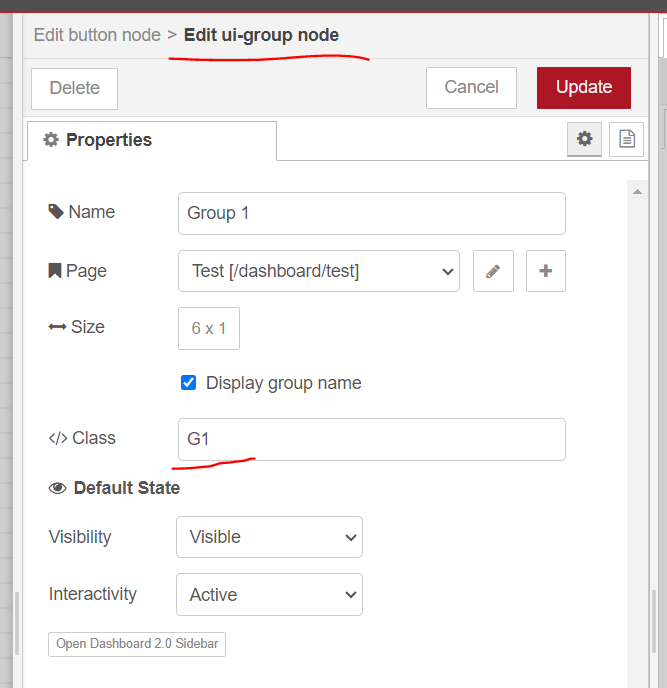
And then write the CSS for page/pages where those groups will live.
Actually many ways to target the group background.

---
### Author:  [@selwynjackson](https://discourse.nodered.org/u/selwynjackson)
#### Post date: [1 October 2024 10:14 UTC](https://discourse.nodered.org/t/group-background-color/92094/7 "2024-10-01T10:14:08Z")
@ [Steve-Mcl](https://discourse.nodered.org/u/Steve-Mcl) you have the solution. You add the definitions to the template:
div.nrdb-ui-group.pink div.v-card {
background-color: pink !important;
}
div.nrdb-ui-group.lime div.v-card {
background-color: lime !important;
}
div.nrdb-ui-group.cyan div.v-card {
background-color: lightcyan !important
}
Then in the group Class, you just specify the colour: lime, lightcyan or pink.
Thank you Steve
---
### Author:  [@system](https://discourse.nodered.org/u/system)
#### Post date: [15 October 2024 10:14 UTC](https://discourse.nodered.org/t/group-background-color/92094/8 "2024-10-15T10:14:13Z")
This topic was automatically closed 14 days after the last reply. New replies are no longer allowed.