# Heating buffer dynamize
**URL:** https://discourse.nodered.org/t/heating-buffer-dynamize/81545
**Category:** Dashboard
**Created:** [24 September 2023 16:08 UTC](https://discourse.nodered.org/t/heating-buffer-dynamize/81545 "2023-09-24T16:08:04Z")
**Posts on this page:** 20
**Page:** 1
### Author:  [@ninaaa](https://discourse.nodered.org/u/ninaaa)
#### Post date: [24 September 2023 16:08 UTC](https://discourse.nodered.org/t/heating-buffer-dynamize/81545/1 "2023-09-24T16:08:04Z")
Hello, I would like to visualize my heating buffer.
3 temperature sensors top middle and bottom.
Now I would like to dynamize the contents of the heating buffer in color using the sensors.
Does anyone have an idea or examples?
thanks greetings
---
### Author:  [@jbudd](https://discourse.nodered.org/u/jbudd)
#### Post date: [24 September 2023 16:39 UTC](https://discourse.nodered.org/t/heating-buffer-dynamize/81545/2 "2023-09-24T16:39:03Z")
I don't know what a heating buffer is nor indeed what dynamizing it's contents means (maybe transatlantic syntax)?
So...
Do you want a dashboard representation of a hot water tank, with some way to show the temperature at three levels in the tank?
How accurate do you want the representation of the tank? Would a simple rectangle suffice?
For the temperature display, do you want numbers, blue to red leds, a gauge for each sensor?
---
### Author:  [@ninaaa](https://discourse.nodered.org/u/ninaaa)
#### Post date: [24 September 2023 17:11 UTC](https://discourse.nodered.org/t/heating-buffer-dynamize/81545/3 "2023-09-24T17:11:34Z")
yes, hot water Tank also possible.
Since there is simply not enough content in this direction in German and I am not an expert in English, I use a translator.
A rectangle would be enough. But I would like to color the content of the rectangle from blue to red. I I have provided me with a color code from 20-90\*C. I don't know how I can divide the tank and give it a nice transition of colors.
---
### Author:  [@hotNipi](https://discourse.nodered.org/u/hotNipi)
#### Post date: [24 September 2023 18:00 UTC](https://discourse.nodered.org/t/heating-buffer-dynamize/81545/4 "2023-09-24T18:00:34Z")
It is for sure interesting enough CSS challenge so I'll take it. For next couple of days I maybe don't have time to deal with it but then let's see ..
---
### Author:  [@jbudd](https://discourse.nodered.org/u/jbudd)
#### Post date: [24 September 2023 19:17 UTC](https://discourse.nodered.org/t/heating-buffer-dynamize/81545/5 "2023-09-24T19:17:35Z")
> [@ninaaa](#):
>
> But I would like to color the content of the rectangle from blue to red. I I have provided me with a color code from 20-90\*C.
Can you show us an example of the temperature readings or the "color codes"?
---
### Author:  [@ninaaa](https://discourse.nodered.org/u/ninaaa)
#### Post date: [24 September 2023 19:32 UTC](https://discourse.nodered.org/t/heating-buffer-dynamize/81545/6 "2023-09-24T19:32:16Z")
if (msg.payload \>=80){
msg.colour ='#600000';}
else if (msg.payload \>= 70) {
msg.colour = '#8b1600';}
else if (msg.payload \>= 65) {
msg.colour = '#932700';}
else if (msg.payload \>= 60) {
msg.colour = '#983400';}
else if (msg.payload \>= 55) {
msg.colour = '#9f4300';}
else if (msg.payload \>= 50) {
msg.colour = '#a75700';}
else if (msg.payload \>= 45) {
msg.colour = '#b16d00';}
else if (msg.payload \>= 40) {
msg.colour = '#b88000';}
else if (msg.payload \>= 35) {
msg.colour = '#a58414';}
else if (msg.payload \>= 30) {
msg.colour = '#5f614d';}
else if (msg.payload \>= 20) {
msg.colour = '#103b8c';}
else if (msg.payload \< 20) {
msg.colour = '#000080';}
return msg;
---
### Author:  [@jbudd](https://discourse.nodered.org/u/jbudd)
#### Post date: [24 September 2023 20:59 UTC](https://discourse.nodered.org/t/heating-buffer-dynamize/81545/7 "2023-09-24T20:59:06Z")
Here is a fairly simple demonstration using your colours and a CSS gradient to blend between them. Import the flow then you can adjust the three temperature readings with the sliders and see the results on your own dashboard.
What do you think about the colours?


```auto
[{"id":"c31640d81bf733c7","type":"tab","label":"Boiler Demo","disabled":false,"info":"","env":[]},{"id":"d25954b36544f696","type":"ui_template","z":"c31640d81bf733c7","group":"be8cd6b09a8d7d5d","name":"CSS","order":14,"width":0,"height":0,"format":"\n","storeOutMessages":true,"fwdInMessages":true,"resendOnRefresh":true,"templateScope":"global","className":"","x":770,"y":120,"wires":[[]]},{"id":"f3c43fd0cfc8b280","type":"ui_template","z":"c31640d81bf733c7","group":"2a81558c7ec1f470","name":"","order":7,"width":3,"height":"6","format":"\n
","storeOutMessages":true,"fwdInMessages":true,"resendOnRefresh":true,"templateScope":"local","className":"","x":780,"y":160,"wires":[[]]},{"id":"0d04e96dc9578de1","type":"function","z":"c31640d81bf733c7","name":"Convert temp to colour","func":"if (msg.payload >= 80) {\n msg.colour = '#600000';\n}\nelse if (msg.payload >= 70) {\n msg.colour = '#8b1600';\n}\nelse if (msg.payload >= 65) {\n msg.colour = '#932700';\n}\nelse if (msg.payload >= 60) {\n msg.colour = '#983400';\n}\nelse if (msg.payload >= 55) {\n msg.colour = '#9f4300';\n}\nelse if (msg.payload >= 50) {\n msg.colour = '#a75700';\n}\nelse if (msg.payload >= 45) {\n msg.colour = '#b16d00';\n}\nelse if (msg.payload >= 40) {\n msg.colour = '#b88000';\n}\nelse if (msg.payload >= 35) {\n msg.colour = '#a58414';\n}\nelse if (msg.payload >= 30) {\n msg.colour = '#5f614d';\n}\nelse if (msg.payload >= 20) {\n msg.colour = '#103b8c';\n}\nelse if (msg.payload < 20) {\n msg.colour = '#000080';\n}\nreturn msg;","outputs":1,"timeout":0,"noerr":0,"initialize":"","finalize":"","libs":[],"x":200,"y":40,"wires":[["5cff6b93cae4a69d"]]},{"id":"3831f2b421e734d8","type":"ui_slider","z":"c31640d81bf733c7","name":"","label":"Top Sensor","tooltip":"","group":"2a81558c7ec1f470","order":2,"width":0,"height":0,"passthru":true,"outs":"end","topic":"topic","topicType":"msg","min":0,"max":"100","step":1,"className":"","x":90,"y":120,"wires":[["f3da952e5ed1c591"]]},{"id":"6529859cd44d0fce","type":"ui_slider","z":"c31640d81bf733c7","name":"","label":"Middle Sensor","tooltip":"","group":"2a81558c7ec1f470","order":3,"width":0,"height":0,"passthru":true,"outs":"end","topic":"topic","topicType":"msg","min":0,"max":"100","step":1,"className":"","x":100,"y":160,"wires":[["cf2ee47352f01a60"]]},{"id":"1c097ca07f7c0d6f","type":"ui_slider","z":"c31640d81bf733c7","name":"","label":"Bottom Sensor","tooltip":"","group":"2a81558c7ec1f470","order":4,"width":0,"height":0,"passthru":true,"outs":"end","topic":"topic","topicType":"msg","min":0,"max":"100","step":1,"className":"","x":100,"y":200,"wires":[["a388b5497055a426"]]},{"id":"d648d364970f0816","type":"link in","z":"c31640d81bf733c7","name":"link in 2","links":[],"x":55,"y":40,"wires":[["0d04e96dc9578de1"]]},{"id":"5cff6b93cae4a69d","type":"link out","z":"c31640d81bf733c7","name":"link out 2","mode":"return","links":[],"x":355,"y":40,"wires":[]},{"id":"f3da952e5ed1c591","type":"link call","z":"c31640d81bf733c7","name":"","links":["d648d364970f0816"],"linkType":"static","timeout":"30","x":260,"y":120,"wires":[["45adf6b29841bb7b"]]},{"id":"cf2ee47352f01a60","type":"link call","z":"c31640d81bf733c7","name":"","links":["d648d364970f0816"],"linkType":"static","timeout":"30","x":260,"y":160,"wires":[["ab18517f066b5022"]]},{"id":"a388b5497055a426","type":"link call","z":"c31640d81bf733c7","name":"","links":["d648d364970f0816"],"linkType":"static","timeout":"30","x":260,"y":200,"wires":[["d3186ffd51763c63"]]},{"id":"45adf6b29841bb7b","type":"change","z":"c31640d81bf733c7","name":"","rules":[{"t":"set","p":"top","pt":"flow","to":"colour","tot":"msg"}],"action":"","property":"","from":"","to":"","reg":false,"x":410,"y":120,"wires":[["30a0aba554bc7f6d"]]},{"id":"ab18517f066b5022","type":"change","z":"c31640d81bf733c7","name":"","rules":[{"t":"set","p":"middle","pt":"flow","to":"colour","tot":"msg"}],"action":"","property":"","from":"","to":"","reg":false,"x":420,"y":160,"wires":[["30a0aba554bc7f6d"]]},{"id":"d3186ffd51763c63","type":"change","z":"c31640d81bf733c7","name":"","rules":[{"t":"set","p":"bottom","pt":"flow","to":"colour","tot":"msg"}],"action":"","property":"","from":"","to":"","reg":false,"x":420,"y":200,"wires":[["30a0aba554bc7f6d"]]},{"id":"30a0aba554bc7f6d","type":"function","z":"c31640d81bf733c7","name":"function 52","func":"msg.top = flow.get(\"top\") ?? 0\nmsg.middle = flow.get(\"middle\") ?? 0\nmsg.bottom = flow.get(\"bottom\") ?? 0\nreturn msg;","outputs":1,"timeout":0,"noerr":0,"initialize":"","finalize":"","libs":[],"x":610,"y":160,"wires":[["f3c43fd0cfc8b280"]]},{"id":"be8cd6b09a8d7d5d","type":"ui_group","name":"Labels","tab":"704020d306ae5506","order":1,"disp":false,"width":2,"collapse":false,"className":""},{"id":"2a81558c7ec1f470","type":"ui_group","name":"Boiler","tab":"1e5db0123cb5abe5","order":1,"disp":true,"width":"6","collapse":false,"className":""},{"id":"704020d306ae5506","type":"ui_tab","name":"ESP BME","icon":"dashboard","order":1,"disabled":false,"hidden":false},{"id":"1e5db0123cb5abe5","type":"ui_tab","name":"Boiler","icon":"dashboard","disabled":false,"hidden":false}]
```
---
### Author:  [@ninaaa](https://discourse.nodered.org/u/ninaaa)
#### Post date: [25 September 2023 09:08 UTC](https://discourse.nodered.org/t/heating-buffer-dynamize/81545/8 "2023-09-25T09:08:37Z")
Thank you,
But somehow I can't get any colors into the boiler.
I still have to take a closer look at it
but thank you very much
---
### Author:  [@jbudd](https://discourse.nodered.org/u/jbudd)
#### Post date: [25 September 2023 09:39 UTC](https://discourse.nodered.org/t/heating-buffer-dynamize/81545/9 "2023-09-25T09:39:20Z")
> [@ninaaa](#):
>
> somehow I can't get any colors into the boiler.
Well that's not good! Connect a debug node to the output of "function 52". Set it to display the entire message object. Move the sliders around a bit and share with us what the debug shows.
---
### Author:  [@dynamicdave](https://discourse.nodered.org/u/dynamicdave)
#### Post date: [25 September 2023 11:16 UTC](https://discourse.nodered.org/t/heating-buffer-dynamize/81545/10 "2023-09-25T11:16:51Z")
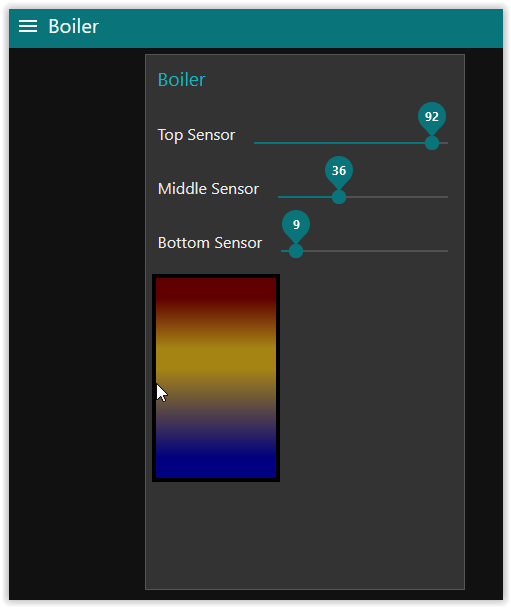
@jbudd's NR flow works for me.
---
### Author:  [@E1cid](https://discourse.nodered.org/u/E1cid)
#### Post date: [25 September 2023 11:59 UTC](https://discourse.nodered.org/t/heating-buffer-dynamize/81545/11 "2023-09-25T11:59:07Z")
Worked for me to. Are you using `node-red-dashboard 3.6.0`
I did alter it after as seems to call 2 functions and multiple link calls, I thought 1 function should do. I also reduced the ui-templates.
finally i added some error messages and a high and low average temp warning as i was bored.
Each incoming sensor reading needs a topic `top`, `middle` and `bottom`.
```auto
[{"id":"3831f2b421e734d8","type":"ui_slider","z":"c31640d81bf733c7","name":"","label":"Top Sensor","tooltip":"","group":"2a81558c7ec1f470","order":2,"width":0,"height":0,"passthru":false,"outs":"end","topic":"top","topicType":"str","min":0,"max":"100","step":1,"className":"","x":90,"y":140,"wires":[["30a0aba554bc7f6d"]]},{"id":"30a0aba554bc7f6d","type":"function","z":"c31640d81bf733c7","name":"function 52","func":"if(!isNaN(msg.payload)){\n if(msg.payload >= 80) {\n msg.colour = '#600000';\n }else if(msg.payload >= 70) {\n msg.colour = '#8b1600';\n }else if(msg.payload >= 65) {\n msg.colour = '#932700';\n }else if(msg.payload >= 60) {\n msg.colour = '#983400';\n }else if (msg.payload >= 55) {\n msg.colour = '#9f4300';\n }else if(msg.payload >= 50) {\n msg.colour = '#a75700';\n }else if(msg.payload >= 45) {\n msg.colour = '#b16d00';\n }else if(msg.payload >= 40) {\n msg.colour = '#b88000';\n }else if(msg.payload >= 35) {\n msg.colour = '#a58414';\n }else if(msg.payload >= 30) {\n msg.colour = '#5f614d';\n }else if(msg.payload >= 20) {\n msg.colour = '#103b8c';\n }else {\n msg.colour = '#000080';\n }\n}else{\n node.error(\"bad sensor reading\");\n msg.topic =\"\";\n}\nif([\"top\",\"middle\",\"bottom\"].includes(msg.topic)){\n flow.set(\"heat_store.\" + msg.topic, {colour: msg.colour, value: msg.payload})\n msg.warning = \"\";\n msg.top = flow.get(\"heat_store.top\") ?? {colour: '#000080', value: 5};\n msg.middle = flow.get(\"heat_store.middle\") ?? {colour: '#000080', value: 5}\n msg.bottom = flow.get(\"heat_store.bottom\") ?? {colour: '#000080', value: 5}\n msg.average = (msg.top.value + msg.middle.value + msg.bottom.value)/3\n if(msg.average > 95){\n msg.warning = \"heat store over temperature\";\n }else if(msg.average < 5){\n msg.warning = \"heat store in danger of freezing\";\n }\n return msg;\n}","outputs":1,"noerr":0,"initialize":"","finalize":"","libs":[],"x":330,"y":180,"wires":[["f3c43fd0cfc8b280"]]},{"id":"6529859cd44d0fce","type":"ui_slider","z":"c31640d81bf733c7","name":"","label":"Middle Sensor","tooltip":"","group":"2a81558c7ec1f470","order":3,"width":0,"height":0,"passthru":false,"outs":"end","topic":"middle","topicType":"str","min":0,"max":"100","step":1,"className":"","x":100,"y":180,"wires":[["30a0aba554bc7f6d"]]},{"id":"1c097ca07f7c0d6f","type":"ui_slider","z":"c31640d81bf733c7","name":"","label":"Bottom Sensor","tooltip":"","group":"2a81558c7ec1f470","order":4,"width":0,"height":0,"passthru":false,"outs":"end","topic":"bottom","topicType":"str","min":0,"max":"100","step":1,"className":"","x":100,"y":220,"wires":[["30a0aba554bc7f6d"]]},{"id":"f3c43fd0cfc8b280","type":"ui_template","z":"c31640d81bf733c7","group":"2a81558c7ec1f470","name":"","order":7,"width":3,"height":"6","format":"\n{{msg.warning}}\n
","storeOutMessages":false,"fwdInMessages":true,"resendOnRefresh":true,"templateScope":"local","className":"","x":500,"y":180,"wires":[["9fed361fb72a1a61"]]},{"id":"9fed361fb72a1a61","type":"debug","z":"c31640d81bf733c7","name":"debug 341","active":true,"tosidebar":true,"console":false,"tostatus":false,"complete":"true","targetType":"full","statusVal":"","statusType":"auto","x":430,"y":120,"wires":[]},{"id":"2a81558c7ec1f470","type":"ui_group","name":"Boiler","tab":"1e5db0123cb5abe5","order":1,"disp":true,"width":"6","collapse":false,"className":""},{"id":"1e5db0123cb5abe5","type":"ui_tab","name":"Boiler","icon":"dashboard","disabled":false,"hidden":false}]
```

---
### Author:  [@jbudd](https://discourse.nodered.org/u/jbudd)
#### Post date: [25 September 2023 12:36 UTC](https://discourse.nodered.org/t/heating-buffer-dynamize/81545/12 "2023-09-25T12:36:15Z")
Much more compact, but I suspect less easy to understand (for me it is anyway - not invented here!)
If you are bored, can you tweek it to use hsv or hsl colours instead of hex codes?
A range node to convert slider value 0 to 240, 100 to 359
`background: linear-gradient(hsl(var --top), 100%, 50%, etc`
I can't get it to work.
Is this the _ **right** _ way to make msg properties accessible to CSS variables?
```auto
style="--bottom: {{msg.bottom}}; --middle: {{msg.middle}}; --top: {{msg.top}};"
```
---
### Author:  [@hotNipi](https://discourse.nodered.org/u/hotNipi)
#### Post date: [25 September 2023 12:50 UTC](https://discourse.nodered.org/t/heating-buffer-dynamize/81545/13 "2023-09-25T12:50:47Z")
By having needs to play with colors I have found great tool called [chroma-js](https://gka.github.io/chroma.js/)
And the gradients can be done with a bit less mud (gray dead zone) nowadays using different color spaces. [Color Spaces for More Interesting Gradients | CSS-Tricks - CSS-Tricks](https://css-tricks.com/color-spaces-for-more-interesting-css-gradients/)
Here's that little what it takes to create gradient dolors.
Explore the flow to gain and grow the ideas.
```auto
[{"id":"d25954b36544f696","type":"ui_template","z":"c31640d81bf733c7","group":"be8cd6b09a8d7d5d","name":"CSS","order":14,"width":0,"height":0,"format":"\n","storeOutMessages":true,"fwdInMessages":true,"resendOnRefresh":true,"templateScope":"global","className":"","x":770,"y":120,"wires":[[]]},{"id":"f3c43fd0cfc8b280","type":"ui_template","z":"c31640d81bf733c7","group":"2a81558c7ec1f470","name":"","order":7,"width":"6","height":"8","format":"\n","storeOutMessages":true,"fwdInMessages":true,"resendOnRefresh":true,"templateScope":"local","className":"boilers","x":780,"y":160,"wires":[[]]},{"id":"0d04e96dc9578de1","type":"function","z":"c31640d81bf733c7","name":"Convert temp to colour","func":"msg.colour = context.get(\"colourFunction\")(msg.payload).css()\nreturn msg;","outputs":1,"noerr":0,"initialize":"const colors = ['blue', 'orange', 'red']\ncontext.set('colourFunction', chroma.scale(colors).mode('lab').domain([20, 50, 90]))","finalize":"","libs":[{"var":"chroma","module":"chroma-js"}],"x":200,"y":40,"wires":[["5cff6b93cae4a69d"]]},{"id":"3831f2b421e734d8","type":"ui_slider","z":"c31640d81bf733c7","name":"","label":"Top Sensor","tooltip":"","group":"2a81558c7ec1f470","order":2,"width":0,"height":0,"passthru":true,"outs":"all","topic":"topic","topicType":"msg","min":0,"max":"100","step":1,"className":"","x":90,"y":120,"wires":[["f3da952e5ed1c591"]]},{"id":"6529859cd44d0fce","type":"ui_slider","z":"c31640d81bf733c7","name":"","label":"Middle Sensor","tooltip":"","group":"2a81558c7ec1f470","order":3,"width":0,"height":0,"passthru":true,"outs":"all","topic":"topic","topicType":"msg","min":0,"max":"100","step":1,"className":"","x":100,"y":160,"wires":[["cf2ee47352f01a60"]]},{"id":"1c097ca07f7c0d6f","type":"ui_slider","z":"c31640d81bf733c7","name":"","label":"Bottom Sensor","tooltip":"","group":"2a81558c7ec1f470","order":4,"width":0,"height":0,"passthru":true,"outs":"all","topic":"topic","topicType":"msg","min":0,"max":"100","step":1,"className":"","x":100,"y":200,"wires":[["a388b5497055a426"]]},{"id":"d648d364970f0816","type":"link in","z":"c31640d81bf733c7","name":"link in 2","links":[],"x":55,"y":40,"wires":[["0d04e96dc9578de1"]]},{"id":"5cff6b93cae4a69d","type":"link out","z":"c31640d81bf733c7","name":"link out 2","mode":"return","links":[],"x":355,"y":40,"wires":[]},{"id":"f3da952e5ed1c591","type":"link call","z":"c31640d81bf733c7","name":"","links":["d648d364970f0816"],"linkType":"static","timeout":"30","x":260,"y":120,"wires":[["45adf6b29841bb7b"]]},{"id":"cf2ee47352f01a60","type":"link call","z":"c31640d81bf733c7","name":"","links":["d648d364970f0816"],"linkType":"static","timeout":"30","x":260,"y":160,"wires":[["ab18517f066b5022"]]},{"id":"a388b5497055a426","type":"link call","z":"c31640d81bf733c7","name":"","links":["d648d364970f0816"],"linkType":"static","timeout":"30","x":260,"y":200,"wires":[["d3186ffd51763c63"]]},{"id":"45adf6b29841bb7b","type":"change","z":"c31640d81bf733c7","name":"","rules":[{"t":"set","p":"top","pt":"flow","to":"colour","tot":"msg"}],"action":"","property":"","from":"","to":"","reg":false,"x":410,"y":120,"wires":[["30a0aba554bc7f6d"]]},{"id":"ab18517f066b5022","type":"change","z":"c31640d81bf733c7","name":"","rules":[{"t":"set","p":"middle","pt":"flow","to":"colour","tot":"msg"}],"action":"","property":"","from":"","to":"","reg":false,"x":420,"y":160,"wires":[["30a0aba554bc7f6d"]]},{"id":"d3186ffd51763c63","type":"change","z":"c31640d81bf733c7","name":"","rules":[{"t":"set","p":"bottom","pt":"flow","to":"colour","tot":"msg"}],"action":"","property":"","from":"","to":"","reg":false,"x":420,"y":200,"wires":[["30a0aba554bc7f6d"]]},{"id":"30a0aba554bc7f6d","type":"function","z":"c31640d81bf733c7","name":"function 52","func":"msg.top = flow.get(\"top\") ?? 0\nmsg.middle = flow.get(\"middle\") ?? 0\nmsg.bottom = flow.get(\"bottom\") ?? 0\nreturn msg;","outputs":1,"noerr":0,"initialize":"","finalize":"","libs":[],"x":610,"y":160,"wires":[["f3c43fd0cfc8b280"]]},{"id":"be8cd6b09a8d7d5d","type":"ui_group","name":"Labels","tab":"704020d306ae5506","order":1,"disp":false,"width":2,"collapse":false,"className":""},{"id":"2a81558c7ec1f470","type":"ui_group","name":"Boiler","tab":"1e5db0123cb5abe5","order":1,"disp":true,"width":"6","collapse":false,"className":""},{"id":"704020d306ae5506","type":"ui_tab","name":"ESP BME","icon":"dashboard","order":1,"disabled":false,"hidden":false},{"id":"1e5db0123cb5abe5","type":"ui_tab","name":"Boiler","icon":"dashboard","disabled":false,"hidden":false}]
```
---
### Author:  [@jbudd](https://discourse.nodered.org/u/jbudd)
#### Post date: [25 September 2023 13:12 UTC](https://discourse.nodered.org/t/heating-buffer-dynamize/81545/14 "2023-09-25T13:12:36Z")
Thanks for that enhancement @hotNipi 😃
OKLab is supposed to work in Firefox v111 onwards but I have v116 and it's not working for me.
It works in Chrome and Edge.
---
### Author:  [@hotNipi](https://discourse.nodered.org/u/hotNipi)
#### Post date: [25 September 2023 13:22 UTC](https://discourse.nodered.org/t/heating-buffer-dynamize/81545/15 "2023-09-25T13:22:20Z")
> [@jbudd](#):
>
> v116 and it's not working for me
Sadly true.
> **["linear-gradient in color-space" | Can I use... Support tables for HTML5,...](https://caniuse.com/?search=linear-gradient%20in%20color-space)**
>
> "Can I use" provides up-to-date browser support tables for support of front-end web technologies on desktop and mobile web browsers.
---
### Author:  [@jbudd](https://discourse.nodered.org/u/jbudd)
#### Post date: [25 September 2023 13:33 UTC](https://discourse.nodered.org/t/heating-buffer-dynamize/81545/16 "2023-09-25T13:33:33Z")
That's a shame, and odd too. I saw this [https://developer.mozilla.org/en-US/blog/css-color-module-level-4/](https://developer.mozilla.org/en-US/blog/css-color-module-level-4/) on [mozilla.org](http://mozilla.org) and assumed these features were supported.
---
### Author:  [@E1cid](https://discourse.nodered.org/u/E1cid)
#### Post date: [25 September 2023 13:58 UTC](https://discourse.nodered.org/t/heating-buffer-dynamize/81545/17 "2023-09-25T13:58:53Z")
I have had success with this syntax
```auto
background: linear-gradient(to top , hsl(var(--bottom)) 15% , hsl(var(--middle)) 70%, hsl(var(--top)) );
--bottom: {{msg.bottom.value}}, 100%, 50%;
--middle: {{msg.middle.value}}, 100%, 50%;
--top: {{msg.top.value}}, 100%, 50%;
```
not attached a range node as of yet.
right image is hsl 0 to 100

with range 240 - 359
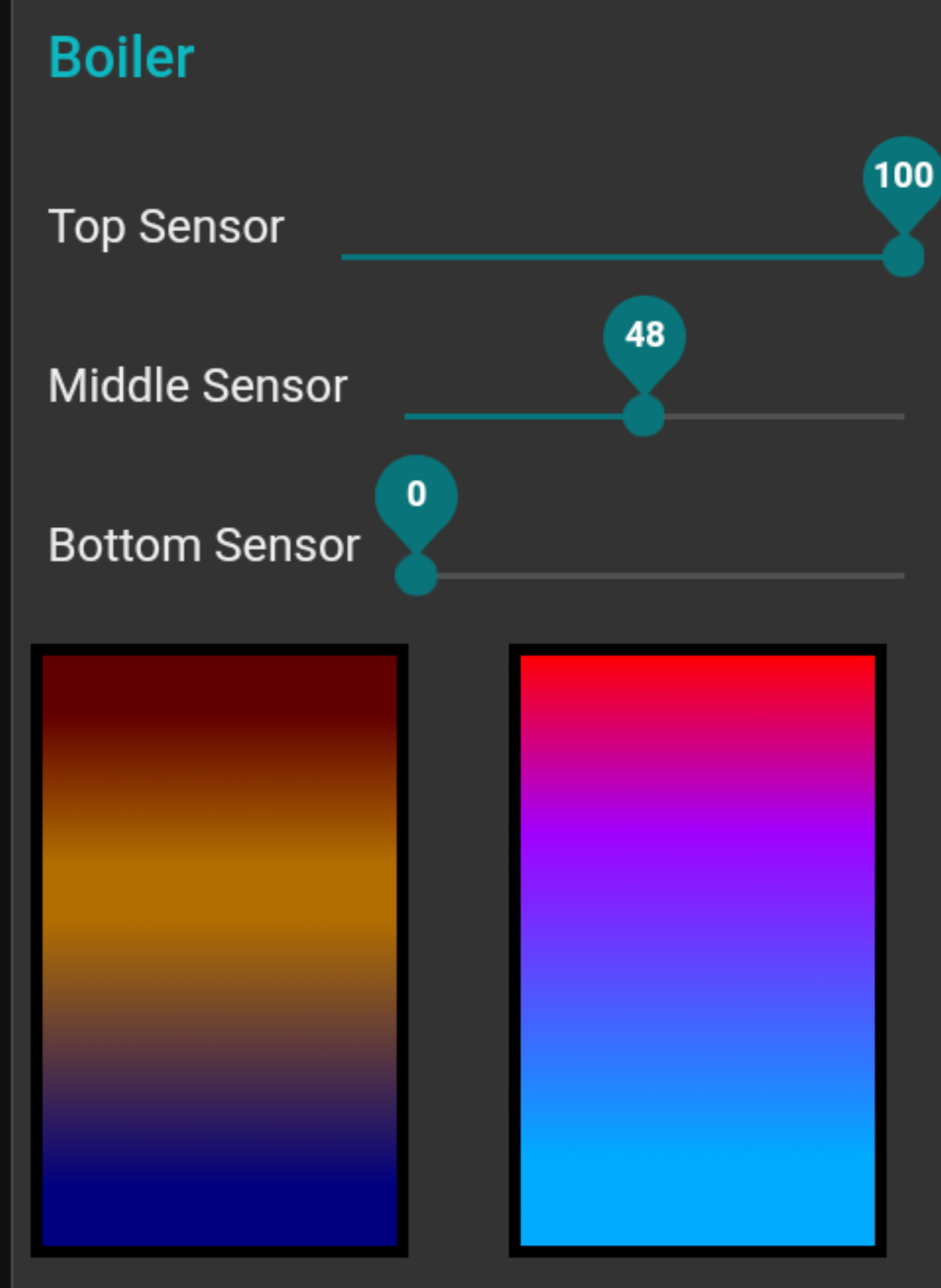
Here is the single function node no range node hack.
[edit] post correct flow
```auto
[{"id":"3831f2b421e734d8","type":"ui_slider","z":"c31640d81bf733c7","name":"","label":"Top Sensor","tooltip":"","group":"2a81558c7ec1f470","order":2,"width":0,"height":0,"passthru":false,"outs":"end","topic":"top","topicType":"str","min":0,"max":"100","step":1,"className":"","x":90,"y":140,"wires":[["6bd06de5d815dfa8","30a0aba554bc7f6d"]]},{"id":"30a0aba554bc7f6d","type":"function","z":"c31640d81bf733c7","name":"function 52","func":"if(isNaN(msg.payload)){\n node.error(\"bad sensor reading\");\n msg.topic =\"\";\n}\nif([\"top\",\"middle\",\"bottom\"].includes(msg.topic)){\n let lookup = {\n bottom: 200,\n middle: 230,\n top: 259\n }\n let hsl_offset = lookup[msg.topic];\n flow.set(\"heat_store2.\" + msg.topic, {colour: msg.payload + hsl_offset, value: msg.payload})\n msg.warning = \"\";\n msg.top = flow.get(\"heat_store2.top\") ?? {colour: 240, value: 5};\n msg.middle = flow.get(\"heat_store2.middle\") ?? {colour: 240, value: 5}\n msg.bottom = flow.get(\"heat_store2.bottom\") ?? {colour: 240, value: 5}\n msg.average = (msg.top.value + msg.middle.value + msg.bottom.value)/3\n if(msg.average > 95){\n msg.warning = \"heat store over temperature\";\n }else if(msg.average < 5){\n msg.warning = \"heat store in danger of freezing\";\n }\n return msg;\n}","outputs":1,"noerr":0,"initialize":"","finalize":"","libs":[],"x":330,"y":180,"wires":[["a7913e49fe94e06e"]]},{"id":"6529859cd44d0fce","type":"ui_slider","z":"c31640d81bf733c7","name":"","label":"Middle Sensor","tooltip":"","group":"2a81558c7ec1f470","order":3,"width":0,"height":0,"passthru":false,"outs":"end","topic":"middle","topicType":"str","min":0,"max":"100","step":1,"className":"","x":100,"y":180,"wires":[["6bd06de5d815dfa8","30a0aba554bc7f6d"]]},{"id":"1c097ca07f7c0d6f","type":"ui_slider","z":"c31640d81bf733c7","name":"","label":"Bottom Sensor","tooltip":"","group":"2a81558c7ec1f470","order":4,"width":0,"height":0,"passthru":false,"outs":"end","topic":"bottom","topicType":"str","min":0,"max":"100","step":1,"className":"","x":100,"y":220,"wires":[["6bd06de5d815dfa8","30a0aba554bc7f6d"]]},{"id":"a7913e49fe94e06e","type":"ui_template","z":"c31640d81bf733c7","group":"2a81558c7ec1f470","name":"","order":7,"width":3,"height":"6","format":"\n{{msg.warning}}\n
","storeOutMessages":false,"fwdInMessages":true,"resendOnRefresh":true,"templateScope":"local","className":"","x":500,"y":180,"wires":[["9fed361fb72a1a61"]]},{"id":"9fed361fb72a1a61","type":"debug","z":"c31640d81bf733c7","name":"debug 341","active":true,"tosidebar":true,"console":false,"tostatus":false,"complete":"true","targetType":"full","statusVal":"","statusType":"auto","x":430,"y":120,"wires":[]},{"id":"2a81558c7ec1f470","type":"ui_group","name":"Boiler","tab":"1e5db0123cb5abe5","order":1,"disp":true,"width":"6","collapse":false,"className":""},{"id":"1e5db0123cb5abe5","type":"ui_tab","name":"Boiler","icon":"dashboard","disabled":false,"hidden":false}]
```
@hotNipi not sure if it is any better on my chrome browser

---
### Author:  [@hotNipi](https://discourse.nodered.org/u/hotNipi)
#### Post date: [25 September 2023 14:26 UTC](https://discourse.nodered.org/t/heating-buffer-dynamize/81545/18 "2023-09-25T14:26:03Z")
Well, better is of course subjective. Actually most about the colors is deeply subjecive. I just pointed out that option cos it may come useful for such implementations.
---
### Author:  [@ninaaa](https://discourse.nodered.org/u/ninaaa)
#### Post date: [25 September 2023 21:44 UTC](https://discourse.nodered.org/t/heating-buffer-dynamize/81545/19 "2023-09-25T21:44:25Z")
I'm too stupid, I can't do it.
function 52 just doesn't output!!
---
### Author:  [@jbudd](https://discourse.nodered.org/u/jbudd)
#### Post date: [25 September 2023 22:56 UTC](https://discourse.nodered.org/t/heating-buffer-dynamize/81545/20 "2023-09-25T22:56:17Z")
I'm inclined to think there is some other reason than that @ninaaa!
Just so we can check the code you are working with, can you export your flow and post it here?
To export: CTRL C (or hamburger menu and "Export"), make sure that the "current flow" tab is selected then click "Copy to clipboard".
In the forum, click the `` button and CTRL V to paste your flow over the top of "type or paste code here"
[Next page](https://discourse.nodered.org/t/heating-buffer-dynamize/81545.md?page=2)