# Help with pressing a button on a web form (http GET)

**URL:** https://discourse.nodered.org/t/help-with-pressing-a-button-on-a-web-form-http-get/85130
**Category:** General
**Created:** [1 February 2024 18:05 UTC](https://discourse.nodered.org/t/help-with-pressing-a-button-on-a-web-form-http-get/85130 "2024-02-01T18:05:30Z")
**Posts on this page:** 6
**Page:** 1

<div class="post-metadata">

### Author: ![xyl](https://avatars.discourse-cdn.com/v4/letter/x/f475e1/32.png) [@xyl](https://discourse.nodered.org/u/xyl)
#### Post date: [1 February 2024 18:05 UTC](https://discourse.nodered.org/t/help-with-pressing-a-button-on-a-web-form-http-get/85130/1 "2024-02-01T18:05:30Z")

</div>

Hello, and thank you for looking!

### Big Picture

I have an ESP8266 connected to my heat pump so I can control it over MQTT. Occasionally, it disconnects from the MQTT server, and the fix is to reboot the device.

It serves a webpage with a REBOOT button.

When it stops responding on MQTT, I'd like Node-RED to press that button!

### What I'm having trouble with

I've looked at the webpage source in Firefox, and here's the relevant section for the Reboot button (full source in the Background Info section below):

```auto
<form><button type='submit' name='REBOOT' class='button bred'>Reboot</button></form>

```

I've also watched what happens in Firefox Network Inspector, and I've seen two things I think are important:

| Status | Method | File |
| --- | --- | --- |
| 200 | GET | /?REBOOT= |

And also:

```auto
          "queryString": [
            {
              "name": "REBOOT",
              "value": ""
            }

```

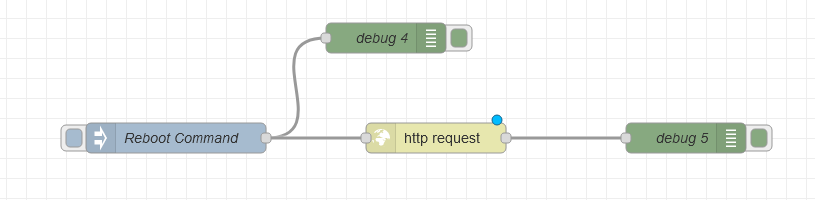
I've tried to pass many things in string form to my http-request GET node:
 ![flow](https://us1.discourse-cdn.com/flex026/uploads/nodered/original/3X/8/1/81fa5546669fc522cf3283996666a587bbc1259f.png)  
That Debug 5 node always responds with a webpage, but I haven't successfully triggered a reboot yet.

**Bottom line, I don't know what to pass the http-request GET node to get it to send the appropriate info to the webpage to trigger a reboot.**

Any help would be greatly appreciated - happy to provide more troubleshooting info, too. Thank you again!

### Background Info

- I'm running Node-RED 17.0.3 as an Add-On in Home Assistant;

- [This is the link](https://github.com/dzungpv/mitsubishi2MQTT) to the Github project that's running on the ESP8266;

- Here is the entire contents of the View Source for the device webpage:

```auto
<!DOCTYPE html><html lang='en' class=''><head><meta charset='utf-8'><meta name='viewport' content='width=device-width,initial-scale=1,user-scalable=no' /><title>Mitsubishi2MQTT - hvac-frontbedroom</title><style>*{font-family: verdana,sans-serif;}body {text-align: center;}div,fieldset,input,select {padding: 5px;font-size: 1em;}.main {text-align:left;display: inline-block;min-width:340px;}fieldset {background-color: #f2f2f2;}p {margin: 0.5em 0;}.ctrlrow {padding: 0px !important;margin: 0.5em 0 !important;}input {width: 100%;box-sizing: border-box;-webkit-box-sizing: border-box;-moz-box-sizing: border-box;}input[type=checkbox],input[type=radio] {width: 1em;margin-right: 6px;vertical-align: -1px;}select {width: 100%;background: #dddddd;color: #000000;block-size: 40px;}textarea {resize: true;width: 100%;height: 50px;padding: 5px;box-sizing: border-box;border: 2px solid #ccc;border-radius: 4px;background-color: #f8f8f8;overflow: auto;}td {padding: 0px;}button {border: 0;border-radius: 0.3rem;background-color: #1fa3ec;color: #fff;line-height: 2.4rem;font-size: 1.2rem;width: 100%;-webkit-transition-duration: 0.4s;transition-duration: 0.4s;cursor: pointer;}button:hover {background-color: #0e70a4;}.bred {background-color: #d43535;}.bred:hover {background-color: #931f1f;}.bgrn {background-color: #47c266;}.bgrn:hover {background-color: #5aaf6f;}a {text-decoration: none;}.p {float: left;text-align: left;}.q {float: right;text-align: right;}pan {display: inline-block;}/* ON/OFF switch *//* The switch - the box around the slider */.switch {position: relative;display: inline-block;width: 60px;height: 34px;}/* Hide default HTML checkbox */.switch input {opacity: 0;width: 0;height: 0;}/* The slider */.slider {position: absolute;cursor: pointer;top: 0;left: 0;right: 0;bottom: 0;background-color: #ccc;-webkit-transition: 0.4s;transition: 0.4s;}.slider:before {position: absolute;content: '';height: 26px;width: 26px;left: 4px;bottom: 4px;background-color: white;-webkit-transition: 0.4s;transition: 0.4s;}input:checked + .slider {background-color: #0c0;}input:focus + .slider {box-shadow: 0 0 1px #2196f3;}input:checked + .slider:before {-webkit-transform: translateX(26px);-ms-transform: translateX(26px);transform: translateX(26px);}/* Rounded sliders */.slider.round {border-radius: 34px;}.slider.round:before {border-radius: 50%;}</style></head><body><div class='main'><div style='text-align:center;'><noscript>To user Mitsubishi2MQTT, you need to activate Javascript<br/></noscript><h3>hvac-frontbedroom</h3></div><script>var showLogout = 0;var showControl = 1;document.onreadystatechange = function() {if (document.readyState === 'complete') {if (showLogout == 0) {var element = document.getElementById('logout');element.parentNode.removeChild(element);}if (showControl == 0) {var element = document.getElementById('control');element.parentNode.removeChild(element);}}}</script><div style='text-align:center;'><h2>Home page</h2></div><div id='control'><form action='/control' method='get'><button>Control</button></form></div><div><form action='/setup' method='get'><button>Setup</button></form></div><div><form action='/status' method='get'><button>Status</button></form></div><div><form action='/upgrade' method='get'><button>Firmware Upgrade</button></form></div><div><form><button type='submit' name='REBOOT' class='button bred'>Reboot</button></form></div><div id='logout'><form action='/login?LOGOUT=YES' method='post'><button type='submit' name='Logout' class='button bred'>Logout</button></form></div><br/><div style='text-align:right;font-size:10px;color: grey;'><hr/>Mitsubishi2MQTT 2023.12.4</div></div></div></body></html>

```

- Here is my attempt:

```auto
[{"id":"c7ebb3a771a08f7c","type":"tab","label":"Flow 2","disabled":false,"info":"","env":[]},{"id":"1d8d26d8d759c6bf","type":"http request","z":"c7ebb3a771a08f7c","name":"","method":"POST","ret":"txt","paytoqs":"ignore","url":"10.69.14.10","tls":"","persist":false,"proxy":"","insecureHTTPParser":false,"authType":"","senderr":false,"headers":[],"x":690,"y":320,"wires":[["f0b73838af05587b"]]},{"id":"5e169f80e6401569","type":"inject","z":"c7ebb3a771a08f7c","name":"Reboot Command","props":[{"p":"payload"},{"p":"topic","vt":"str"}],"repeat":"","crontab":"","once":false,"onceDelay":0.1,"topic":"","payload":"button type='submit' name='REBOOT'","payloadType":"str","x":430,"y":320,"wires":[["1881558f631426ba","1d8d26d8d759c6bf"]]},{"id":"1881558f631426ba","type":"debug","z":"c7ebb3a771a08f7c","name":"debug 4","active":true,"tosidebar":true,"console":false,"tostatus":false,"complete":"false","statusVal":"","statusType":"auto","x":640,"y":220,"wires":[]},{"id":"f0b73838af05587b","type":"debug","z":"c7ebb3a771a08f7c","name":"debug 5","active":true,"tosidebar":true,"console":false,"tostatus":false,"complete":"false","statusVal":"","statusType":"auto","x":940,"y":320,"wires":[]}]

```

- Here's the complete output of the Firefox Network Inspector .har file:

```auto
{
  "log": {
    "version": "1.2",
    "creator": {
      "name": "Firefox",
      "version": "122.0"
    },
    "browser": {
      "name": "Firefox",
      "version": "122.0"
    },
    "pages": [
      {
        "id": "page_2",
        "pageTimings": {
          "onContentLoad": 101,
          "onLoad": 104
        },
        "startedDateTime": "2024-02-01T09:40:56.928-08:00",
        "title": "http://10.69.14.10/?REBOOT="
      }
    ],
    "entries": [
      {
        "startedDateTime": "2024-02-01T09:40:56.928-08:00",
        "request": {
          "bodySize": 0,
          "method": "GET",
          "url": "http://10.69.14.10/?REBOOT=",
          "httpVersion": "HTTP/1.1",
          "headers": [
            {
              "name": "Host",
              "value": "10.69.14.10"
            },
            {
              "name": "User-Agent",
              "value": "Mozilla/5.0 (Windows NT 10.0; Win64; x64; rv:122.0) Gecko/20100101 Firefox/122.0"
            },
            {
              "name": "Accept",
              "value": "text/html,application/xhtml+xml,application/xml;q=0.9,image/avif,image/webp,*/*;q=0.8"
            },
            {
              "name": "Accept-Language",
              "value": "en-US,en;q=0.5"
            },
            {
              "name": "Accept-Encoding",
              "value": "gzip, deflate"
            },
            {
              "name": "DNT",
              "value": "1"
            },
            {
              "name": "Connection",
              "value": "keep-alive"
            },
            {
              "name": "Referer",
              "value": "http://10.69.14.10/?"
            },
            {
              "name": "Upgrade-Insecure-Requests",
              "value": "1"
            }
          ],
          "cookies": [],
          "queryString": [
            {
              "name": "REBOOT",
              "value": ""
            }
          ],
          "headersSize": 392
        },
        "response": {
          "status": 200,
          "statusText": "OK",
          "httpVersion": "HTTP/1.1",
          "headers": [
            {
              "name": "Content-Length",
              "value": "3022"
            },
            {
              "name": "Content-Type",
              "value": "text/html"
            },
            {
              "name": "Connection",
              "value": "close"
            },
            {
              "name": "Accept-Ranges",
              "value": "none"
            }
          ],
          "cookies": [],
          "content": {
            "mimeType": "text/html",
            "size": 3022,
            "text": "<!DOCTYPE html><html lang='en' class=''><head><meta charset='utf-8'><meta name='viewport' content='width=device-width,initial-scale=1,user-scalable=no' /><title>Mitsubishi2MQTT - hvac-frontbedroom</title><style>*{font-family: verdana,sans-serif;}body {text-align: center;}div,fieldset,input,select {padding: 5px;font-size: 1em;}.main {text-align:left;display: inline-block;min-width:340px;}fieldset {background-color: #f2f2f2;}p {margin: 0.5em 0;}.ctrlrow {padding: 0px !important;margin: 0.5em 0 !important;}input {width: 100%;box-sizing: border-box;-webkit-box-sizing: border-box;-moz-box-sizing: border-box;}input[type=checkbox],input[type=radio] {width: 1em;margin-right: 6px;vertical-align: -1px;}select {width: 100%;background: #dddddd;color: #000000;block-size: 40px;}textarea {resize: true;width: 100%;height: 50px;padding: 5px;box-sizing: border-box;border: 2px solid #ccc;border-radius: 4px;background-color: #f8f8f8;overflow: auto;}td {padding: 0px;}button {border: 0;border-radius: 0.3rem;background-color: #1fa3ec;color: #fff;line-height: 2.4rem;font-size: 1.2rem;width: 100%;-webkit-transition-duration: 0.4s;transition-duration: 0.4s;cursor: pointer;}button:hover {background-color: #0e70a4;}.bred {background-color: #d43535;}.bred:hover {background-color: #931f1f;}.bgrn {background-color: #47c266;}.bgrn:hover {background-color: #5aaf6f;}a {text-decoration: none;}.p {float: left;text-align: left;}.q {float: right;text-align: right;}pan {display: inline-block;}/* ON/OFF switch *//* The switch - the box around the slider */.switch {position: relative;display: inline-block;width: 60px;height: 34px;}/* Hide default HTML checkbox */.switch input {opacity: 0;width: 0;height: 0;}/* The slider */.slider {position: absolute;cursor: pointer;top: 0;left: 0;right: 0;bottom: 0;background-color: #ccc;-webkit-transition: 0.4s;transition: 0.4s;}.slider:before {position: absolute;content: '';height: 26px;width: 26px;left: 4px;bottom: 4px;background-color: white;-webkit-transition: 0.4s;transition: 0.4s;}input:checked + .slider {background-color: #0c0;}input:focus + .slider {box-shadow: 0 0 1px #2196f3;}input:checked + .slider:before {-webkit-transform: translateX(26px);-ms-transform: translateX(26px);transform: translateX(26px);}/* Rounded sliders */.slider.round {border-radius: 34px;}.slider.round:before {border-radius: 50%;}</style></head><body><div class='main'><div style='text-align:center;'><noscript>To user Mitsubishi2MQTT, you need to activate Javascript<br/></noscript><h3>hvac-frontbedroom</h3></div><p>Rebooting... Refresh in <span id='count'>20s</span>...</p><script>setTimeout(function() {window.location.href = '/';}, 20000);</script><script>var count = 30;(function countDown() {document.getElementById('count').innerHTML = count + 's';setTimeout(function() {if(count > 0) {count --;return countDown();} else {window.location.href = '/';}}, 1000);})();</script><br/><div style='text-align:right;font-size:10px;color: grey;'><hr/>Mitsubishi2MQTT 2023.12.4</div></div></div></body></html>"
          },
          "redirectURL": "",
          "headersSize": 106,
          "bodySize": 3128
        },
        "cache": {},
        "timings": {
          "blocked": 0,
          "dns": 0,
          "connect": 54,
          "ssl": 0,
          "send": 0,
          "wait": 21,
          "receive": 20
        },
        "time": 95,
        "_securityState": "insecure",
        "serverIPAddress": "10.69.14.10",
        "connection": "80",
        "pageref": "page_2"
      },
      {
        "startedDateTime": "2024-02-01T09:40:57.040-08:00",
        "request": {
          "bodySize": 0,
          "method": "GET",
          "url": "http://10.69.14.10/favicon.ico",
          "httpVersion": "HTTP/1.1",
          "headers": [
            {
              "name": "Host",
              "value": "10.69.14.10"
            },
            {
              "name": "User-Agent",
              "value": "Mozilla/5.0 (Windows NT 10.0; Win64; x64; rv:122.0) Gecko/20100101 Firefox/122.0"
            },
            {
              "name": "Accept",
              "value": "image/avif,image/webp,*/*"
            },
            {
              "name": "Accept-Language",
              "value": "en-US,en;q=0.5"
            },
            {
              "name": "Accept-Encoding",
              "value": "gzip, deflate"
            },
            {
              "name": "DNT",
              "value": "1"
            },
            {
              "name": "Connection",
              "value": "keep-alive"
            },
            {
              "name": "Referer",
              "value": "http://10.69.14.10/?REBOOT="
            }
          ],
          "cookies": [],
          "queryString": [],
          "headersSize": 0
        },
        "response": {
          "status": 200,
          "statusText": "OK",
          "httpVersion": "HTTP/1.1",
          "headers": [
            {
              "name": "Content-Length",
              "value": "3688"
            },
            {
              "name": "Content-Type",
              "value": "text/html"
            },
            {
              "name": "Connection",
              "value": "close"
            },
            {
              "name": "Accept-Ranges",
              "value": "none"
            }
          ],
          "cookies": [],
          "content": {
            "mimeType": "text/html",
            "size": 3688,
            "text": "<!DOCTYPE html><html lang='en' class=''><head><meta charset='utf-8'><meta name='viewport' content='width=device-width,initial-scale=1,user-scalable=no' /><title>Mitsubishi2MQTT - hvac-frontbedroom</title><style>*{font-family: verdana,sans-serif;}body {text-align: center;}div,fieldset,input,select {padding: 5px;font-size: 1em;}.main {text-align:left;display: inline-block;min-width:340px;}fieldset {background-color: #f2f2f2;}p {margin: 0.5em 0;}.ctrlrow {padding: 0px !important;margin: 0.5em 0 !important;}input {width: 100%;box-sizing: border-box;-webkit-box-sizing: border-box;-moz-box-sizing: border-box;}input[type=checkbox],input[type=radio] {width: 1em;margin-right: 6px;vertical-align: -1px;}select {width: 100%;background: #dddddd;color: #000000;block-size: 40px;}textarea {resize: true;width: 100%;height: 50px;padding: 5px;box-sizing: border-box;border: 2px solid #ccc;border-radius: 4px;background-color: #f8f8f8;overflow: auto;}td {padding: 0px;}button {border: 0;border-radius: 0.3rem;background-color: #1fa3ec;color: #fff;line-height: 2.4rem;font-size: 1.2rem;width: 100%;-webkit-transition-duration: 0.4s;transition-duration: 0.4s;cursor: pointer;}button:hover {background-color: #0e70a4;}.bred {background-color: #d43535;}.bred:hover {background-color: #931f1f;}.bgrn {background-color: #47c266;}.bgrn:hover {background-color: #5aaf6f;}a {text-decoration: none;}.p {float: left;text-align: left;}.q {float: right;text-align: right;}pan {display: inline-block;}/* ON/OFF switch *//* The switch - the box around the slider */.switch {position: relative;display: inline-block;width: 60px;height: 34px;}/* Hide default HTML checkbox */.switch input {opacity: 0;width: 0;height: 0;}/* The slider */.slider {position: absolute;cursor: pointer;top: 0;left: 0;right: 0;bottom: 0;background-color: #ccc;-webkit-transition: 0.4s;transition: 0.4s;}.slider:before {position: absolute;content: '';height: 26px;width: 26px;left: 4px;bottom: 4px;background-color: white;-webkit-transition: 0.4s;transition: 0.4s;}input:checked + .slider {background-color: #0c0;}input:focus + .slider {box-shadow: 0 0 1px #2196f3;}input:checked + .slider:before {-webkit-transform: translateX(26px);-ms-transform: translateX(26px);transform: translateX(26px);}/* Rounded sliders */.slider.round {border-radius: 34px;}.slider.round:before {border-radius: 50%;}</style></head><body><div class='main'><div style='text-align:center;'><noscript>To user Mitsubishi2MQTT, you need to activate Javascript<br/></noscript><h3>hvac-frontbedroom</h3></div><script>var showLogout = 0;var showControl = 1;document.onreadystatechange = function() {if (document.readyState === 'complete') {if (showLogout == 0) {var element = document.getElementById('logout');element.parentNode.removeChild(element);}if (showControl == 0) {var element = document.getElementById('control');element.parentNode.removeChild(element);}}}</script><div style='text-align:center;'><h2>_TXT_HOME_PAGE_</h2></div><div id='control'><form action='/control' method='get'><button>_TXT_CONTROL_</button></form></div><div><form action='/setup' method='get'><button>_TXT_SETUP_</button></form></div><div><form action='/status' method='get'><button>_TXT_STATUS_</button></form></div><div><form action='/upgrade' method='get'><button>_TXT_FW_UPGRADE_</button></form></div><div><form><button type='submit' name='REBOOT' class='button bred'>_TXT_REBOOT_</button></form></div><div id='logout'><form action='/login?LOGOUT=YES' method='post'><button type='submit' name='Logout' class='button bred'>_TXT_LOGOUT_</button></form></div><br/><div style='text-align:right;font-size:10px;color: grey;'><hr/>Mitsubishi2MQTT 2023.12.4</div></div></div></body></html>"
          },
          "redirectURL": "",
          "headersSize": 0,
          "bodySize": 3688
        },
        "cache": {},
        "timings": {
          "blocked": 0,
          "dns": 0,
          "ssl": 0,
          "connect": 0,
          "send": 0,
          "wait": 0,
          "receive": 0
        },
        "time": 0,
        "_securityState": "insecure",
        "pageref": "page_2"
      }
    ]
  }
}

```

---

<div class="post-metadata">

### Author: ![Steve-Mcl](https://sea2.discourse-cdn.com/flex026/user_avatar/discourse.nodered.org/steve-mcl/32/4826_2.png) [@Steve-Mcl](https://discourse.nodered.org/u/Steve-Mcl)
#### Post date: [1 February 2024 20:37 UTC](https://discourse.nodered.org/t/help-with-pressing-a-button-on-a-web-form-http-get/85130/2 "2024-02-01T20:37:15Z")

</div>

I've not loaded your flow but it looks like you have the request node `method` set to `POST` and the `URL` set to `10.69.14.10`

But according to the info provided you should use the `GET` method and the URL should be `http://10.69.14.10/?REBOOT=`

> [@xyl](#):
>
> ```auto
> method": "GET",
> "url": "http://10.69.14.10/?REBOOT="
> 
> ```

🤷‍♂️

---

<div class="post-metadata">

### Author: ![xyl](https://avatars.discourse-cdn.com/v4/letter/x/f475e1/32.png) [@xyl](https://discourse.nodered.org/u/xyl)
#### Post date: [1 February 2024 20:49 UTC](https://discourse.nodered.org/t/help-with-pressing-a-button-on-a-web-form-http-get/85130/3 "2024-02-01T20:49:12Z")

</div>

Holy cow, thank you--changing the URL was super critical. Here's the flow that successfully reboots the thing:

```auto
[{"id":"c7ebb3a771a08f7c","type":"tab","label":"Flow 2","disabled":false,"info":"","env":[]},{"id":"1d8d26d8d759c6bf","type":"http request","z":"c7ebb3a771a08f7c","name":"","method":"GET","ret":"txt","paytoqs":"ignore","url":"http://10.69.14.10/?REBOOT=","tls":"","persist":false,"proxy":"","insecureHTTPParser":false,"authType":"","senderr":false,"headers":[],"x":690,"y":320,"wires":[["f0b73838af05587b"]]},{"id":"5e169f80e6401569","type":"inject","z":"c7ebb3a771a08f7c","name":"Reboot Command","props":[{"p":"payload"},{"p":"topic","vt":"str"}],"repeat":"","crontab":"","once":false,"onceDelay":0.1,"topic":"","payload":"\"name\": \"REBOOT\",\"value\": \"\"","payloadType":"str","x":430,"y":320,"wires":[["1881558f631426ba","1d8d26d8d759c6bf"]]},{"id":"1881558f631426ba","type":"debug","z":"c7ebb3a771a08f7c","name":"debug 4","active":true,"tosidebar":true,"console":false,"tostatus":false,"complete":"false","statusVal":"","statusType":"auto","x":640,"y":220,"wires":[]},{"id":"f0b73838af05587b","type":"debug","z":"c7ebb3a771a08f7c","name":"debug 5","active":true,"tosidebar":true,"console":false,"tostatus":false,"complete":"false","statusVal":"","statusType":"auto","x":940,"y":320,"wires":[]}]

```

I have no idea if I'm passing the correct message payload, but it's working anyway. Here's what I'm sending:  
`"name": "REBOOT","value":""`

Sidenote, is there a way to see more characters in the debug window? It seems to cut off at 3022 characters.

Thanks again for your time!

---

<div class="post-metadata">

### Author: ![Steve-Mcl](https://sea2.discourse-cdn.com/flex026/user_avatar/discourse.nodered.org/steve-mcl/32/4826_2.png) [@Steve-Mcl](https://discourse.nodered.org/u/Steve-Mcl)
#### Post date: [1 February 2024 21:08 UTC](https://discourse.nodered.org/t/help-with-pressing-a-button-on-a-web-form-http-get/85130/4 "2024-02-01T21:08:48Z")

</div>

> [@xyl](#):
>
> Sidenote, is there a way to see more characters in the debug window? It seems to cut off at 3022 characters

Yes, but it is not advised.

I'm sure you realise that all of the data IS there in the message (nothing is lost) but it IS deliberately trimmed for debug for performance reasons. It is usually advised to send to terminal (checkbox in debug node) or send it to file (file node). However if you must, look in settings.js - you'll see the setting to change.

---

<div class="post-metadata">

### Author: ![xyl](https://avatars.discourse-cdn.com/v4/letter/x/f475e1/32.png) [@xyl](https://discourse.nodered.org/u/xyl)
#### Post date: [7 February 2024 16:19 UTC](https://discourse.nodered.org/t/help-with-pressing-a-button-on-a-web-form-http-get/85130/5 "2024-02-07T16:19:12Z")

</div>

That makes sense - thank you for your help. The temperature in the living room hasn't had any excursions since your fix!

---

<div class="post-metadata">

### Author: ![system](https://us1.discourse-cdn.com/flex026/uploads/nodered/original/1X/d073cd938eafa2e558d7c2cd59003b3ef4963033.png) [@system](https://discourse.nodered.org/u/system)
#### Post date: [21 February 2024 16:19 UTC](https://discourse.nodered.org/t/help-with-pressing-a-button-on-a-web-form-http-get/85130/6 "2024-02-21T16:19:27Z")

</div>

This topic was automatically closed 14 days after the last reply. New replies are no longer allowed.
