# House dashboard, tab display problem
**URL:** https://discourse.nodered.org/t/house-dashboard-tab-display-problem/57253
**Category:** Dashboard
**Tags:** node-red-dashboard
**Created:** [26 January 2022 11:18 UTC](https://discourse.nodered.org/t/house-dashboard-tab-display-problem/57253 "2022-01-26T11:18:57Z")
**Posts on this page:** 15
**Page:** 1
### Author:  [@Clouard-Dista](https://discourse.nodered.org/u/Clouard-Dista)
#### Post date: [26 January 2022 11:18 UTC](https://discourse.nodered.org/t/house-dashboard-tab-display-problem/57253/1 "2022-01-26T11:18:57Z")
Hi for my house I made a dashboard to manage my different api and connected device, but when I am on one of the tabs has set up my devices and my wife logs in to modify another device, the ui\_control sends the change of tab on our two sessions, do you have a solution for this change to be targeted on a single session, can you help me?
---
### Author:  [@dynamicdave](https://discourse.nodered.org/u/dynamicdave)
#### Post date: [26 January 2022 11:39 UTC](https://discourse.nodered.org/t/house-dashboard-tab-display-problem/57253/2 "2022-01-26T11:39:25Z")
I think you'll find it is because there is only one dashboard. You can multiple tabs but they all affect the same single dashboard. I had a similar effect with my IoT students when a pair of students were working in two tabs on the same instance of Node-RED. Took a while before we realised what was going on.
---
### Author:  [@Clouard-Dista](https://discourse.nodered.org/u/Clouard-Dista)
#### Post date: [26 January 2022 12:07 UTC](https://discourse.nodered.org/t/house-dashboard-tab-display-problem/57253/3 "2022-01-26T12:07:00Z")
Quelle solution avais vous trouvé?
---
### Author:  [@dynamicdave](https://discourse.nodered.org/u/dynamicdave)
#### Post date: [26 January 2022 12:22 UTC](https://discourse.nodered.org/t/house-dashboard-tab-display-problem/57253/4 "2022-01-26T12:22:42Z")
Probably not the solution you are looking for...
I took the quick and easy solution and assigned each student to their own Raspberry Pi - Zero.
> [@Raspberry Pi-Zero-W Mini-Tower](https://discourse.nodered.org/t/raspberry-pi-zero-w-mini-tower/20217):
>
> Just finished building a couple of mini-towers for my IoT Club. The idea is the towers can be kept in a cupboard at school and just brought out when I run the IoT Club. All I would need to do is plug the 6-port PSU into the mains and switch-on the Club's WiFi router. Should save a lot of time as previously I had to cobble together a number of Raspberry Pi(es),of various vintages, and then at the end of the session take the whole lot apart!!! [wifi\_1\_small] [wifi\_3\_small] [wifi\_2\_small] Tues…
---
### Author:  [@Christian-Me](https://discourse.nodered.org/u/Christian-Me)
#### Post date: [26 January 2022 15:29 UTC](https://discourse.nodered.org/t/house-dashboard-tab-display-problem/57253/5 "2022-01-26T15:29:08Z")
Hi,
ui-control triggers tab changes to all connected clients only if no `socketid` is specified
if you specify the `socketid` of a single client only these client will be affected.

this inject node will only change the tab on the client specified by it's socketid
you can get the socketid by the ui-control node listening for connect events (or via responses of input widgets)

To differentiate yourself form your wife you have the chance via fixed ip addresses as the socketid changes on all connects randomly

---
### Author:  [@Clouard-Dista](https://discourse.nodered.org/u/Clouard-Dista)
#### Post date: [26 January 2022 16:13 UTC](https://discourse.nodered.org/t/house-dashboard-tab-display-problem/57253/6 "2022-01-26T16:13:28Z")
thank you i will try
---
### Author:  [@Clouard-Dista](https://discourse.nodered.org/u/Clouard-Dista)
#### Post date: [27 January 2022 09:24 UTC](https://discourse.nodered.org/t/house-dashboard-tab-display-problem/57253/7 "2022-01-27T09:24:23Z")
Hi I sent him the socket id but nothing changed, I tested with the ip, and even the two together but nothing worked, I even tested it in the payload.
But with the notification message it works, are you sure that's the only thing to change?
---
### Author:  [@Christian-Me](https://discourse.nodered.org/u/Christian-Me)
#### Post date: [27 January 2022 13:00 UTC](https://discourse.nodered.org/t/house-dashboard-tab-display-problem/57253/8 "2022-01-27T13:00:41Z")
First: It only works by providing the socketid as under one ip-address there could be more than one session. The ip address might only be usefull to distinguish different users.
**TL;DR: Upgrade the dashboard to the latest version**
After testing I was a little bit lost as the socketid given by the ui-control node differs from the browsers socketid and seams to be wrong

Browser

They are not the same. The browsers `socketid` works fine but the `socketid` given by the ui-control node in version below 3.1.3 might give you wrong gesults (EDIT)
but the socket id coming from a ui widget (here a button) is fine
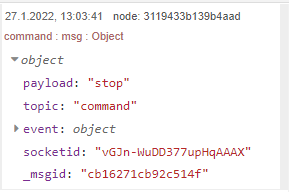
Investigating a little bit further there was an issue up to version 3.1.3 [Wrong socketid displayed by ui-control node · Issue #738 · node-red/node-red-dashboard · GitHub](https://github.com/node-red/node-red-dashboard/issues/738)
**So upgrade to the latest version and it should work as expected**
here my little test flow:
```auto
[{"id":"2d8ea7af5b1757b8","type":"ui_ui_control","z":"677e78e.a3a7288","name":"","events":"change","x":367,"y":612,"wires":[["5f2a9a1765eaa802"]]},{"id":"5f2a9a1765eaa802","type":"debug","z":"677e78e.a3a7288","name":"","active":true,"tosidebar":true,"console":false,"tostatus":false,"complete":"true","targetType":"full","statusVal":"","statusType":"auto","x":509,"y":612,"wires":[]},{"id":"fda0b01a484a037f","type":"inject","z":"677e78e.a3a7288","name":"","props":[{"p":"socketid","v":"vGJn-WuDD377upHqAAAX","vt":"str"},{"p":"payload"}],"repeat":"","crontab":"","once":false,"onceDelay":0.1,"topic":"","payload":"{\"tab\":0}","payloadType":"json","x":220,"y":612,"wires":[["2d8ea7af5b1757b8"]]}]
```
---
### Author:  [@Clouard-Dista](https://discourse.nodered.org/u/Clouard-Dista)
#### Post date: [27 January 2022 14:20 UTC](https://discourse.nodered.org/t/house-dashboard-tab-display-problem/57253/9 "2022-01-27T14:20:22Z")
I opened two windows in private browsing on two different browsers on my pc and still does not work but I am in 3.1.0 😕
I quickly switch to 3.1.5 to test
---
### Author:  [@Christian-Me](https://discourse.nodered.org/u/Christian-Me)
#### Post date: [27 January 2022 17:13 UTC](https://discourse.nodered.org/t/house-dashboard-tab-display-problem/57253/10 "2022-01-27T17:13:29Z")
### 3.1.3: Maintenance Release
**Fixes**
- Remove main entry from package.json. Issue #740
- Let date-picker send repeated existing values.
- Warn if Node.js version not 12+.
- Allow ui-dropdown to accept single string for one valid option.
- **Fix socketid back to be in sync with reality. Issue #738**
---
### Author:  [@smanjunath211](https://discourse.nodered.org/u/smanjunath211)
#### Post date: [29 January 2022 13:59 UTC](https://discourse.nodered.org/t/house-dashboard-tab-display-problem/57253/11 "2022-01-29T13:59:47Z")
> [@Christian-Me](#):
>
> Let date-picker send repeated existing values.
I am using Dashboard 3.1.5 and have found this issue.
> [@Date Picker Doesn't send payload if clicking on already selected](https://discourse.nodered.org/t/date-picker-doesnt-send-payload-if-clicking-on-already-selected/57455):
>
> Date picker doesn't send a payload if I click on the 'pre-selected' date. i am forced to click on other date and then the required date to get the payload. Is this expected ? if not how do i get the payload returned ? [datepick]
---
### Author:  [@Christian-Me](https://discourse.nodered.org/u/Christian-Me)
#### Post date: [29 January 2022 14:34 UTC](https://discourse.nodered.org/t/house-dashboard-tab-display-problem/57253/12 "2022-01-29T14:34:38Z")
Think you might have to raise an issue on github if you found a reproduceable bug.
---
### Author:  [@smanjunath211](https://discourse.nodered.org/u/smanjunath211)
#### Post date: [29 January 2022 15:31 UTC](https://discourse.nodered.org/t/house-dashboard-tab-display-problem/57253/13 "2022-01-29T15:31:04Z")
>
>
> \