# How to access zigbee2mqtt topic / sensor name?
**URL:** https://discourse.nodered.org/t/how-to-access-zigbee2mqtt-topic-sensor-name/33899
**Category:** General
**Created:** [7 October 2020 17:42 UTC](https://discourse.nodered.org/t/how-to-access-zigbee2mqtt-topic-sensor-name/33899 "2020-10-07T17:42:13Z")
**Posts on this page:** 3
**Page:** 1
### Author:  [@diagonali](https://discourse.nodered.org/u/diagonali)
#### Post date: [7 October 2020 17:42 UTC](https://discourse.nodered.org/t/how-to-access-zigbee2mqtt-topic-sensor-name/33899/1 "2020-10-07T17:42:13Z")
I'm trying to extract the zigbee2mqtt topic from a msg.payload sent from a zigbee2mqtt sensor in Home Assistant which otherwise works perfectly but I can't see an object attribute of "topic" in the debug output. I've seen tutorials which do show it there. I can however see that "zigbee2mqtt/vb\_test" is listed above the object attributes in the debug panel. How can I access this string or how can I enable to topic to be sent/set? Attached screenshot of what I mean. Thanks
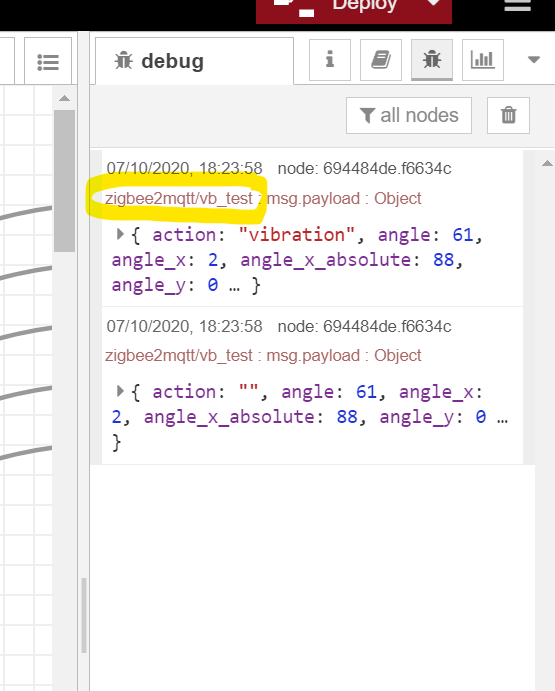
---
### Author:  [@diagonali](https://discourse.nodered.org/u/diagonali)
#### Post date: [7 October 2020 17:48 UTC](https://discourse.nodered.org/t/how-to-access-zigbee2mqtt-topic-sensor-name/33899/2 "2020-10-07T17:48:44Z")
I figured it out: I used msg.topic
---
### Author:  [@system](https://discourse.nodered.org/u/system)
#### Post date: [21 October 2020 17:48 UTC](https://discourse.nodered.org/t/how-to-access-zigbee2mqtt-topic-sensor-name/33899/3 "2020-10-21T17:48:45Z")
This topic was automatically closed 14 days after the last reply. New replies are no longer allowed.