# How to use Modbus Register values in Dashboard
**URL:** https://discourse.nodered.org/t/how-to-use-modbus-register-values-in-dashboard/65668
**Category:** Dashboard
**Tags:** node-red-dashboard, modbus
**Created:** [27 July 2022 05:34 UTC](https://discourse.nodered.org/t/how-to-use-modbus-register-values-in-dashboard/65668 "2022-07-27T05:34:52Z")
**Posts on this page:** 11
**Page:** 1
### Author:  [@SachinKumar-tech](https://discourse.nodered.org/u/SachinKumar-tech)
#### Post date: [27 July 2022 05:34 UTC](https://discourse.nodered.org/t/how-to-use-modbus-register-values-in-dashboard/65668/1 "2022-07-27T05:34:52Z")
I want to use some values of Modbus Holding Register to appear in Dashboard in form of Chart and Gauges, How can I do that Because I am Unable to find any clue.

---
### Author:  [@smanjunath211](https://discourse.nodered.org/u/smanjunath211)
#### Post date: [27 July 2022 08:14 UTC](https://discourse.nodered.org/t/how-to-use-modbus-register-values-in-dashboard/65668/2 "2022-07-27T08:14:40Z")
what have you tried and what is not working ?
have you tried putting a `ui_chart` node ?
---
### Author:  [@SachinKumar-tech](https://discourse.nodered.org/u/SachinKumar-tech)
#### Post date: [27 July 2022 08:30 UTC](https://discourse.nodered.org/t/how-to-use-modbus-register-values-in-dashboard/65668/3 "2022-07-27T08:30:21Z")
Actually I am not good at Javascript, I want to extract those register values and use them in Dashboard.
---
### Author:  [@smanjunath211](https://discourse.nodered.org/u/smanjunath211)
#### Post date: [27 July 2022 08:33 UTC](https://discourse.nodered.org/t/how-to-use-modbus-register-values-in-dashboard/65668/4 "2022-07-27T08:33:09Z")
that is the purpose of Node-Red, you dont need to know javascript.
if you know how to post your flow, please share,
---
### Author:  [@smanjunath211](https://discourse.nodered.org/u/smanjunath211)
#### Post date: [27 July 2022 08:35 UTC](https://discourse.nodered.org/t/how-to-use-modbus-register-values-in-dashboard/65668/5 "2022-07-27T08:35:39Z")
```auto
[{"id":"0b871d7230afe0d7","type":"modbus-read","z":"dcb4243a3541d58d","name":"","topic":"","showStatusActivities":false,"logIOActivities":false,"showErrors":false,"unitid":"","dataType":"HoldingRegister","adr":"0","quantity":"20","rate":"1","rateUnit":"s","delayOnStart":false,"startDelayTime":"","server":"c3fed0777000f903","useIOFile":false,"ioFile":"","useIOForPayload":false,"emptyMsgOnFail":false,"x":110,"y":700,"wires":[["1acedc4a2b25cb1b","2c3244e35ba10b0f","96755ba035229fde","445c1aedfbb2f7d4"],[]]},{"id":"1acedc4a2b25cb1b","type":"debug","z":"dcb4243a3541d58d","name":"debug 5","active":false,"tosidebar":true,"console":false,"tostatus":false,"complete":"false","statusVal":"","statusType":"auto","x":320,"y":600,"wires":[]},{"id":"2c3244e35ba10b0f","type":"change","z":"dcb4243a3541d58d","name":"","rules":[{"t":"set","p":"payload","pt":"msg","to":"payload[2]","tot":"msg"},{"t":"set","p":"topic","pt":"msg","to":"Machine #2","tot":"str"}],"action":"","property":"","from":"","to":"","reg":false,"x":320,"y":700,"wires":[["c43121771c180450"]]},{"id":"96755ba035229fde","type":"change","z":"dcb4243a3541d58d","name":"","rules":[{"t":"set","p":"payload","pt":"msg","to":"payload[10]","tot":"msg"},{"t":"set","p":"topic","pt":"msg","to":"Machine #10","tot":"str"}],"action":"","property":"","from":"","to":"","reg":false,"x":320,"y":740,"wires":[["c43121771c180450"]]},{"id":"445c1aedfbb2f7d4","type":"change","z":"dcb4243a3541d58d","name":"","rules":[{"t":"set","p":"payload","pt":"msg","to":"payload[13]","tot":"msg"},{"t":"set","p":"topic","pt":"msg","to":"Machine #13","tot":"str"}],"action":"","property":"","from":"","to":"","reg":false,"x":320,"y":780,"wires":[["c43121771c180450"]]},{"id":"c43121771c180450","type":"ui_chart","z":"dcb4243a3541d58d","name":"","group":"c518e519089eaaf9","order":2,"width":0,"height":0,"label":"Modbus-Values","chartType":"line","legend":"true","xformat":"HH:mm:ss","interpolate":"linear","nodata":"","dot":true,"ymin":"0","ymax":"100","removeOlder":1,"removeOlderPoints":"","removeOlderUnit":"3600","cutout":0,"useOneColor":false,"useUTC":false,"colors":["#1f77b4","#d81330","#ff7f0e","#2ca02c","#98df8a","#d62728","#ff9896","#9467bd","#c5b0d5"],"outputs":1,"useDifferentColor":false,"className":"","x":540,"y":700,"wires":[[]]},{"id":"31db2303054f81ba","type":"inject","z":"dcb4243a3541d58d","name":"","props":[{"p":"payload"},{"p":"topic","vt":"str"}],"repeat":"","crontab":"","once":false,"onceDelay":0.1,"topic":"","payload":"[]","payloadType":"json","x":300,"y":820,"wires":[["c43121771c180450"]]},{"id":"c3fed0777000f903","type":"modbus-client","name":"","clienttype":"tcp","bufferCommands":true,"stateLogEnabled":false,"queueLogEnabled":false,"tcpHost":"10.180.18.50","tcpPort":"502","tcpType":"DEFAULT","serialPort":"/dev/ttyUSB","serialType":"RTU-BUFFERD","serialBaudrate":"9600","serialDatabits":"8","serialStopbits":"1","serialParity":"none","serialConnectionDelay":"100","serialAsciiResponseStartDelimiter":"0x3A","unit_id":"1","commandDelay":"1","clientTimeout":"1000","reconnectOnTimeout":true,"reconnectTimeout":"2000","parallelUnitIdsAllowed":true},{"id":"c518e519089eaaf9","type":"ui_group","name":"Group 1","tab":"a332b39a9d8db50d","order":1,"disp":false,"width":"20","collapse":false,"className":""},{"id":"a332b39a9d8db50d","type":"ui_tab","name":"Tab 4","icon":"dashboard","order":4}]
```
---
### Author:  [@smanjunath211](https://discourse.nodered.org/u/smanjunath211)
#### Post date: [27 July 2022 12:12 UTC](https://discourse.nodered.org/t/how-to-use-modbus-register-values-in-dashboard/65668/7 "2022-07-27T12:12:33Z")
are you having trouble , exporting the flow ?
just press CTRL+E in the editor, select current flow, click copy to clipboard, and then in this reply box, press ctrl+e and then paste the contents
---
### Author:  [@SachinKumar-tech](https://discourse.nodered.org/u/SachinKumar-tech)
#### Post date: [2 August 2022 03:45 UTC](https://discourse.nodered.org/t/how-to-use-modbus-register-values-in-dashboard/65668/8 "2022-08-02T03:45:34Z")
Solved Now , Thanks for the reply
---
### Author:  [@smanjunath211](https://discourse.nodered.org/u/smanjunath211)
#### Post date: [2 August 2022 05:53 UTC](https://discourse.nodered.org/t/how-to-use-modbus-register-values-in-dashboard/65668/9 "2022-08-02T05:53:42Z")
please mark the topic as 'solved' if you have the solution to your query, it helps other forum members to look for solved issues.
---
### Author:  [@SachinKumar-tech](https://discourse.nodered.org/u/SachinKumar-tech)
#### Post date: [2 August 2022 06:14 UTC](https://discourse.nodered.org/t/how-to-use-modbus-register-values-in-dashboard/65668/10 "2022-08-02T06:14:46Z")
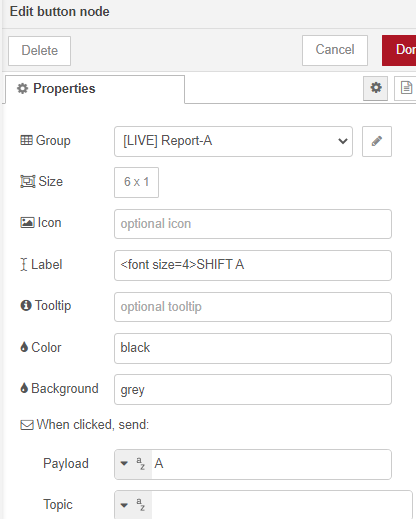
Can You Please tell me one more thing as, I want to increase font size in dashboard.
How can I do that?
---
### Author:  [@smanjunath211](https://discourse.nodered.org/u/smanjunath211)
#### Post date: [2 August 2022 08:18 UTC](https://discourse.nodered.org/t/how-to-use-modbus-register-values-in-dashboard/65668/11 "2022-08-02T08:18:13Z")
you should use `template node` for the dashboard, CSS is not my forte, however minimal adjustment we can try using `` in the 'ui\_text' or 'ui\_button' widgets.
please share your flow
---
### Author:  [@system](https://discourse.nodered.org/u/system)
#### Post date: [1 September 2022 08:18 UTC](https://discourse.nodered.org/t/how-to-use-modbus-register-values-in-dashboard/65668/12 "2022-09-01T08:18:34Z")
This topic was automatically closed 30 days after the last reply. New replies are no longer allowed.