# How to use pay load in one text output trigger color applied to another?
**URL:** https://discourse.nodered.org/t/how-to-use-pay-load-in-one-text-output-trigger-color-applied-to-another/62658
**Category:** Dashboard
**Tags:** node-red-dashboard, function-node
**Created:** [15 May 2022 23:52 UTC](https://discourse.nodered.org/t/how-to-use-pay-load-in-one-text-output-trigger-color-applied-to-another/62658 "2022-05-15T23:52:25Z")
**Posts on this page:** 20
**Page:** 1
### Author:  [@vk4tux](https://discourse.nodered.org/u/vk4tux)
#### Post date: [15 May 2022 23:52 UTC](https://discourse.nodered.org/t/how-to-use-pay-load-in-one-text-output-trigger-color-applied-to-another/62658/1 "2022-05-15T23:52:25Z")
I have one tcp req \> func rtn msg \> text node output being either 'Main' or 'Sub'.
In another similar node I have a frequency readout from same tcp request .
When first node shows Sub, I would like that and the freq readout to both display in Cyan color.
Thankyou.
---
### Author:  [@Steve-Mcl](https://discourse.nodered.org/u/Steve-Mcl)
#### Post date: [16 May 2022 07:23 UTC](https://discourse.nodered.org/t/how-to-use-pay-load-in-one-text-output-trigger-color-applied-to-another/62658/2 "2022-05-16T07:23:42Z")
Better off using a CSS class than encoding the (depreciated) `font` element into text.
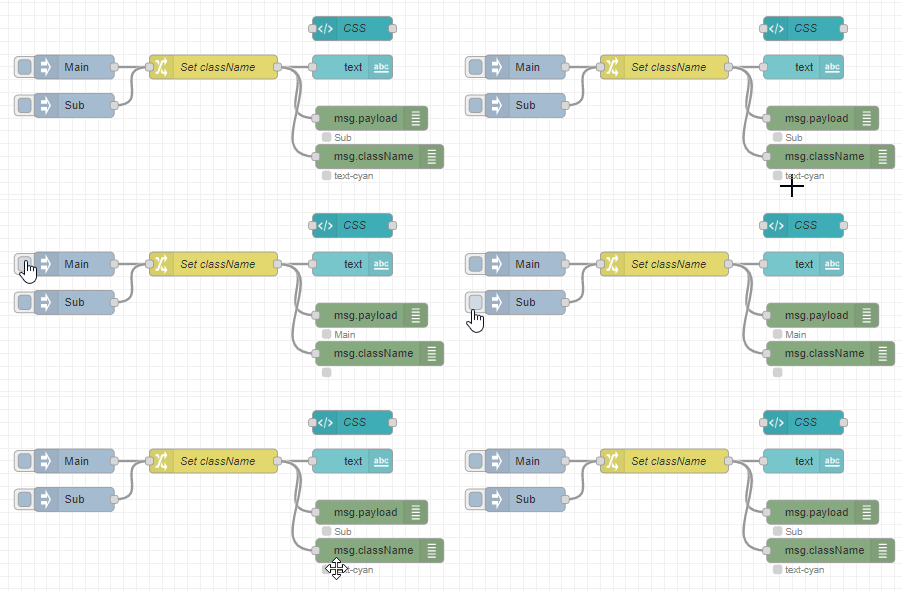

Demo flow (use `CTRL+I` to import)
```auto
[{"id":"e30f50eced1d4668","type":"inject","z":"7eecf5f1d763605a","name":"","props":[{"p":"payload"},{"p":"topic","vt":"str"}],"repeat":"","crontab":"","once":false,"onceDelay":0.1,"topic":"","payload":"Main","payloadType":"str","x":1794,"y":240,"wires":[["0982de3afd334584"]]},{"id":"c8e2fef72821ad3c","type":"debug","z":"7eecf5f1d763605a","name":"","active":true,"tosidebar":false,"console":false,"tostatus":true,"complete":"payload","targetType":"msg","statusVal":"payload","statusType":"auto","x":2166,"y":304,"wires":[]},{"id":"81bf8b1d6c478e15","type":"ui_text","z":"7eecf5f1d763605a","group":"5d6cc5965f273db3","order":2,"width":0,"height":0,"name":"","label":"text","format":"{{msg.payload}}","layout":"row-spread","className":"","x":2142,"y":240,"wires":[]},{"id":"6a6960ee76c2d4da","type":"inject","z":"7eecf5f1d763605a","name":"","props":[{"p":"payload"},{"p":"topic","vt":"str"}],"repeat":"","crontab":"","once":false,"onceDelay":0.1,"topic":"","payload":"Sub","payloadType":"str","x":1794,"y":288,"wires":[["0982de3afd334584"]]},{"id":"0982de3afd334584","type":"change","z":"7eecf5f1d763605a","name":"Set className","rules":[{"t":"set","p":"className","pt":"msg","to":"payload = \"Sub\" ? \"text-cyan\": \"\"","tot":"jsonata"}],"action":"","property":"","from":"","to":"","reg":false,"x":1968,"y":240,"wires":[["81bf8b1d6c478e15","c8e2fef72821ad3c","a37787e572c76722"]]},{"id":"4ceb298ba4b70f1b","type":"ui_template","z":"7eecf5f1d763605a","group":"81dd3718.b97888","name":"CSS","order":1,"width":0,"height":0,"format":"","storeOutMessages":true,"fwdInMessages":true,"resendOnRefresh":true,"templateScope":"global","className":"","x":2142,"y":192,"wires":[[]]},{"id":"a37787e572c76722","type":"debug","z":"7eecf5f1d763605a","name":"","active":true,"tosidebar":false,"console":false,"tostatus":true,"complete":"className","targetType":"msg","statusVal":"payload","statusType":"auto","x":2176,"y":352,"wires":[]},{"id":"5d6cc5965f273db3","type":"ui_group","name":"Carica Certificato Taratura","tab":"21286fd2ee7bdc0c","order":5,"disp":true,"width":"4","collapse":false,"className":""},{"id":"81dd3718.b97888","type":"ui_group","name":"Active Alarms","tab":"4e11db25.239e94","order":1,"disp":true,"width":13,"collapse":true},{"id":"21286fd2ee7bdc0c","type":"ui_tab","name":"test-tab","icon":"assignment","order":5,"disabled":false,"hidden":false},{"id":"4e11db25.239e94","type":"ui_tab","name":"Alarms Monitiring","icon":"dashboard","order":1,"disabled":false,"hidden":false}]
```
---
### Author:  [@vk4tux](https://discourse.nodered.org/u/vk4tux)
#### Post date: [16 May 2022 08:48 UTC](https://discourse.nodered.org/t/how-to-use-pay-load-in-one-text-output-trigger-color-applied-to-another/62658/3 "2022-05-16T08:48:56Z")
Thankyou, what I need to do now is how to apply that to a separate frequency text node to make that cyan when the condition is 'Sub'. These are separate sections in the same flow.
---
### Author:  [@jbudd](https://discourse.nodered.org/u/jbudd)
#### Post date: [16 May 2022 08:57 UTC](https://discourse.nodered.org/t/how-to-use-pay-load-in-one-text-output-trigger-color-applied-to-another/62658/4 "2022-05-16T08:57:52Z")
What happens if you send a message to the frequency node with just msg.className = "text-cyan" ?
---
### Author:  [@vk4tux](https://discourse.nodered.org/u/vk4tux)
#### Post date: [16 May 2022 10:28 UTC](https://discourse.nodered.org/t/how-to-use-pay-load-in-one-text-output-trigger-color-applied-to-another/62658/5 "2022-05-16T10:28:42Z")
Just add msg.className = "text-cyan" to the freq Text Node layout \Class field ?
---
### Author:  [@Steve-Mcl](https://discourse.nodered.org/u/Steve-Mcl)
#### Post date: [16 May 2022 10:36 UTC](https://discourse.nodered.org/t/how-to-use-pay-load-in-one-text-output-trigger-color-applied-to-another/62658/6 "2022-05-16T10:36:31Z")
No, that would set it permanently.
You want it to turn cyan only under certain conditions.
So, **send** a `msg` with `msg.className` set to `text-cyan` when that condition is met and send a `msg` with `msg.className` set to ` ` an empty string when the condition is not met.
---
### Author:  [@jbudd](https://discourse.nodered.org/u/jbudd)
#### Post date: [16 May 2022 11:45 UTC](https://discourse.nodered.org/t/how-to-use-pay-load-in-one-text-output-trigger-color-applied-to-another/62658/8 "2022-05-16T11:45:10Z")
You seem not to have grasped that you can change the way a UI widget is styled by **sending a message which has msg.className set** to "text-cyan"
If you send `{payload: "Leaning Tower of Pisa", className: "text-cyan"}` it will display "Leaning Tower of Pisa" **in cyan** - because you already have a template where the class text-cyan is defined.
If you send `{payload: "Tower of Babel", className: "text-skybluepink"}` it will display "Tower of Babel" **in the default text colour** - because you do not have a definition for the class text-skybluepink.
And if you send this message `{className: "text-cyan"}` (Do you see there is no msg.payload?) it will **not change the actual text** but it **will change the colour to cyan**.
One way to get the desired result is to send the same message that goes to your Main/Sub node to the Frequency node **as well** but pass it through a Change node to **delete msg.payload**.
---
### Author:  [@vk4tux](https://discourse.nodered.org/u/vk4tux)
#### Post date: [16 May 2022 12:16 UTC](https://discourse.nodered.org/t/how-to-use-pay-load-in-one-text-output-trigger-color-applied-to-another/62658/9 "2022-05-16T12:16:31Z")
I Cant even get the Sub display Cyan at the moment via CSS. Debugger showed a 4 string so space trailing.
Inserted a string with Left 3 ;
16/05/2022, 22:13:07node: ef94bf834e366945
msg.payload : string[3]
"Sub"
So that looks good going into the same change node as per your example, and CSS template the same, but 'Sub' display remains white.
May be my google chrome browser, I debugged for class/msg as per example at text node input ;
16/05/2022, 22:30:09[node: 04d0556dc887f885](http://192.168.0.3:1880/#)msg.className : string[9]
"text-cyan"
16/05/2022, 22:30:10[node: ef94bf834e366945](http://192.168.0.3:1880/#)msg.payload : string[3]
"Sub"
---
### Author:  [@jbudd](https://discourse.nodered.org/u/jbudd)
#### Post date: [16 May 2022 13:38 UTC](https://discourse.nodered.org/t/how-to-use-pay-load-in-one-text-output-trigger-color-applied-to-another/62658/10 "2022-05-16T13:38:41Z")
Does @Steve-Mcl's example flow correctly display "Sub" in cyan in your Chrome browser?
Please show us a screenshot of your flow and your dashboard.
You can right click on "Sub" and Inspect to see useful debug info.
In my example you can see that the md-card element which contains the text widget has an extra class `nr-dashboard-widget-text visible text-cyan`
And the matching CSS definition is `.nr-dashboard-widget-text.text-cyan > p.value { color: cyan; }`

---
### Author:  [@vk4tux](https://discourse.nodered.org/u/vk4tux)
#### Post date: [16 May 2022 14:06 UTC](https://discourse.nodered.org/t/how-to-use-pay-load-in-one-text-output-trigger-color-applied-to-another/62658/11 "2022-05-16T14:06:36Z")
> [@jbudd](#):
>
> **sending a message which has msg.className set** to "text-cyan"

Ispect on VFO Sub ;
```auto
Sub VFO
```

---
### Author:  [@vk4tux](https://discourse.nodered.org/u/vk4tux)
#### Post date: [16 May 2022 14:15 UTC](https://discourse.nodered.org/t/how-to-use-pay-load-in-one-text-output-trigger-color-applied-to-another/62658/12 "2022-05-16T14:15:57Z")
I installed the CSS template as per example given ;
```auto
```
After it did not work I removed those elements.
---
### Author:  [@jbudd](https://discourse.nodered.org/u/jbudd)
#### Post date: [16 May 2022 14:36 UTC](https://discourse.nodered.org/t/how-to-use-pay-load-in-one-text-output-trigger-color-applied-to-another/62658/13 "2022-05-16T14:36:40Z")
I guess that the relevant bits of the dashboard are those I have ringed? Main/Sub and Frequency.

Your "Inspect on VFO Sub" doesn't give me any useful information. I presume this is the highlighted text in the right hand column? Is this the bit you want in cyan? If so we will need more information on how you have implemented that column.
> [@vk4tux](#):
>
> After it did not work I removed those elements.
The approach we are trying to help you with will not work unless you have a template with this CSS definition.
Please show us the contents of your "vfo manipulation" function node. (I hope this is the right one.)
Also add a debug node set to show "complete msg object" on the output of this function. Show us what the message contains when the payload is "Main" and again when it is "Sub"
---
### Author:  [@vk4tux](https://discourse.nodered.org/u/vk4tux)
#### Post date: [16 May 2022 15:01 UTC](https://discourse.nodered.org/t/how-to-use-pay-load-in-one-text-output-trigger-color-applied-to-another/62658/14 "2022-05-16T15:01:23Z")
What you see there is a set function. The flow also uses get code to the tcp server to get status , and that is what I am using. I have uplaed the section of the relevant flow here, and yes that is what displays the two cicled points. Freq & VFO ;

I placed the CSS template back, into header, and it seems to show on the Freq display inspect re txet cyan etc,
```auto
10.136000
Freq display text node has Func ;
```
```auto
msg.payload = (msg.payload/1000000).toFixed(6);
if (msg.payload == "10.135000") {
msg.payload = "10.135000"
}
if (msg.payload == "10.135500") {
msg.payload = "10.135500"
}
if (msg.payload == "50.312000") {
msg.payload = "50.312000"
}
if (msg.payload == "50.312500") {
msg.payload = "50.312500"
}
return msg;
```
```auto
```
When testing CSS all of that was // out apart from;
return msg;
VFO Main/Sub Function
```auto
msg.payload = msg.payload.substring(0, msg.payload.indexOf("\n"));
if (msg.payload == "Main") {
msg.payload = "Main"
}
if (msg.payload == "Sub") {
msg.payload = "Sub"
}
return msg;
//
```
```auto
VFO text node value ; {{msg.payload}}
```
```auto
Freq text node value ; {{msg.payload}}
```
---
### Author:  [@mickym2](https://discourse.nodered.org/u/mickym2)
#### Post date: [16 May 2022 15:14 UTC](https://discourse.nodered.org/t/how-to-use-pay-load-in-one-text-output-trigger-color-applied-to-another/62658/15 "2022-05-16T15:14:05Z")
I have tested it - looked to the help and it works.
What is important that it has to match your label of the text node.
.nr-dashboard-widget-text.text-cyan - does only work with text as label .
If your label is mwtext in your text node - your classname has to redefined as well:

.nr-dashboard-widget-mwtext.text-cyan
I tested it with other elements - like label or label of a switch and it works as well.

```auto
``
```
Important is that you can address individual elements of a node (text node, label or value) with this CSS selector syntax:

---
### Author:  [@jbudd](https://discourse.nodered.org/u/jbudd)
#### Post date: [16 May 2022 15:21 UTC](https://discourse.nodered.org/t/how-to-use-pay-load-in-one-text-output-trigger-color-applied-to-another/62658/16 "2022-05-16T15:21:39Z")
First thought is that `"text-cyan"` is wrong:

Not sure why just yet...
Using html for styling `msg.payload = "Sub"` is outdated and bad form.
Please try getting rid of these and instead use
```auto
if (msg.payload == "Sub") {
msg.className = "text-cyan";
}
```
I am pretty sure that what @mickeym2 says above is Edit - Misleading, not wrong (Sorry!)
---
### Author:  [@vk4tux](https://discourse.nodered.org/u/vk4tux)
#### Post date: [16 May 2022 15:53 UTC](https://discourse.nodered.org/t/how-to-use-pay-load-in-one-text-output-trigger-color-applied-to-another/62658/17 "2022-05-16T15:53:46Z")
Ok, on the html color tags, yes using until I get css working.
I changed function to
```auto
msg.payload = msg.payload.substring(0, msg.payload.indexOf("\n"));
if (msg.payload == "Sub") {
msg.className = "text-cyan";
}
return msg;
```
Took out the change node and connected direct to VFO text node also renamed text node to text.
```auto
"Sub"
17/05/2022, 01:58:29node: 04d0556dc887f885
msg.className : string[9]
"text-cyan"
17/05/2022, 01:58:29node: ef94bf834e366945
msg.payload : string[3]
"Sub"
17/05/2022, 01:58:31node: 04d0556dc887f885
msg.className : string[9]
"text-cyan"
17/05/2022, 01:58:31node: ef94bf834e366945
msg.payload : string[3]
"Sub"
17/05/2022, 01:58:31node: 04d0556dc887f885
msg.className : string[9]
"text-cyan"
17/05/2022, 01:58:31node: ef94bf834e366945
msg.payload : string[3]
"Sub"
17/05/2022, 01:58:31node: 04d0556dc887f885
msg.className : string[9]
"text-cyan"
17/05/2022, 01:58:31node: ef94bf834e366945
msg.payload : string[3]
```
Did not change Sub color to Cyan still on Sub status.
---
### Author:  [@vk4tux](https://discourse.nodered.org/u/vk4tux)
#### Post date: [16 May 2022 16:15 UTC](https://discourse.nodered.org/t/how-to-use-pay-load-in-one-text-output-trigger-color-applied-to-another/62658/18 "2022-05-16T16:15:29Z")
I just realised you are referring to label, not name, so will rename as before and change the class.
How does that work for two separate labels controlled by same Sub status for color call ?
---
### Author:  [@mickym2](https://discourse.nodered.org/u/mickym2)
#### Post date: [16 May 2022 16:17 UTC](https://discourse.nodered.org/t/how-to-use-pay-load-in-one-text-output-trigger-color-applied-to-another/62658/19 "2022-05-16T16:17:16Z")
Yes this is important. 😉 - I tried it with name - this will not work. It has really to match the label. 😉
If you look to the help it refers to the label as well. 😉

---
### Author:  [@mickym2](https://discourse.nodered.org/u/mickym2)
#### Post date: [16 May 2022 16:24 UTC](https://discourse.nodered.org/t/how-to-use-pay-load-in-one-text-output-trigger-color-applied-to-another/62658/20 "2022-05-16T16:24:20Z")
> [@vk4tux](#):
>
> How does that work for two separate labels controlled by same Sub status for color call ?
I guess you have to create all classes with 2 labels - but you can then use the same class name to change all.
so if you define:
```auto
.nr-dashboard-widget-label1.text-cyan > p.value {
color: cyan
}
.nr-dashboard-widget-label2.text-cyan > p.value {
color: cyan
}
```
You can change both text nodes with a msg.className="text-cyan". So I am not an expert of CSS Classes, but this how I understood this.
---
### Author:  [@vk4tux](https://discourse.nodered.org/u/vk4tux)
#### Post date: [16 May 2022 16:24 UTC](https://discourse.nodered.org/t/how-to-use-pay-load-in-one-text-output-trigger-color-applied-to-another/62658/21 "2022-05-16T16:24:34Z")
Its annoying as I don't want a label on the dashboard for freq. However I did it and matched ;
```auto
```
Still no sign of it working on VFO, which has the function giving good debug.
[Next page](https://discourse.nodered.org/t/how-to-use-pay-load-in-one-text-output-trigger-color-applied-to-another/62658.md?page=2)