# Line thickness of chart
**URL:** https://discourse.nodered.org/t/line-thickness-of-chart/99599
**Category:** Dashboard
**Tags:** chart, dashboard-2
**Created:** [5 November 2025 18:25 UTC](https://discourse.nodered.org/t/line-thickness-of-chart/99599 "2025-11-05T18:25:44Z")
**Posts on this page:** 8
**Page:** 1
### Author:  [@MKaiser96](https://discourse.nodered.org/u/MKaiser96)
#### Post date: [5 November 2025 18:25 UTC](https://discourse.nodered.org/t/line-thickness-of-chart/99599/1 "2025-11-05T18:25:44Z")
Hello,
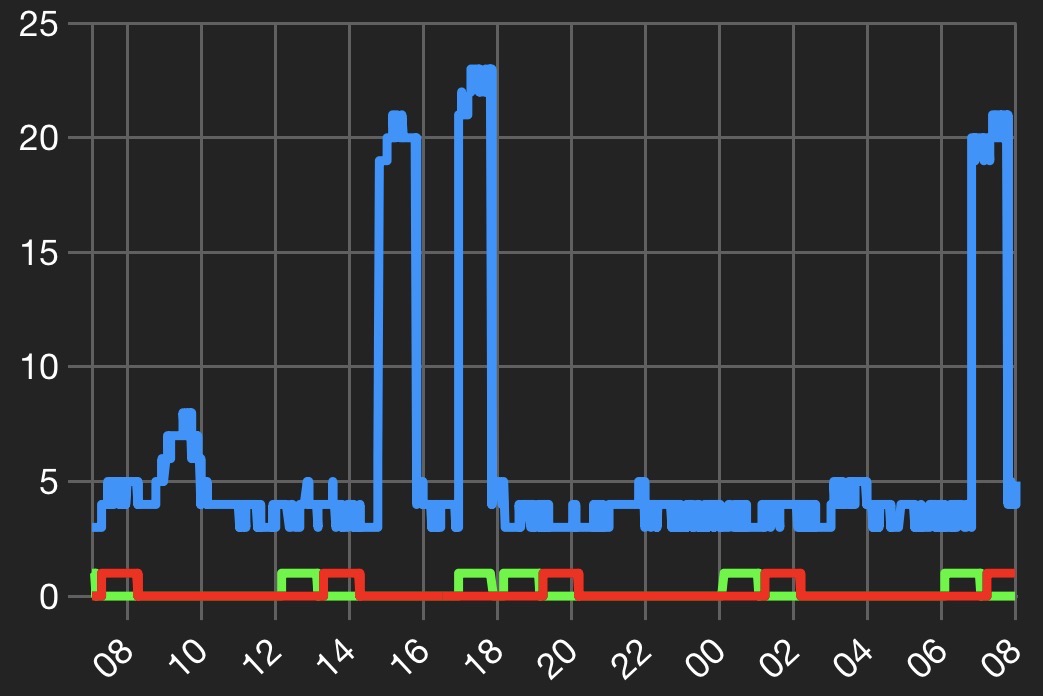
I use the chart node in dashboard-2. How can I change the line thickness of the data line? In my case it is a bit too thick.
Regards,
Markus
---
### Author:  [@Colin](https://discourse.nodered.org/u/Colin)
#### Post date: [5 November 2025 20:02 UTC](https://discourse.nodered.org/t/line-thickness-of-chart/99599/2 "2025-11-05T20:02:09Z")
Is it the line thickness, or have you got lots of data points and the dots are merging? Try reducing the size of the point markers
---
### Author:  [@MKaiser96](https://discourse.nodered.org/u/MKaiser96)
#### Post date: [5 November 2025 20:26 UTC](https://discourse.nodered.org/t/line-thickness-of-chart/99599/3 "2025-11-05T20:26:46Z")
It’s the line thickness.
---
### Author:  [@Colin](https://discourse.nodered.org/u/Colin)
#### Post date: [5 November 2025 20:36 UTC](https://discourse.nodered.org/t/line-thickness-of-chart/99599/4 "2025-11-05T20:36:22Z")
Can you post a screenshot?
---
### Author:  [@MKaiser96](https://discourse.nodered.org/u/MKaiser96)
#### Post date: [6 November 2025 07:04 UTC](https://discourse.nodered.org/t/line-thickness-of-chart/99599/5 "2025-11-06T07:04:32Z")
Here is a screenshot. There are a lot of datapoints in blue line, but in green and red line not. The lines are too thick. It doesn’t look good.
---
### Author:  [@Colin](https://discourse.nodered.org/u/Colin)
#### Post date: [6 November 2025 07:29 UTC](https://discourse.nodered.org/t/line-thickness-of-chart/99599/6 "2025-11-06T07:29:37Z")
Is that running on a small screen or on a PC? Unfortunately I am away from home and the broadband there has failed so I am unable to look at my charts to compare with yours.
There is an open feature request on the dashboard to allow access to the underlying echarts objects which would then allow you to modify the line thickness, but as far as I know that is not currently possible.
---
### Author:  [@MKaiser96](https://discourse.nodered.org/u/MKaiser96)
#### Post date: [6 November 2025 07:47 UTC](https://discourse.nodered.org/t/line-thickness-of-chart/99599/7 "2025-11-06T07:47:33Z")
It’s a screenshot from my smartphone.
---
### Author:  [@system](https://discourse.nodered.org/u/system)
#### Post date: [6 December 2025 07:47 UTC](https://discourse.nodered.org/t/line-thickness-of-chart/99599/8 "2025-12-06T07:47:49Z")
This topic was automatically closed 30 days after the last reply. New replies are no longer allowed.