# Logging dash events to a flat file
**URL:** https://discourse.nodered.org/t/logging-dash-events-to-a-flat-file/36151
**Category:** General
**Created:** [18 November 2020 16:11 UTC](https://discourse.nodered.org/t/logging-dash-events-to-a-flat-file/36151 "2020-11-18T16:11:32Z")
**Posts on this page:** 14
**Page:** 1
### Author:  [@RASelkirk](https://discourse.nodered.org/u/RASelkirk)
#### Post date: [18 November 2020 16:11 UTC](https://discourse.nodered.org/t/logging-dash-events-to-a-flat-file/36151/1 "2020-11-18T16:11:32Z")
Hi All,
I've been trying to get simple info from my dashboard (just an IP for now) into a flat (text) file using the "file" node and have it writing to a file. I plan to add other info when I get a handle on the "how" part. Like how to string pieces of info together so it's readable in a text file. Tab spacing would be great! I spent the better part of yesterday searching the 'net and found little on how to add parts to a string before writing it...
**Problem:** Irregardless, whatever info that goes to the file after my initial "write" does not get appended, but _stuck in front_ of the previous entry. When I open the file, the curser is always at the first position in the file, and that's where the new write occurs. I've tried \n and \r, both work fine in a debug node but not in actual practice.
So I need schooling in the basics of writing to files. Also any input on specific "-contrib" nodes that may be better for a programmer at the 1st grade level...
Thanks!
Russ
---
### Author:  [@Colin](https://discourse.nodered.org/u/Colin)
#### Post date: [18 November 2020 21:14 UTC](https://discourse.nodered.org/t/logging-dash-events-to-a-flat-file/36151/2 "2020-11-18T21:14:24Z")
Show us how you have configured the file node and show what you see in a debug node showing what is going into the file node.
---
### Author:  [@RASelkirk](https://discourse.nodered.org/u/RASelkirk)
#### Post date: [19 November 2020 18:39 UTC](https://discourse.nodered.org/t/logging-dash-events-to-a-flat-file/36151/3 "2020-11-19T18:39:28Z")
I got it to do what I need, prolly very inefficient though. And a few puzzlers...

A button triggers two things:
1). EXEC "netstat -tn | grep :1880 | awk '{print $5}' | cut -d: -f1" which pulls the IP being used to access pi. SPLIT parses by \n, SWITCH culls out my local network (other than the phone I'm using to call pi). FUNCTION adds "\n\r" to the string.
2). FUNCTION grabs the date, it gets formatted, FUNCTION adds "t" character.
JOIN (manual, join using \n) combines the two and FILE (append, \n) writes it. I can't get a new line without a \r, and have tried seemingly every combo of where and how to place the (multiple) \n's required to make this work? Though some appear to be doing nothing, omitting then is worse.
Right now, the date with tab is first, then the IP and new line. Assuming I add other items, how does one control the order these items appear in?
 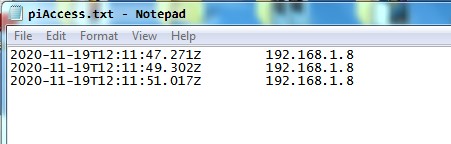
Hopefully someone can provide insight on where I can better learn how to structure multiple items into a "line"?
Russ
_PS- The internet is a wonderful thing. Many thanks to some poster for that netstat command, a zoo full of monkeys could have got it figured quicker than me!_
---
### Author:  [@Colin](https://discourse.nodered.org/u/Colin)
#### Post date: [19 November 2020 21:25 UTC](https://discourse.nodered.org/t/logging-dash-events-to-a-flat-file/36151/4 "2020-11-19T21:25:53Z")
The first thing I would suggest is not to separate the two paths. Keep the upper path, but remove the bit that adds the line ending, the file node will do that for you (there is a checkbox for adding new line). Then after the LAN switch add a node that adds the timestamp into the payload. You can do that by feeding the message into a [node-red-contrib-simpletime](https://flows.nodered.org/node/node-red-contrib-simpletime), which will add the timestamp in various formats into the message, without changing msg.payload. Then you can feed it through a function node containing
```auto
msg.payload = `${msg.myrawdate}\t${msg.payload}`
return msg;
```
and then to the file node.
---
### Author:  [@RASelkirk](https://discourse.nodered.org/u/RASelkirk)
#### Post date: [19 November 2020 22:03 UTC](https://discourse.nodered.org/t/logging-dash-events-to-a-flat-file/36151/5 "2020-11-19T22:03:57Z")
Colin,
Much nicer, thanks! I tried your function node as-is with only "new line"checked in file, no new line. Tried adding \n to your function, no new line. Tried \r appended to your (modified) function, then removing "new line" from file, no new line. So, I actually need the "new line check" in file, but also need a \r in the function. Without both, no new line. Works, but not as expected.

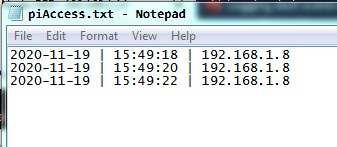
I'm studying on how to build a string from various N-R sources. If I import payloads from different nodes into one function, are those sortable using variables?
Thanks!
Russ
---
### Author:  [@Colin](https://discourse.nodered.org/u/Colin)
#### Post date: [19 November 2020 22:27 UTC](https://discourse.nodered.org/t/logging-dash-events-to-a-flat-file/36151/6 "2020-11-19T22:27:09Z")
The new line stuff seems very odd. Can you stop node-red and then start it again in a terminal and copy/paste the log here please. When pasting, got to a new line and click the `` button at the top of the forum entry window and paste the log in where it says.
How did you install node-red? Did you use the recommended way from the node-red docs [https://nodered.org/docs/getting-started/raspberrypi](https://nodered.org/docs/getting-started/raspberrypi) ?
Then select the nodes in the flow you have shown and Export it to the clipboard (Ctrl-E) and paste that in using the same button.
---
### Author:  [@RASelkirk](https://discourse.nodered.org/u/RASelkirk)
#### Post date: [19 November 2020 22:58 UTC](https://discourse.nodered.org/t/logging-dash-events-to-a-flat-file/36151/7 "2020-11-19T22:58:51Z")
OK, here's the restart:
```auto
pi@pigate:~ $ node-red-stop
Stop Node-RED
Use node-red-start to start Node-RED again
pi@pigate:~ $ node-red-start
Start Node-RED
Once Node-RED has started, point a browser at http://192.168.1.14:1880
On Pi Node-RED works better with the Firefox or Chrome browser
Use node-red-stop to stop Node-RED
Use node-red-start to start Node-RED again
Use node-red-log to view the recent log output
Use sudo systemctl enable nodered.service to autostart Node-RED at every boot
Use sudo systemctl disable nodered.service to disable autostart on boot
To find more nodes and example flows - go to http://flows.nodered.org
Starting as a systemd service.
Started Node-RED graphical event wiring tool.
19 Nov 16:36:20 - [info]
Welcome to Node-RED
===================
19 Nov 16:36:20 - [info] Node-RED version: v1.1.2
19 Nov 16:36:20 - [info] Node.js version: v12.18.2
19 Nov 16:36:20 - [info] Linux 4.14.79-v7+ arm LE
19 Nov 16:36:22 - [info] Loading palette nodes
19 Nov 16:36:27 - [info] Dashboard version 2.24.0 started at /ui
19 Nov 16:36:28 - [info] Settings file : /home/pi/.node-red/settings.js
19 Nov 16:36:28 - [info] Context store : 'default' [module=memory]
19 Nov 16:36:28 - [info] User directory : /home/pi/.node-red
19 Nov 16:36:28 - [warn] Projects disabled : editorTheme.projects.enabled=false
19 Nov 16:36:28 - [info] Flows file : /home/pi/.node-red/flows_pigate.json
19 Nov 16:36:28 - [info] Server now running at http://127.0.0.1:1880/
19 Nov 16:36:28 - [info] Starting flows
19 Nov 16:36:28 - [info] Started flows
```
And the flows:
```auto
[{"id":"858c4e3a.263b5","type":"switch","z":"c199b9b6.017a2","g":"72e98ad2.deb1cc","name":"LAN","property":"payload","propertyType":"msg","rules":[{"t":"neq","v":"192.168.1.8","vt":"str"},{"t":"else"}],"checkall":"true","repair":false,"outputs":2,"x":930,"y":640,"wires":[[],["62cee68c.474da"]],"info":"Change range to suit when exposed to outside\n\n192.168.1.1 - 192.168.1.20"},{"id":"5fa135ba.5aa8d4","type":"exec","z":"c199b9b6.017a2","g":"72e98ad2.deb1cc","command":"netstat","addpay":true,"append":"-tn | grep :1880 | awk '{print $5}' | cut -d: -f1","useSpawn":"false","timer":"","oldrc":false,"name":"","x":790,"y":620,"wires":[["f5b8bb2e.f0e018"],[],[]]},{"id":"f5b8bb2e.f0e018","type":"split","z":"c199b9b6.017a2","g":"72e98ad2.deb1cc","name":"","splt":"","spltType":"str","arraySplt":"1","arraySpltType":"len","stream":false,"addname":"","x":930,"y":600,"wires":[["858c4e3a.263b5"]]},{"id":"62cee68c.474da","type":"simpletime","z":"c199b9b6.017a2","g":"72e98ad2.deb1cc","name":"","mydate":false,"myymd":true,"myyear":false,"mymonth":false,"mymonthn":false,"mydom":false,"mydoy":false,"myday":false,"myhourpm":false,"myhour":false,"mytime":false,"mytimes":true,"myminute":false,"myminutes":false,"mysecond":false,"mymillis":false,"myepoch":false,"myrawdate":false,"mypm":false,"x":1120,"y":600,"wires":[["f52c94e3.5d1028"]]},{"id":"81697f6c.4b15e","type":"file","z":"c199b9b6.017a2","g":"72e98ad2.deb1cc","name":"","filename":"/home/pi/share/piAccess.txt","appendNewline":true,"createDir":false,"overwriteFile":"false","encoding":"none","x":1170,"y":640,"wires":[["63b04869.65de98"]]},{"id":"f52c94e3.5d1028","type":"function","z":"c199b9b6.017a2","g":"72e98ad2.deb1cc","name":"","func":"msg.payload = `${msg.myymd} | ${msg.mytimes} | ${msg.payload}\\r`\nreturn msg;","outputs":1,"noerr":0,"initialize":"","finalize":"","x":1270,"y":600,"wires":[["81697f6c.4b15e"]]},{"id":"63b04869.65de98","type":"debug","z":"c199b9b6.017a2","g":"72e98ad2.deb1cc","name":"","active":true,"tosidebar":true,"console":false,"tostatus":false,"complete":"payload","targetType":"msg","statusVal":"","statusType":"auto","x":1380,"y":640,"wires":[]}]
```
Use an inject node to push an integer 1.
I removed the \r from the function and it works but now I get multiple entries of the same thing. Restart flows helps too.
N-R was burned into pi install image that was installed from new.
Russ
---
### Author:  [@dceejay](https://discourse.nodered.org/u/dceejay)
#### Post date: [20 November 2020 00:05 UTC](https://discourse.nodered.org/t/logging-dash-events-to-a-flat-file/36151/8 "2020-11-20T00:05:20Z")
Yes Windows used to need \r\n (cr-lf) at the end of lines but I thought they must have been able to handle that by now... but maybe not.
---
### Author:  [@RASelkirk](https://discourse.nodered.org/u/RASelkirk)
#### Post date: [20 November 2020 00:19 UTC](https://discourse.nodered.org/t/logging-dash-events-to-a-flat-file/36151/9 "2020-11-20T00:19:59Z")
Would it matter if I'm accessing the editor (located on pi) from a Win browser? From Win, I added the \r back to the function and it works fine. Also changing the encoding option in file node to UTF8 seems to have stabilized output.
Put the \n back into the split node (split using...) and it stopped the multiple entries. For now, I hope!
Russ
---
### Author:  [@RASelkirk](https://discourse.nodered.org/u/RASelkirk)
#### Post date: [20 November 2020 00:28 UTC](https://discourse.nodered.org/t/logging-dash-events-to-a-flat-file/36151/10 "2020-11-20T00:28:05Z")
Something else:
After I deploy the flow(s), the inject node (integer: 1) no longer triggers the exec node. If I use the button on my dashboard, it does. Once I use the button, inject works as expected from then on.
Button code:
```auto
```
Is that payload something other an integer?
Russ
---
### Author:  [@michaelblight](https://discourse.nodered.org/u/michaelblight)
#### Post date: [20 November 2020 02:41 UTC](https://discourse.nodered.org/t/logging-dash-events-to-a-flat-file/36151/11 "2020-11-20T02:41:01Z")
> [@RASelkirk](#):
>
> Also any input on specific "-contrib" nodes that may be better for a programmer at the 1st grade level
I use `node-red-contrib-flogger` to log to flat files, partly because it supports log rotation. I also forked it to create `node-red-contrib-flogger-now` which allows your flow to trigger the rotation (eg. at midnight).
---
### Author:  [@Colin](https://discourse.nodered.org/u/Colin)
#### Post date: [20 November 2020 08:33 UTC](https://discourse.nodered.org/t/logging-dash-events-to-a-flat-file/36151/12 "2020-11-20T08:33:31Z")
> [@RASelkirk](#):
>
> the inject node (integer: 1) no longer triggers the exec node
In the flow you posted the Exec node has Append msg.payload, which means whatever you have in the payload will be added on the end of the command line. Did you mean that?
Whenever you have a problem with a node that has multiple outputs check what it coming out of all of them. In the case of the Exec node that would probably have shown you an error message, which may or may not, be helpful. Also when there is a problem add a Catch node catching everything and see if it picks up anything.
---
### Author:  [@RASelkirk](https://discourse.nodered.org/u/RASelkirk)
#### Post date: [20 November 2020 19:21 UTC](https://discourse.nodered.org/t/logging-dash-events-to-a-flat-file/36151/13 "2020-11-20T19:21:57Z")
Michael, I'll give that a try.
Colin, thanks for sticking with me. Catch node is not showing anything but I've taken out the "append msg" so maybe that was it...
Russ
---
### Author:  [@system](https://discourse.nodered.org/u/system)
#### Post date: [19 January 2021 19:22 UTC](https://discourse.nodered.org/t/logging-dash-events-to-a-flat-file/36151/14 "2021-01-19T19:22:02Z")
This topic was automatically closed 60 days after the last reply. New replies are no longer allowed.