# Make a button link to another page HTML !?
**URL:** https://discourse.nodered.org/t/make-a-button-link-to-another-page-html/880
**Category:** General
**Created:** [18 June 2018 07:23 UTC](https://discourse.nodered.org/t/make-a-button-link-to-another-page-html/880 "2018-06-18T07:23:01Z")
**Posts on this page:** 17
**Page:** 1
### Author:  [@imadouino](https://discourse.nodered.org/u/imadouino)
#### Post date: [18 June 2018 07:23 UTC](https://discourse.nodered.org/t/make-a-button-link-to-another-page-html/880/1 "2018-06-18T07:23:02Z")
Hi,
i searsh to make a button link to another page HTML. it's work with a link like ([www.google.com](http://www.google.com)) but i can't do it with my link ( [http://IP/ui/#/1](http://IP/ui/#/1)), the link change in the case of the adresse of my navigator but it does run it.
this is the page of redirection
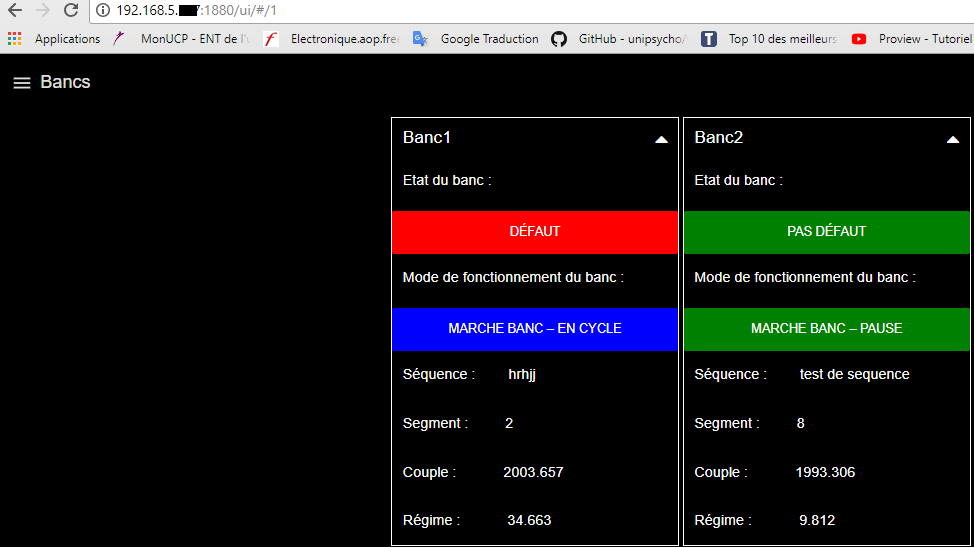


this is my code HTML.
Thank you for your help
```
Bancs
Etat du banc
Fonc- tion- nement
Anoma- lie
BANC1
zerzer
BANC2
zerzer
BANC3
zerzer
zerzer
zerzer
BANC4
zerzer
zerzer
zerzer
BANC5
zerzer
zerzer
zerzer
BANC6
zerzer
zerzer
zerzer
```
---
### Author:  [@Andrei](https://discourse.nodered.org/u/Andrei)
#### Post date: [18 June 2018 13:28 UTC](https://discourse.nodered.org/t/make-a-button-link-to-another-page-html/880/2 "2018-06-18T13:28:13Z")
Hello Imadouino,
I guess the solution relies on the use of the settings.js configuration file in your .node-red folder
When we want to serve local content we need to set up an http static path in this configuration file.
I use Windows10 and configured below path to point to the projects file in the node-red installation.
```auto
// following property can be used to identify a directory of static content
// that should be served at http://localhost:1880/.
//httpStatic: '/home/nol/node-red-static/',
httpStatic: "C://Users/OCM/.node-red/projects",
```
inside this directory (projects) I created others to serve images, http files, fonts, etc
Users/OCM/.node-red/projects/nrhttp
Users/OCM/.node-red/projects/nrimages
Users/OCM/.node-red/projects/nrfonts
Inside my Node-RED flow i use relative paths from httpstatic (in settings.js) to where my files are stored. For instance, to reach the file f1.html (a test html Hello world) that is inside projects/nrhttp folder I would use:
```auto
BANC1
```
I tested with your template and it worked fine.

Notes:
1- When changing the settings.js file you need to restart node.red
2- Check if the httpstatic file is shown in the initialization of Node-RED
```auto
18 Jun 10:01:06 - [info] Settings file : \Users\OCM\.node-red\settings.js
18 Jun 10:01:06 - [info] HTTP Static : C:\Users\OCM\.node-red\projects
```
---
### Author:  [@imadouino](https://discourse.nodered.org/u/imadouino)
#### Post date: [18 June 2018 13:51 UTC](https://discourse.nodered.org/t/make-a-button-link-to-another-page-html/880/3 "2018-06-18T13:51:03Z")
Hi Andrei,
I’m in linux, that i will searsh to find this file in linux and i will try this solution.
Thank youuuuu.
---
### Author:  [@dceejay](https://discourse.nodered.org/u/dceejay)
#### Post date: [18 June 2018 15:13 UTC](https://discourse.nodered.org/t/make-a-button-link-to-another-page-html/880/4 "2018-06-18T15:13:07Z")
In Linux it should be the one under ~/.node-red
---
### Author:  [@imadouino](https://discourse.nodered.org/u/imadouino)
#### Post date: [28 June 2018 08:09 UTC](https://discourse.nodered.org/t/make-a-button-link-to-another-page-html/880/5 "2018-06-28T08:09:44Z")
> [@Andrei](#):
>
> ```auto
>
>
> ```
Hi Andrei,
Thank you for your response, but my link is it not .php or .html, my link it is like that for example:
" [http://localhost:1880/ui/#/4](http://localhost:1880/ui/#/4)"
the method you sent me did not work ☹ .
Thank yoouuuu for your help.
---
### Author:  [@Andrei](https://discourse.nodered.org/u/Andrei)
#### Post date: [28 June 2018 13:41 UTC](https://discourse.nodered.org/t/make-a-button-link-to-another-page-html/880/6 "2018-06-28T13:41:52Z")
Hello imadouino,
The title of the post suggests that you were trying to open an html file. Could you please recap what is the expected behavior when you click the buttom ? Perhaps you want to move to another page (tab) of a local dashboard ? or perhaps something else ?
---
### Author:  [@imadouino](https://discourse.nodered.org/u/imadouino)
#### Post date: [28 June 2018 14:11 UTC](https://discourse.nodered.org/t/make-a-button-link-to-another-page-html/880/7 "2018-06-28T14:11:00Z")
Hi ANDREI,
thank you for your attention; my question was, how i can make button link(for an auther tab in node-red) with html button,I explained that on the pictures above, and not to trying to open an html file ou html page.
I hope you have understood my situation.
Thank you for your help.
---
### Author:  [@shrickus](https://discourse.nodered.org/u/shrickus)
#### Post date: [28 June 2018 14:30 UTC](https://discourse.nodered.org/t/make-a-button-link-to-another-page-html/880/8 "2018-06-28T14:30:08Z")
The easiest way to switch to another "page" of your existing dashboard is to pass a msg to the `ui_control` node. From the node's information sidebar:
> Allows dynamic control of the Dashboard.
>
> The default function is to change the currently displayed tab. msg.payload should either be an object of the form {tab:"my\_tab\_name"}, or just be the tab name or numeric index (from 0) of the tab or link to be displayed.
>
> Sending a blank tab name "" will refresh the current page. You can also send "+1" for next tab and "-1" for previous tab.
So all you need in the first page is a button or other html element that can send a msg with a payload containing the tab name or index number. You could use the `ui_button` node set to send the other tab name, or embed some angular html in a `ui_template` node -- something like this:
```html
```
Wire the output of your button or template node into the `ui_control` node, and it should just work for you. For some other examples and cautions, you can check [this discussion](https://discourse.nodered.org/t/orchestrating-dashboard-page-flow-via-ui-control/1103/3) that was started recently...
---
### Author:  [@imadouino](https://discourse.nodered.org/u/imadouino)
#### Post date: [28 June 2018 14:37 UTC](https://discourse.nodered.org/t/make-a-button-link-to-another-page-html/880/9 "2018-06-28T14:37:42Z")
> [@shrickus](#):
>
> ng-click="send({payload: 1})"
thank you that's exactly what was looking for and it works
Thank youuu
---
### Author:  [@imadouino](https://discourse.nodered.org/u/imadouino)
#### Post date: [28 June 2018 14:42 UTC](https://discourse.nodered.org/t/make-a-button-link-to-another-page-html/880/10 "2018-06-28T14:42:08Z")
it work too for the hypertext in html ?
Thank you
---
### Author:  [@shrickus](https://discourse.nodered.org/u/shrickus)
#### Post date: [28 June 2018 17:15 UTC](https://discourse.nodered.org/t/make-a-button-link-to-another-page-html/880/11 "2018-06-28T17:15:25Z")
If you mean the href on an html `link` element, then you will have to invoke a javascript function inside the angular `scope` – something like this (untested):
```auto
Details
```
---
### Author:  [@imadouino](https://discourse.nodered.org/u/imadouino)
#### Post date: [2 July 2018 08:30 UTC](https://discourse.nodered.org/t/make-a-button-link-to-another-page-html/880/12 "2018-07-02T08:30:38Z")
Thank youuuuuu very much shrickus,
My last question is, when i change tab with UI CONTROL, it also changes to another device, who is also connected to the site, how can to avoid that.
Thank you for your attention.
---
### Author:  [@ukmoose](https://discourse.nodered.org/u/ukmoose)
#### Post date: [2 July 2018 08:37 UTC](https://discourse.nodered.org/t/make-a-button-link-to-another-page-html/880/13 "2018-07-02T08:37:40Z")
Copied from the ReadMe of the dashboard nodes
> **[node-red-dashboard](https://flows.nodered.org/node/node-red-dashboard)**
>
> A set of dashboard nodes for Node-RED
> Multiple Users
>
> This Dashboard does NOT support multiple individual users. It is a view of the status of the underlying Node-RED flow, which itself is single user. If the state of the flow changes then all clients will get notified of that change.
---
### Author:  [@imadouino](https://discourse.nodered.org/u/imadouino)
#### Post date: [2 July 2018 08:43 UTC](https://discourse.nodered.org/t/make-a-button-link-to-another-page-html/880/14 "2018-07-02T08:43:18Z")
Thank you UKMOOSE,
there is no other way to change the tab automatically without going through the UI CONTROL then.
---
### Author:  [@Colin](https://discourse.nodered.org/u/Colin)
#### Post date: [2 July 2018 09:01 UTC](https://discourse.nodered.org/t/make-a-button-link-to-another-page-html/880/15 "2018-07-02T09:01:34Z")
> [@ukmoose](#):
>
> This Dashboard does NOT support multiple individual users. It is a view of the status of the underlying Node-RED flow, which itself is single user. If the state of the flow changes then all clients will get notified of that change.
Multiple users can, of course, view different tabs at the same time. The problem with switching tabs using ui-control is that it is done via the server so all users will be switched. To only switch tabs for the current user then I think it would have to be done within the browser. I don't know if there is a way of doing that.
---
### Author:  [@dceejay](https://discourse.nodered.org/u/dceejay)
#### Post date: [2 July 2018 11:21 UTC](https://discourse.nodered.org/t/make-a-button-link-to-another-page-html/880/16 "2018-07-02T11:21:08Z")
when you send a command from the dashboard it has a `msg.socketid` property set… if you set that correctly then the ui\_control message will only go to the corresponding socket/screen… Obviously the tricky part is associating the correct socketid if the command isn’t coming from a user in the first place.
---
### Author:  [@dceejay](https://discourse.nodered.org/u/dceejay)
#### Post date: [23 September 2020 07:02 UTC](https://discourse.nodered.org/t/make-a-button-link-to-another-page-html/880/18 "2020-09-23T07:02:18Z")