# Method to interact bewteen node-red/JS/HTML/CSS ui\_template

**URL:** https://discourse.nodered.org/t/method-to-interact-bewteen-node-red-js-html-css-ui-template/4229
**Category:** Dashboard
**Created:** [23 October 2018 17:23 UTC](https://discourse.nodered.org/t/method-to-interact-bewteen-node-red-js-html-css-ui-template/4229 "2018-10-23T17:23:33Z")
**Posts on this page:** 20
**Page:** 1

<div class="post-metadata">

### Author: ![Bobet21](https://sea2.discourse-cdn.com/flex026/user_avatar/discourse.nodered.org/bobet21/32/3162_2.png) [@Bobet21](https://discourse.nodered.org/u/Bobet21)
#### Post date: [23 October 2018 17:23 UTC](https://discourse.nodered.org/t/method-to-interact-bewteen-node-red-js-html-css-ui-template/4229/1 "2018-10-23T17:23:33Z")

</div>

Hey,

Keeping up on my battery application (node is copied below) - I am trying to get my msg.payload to animate HTML and CSS and I am not quite sure how to do this.  
The example of the ui\_template suggests that the HTML code would be handling it, i succesfully passed a message to display a value on the dashboard, now i would like to use that same value to position/colored css elements. I know it's more css/js related - but i have been on a lot of forum and try that all..so looking for your experience on using the ui\_template.

I get the following HTML warning

```
You are using the ngTouch module. 
AngularJS Material already has mobile click, tap, and swipe support... 
ngTouch is not supported with AngularJS Material!

```

and

```
Source map error: request failed with status 404
Resource URL: http://localhost:1880/ui/js/app.min.js
Source Map URL: angular-chart.min.js.map[Learn More]

```

and this error (which use not to block me before)

> Error: msg is undefined @[http://localhost:1880/ui/#/0:5:9](http://localhost:1880/ui/#/0:5:9) $digest@[http://localhost:1880/ui/js/app.min.js:165:410](http://localhost:1880/ui/js/app.min.js:165:410) $apply@[http://localhost:1880/ui/js/app.min.js:168:361](http://localhost:1880/ui/js/app.min.js:168:361) e/q\<@[http://localhost:1880/ui/js/app.min.js:181:386](http://localhost:1880/ui/js/app.min.js:181:386) f@[http://localhost:1880/ui/js/app.min.js:66:490](http://localhost:1880/ui/js/app.min.js:66:490) mg/k.defer/c\<@[http://localhost:1880/ui/js/app.min.js:69:418](http://localhost:1880/ui/js/app.min.js:69:418)

Thanks for your recommendation.

`[{"id":"89106e79.6e3368","type":"function","z":"19017313.db0925","name":"SOC","func":"if (msg.canid === 884) {\n var MSB = (msg.data[1]-10)/2 ;\n var Vtg = MSB/2 ;\n msg.payload = Vtg;\n return msg;\n} else {\n return null;\n}\n\n\n\n","outputs":2,"noerr":0,"x":230,"y":100,"wires":[["45ddf0ad.f0ab9"],[]]},{"id":"45ddf0ad.f0ab9","type":"delay","z":"19017313.db0925","name":"","pauseType":"rate","timeout":"5","timeoutUnits":"seconds","rate":"1","nbRateUnits":"1","rateUnits":"second","randomFirst":"1","randomLast":"5","randomUnits":"seconds","drop":false,"x":370,"y":100,"wires":[["1345a1cf.428186"]]},{"id":"1345a1cf.428186","type":"ui_template","z":"19017313.db0925","group":"52aeaff2.e16798","name":"Batt_NEW","order":0,"width":0,"height":0,"format":"<div class=\"battery\">\n <div class=\"battery-level\" ></div>\n <div class=\"battery-text\"><p><span id=\"myMsg\"></span>%</p></div>\n</div>\n<!--\n<div class=\"battery\">\n <div class=\"battery-level warn\" style=\"width:18%;\"></div>\n</div>\n\n<div class=\"battery\">\n <div class=\"battery-level alert\" style=\"width:10%;\"></div>\n</div>\n-->\n\n<style>\n/*Initial Code By Mickael Novotny*/\n\n:root {\n --batt_lev: 50%;\n --batt_col: #30b455;\n}\n\nbody {\n padding: 25px 50px;\n}\n\n.battery {\n/* Battery outerwall*/\n border: 5px solid #333;\n width: 278px;\n height: 108px;\n padding: 4px;\n border-radius: 2px;\n position: relative;\n margin: 15px 0;\n} \n\n.battery::before {\n/* Battery Pole */\n content: '';\n height: 90px;\n width: 16px;\n background: #333;\n display: block;\n position: absolute;\n top: 7.5px;\n right: -16px;\n border-radius: 0 4px 4px 0;\n}\n\n.battery::after {\n/* Battery inner margins*/\n content: '';\n display: block;\n position: absolute;\n top: -3px;\n left: -3px;\n right: -3px;\n bottom: -3px;\n border: 6px solid #fff;\n border-radius: 2px;\n}\n\n\n.battery-level {\n/* battery level*/\n background: --batt_col; \n position: absolute;\n top: 0px;\n bottom: 0px;\n left: --batt_lev;\n}\n\n.battery-text{\n z-index:99;\n position: absolute;\n font-size:32px;\n top: 20px;\n left:120px;\n color:'';\n}\n\n.warn {\n background-color: #efaf13;\n}\n \n.alert {\n background-color: #e81309;\n} \n\n.alert::after {\n background-image: url('data:image/svg+xml;charset=US-ASCII,%3C%3Fxml%20version%3D%221.0%22%20encoding%3D%22utf-8%22%3F%3E%3C!DOCTYPE%20svg%20PUBLIC%20%22-%2F%2FW3C%2F%2FDTD%20SVG%201.1%2F%2FEN%22%20%22http%3A%2F%2Fwww.w3.org%2FGraphics%2FSVG%2F1.1%2FDTD%2Fsvg11.dtd%22%3E%3Csvg%20version%3D%221.1%22%20xmlns%3D%22http%3A%2F%2Fwww.w3.org%2F2000%2Fsvg%22%20xmlns%3Axlink%3D%22http%3A%2F%2Fwww.w3.org%2F1999%2Fxlink%22%20width%3D%2232%22%20height%3D%2232%22%20viewBox%3D%220%200%2032%2032%22%3E%3Cg%3E%3C%2Fg%3E%20%3Cpath%20fill%3D%22%23e81309%22%20d%3D%22M17.927%2012l2.68-10.28c0.040-0.126%200.060-0.261%200.060-0.4%200-0.726-0.587-1.32-1.314-1.32-0.413%200-0.78%200.187-1.019%200.487l-13.38%2017.353c-0.18%200.227-0.287%200.513-0.287%200.827%200%200.733%200.6%201.333%201.333%201.333h8.073l-2.68%2010.28c-0.041%200.127-0.060%200.261-0.060%200.4%200.001%200.727%200.587%201.32%201.314%201.32%200.413%200%200.78-0.186%201.020-0.487l13.379-17.353c0.181-0.227%200.287-0.513%200.287-0.827%200-0.733-0.6-1.333-1.333-1.333h-8.073z%22%3E%3C%2Fpath%3E%3C%2Fsvg%3E'); \n background-repeat: no-repeat;\n background-size: 18px;\n height: 18px;\n width: 18px;\n margin: 6px 0 0 8px;\n content: '';\n display: inline-block;\n position: absolute;\n}\n\n}\n</style>\n\n\n<script>\n(function(scope) {\n scope.$watch('msg', function(msg) {\n // new message received\n document.getElementById(\"myMsg\").innerHTML = msg.payload;\n document.documentElement.style.setProperty(`--batt\_lev`, msg.payload + '%');\n });\n})(scope);\n\n</script>","storeOutMessages":true,"fwdInMessages":true,"templateScope":"local","x":550,"y":100,"wires":[[]]},{"id":"52aeaff2.e16798","type":"ui_group","z":"","name":"Car Data","tab":"ca621891.e2b488","order":3,"disp":true,"width":"12","collapse":false},{"id":"ca621891.e2b488","type":"ui_tab","z":"","name":"Home","icon":"dashboard"}]`

---

<div class="post-metadata">

### Author: ![Andrei](https://sea2.discourse-cdn.com/flex026/user_avatar/discourse.nodered.org/andrei/32/10446_2.png) [@Andrei](https://discourse.nodered.org/u/Andrei)
#### Post date: [23 October 2018 21:55 UTC](https://discourse.nodered.org/t/method-to-interact-bewteen-node-red-js-html-css-ui-template/4229/2 "2018-10-23T21:55:35Z")

</div>

> [@Bobet21](#):
>
> i succesfully passed a message to display a value on the dashboard,

I suspect that you did not copy the full code since there is not data feeding the function node screenshot below) and this results in errros.

![t-02](https://us1.discourse-cdn.com/flex026/uploads/nodered/original/2X/9/917d4698399cb59dda86bb9bbda26f5b4f137ddd.png)

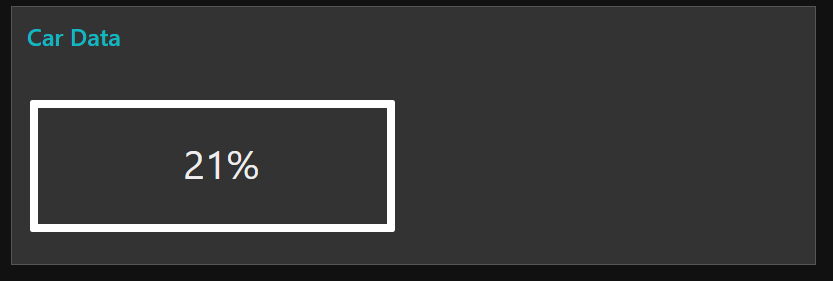
By generating random data (state of charge in msg.payload) I got the following displayed in the dashboard. I guess you are almost there.
 ![t-01](https://us1.discourse-cdn.com/flex026/uploads/nodered/original/2X/a/a35419cc69ccd0bfc81dd5d3e7f659cb895e1a04.png)

my test flow:

```auto
[{"id":"9345e788.8ae158","type":"tab","label":"Flow 2","disabled":false,"info":""},{"id":"c2c17c33.f245d","type":"delay","z":"9345e788.8ae158","name":"","pauseType":"rate","timeout":"5","timeoutUnits":"seconds","rate":"1","nbRateUnits":"1","rateUnits":"second","randomFirst":"1","randomLast":"5","randomUnits":"seconds","drop":false,"x":590,"y":320,"wires":[["a246f6ee.fa75c8","b0b0d6e.78fc628"]]},{"id":"a246f6ee.fa75c8","type":"ui_template","z":"9345e788.8ae158","group":"b8a5fd64.71bf8","name":"Batt_NEW","order":0,"width":0,"height":0,"format":"<div class=\"battery\">\n <div class=\"battery-level\" ></div>\n <div class=\"battery-text\"><p><span id=\"myMsg\"></span>%</p></div>\n</div>\n<!--\n<div class=\"battery\">\n <div class=\"battery-level warn\" style=\"width:18%;\"></div>\n</div>\n\n<div class=\"battery\">\n <div class=\"battery-level alert\" style=\"width:10%;\"></div>\n</div>\n-->\n\n<style>\n/*Initial Code By Mickael Novotny*/\n\n:root {\n --batt_lev: 50%;\n --batt_col: #30b455;\n}\n\nbody {\n padding: 25px 50px;\n}\n\n.battery {\n/* Battery outerwall*/\n border: 5px solid #333;\n width: 278px;\n height: 108px;\n padding: 4px;\n border-radius: 2px;\n position: relative;\n margin: 15px 0;\n} \n\n.battery::before {\n/* Battery Pole */\n content: '';\n height: 90px;\n width: 16px;\n background: #333;\n display: block;\n position: absolute;\n top: 7.5px;\n right: -16px;\n border-radius: 0 4px 4px 0;\n}\n\n.battery::after {\n/* Battery inner margins*/\n content: '';\n display: block;\n position: absolute;\n top: -3px;\n left: -3px;\n right: -3px;\n bottom: -3px;\n border: 6px solid #fff;\n border-radius: 2px;\n}\n\n\n.battery-level {\n/* battery level*/\n background: --batt_col; \n position: absolute;\n top: 0px;\n bottom: 0px;\n left: --batt_lev;\n}\n\n.battery-text{\n z-index:99;\n position: absolute;\n font-size:32px;\n top: 20px;\n left:120px;\n color:'';\n}\n\n.warn {\n background-color: #efaf13;\n}\n \n.alert {\n background-color: #e81309;\n} \n\n.alert::after {\n background-image: url('data:image/svg+xml;charset=US-ASCII,%3C%3Fxml%20version%3D%221.0%22%20encoding%3D%22utf-8%22%3F%3E%3C!DOCTYPE%20svg%20PUBLIC%20%22-%2F%2FW3C%2F%2FDTD%20SVG%201.1%2F%2FEN%22%20%22http%3A%2F%2Fwww.w3.org%2FGraphics%2FSVG%2F1.1%2FDTD%2Fsvg11.dtd%22%3E%3Csvg%20version%3D%221.1%22%20xmlns%3D%22http%3A%2F%2Fwww.w3.org%2F2000%2Fsvg%22%20xmlns%3Axlink%3D%22http%3A%2F%2Fwww.w3.org%2F1999%2Fxlink%22%20width%3D%2232%22%20height%3D%2232%22%20viewBox%3D%220%200%2032%2032%22%3E%3Cg%3E%3C%2Fg%3E%20%3Cpath%20fill%3D%22%23e81309%22%20d%3D%22M17.927%2012l2.68-10.28c0.040-0.126%200.060-0.261%200.060-0.4%200-0.726-0.587-1.32-1.314-1.32-0.413%200-0.78%200.187-1.019%200.487l-13.38%2017.353c-0.18%200.227-0.287%200.513-0.287%200.827%200%200.733%200.6%201.333%201.333%201.333h8.073l-2.68%2010.28c-0.041%200.127-0.060%200.261-0.060%200.4%200.001%200.727%200.587%201.32%201.314%201.32%200.413%200%200.78-0.186%201.020-0.487l13.379-17.353c0.181-0.227%200.287-0.513%200.287-0.827%200-0.733-0.6-1.333-1.333-1.333h-8.073z%22%3E%3C%2Fpath%3E%3C%2Fsvg%3E'); \n background-repeat: no-repeat;\n background-size: 18px;\n height: 18px;\n width: 18px;\n margin: 6px 0 0 8px;\n content: '';\n display: inline-block;\n position: absolute;\n}\n\n}\n</style>\n\n\n<script>\n(function(scope) {\n scope.$watch('msg', function(msg) {\n // new message received\n document.getElementById(\"myMsg\").innerHTML = msg.payload;\n document.documentElement.style.setProperty(--batt_lev, msg.payload + '%');\n });\n})(scope);\n\n</script>","storeOutMessages":true,"fwdInMessages":true,"templateScope":"local","x":770,"y":320,"wires":[[]]},{"id":"b0b0d6e.78fc628","type":"debug","z":"9345e788.8ae158","name":"","active":true,"tosidebar":true,"console":false,"tostatus":false,"complete":"true","x":760,"y":280,"wires":[]},{"id":"7147e36.1a3c41c","type":"inject","z":"9345e788.8ae158","name":"Trigger","topic":"","payload":"","payloadType":"date","repeat":"3","crontab":"","once":true,"onceDelay":0.1,"x":240,"y":320,"wires":[["54a8c2a0.75442c"]]},{"id":"54a8c2a0.75442c","type":"change","z":"9345e788.8ae158","name":"","rules":[{"t":"set","p":"payload","pt":"msg","to":"payload%100","tot":"jsonata"}],"action":"","property":"","from":"","to":"","reg":false,"x":400,"y":320,"wires":[["c2c17c33.f245d"]]},{"id":"b8a5fd64.71bf8","type":"ui_group","z":"","name":"Car Data","tab":"f484a0a.6c67a6","order":3,"disp":true,"width":"12","collapse":false},{"id":"f484a0a.6c67a6","type":"ui_tab","z":"","name":"Home","icon":"dashboard"}]

```

---

<div class="post-metadata">

### Author: ![Bobet21](https://sea2.discourse-cdn.com/flex026/user_avatar/discourse.nodered.org/bobet21/32/3162_2.png) [@Bobet21](https://discourse.nodered.org/u/Bobet21)
#### Post date: [24 October 2018 05:49 UTC](https://discourse.nodered.org/t/method-to-interact-bewteen-node-red-js-html-css-ui-template/4229/3 "2018-10-24T05:49:21Z")

</div>

Thanks Andrei, yes indeed i didn't put my input node from my CAN network  
by changing your UI theme to Light you would see something like the one i designed - basically trying to get, mostly, a green filling of the battery based on the msg.payload value.

---

<div class="post-metadata">

### Author: ![Andrei](https://sea2.discourse-cdn.com/flex026/user_avatar/discourse.nodered.org/andrei/32/10446_2.png) [@Andrei](https://discourse.nodered.org/u/Andrei)
#### Post date: [24 October 2018 12:07 UTC](https://discourse.nodered.org/t/method-to-interact-bewteen-node-red-js-html-css-ui-template/4229/4 "2018-10-24T12:07:34Z")

</div>

> [@Bobet21](#):
>
> trying to get, mostly, a green filling of the battery based on the msg.payload value.

ok, I see now.

![t-03](https://us1.discourse-cdn.com/flex026/uploads/nodered/original/2X/f/f96ca8d5c764afd26545cad15afd008569dfdd3e.png)

There are possibly two or three things to fix in the code.

**Let´s starting talking about CSS variables**.

This `::root` statement is good for static data. Later on we may need to use mustache syntax to change the `batt_lev` variable based on `msg.payload`.

```auto
:root {
 --batt_lev: 80%;
 --batt_col: #30b455;
}

```

Moving on, I think it is necessary to replace:

```auto
.battery-level {
/* battery level*/
 background: --batt_col; 
 position: absolute;
 top: 0px;
 bottom: 0px;
 left: --batt_lev;
}

```

by

```auto
.battery-level {
/* battery level*/
 background: var(--batt_col, blue); 
 position: absolute;
 top: 0px;
 bottom: 0px;
 left: var(--batt_lev, 50px);
}

```

Please test and let me know the results.

---

<div class="post-metadata">

### Author: ![Bobet21](https://sea2.discourse-cdn.com/flex026/user_avatar/discourse.nodered.org/bobet21/32/3162_2.png) [@Bobet21](https://discourse.nodered.org/u/Bobet21)
#### Post date: [24 October 2018 12:44 UTC](https://discourse.nodered.org/t/method-to-interact-bewteen-node-red-js-html-css-ui-template/4229/5 "2018-10-24T12:44:44Z")

</div>

Basically no change - can't see any color -

The attached code(Nored) there work for me - but i am not able to understand what it does - if that can help  
[Battery-gauge-solved](https://discourse.nodered.org/t/battery-gauge-load-msg-payload-into-javascript-resolved/2639)

---

<div class="post-metadata">

### Author: ![Andrei](https://sea2.discourse-cdn.com/flex026/user_avatar/discourse.nodered.org/andrei/32/10446_2.png) [@Andrei](https://discourse.nodered.org/u/Andrei)
#### Post date: [24 October 2018 12:49 UTC](https://discourse.nodered.org/t/method-to-interact-bewteen-node-red-js-html-css-ui-template/4229/6 "2018-10-24T12:49:37Z")

</div>

As a matter of fact I have it working like shown below. I just wanted to show you, step by step, what are the changes made.

![node-red-10](https://us1.discourse-cdn.com/flex026/uploads/nodered/original/2X/0/0f042c18c79c44ea00b519243896e0e7eabca08c.gif)

---

<div class="post-metadata">

### Author: ![Andrei](https://sea2.discourse-cdn.com/flex026/user_avatar/discourse.nodered.org/andrei/32/10446_2.png) [@Andrei](https://discourse.nodered.org/u/Andrei)
#### Post date: [24 October 2018 12:53 UTC](https://discourse.nodered.org/t/method-to-interact-bewteen-node-red-js-html-css-ui-template/4229/7 "2018-10-24T12:53:34Z")

</div>

The second change applied is shown below. It seems to make more sense to incrementaly change the width of the charging bar, instead of changing the left margin property.

```auto
.battery-level {
/* battery level*/
 background: var(--batt_col, blue); 
 position: absolute;
 top: 0px;
 bottom: 0px;
 width: var(--batt_lev, 50%);
 left: 0%;
}

```

---

<div class="post-metadata">

### Author: ![Andrei](https://sea2.discourse-cdn.com/flex026/user_avatar/discourse.nodered.org/andrei/32/10446_2.png) [@Andrei](https://discourse.nodered.org/u/Andrei)
#### Post date: [24 October 2018 13:01 UTC](https://discourse.nodered.org/t/method-to-interact-bewteen-node-red-js-html-css-ui-template/4229/8 "2018-10-24T13:01:18Z")

</div>

Finally to make it dynamic according to the `msg.payload` I have used the mustache syntax as below:

```auto
:root {
 --batt_lev: {{msg.payload}}%;
 --batt_col: #30b455;
}

```

This is the working flow:

```auto
[{"id":"9345e788.8ae158","type":"tab","label":"Flow 2","disabled":false,"info":""},{"id":"c2c17c33.f245d","type":"delay","z":"9345e788.8ae158","name":"","pauseType":"rate","timeout":"5","timeoutUnits":"seconds","rate":"1","nbRateUnits":"1","rateUnits":"second","randomFirst":"1","randomLast":"5","randomUnits":"seconds","drop":false,"x":490,"y":180,"wires":[["a246f6ee.fa75c8"]]},{"id":"a246f6ee.fa75c8","type":"ui_template","z":"9345e788.8ae158","group":"b8a5fd64.71bf8","name":"Batt_NEW","order":0,"width":0,"height":0,"format":"<!DOCTYPE html>\n<html>\n<head>\n\n<style>\n\n/*Initial Code By Mickael Novotny*/\n\n:root {\n --batt_lev: {{msg.payload}}%;\n --batt_col: #30b455;\n}\n\nbody {\n padding: 25px 50px;\n}\n\n.battery {\n/* Battery outerwall*/\n border: 5px solid #333;\n width: 278px;\n height: 108px;\n padding: 4px;\n border-radius: 2px;\n position: relative;\n margin: 15px 0;\n} \n\n\n.battery::before {\n/* Battery Pole */\n content: '';\n height: 90px;\n width: 16px;\n background: #333;\n display: block;\n position: absolute;\n top: 7.5px;\n right: -16px;\n border-radius: 0 4px 4px 0;\n}\n\n.battery::after {\n/* Battery inner margins*/\n content: '';\n display: block;\n position: absolute;\n top: -3px;\n left: -3px;\n right: -3px;\n bottom: -3px;\n border: 6px solid #fff;\n border-radius: 2px;\n}\n\n-->\n\n.battery-level {\n/* battery level*/\n background: var(--batt_col, blue); \n position: absolute;\n top: 0px;\n bottom: 0px;\n width: var(--batt_lev, 50%);\n left: 0%;\n}\n\n.battery-text{\n z-index:99;\n position: absolute;\n font-size:32px;\n top: 20px;\n left:120px;\n color:'';\n}\n\n.warn {\n background-color: #efaf13;\n}\n \n.alert {\n background-color: #e81309;\n} \n\n.alert::after {\n background-image: url('data:image/svg+xml;charset=US-ASCII,%3C%3Fxml%20version%3D%221.0%22%20encoding%3D%22utf-8%22%3F%3E%3C!DOCTYPE%20svg%20PUBLIC%20%22-%2F%2FW3C%2F%2FDTD%20SVG%201.1%2F%2FEN%22%20%22http%3A%2F%2Fwww.w3.org%2FGraphics%2FSVG%2F1.1%2FDTD%2Fsvg11.dtd%22%3E%3Csvg%20version%3D%221.1%22%20xmlns%3D%22http%3A%2F%2Fwww.w3.org%2F2000%2Fsvg%22%20xmlns%3Axlink%3D%22http%3A%2F%2Fwww.w3.org%2F1999%2Fxlink%22%20width%3D%2232%22%20height%3D%2232%22%20viewBox%3D%220%200%2032%2032%22%3E%3Cg%3E%3C%2Fg%3E%20%3Cpath%20fill%3D%22%23e81309%22%20d%3D%22M17.927%2012l2.68-10.28c0.040-0.126%200.060-0.261%200.060-0.4%200-0.726-0.587-1.32-1.314-1.32-0.413%200-0.78%200.187-1.019%200.487l-13.38%2017.353c-0.18%200.227-0.287%200.513-0.287%200.827%200%200.733%200.6%201.333%201.333%201.333h8.073l-2.68%2010.28c-0.041%200.127-0.060%200.261-0.060%200.4%200.001%200.727%200.587%201.32%201.314%201.32%200.413%200%200.78-0.186%201.020-0.487l13.379-17.353c0.181-0.227%200.287-0.513%200.287-0.827%200-0.733-0.6-1.333-1.333-1.333h-8.073z%22%3E%3C%2Fpath%3E%3C%2Fsvg%3E'); \n background-repeat: no-repeat;\n background-size: 18px;\n height: 18px;\n width: 18px;\n margin: 6px 0 0 8px;\n content: '';\n display: inline-block;\n position: absolute;\n}\n\n</style>\n</head>\n\n<body>\n\n<div class=\"battery\">\n <div class=\"battery-level\"></div>\n <div class=\"battery-text\"><p><span id=\"myMsg\"></span>%</p></div>\n</div>\n\n<!--\n<div class=\"battery\">\n <div class=\"battery-level warn\" style=\"width:18%;\"></div>\n</div>\n\n<div class=\"battery\">\n <div class=\"battery-level alert\" style=\"width:10%;\"></div>\n</div>\n\n-->\n\n\n<script>\n(function(scope) {\n scope.$watch('msg', function(msg) {\n // new message received\n document.getElementById(\"myMsg\").innerHTML = msg.payload;\n //document.documentElement.style.setProperty(--batt_lev, msg.payload + '%');\n });\n})(scope);\n\n</script>\n\n</body>\n\n</html>","storeOutMessages":true,"fwdInMessages":true,"templateScope":"local","x":690,"y":180,"wires":[[]]},{"id":"7147e36.1a3c41c","type":"inject","z":"9345e788.8ae158","name":"Trigger","topic":"","payload":"","payloadType":"date","repeat":"0.9","crontab":"","once":true,"onceDelay":0.1,"x":140,"y":180,"wires":[["54a8c2a0.75442c"]]},{"id":"54a8c2a0.75442c","type":"change","z":"9345e788.8ae158","name":"","rules":[{"t":"set","p":"payload","pt":"msg","to":"payload%100","tot":"jsonata"}],"action":"","property":"","from":"","to":"","reg":false,"x":300,"y":180,"wires":[["c2c17c33.f245d"]]},{"id":"b8a5fd64.71bf8","type":"ui_group","z":"","name":"Car Data","tab":"f484a0a.6c67a6","order":3,"disp":true,"width":"12","collapse":false},{"id":"f484a0a.6c67a6","type":"ui_tab","z":"","name":"Home","icon":"dashboard"}]

```

---

<div class="post-metadata">

### Author: ![Bobet21](https://sea2.discourse-cdn.com/flex026/user_avatar/discourse.nodered.org/bobet21/32/3162_2.png) [@Bobet21](https://discourse.nodered.org/u/Bobet21)
#### Post date: [24 October 2018 13:04 UTC](https://discourse.nodered.org/t/method-to-interact-bewteen-node-red-js-html-css-ui-template/4229/9 "2018-10-24T13:04:43Z")

</div>

Thanks a lot Andrei 😊 ! Seems to work well now - i still have a couple of things to correct which i will work on

- like the background of the battery text to be transparent
- change the battery color according to the background

one more question i have then - considergin this mustache synthax

- could i get rid of this part of the JS code ?

> document.getElementById("myMsg").innerHTML = msg.payload;

---

<div class="post-metadata">

### Author: ![Andrei](https://sea2.discourse-cdn.com/flex026/user_avatar/discourse.nodered.org/andrei/32/10446_2.png) [@Andrei](https://discourse.nodered.org/u/Andrei)
#### Post date: [24 October 2018 13:07 UTC](https://discourse.nodered.org/t/method-to-interact-bewteen-node-red-js-html-css-ui-template/4229/10 "2018-10-24T13:07:27Z")

</div>

> [@Bobet21](#):
>
> could i get rid of this part of the JS code ?

Actually I removed (commented out) the next line in the code as it seems unnecessary:

```auto
 document.getElementById("myMsg").innerHTML = msg.payload;
 //document.documentElement.style.setProperty(--batt_lev, msg.payload + '%');

```

The first line is required to show the numeric value inside the battery.

---

<div class="post-metadata">

### Author: ![Bobet21](https://sea2.discourse-cdn.com/flex026/user_avatar/discourse.nodered.org/bobet21/32/3162_2.png) [@Bobet21](https://discourse.nodered.org/u/Bobet21)
#### Post date: [24 October 2018 13:38 UTC](https://discourse.nodered.org/t/method-to-interact-bewteen-node-red-js-html-css-ui-template/4229/11 "2018-10-24T13:38:20Z")

</div>

The question maybe more generic - i though i had to use the JS to use any msg.payload value in dynamic. Would the moustache style be usable in both CSS and HTML? Would you have syntax guide on how i could use this to adapt the color based on the {{msg.payload}} value?

By the way - thanks for your time!

---

<div class="post-metadata">

### Author: ![Andrei](https://sea2.discourse-cdn.com/flex026/user_avatar/discourse.nodered.org/andrei/32/10446_2.png) [@Andrei](https://discourse.nodered.org/u/Andrei)
#### Post date: [24 October 2018 16:57 UTC](https://discourse.nodered.org/t/method-to-interact-bewteen-node-red-js-html-css-ui-template/4229/12 "2018-10-24T16:57:45Z")

</div>

HI @Bobet21, you're welcome. I modified your code to show you an example of using `msg.color` along with CSS variables.

```auto
[{"id":"21e5ebaa.aba024","type":"tab","label":"Flow 1","disabled":false,"info":""},{"id":"61624757.a64c28","type":"ui_template","z":"21e5ebaa.aba024","group":"b8a5fd64.71bf8","name":"Batt_NEW","order":0,"width":0,"height":0,"format":"<!DOCTYPE html>\n<html>\n<head>\n\n<style>\n\n/*Initial Code By Mickael Novotny*/\n\n:root {\n --batt_lev: {{msg.payload}}%;\n --batt_col: {{msg.color}}\n \n}\n\nbody {\n padding: 25px 50px;\n}\n\n.battery {\n/* Battery outerwall*/\n border: 5px solid #333;\n width: 278px;\n height: 108px;\n padding: 4px;\n border-radius: 2px;\n position: relative;\n margin: 15px 0;\n} \n\n\n.battery::before {\n/* Battery Pole */\n content: \"\";\n height: 90px;\n width: 16px;\n background: #333;\n display: block;\n position: absolute;\n top: 7.5px;\n right: -16px;\n border-radius: 0 4px 4px 0;\n}\n\n.battery::after {\n/* Battery inner margins*/\n content: \"\";\n display: block;\n position: absolute;\n top: -3px;\n left: -3px;\n right: -3px;\n bottom: -3px;\n border: 6px solid #fff;\n border-radius: 2px;\n}\n\n-->\n\n.battery-level {\n/* battery level*/\n background: var(--batt_col, blue); \n position: absolute;\n top: 0px;\n bottom: 0px;\n width: var(--batt_lev, 50%);\n left: 0%;\n}\n\n.battery-text{\n z-index:99;\n position: absolute;\n font-size:32px;\n top: 20px;\n left:120px;\n color:'';\n}\n\n.warn {\n background-color: #efaf13;\n}\n \n.alert {\n background-color: #e81309;\n} \n\n.alert::after {\n background-image: url('data:image/svg+xml;charset=US-ASCII,%3C%3Fxml%20version%3D%221.0%22%20encoding%3D%22utf-8%22%3F%3E%3C!DOCTYPE%20svg%20PUBLIC%20%22-%2F%2FW3C%2F%2FDTD%20SVG%201.1%2F%2FEN%22%20%22http%3A%2F%2Fwww.w3.org%2FGraphics%2FSVG%2F1.1%2FDTD%2Fsvg11.dtd%22%3E%3Csvg%20version%3D%221.1%22%20xmlns%3D%22http%3A%2F%2Fwww.w3.org%2F2000%2Fsvg%22%20xmlns%3Axlink%3D%22http%3A%2F%2Fwww.w3.org%2F1999%2Fxlink%22%20width%3D%2232%22%20height%3D%2232%22%20viewBox%3D%220%200%2032%2032%22%3E%3Cg%3E%3C%2Fg%3E%20%3Cpath%20fill%3D%22%23e81309%22%20d%3D%22M17.927%2012l2.68-10.28c0.040-0.126%200.060-0.261%200.060-0.4%200-0.726-0.587-1.32-1.314-1.32-0.413%200-0.78%200.187-1.019%200.487l-13.38%2017.353c-0.18%200.227-0.287%200.513-0.287%200.827%200%200.733%200.6%201.333%201.333%201.333h8.073l-2.68%2010.28c-0.041%200.127-0.060%200.261-0.060%200.4%200.001%200.727%200.587%201.32%201.314%201.32%200.413%200%200.78-0.186%201.020-0.487l13.379-17.353c0.181-0.227%200.287-0.513%200.287-0.827%200-0.733-0.6-1.333-1.333-1.333h-8.073z%22%3E%3C%2Fpath%3E%3C%2Fsvg%3E'); \n background-repeat: no-repeat;\n background-size: 18px;\n height: 18px;\n width: 18px;\n margin: 6px 0 0 8px;\n content: \"\";\n display: inline-block;\n position: absolute;\n}\n\n</style>\n</head>\n\n<body>\n\n<div class=\"battery\">\n <div class=\"battery-level\"></div>\n <div class=\"battery-text\"><p><span id=\"myMsg\"></span>%</p></div>\n</div>\n\n<!--\n<div class=\"battery\">\n <div class=\"battery-level warn\" style=\"width:18%;\"></div>\n</div>\n\n<div class=\"battery\">\n <div class=\"battery-level alert\" style=\"width:10%;\"></div>\n</div>\n\n-->\n\n\n<script>\n(function(scope) {\n scope.$watch('msg', function(msg) {\n // new message received\n document.getElementById(\"myMsg\").innerHTML = msg.payload;\n \n });\n})(scope);\n\n</script>\n\n</body>\n\n</html>","storeOutMessages":true,"fwdInMessages":true,"templateScope":"local","x":630,"y":160,"wires":[[]]},{"id":"d8cabc6a.e87c5","type":"inject","z":"21e5ebaa.aba024","name":"Trigger","topic":"","payload":"","payloadType":"date","repeat":"0.9","crontab":"","once":true,"onceDelay":0.1,"x":120,"y":160,"wires":[["c742f45c.63c858"]]},{"id":"c742f45c.63c858","type":"change","z":"21e5ebaa.aba024","name":"","rules":[{"t":"set","p":"payload","pt":"msg","to":"payload%100","tot":"jsonata"}],"action":"","property":"","from":"","to":"","reg":false,"x":280,"y":160,"wires":[["23d767e1.0e1a38"]]},{"id":"23d767e1.0e1a38","type":"function","z":"21e5ebaa.aba024","name":"Set color","func":"let pay = msg.payload;\nlet col = \"lime\";\n\nswitch (true) {\n case (pay >70):\n col = \"lime\";\n break;\n case (pay >50):\n col = \"orange\";\n break; \n case (pay >0):\n col = \"red\";\n break;\n}\n\nmsg.color = col;\nreturn msg;","outputs":1,"noerr":0,"x":460,"y":160,"wires":[["61624757.a64c28"]]},{"id":"b8a5fd64.71bf8","type":"ui_group","z":"","name":"Car Data","tab":"f484a0a.6c67a6","order":3,"disp":true,"width":"12","collapse":false},{"id":"f484a0a.6c67a6","type":"ui_tab","z":"","name":"Home","icon":"dashboard"}]

```

Some additional remarks:  
CSS variables works well to dynamically change values of CSS properties. By using the mustache syntax it is possible to "copy" values from Node-Red msg to a CSS variables, as we did here:

```auto
:root {
 --batt_lev: {{msg.payload}}%;
 --batt_col: #30b455;
 
}

```

and afterwards we can access the CSS variable with the function var() as we did here:

```auto
width: var(--batt_lev, 50%);

```

Following paragraph edited (later) for clarity:  
The original flow has a `<script>` tag and some code to try to change the content of HTML dynamically (based on msg.payload). When it comes to the tag `<script>` it is not possible to access the properties `msg.payload` directly. One way to overcome this is to rely on angular stuff (scope.$watch).

note: Perhaps it is possible to "hack" the code to use the CSS attribute `content` and pseudo selector :before and :after, to insert content in an HTML page. I never tried as it may not be a good idea (even if eventually works).

![node-red-10](https://us1.discourse-cdn.com/flex026/uploads/nodered/original/2X/7/7eb3833e5d7a5cd95ddac36a72a0c84414648998.gif)

---

<div class="post-metadata">

### Author: ![Bobet21](https://sea2.discourse-cdn.com/flex026/user_avatar/discourse.nodered.org/bobet21/32/3162_2.png) [@Bobet21](https://discourse.nodered.org/u/Bobet21)
#### Post date: [25 October 2018 16:03 UTC](https://discourse.nodered.org/t/method-to-interact-bewteen-node-red-js-html-css-ui-template/4229/13 "2018-10-25T16:03:54Z")

</div>

Hey Continuing on , as this seems pretty much related with the topic - tell me if I am wrong?

1. I have created a new message property  
`shft` and `rdy` that get sent at different time so my message some times comes with the `shft` property sometimes with the `rdy`

2. i am trying to use that message property to animate my CSS using - it's not really working (both url used alone works though)  
neither (shows no image)`background-color:url('{{(msg.rdy||0) === 1 ? '/Lightning.svg' : '/Test1.png'}}')`  
nor (shows no dashboard 🤨)`background-color:{{(msg.rdy||0) === 1 ? 'url('/Lightning.svg')' : 'url('/Test1.png')'}}`  
Work

Any advice ?

---

<div class="post-metadata">

### Author: ![Andrei](https://sea2.discourse-cdn.com/flex026/user_avatar/discourse.nodered.org/andrei/32/10446_2.png) [@Andrei](https://discourse.nodered.org/u/Andrei)
#### Post date: [25 October 2018 16:14 UTC](https://discourse.nodered.org/t/method-to-interact-bewteen-node-red-js-html-css-ui-template/4229/14 "2018-10-25T16:14:25Z")

</div>

Hi, if you want to display an image the property to be considered should be `background-image` instead of background-color, right ?

Can you share the relevant part of the flow so we can test ?

---

<div class="post-metadata">

### Author: ![Bobet21](https://sea2.discourse-cdn.com/flex026/user_avatar/discourse.nodered.org/bobet21/32/3162_2.png) [@Bobet21](https://discourse.nodered.org/u/Bobet21)
#### Post date: [25 October 2018 16:22 UTC](https://discourse.nodered.org/t/method-to-interact-bewteen-node-red-js-html-css-ui-template/4229/15 "2018-10-25T16:22:15Z")

</div>

And it's working 😕 - should probably take a break on this now - sorry to bother Andrei - below is the flow. The only think that i can see now is that whenever i loose the property of the message it's getting back to 0. So still looking how i could sync those two messages (tried join but they don't have the same sample time) to get a unique msg with both properties ( **but this is probably off topic ?** )

`[{"id":"85bfbb09.a7c59","type":"function","z":"19017313.db0925","name":"Ready","func":"if (msg.canid === 645) {\n if (msg.data[2] === 20) {\n msg.rdy=1\n return msg;\n } else {\n if (msg.data[2] === 2) {\n msg.rdy = 0\n return msg;\n } else {\n return null;\n}\n}\n}\n\n\n\n","outputs":1,"noerr":0,"x":230,"y":20,"wires":[["13242977.17d857","8dfd8b25.18034"]],"outputLabels":["msg.rdy"]},{"id":"cc530cea.32d03","type":"function","z":"19017313.db0925","name":"Shifter","func":"if (msg.canid === 1048) {\n if (msg.data[0] === 80) {\n msg.shft =2\n return msg;\n } else {\n if (msg.data[0] === 82) {\n msg.shft =3\n return msg;\n } else {\n if (msg.data[0] === 78) {\n msg.shft =4\n return msg;\n } else {\n if (msg.data[0] === 68) {\n msg.shft =5\n return msg;\n } else {\n return null;\n}\n}\n}\n}\n}\n\n\n\n\n","outputs":1,"noerr":0,"x":230,"y":60,"wires":[["13242977.17d857","8dfd8b25.18034"]],"outputLabels":["msg.shft"]},{"id":"8dfd8b25.18034","type":"ui_template","z":"19017313.db0925","group":"52aeaff2.e16798","name":"Header","order":1,"width":"6","height":"2","format":"<style>\n .global{\n background-color:'';\n margin:4px;\n }\n\n .letters{\n font-size:50px;\n text-align: right;\n}\n .parking{\n position:relative{};\n color:#9f9f9c;\n left:-30p%;\n}\n \n .rear{\n color:#9f9f9c\n}\n\n .neutral{\n color:#9f9f9c\n}\n\n .drive{\n color:#9f9f9c\n}\n \n .ready {\n background-image:url('{{(msg.rdy) === 1 ? '/Lightning.svg' : '/Test1.png'}}'); \n background-repeat: no-repeat;\n background-size: 45px;\n height: 50px;\n width: 50px;\n margin: 20px 0 0 0px;\n display: inline-block;\n position: absolute;\n background-color:transparent;\n color: #9f9f9c;\n fill: #9f9f9c;\n }\n</style>\n\n<div class=\"global\">\n<span class=\"ready\"></span>\n<p class=\"letters\">\n<span class=\"parking letters\">P</span>\n<span class=\"rear\">R</span>\n<span class=\"neutral\">N</span>\n<span class=\"drive\">D</span>\n</p>\n</div>","storeOutMessages":false,"fwdInMessages":true,"templateScope":"local","x":460,"y":40,"wires":[[]]},{"id":"52aeaff2.e16798","type":"ui_group","z":"","name":"Car Data","tab":"ca621891.e2b488","order":3,"disp":true,"width":"12","collapse":false},{"id":"ca621891.e2b488","type":"ui_tab","z":"","name":"Home","icon":"dashboard"}]`

---

<div class="post-metadata">

### Author: ![Andrei](https://sea2.discourse-cdn.com/flex026/user_avatar/discourse.nodered.org/andrei/32/10446_2.png) [@Andrei](https://discourse.nodered.org/u/Andrei)
#### Post date: [25 October 2018 20:36 UTC](https://discourse.nodered.org/t/method-to-interact-bewteen-node-red-js-html-css-ui-template/4229/16 "2018-10-25T20:36:10Z")

</div>

Hi @Bobet21, your questions are very relevant and the use case is interesting. Nothing that you are asking is off topic.

The only issue regarding the last question is that it is not possible for me (or anyone else) to fully test your code. There is only one variable in your template node:

`background-image:url('{{(msg.rdy) === 1 ?`

For me the code seems to work when I force `msg.rdy` to 0 or 1 (each one displays a small image).

Perhaps it would be useful if you could add some debug nodes in the output of the function nodes and explain what exactly is not working.

---

<div class="post-metadata">

### Author: ![Bobet21](https://sea2.discourse-cdn.com/flex026/user_avatar/discourse.nodered.org/bobet21/32/3162_2.png) [@Bobet21](https://discourse.nodered.org/u/Bobet21)
#### Post date: [26 October 2018 14:50 UTC](https://discourse.nodered.org/t/method-to-interact-bewteen-node-red-js-html-css-ui-template/4229/17 "2018-10-26T14:50:02Z")

</div>

Hey @Andrei - thanks for your support - the issue was that getting signal at different timeframe I was nto sending them simultaneously - so the property of msg1 and msg2 were not transmitted together - i used the `flow.get()` and `flow.set()` functions to transmit the property of msg1 and msg2 each time the property of one of those is actually updated (basically sending one live value and one stored value each time ) [Storing value in node-red](http://www.steves-internet-guide.com/node-red-variables/) Some more challenges to come, i'll keep you updated !

---

<div class="post-metadata">

### Author: ![Colin](https://sea2.discourse-cdn.com/flex026/user_avatar/discourse.nodered.org/colin/32/17040_2.png) [@Colin](https://discourse.nodered.org/u/Colin)
#### Post date: [26 October 2018 15:16 UTC](https://discourse.nodered.org/t/method-to-interact-bewteen-node-red-js-html-css-ui-template/4229/18 "2018-10-26T15:16:24Z")

</div>

You can use a Join node to combine messages with different topics together into key/value pairs in the payload so you can get them both together without need of context vars.

---

<div class="post-metadata">

### Author: ![Bobet21](https://sea2.discourse-cdn.com/flex026/user_avatar/discourse.nodered.org/bobet21/32/3162_2.png) [@Bobet21](https://discourse.nodered.org/u/Bobet21)
#### Post date: [26 October 2018 15:22 UTC](https://discourse.nodered.org/t/method-to-interact-bewteen-node-red-js-html-css-ui-template/4229/19 "2018-10-26T15:22:02Z")

</div>

Hey @Colin Well i tried that - but the node will send a value each time it receives an input....as i won't receive both input at the same time (semi discrete signal) how could i do that ?

---

<div class="post-metadata">

### Author: ![Colin](https://sea2.discourse-cdn.com/flex026/user_avatar/discourse.nodered.org/colin/32/17040_2.png) [@Colin](https://discourse.nodered.org/u/Colin)
#### Post date: [26 October 2018 15:48 UTC](https://discourse.nodered.org/t/method-to-interact-bewteen-node-red-js-html-css-ui-template/4229/20 "2018-10-26T15:48:50Z")

</div>

Set it to send when it has received two messages. If you then want it to send every time it receives either topic then select And Every Subsequent, if you don't want it to send again till it has two more then clear it.

[Next page](https://discourse.nodered.org/t/method-to-interact-bewteen-node-red-js-html-css-ui-template/4229.md?page=2)
