# MQTT node show disconnected status
**URL:** https://discourse.nodered.org/t/mqtt-node-show-disconnected-status/48594
**Category:** General
**Created:** [19 July 2021 13:53 UTC](https://discourse.nodered.org/t/mqtt-node-show-disconnected-status/48594 "2021-07-19T13:53:48Z")
**Posts on this page:** 20
**Page:** 1
### Author:  [@boyvip\_123](https://discourse.nodered.org/u/boyvip_123)
#### Post date: [19 July 2021 13:53 UTC](https://discourse.nodered.org/t/mqtt-node-show-disconnected-status/48594/1 "2021-07-19T13:53:48Z")
I'm learning how to publish LM35 temperature readings via MQTT with the ESP8266 (NodeMCU) to any platform that supports MQTT or any other MQTT client. I’ll publish sensor readings to Node-RED Dashboard and the ESP8266 will be programmed using Arduino IDE. However, MQTT node show disconnected status. I don't know how to solve that problem. I hope everyone will help me. Thank you.
---
### Author:  [@Steve-Mcl](https://discourse.nodered.org/u/Steve-Mcl)
#### Post date: [19 July 2021 13:57 UTC](https://discourse.nodered.org/t/mqtt-node-show-disconnected-status/48594/2 "2021-07-19T13:57:29Z")
> [@boyvip\_123](#):
>
> However, MQTT node show disconnected status
Do you have a broker installed somewhere on your network (RPi? PC? Docker?) or are you using an internet broker?
Explain where (on the network) the broker is installed and what you have entered in the MQTT config node (a screenshot of the MQTT config node will do)
---
### Author:  [@boyvip\_123](https://discourse.nodered.org/u/boyvip_123)
#### Post date: [19 July 2021 15:13 UTC](https://discourse.nodered.org/t/mqtt-node-show-disconnected-status/48594/3 "2021-07-19T15:13:08Z")
I have a broker installed on RPi
---
### Author:  [@Steve-Mcl](https://discourse.nodered.org/u/Steve-Mcl)
#### Post date: [19 July 2021 15:13 UTC](https://discourse.nodered.org/t/mqtt-node-show-disconnected-status/48594/4 "2021-07-19T15:13:49Z")
Can't help if you don't provide info
---
### Author:  [@Colin](https://discourse.nodered.org/u/Colin)
#### Post date: [19 July 2021 15:22 UTC](https://discourse.nodered.org/t/mqtt-node-show-disconnected-status/48594/5 "2021-07-19T15:22:48Z")
> [@boyvip\_123](#):
>
> I have a broker installed on RPi
That is of little use as we don't know where node-red is running, and you have not shown us the mqtt config, as requested.
Also tell us what broker you are using and whether you have checked that it is working using something like MQTT Explorer.
---
### Author:  [@boyvip\_123](https://discourse.nodered.org/u/boyvip_123)
#### Post date: [19 July 2021 15:47 UTC](https://discourse.nodered.org/t/mqtt-node-show-disconnected-status/48594/6 "2021-07-19T15:47:57Z")

I've tested on terminal and received this result.
---
### Author:  [@Steve-Mcl](https://discourse.nodered.org/u/Steve-Mcl)
#### Post date: [19 July 2021 15:55 UTC](https://discourse.nodered.org/t/mqtt-node-show-disconnected-status/48594/7 "2021-07-19T15:55:47Z")
That tells us mqtt works however, you haven't explained where node-red is installed, you haven't showed the MQTT config node. It is impossible to tell what the issue is if you don't explain the architecture.
---
### Author:  [@boyvip\_123](https://discourse.nodered.org/u/boyvip_123)
#### Post date: [19 July 2021 16:11 UTC](https://discourse.nodered.org/t/mqtt-node-show-disconnected-status/48594/8 "2021-07-19T16:11:49Z")
I install node-red not only raspbian but also window. I've tested both of them, but the result still show disconnected.
---
### Author:  [@MecatronicaMADE](https://discourse.nodered.org/u/MecatronicaMADE)
#### Post date: [19 July 2021 16:22 UTC](https://discourse.nodered.org/t/mqtt-node-show-disconnected-status/48594/9 "2021-07-19T16:22:16Z")
hi @boyvip_123 welcome!! could you show us your MQTT node configuration!
are you using the same direction/IP of BROKER for node MQTT? for example:
Server : 127.0.0.1 or localhost
Port: 1883
---
### Author:  [@Colin](https://discourse.nodered.org/u/Colin)
#### Post date: [19 July 2021 16:30 UTC](https://discourse.nodered.org/t/mqtt-node-show-disconnected-status/48594/10 "2021-07-19T16:30:17Z")
How many times do we have to ask you to show us how you have configured the MQTT node? Do you not understand what is meant by that?
---
### Author:  [@jbudd](https://discourse.nodered.org/u/jbudd)
#### Post date: [19 July 2021 16:47 UTC](https://discourse.nodered.org/t/mqtt-node-show-disconnected-status/48594/11 "2021-07-19T16:47:36Z")
You have Mosquitto installed, no authentication, on your Raspberry Pi
Your test message "hello" was published to topic dev/test.
Assuming that you are running Node-RED on the same Raspberry PI:
Double click on the mqtt in node so that this pops up:

Click on the pencil.
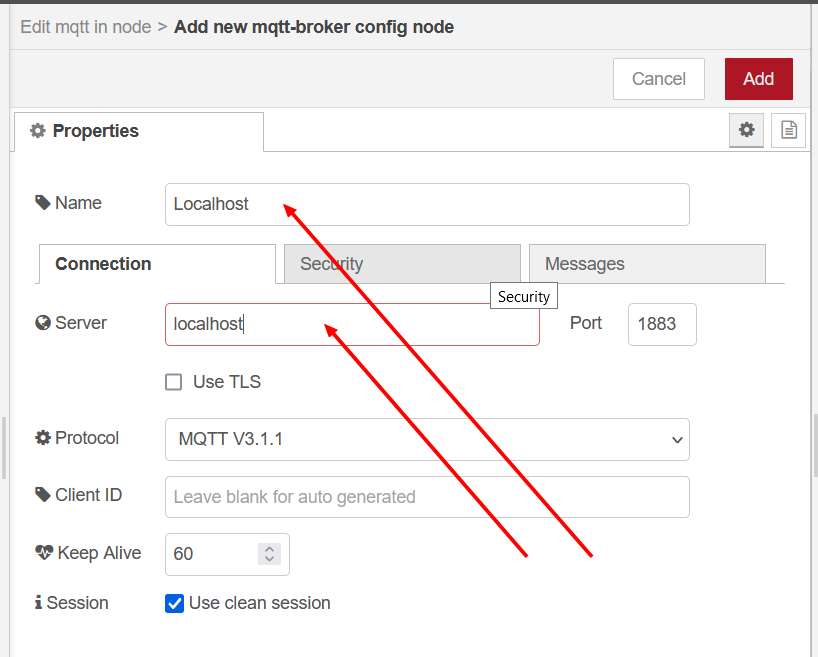
Give the node a name and put "localhost" as the server.
Click Add.
Put "dev/test" in the topic field.
Click Done.
Click Deploy.
Does the node status show "Connected"?
---
### Author:  [@boyvip\_123](https://discourse.nodered.org/u/boyvip_123)
#### Post date: [20 July 2021 01:09 UTC](https://discourse.nodered.org/t/mqtt-node-show-disconnected-status/48594/12 "2021-07-20T01:09:12Z")

---
### Author:  [@boyvip\_123](https://discourse.nodered.org/u/boyvip_123)
#### Post date: [20 July 2021 01:19 UTC](https://discourse.nodered.org/t/mqtt-node-show-disconnected-status/48594/13 "2021-07-20T01:19:55Z")

---
### Author:  [@boyvip\_123](https://discourse.nodered.org/u/boyvip_123)
#### Post date: [20 July 2021 01:23 UTC](https://discourse.nodered.org/t/mqtt-node-show-disconnected-status/48594/14 "2021-07-20T01:23:28Z")
After I click deploy, MQTT node show disconnected. For 10 seconds later, MQTT node show connecting.

---
### Author:  [@craigcurtin](https://discourse.nodered.org/u/craigcurtin)
#### Post date: [20 July 2021 02:07 UTC](https://discourse.nodered.org/t/mqtt-node-show-disconnected-status/48594/15 "2021-07-20T02:07:18Z")
If you look at the screenshots that you posted it explicity says that Mosquitto will only accept local connections because you have not created a configuration file.
Suggest you do that as per the mosquitto doc and then restart Mosquitto
Craig
---
### Author:  [@MecatronicaMADE](https://discourse.nodered.org/u/MecatronicaMADE)
#### Post date: [20 July 2021 02:08 UTC](https://discourse.nodered.org/t/mqtt-node-show-disconnected-status/48594/16 "2021-07-20T02:08:01Z")
it looks good, are the BROKER MQTT and Node RED working at the same Device (RPi)?
if your answer is yes; you could try put in Server property -\> "localhost".

are the BROKER MQTT and NodeRED working at the same Network?
you could try install and test the MQTT connection with [MQTT Explorer](http://mqtt-explorer.com/) or [MQTT.fx](https://mqttfx.jensd.de/)
---
### Author:  [@boyvip\_123](https://discourse.nodered.org/u/boyvip_123)
#### Post date: [20 July 2021 02:45 UTC](https://discourse.nodered.org/t/mqtt-node-show-disconnected-status/48594/17 "2021-07-20T02:45:04Z")
Yes. The BROKER MQTT and Node RED are working at the same Device (RPi).
---
### Author:  [@boyvip\_123](https://discourse.nodered.org/u/boyvip_123)
#### Post date: [20 July 2021 02:58 UTC](https://discourse.nodered.org/t/mqtt-node-show-disconnected-status/48594/18 "2021-07-20T02:58:45Z")
Please show me how to add configuration file.
---
### Author:  [@craigcurtin](https://discourse.nodered.org/u/craigcurtin)
#### Post date: [20 July 2021 03:02 UTC](https://discourse.nodered.org/t/mqtt-node-show-disconnected-status/48594/19 "2021-07-20T03:02:11Z")
google is your friend
Mosquitto v2 config file linux will get you there
---
### Author:  [@Colin](https://discourse.nodered.org/u/Colin)
#### Post date: [20 July 2021 07:54 UTC](https://discourse.nodered.org/t/mqtt-node-show-disconnected-status/48594/20 "2021-07-20T07:54:07Z")
In fact it isn't necessarily that obvious what is the best way to do this by searching for it, some of the links that show up give poor advice.
There are two ways of configuring mosquitto on Linux. One is to modify the supplied default config file (in a pi that will be /etc/mosquitto/mosquitto.conf). This is not the best way of doing it because if you update mosquitto that file will get overwritten. A better way is to add a config override file in the folder /etc/mosquitto/conf.d, which overrides and adds to settings in the default file. That file will not get overwritten on an upgrade. The file can be called anything.conf. So for example to solve this particular problem you could create a file /etc/mosquitto/conf.d/mossy.conf containing
```auto
# Since mosquitto 2.0 have to specify listener and allow anonymous
listener 1883
allow_anonymous true
```
[Next page](https://discourse.nodered.org/t/mqtt-node-show-disconnected-status/48594.md?page=2)