# Msg.status.text (object) to csv (via payload?)
**URL:** https://discourse.nodered.org/t/msg-status-text-object-to-csv-via-payload/31376
**Category:** General
**Created:** [10 August 2020 08:59 UTC](https://discourse.nodered.org/t/msg-status-text-object-to-csv-via-payload/31376 "2020-08-10T08:59:27Z")
**Posts on this page:** 10
**Page:** 1
### Author:  [@ArneR](https://discourse.nodered.org/u/ArneR)
#### Post date: [10 August 2020 08:59 UTC](https://discourse.nodered.org/t/msg-status-text-object-to-csv-via-payload/31376/1 "2020-08-10T08:59:27Z")
Dear
I am a beginner as far as Node-Red is concerned.
Currently I have a msg.object, from which I would like to get the text (msg.status.text).

The photo shows the text as "offline" in this case. The text is variable. I have not yet been able to write a working function.
I want to display this text as a payload value (msg.payload.melding) to be written to a csv file afterwards.
Or are there better methods to make this happen?
**Info:** flow of the status messages to csv.

Thank you very much for your time and help.
---
### Author:  [@zenofmud](https://discourse.nodered.org/u/zenofmud)
#### Post date: [10 August 2020 09:08 UTC](https://discourse.nodered.org/t/msg-status-text-object-to-csv-via-payload/31376/2 "2020-08-10T09:08:17Z")
Hi Arne, welcome to the forum!
The first ting I would suggest is you read the documentation on working with messages and watch the video: [https://nodered.org/docs/user-guide/messages](https://nodered.org/docs/user-guide/messages)
and you can look at the [cookbook](https://cookbook.nodered.org) for an example. Once you do that if you still have a question, I (or someone else) will be glad to help.
---
### Author:  [@ArneR](https://discourse.nodered.org/u/ArneR)
#### Post date: [10 August 2020 09:48 UTC](https://discourse.nodered.org/t/msg-status-text-object-to-csv-via-payload/31376/3 "2020-08-10T09:48:11Z")
Thank you for your fast reply @zenofmud.
I think I need to use the "change-node"?

I can add a payload, but I can't link it with the variable.
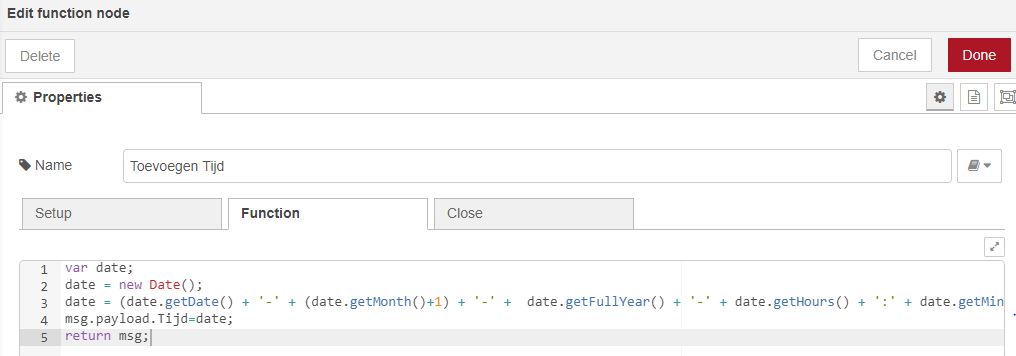
Earlier I used a function to associate the time with a particular message. But I still can't link a variable
---
### Author:  [@Colin](https://discourse.nodered.org/u/Colin)
#### Post date: [10 August 2020 10:20 UTC](https://discourse.nodered.org/t/msg-status-text-object-to-csv-via-payload/31376/4 "2020-08-10T10:20:58Z")
Did you realise that the change node you have shown to overwrite the current value in msg.status.txt to the value in msg.payload.melding? It sets msg.status.txt. I wonder whether you wanted those the other way round. I tend to use Move rather than Set as Set can be confusing. So perhaps you want Move msg.status.text To msg.payload.melding.
If that doesn't work use a Debug node set to Show Complete Message to show us what is going into the Change node, another showing what is coming out. Give them names so they are identifiable in the debug, and post a screenshot of the debug output here.
---
### Author:  [@zenofmud](https://discourse.nodered.org/u/zenofmud)
#### Post date: [10 August 2020 11:59 UTC](https://discourse.nodered.org/t/msg-status-text-object-to-csv-via-payload/31376/5 "2020-08-10T11:59:01Z")
When running into an issue like this, I would put a `debug` node (set to display the complete msg object) on the output of the node feeding the `change` node and then anotehr one on the output of the `change` node to see what the msg going in and msg coming out look like.
That should give you information to discover the issue.
---
### Author:  [@ArneR](https://discourse.nodered.org/u/ArneR)
#### Post date: [10 August 2020 12:11 UTC](https://discourse.nodered.org/t/msg-status-text-object-to-csv-via-payload/31376/6 "2020-08-10T12:11:05Z")
Hey
In the meantime I have achieved what I was looking for. I am convinced that this is certainly not the most optimal solution, but it works.
Maybe I need to reformulate my problem. I didn't know how to add "msg.status.text" to a csv file.
I was still able to achieve this by:
1. Add msg.payload.Status (change node: set)
2. msg.payload.Status = msg.status.text; [see picture in the first post]] (function)
Flow:

1. Change-node:

2. Function:
Note that I use different names than in previous posts.
If this was the correct method, you can put a lock on it 🙂
I want to learn how to work better with Node-red, suggestions are certainly welcome. I've been working with the tool for a few days now. My programming background is very limited, with the exception of TIA Portal to basic HTML and basic Java.
Just a quick question, presumably I have to open a new topic for this .. But is it possible to write data to an exact cell in Excel? I try to generate a report in which I would provide the layout in Excel and then send the desired data to the correct cells. Suggestions? I have not yet found suitable information about this.
Thanks!
---
### Author:  [@Colin](https://discourse.nodered.org/u/Colin)
#### Post date: [10 August 2020 12:45 UTC](https://discourse.nodered.org/t/msg-status-text-object-to-csv-via-payload/31376/7 "2020-08-10T12:45:04Z")
What do you think the Change node is doing, and what do the first two lines of the function do?
---
### Author:  [@ArneR](https://discourse.nodered.org/u/ArneR)
#### Post date: [10 August 2020 12:56 UTC](https://discourse.nodered.org/t/msg-status-text-object-to-csv-via-payload/31376/8 "2020-08-10T12:56:07Z")
The first 2 lines in the function write the msg.status.text to msg.payload.Status
In my CSV I use the following columns:
"Time, oiSnelheidBand, roActueleHoek, roEffectieveTempWater, roLevelWaterbad, Status"
The values are from an S7-1500 PLC, with the exception of Status and Tijd.
If I don't put a Change-note, where I create msg.payload.Status, it looks like my function cannot create the msg.payload.Status. So by first creating msg.payload.Status via the change note, the function can fill it in.
Is it possible to write 'msg.status.text' in the CSV without placing it first in msg.payload.Status? Most likely yes, but I couldn't ..
---
### Author:  [@Colin](https://discourse.nodered.org/u/Colin)
#### Post date: [10 August 2020 13:16 UTC](https://discourse.nodered.org/t/msg-status-text-object-to-csv-via-payload/31376/9 "2020-08-10T13:16:04Z")
That is because msg.payload does not exist. Remove the Change node and in the function node use, instead of the first two lines
`msg.payload = {Status: msg.status.text}`
That will create msg.payload as an object and set the Status value
---
### Author:  [@system](https://discourse.nodered.org/u/system)
#### Post date: [24 August 2020 13:16 UTC](https://discourse.nodered.org/t/msg-status-text-object-to-csv-via-payload/31376/10 "2020-08-24T13:16:14Z")
This topic was automatically closed 14 days after the last reply. New replies are no longer allowed.