# Multiple Charts in One Node, but only one value in Legend ?!
**URL:** https://discourse.nodered.org/t/multiple-charts-in-one-node-but-only-one-value-in-legend/99164
**Category:** Dashboard
**Tags:** dashboard-2
**Created:** [26 September 2025 06:03 UTC](https://discourse.nodered.org/t/multiple-charts-in-one-node-but-only-one-value-in-legend/99164 "2025-09-26T06:03:22Z")
**Posts on this page:** 8
**Page:** 1
### Author:  [@Snotmann](https://discourse.nodered.org/u/Snotmann)
#### Post date: [26 September 2025 06:03 UTC](https://discourse.nodered.org/t/multiple-charts-in-one-node-but-only-one-value-in-legend/99164/1 "2025-09-26T06:03:22Z")
Hey together,
i got the issue that i got a chart with different temperatures. All data came in the same time, but i can only see one value on mouseover ...
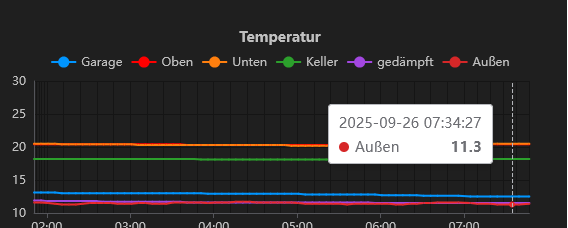
Anyone knows how to fix that ?
Regards,
Snot
---
### Author:  [@Colin](https://discourse.nodered.org/u/Colin)
#### Post date: [26 September 2025 07:05 UTC](https://discourse.nodered.org/t/multiple-charts-in-one-node-but-only-one-value-in-legend/99164/2 "2025-09-26T07:05:28Z")
Can you increase the point size on the chart so the samples can be seen? That may help to show what is happening.
---
### Author:  [@Steve-Mcl](https://discourse.nodered.org/u/Steve-Mcl)
#### Post date: [26 September 2025 07:31 UTC](https://discourse.nodered.org/t/multiple-charts-in-one-node-but-only-one-value-in-legend/99164/3 "2025-09-26T07:31:51Z")
> [@Snotmann](#):
>
> All data came in the same time
If the messages arrive individually, they do **not** arrive at the same time no matter how close together they are. Even 1ms difference will create what you see (see chart 1 in demo below)
However, if you _round_ the time to nearest reasonable value (e.g. to nearest 100ms) then you can _align_ the time stamps (see chart 2).

This is the function I used to quantize the time
```js
const now = Date.now()
const nowAlignedTo100ms = Math.round(now / 100) * 100
msg.payload = {x: nowAlignedTo100ms, y: msg.payload}
return msg
```
And you need to set the chart x/y options

That all said, there is an option in echarts to make the tooltip gather _close\_by_ values but that would be a future iteration (if requested in a FR issue)
---
### Author:  [@joepavitt](https://discourse.nodered.org/u/joepavitt)
#### Post date: [26 September 2025 08:08 UTC](https://discourse.nodered.org/t/multiple-charts-in-one-node-but-only-one-value-in-legend/99164/4 "2025-09-26T08:08:18Z")
> [@Steve-Mcl](#):
>
> That all said, there is an option in echarts to make the tooltip gather _close\_by_ values but that would be a future iteration (if requested in a FR issue)
he challenge here I believe would be multiple hits per line, or lines that are very offset would still catch
---
### Author:  [@Snotmann](https://discourse.nodered.org/u/Snotmann)
#### Post date: [26 September 2025 08:16 UTC](https://discourse.nodered.org/t/multiple-charts-in-one-node-but-only-one-value-in-legend/99164/5 "2025-09-26T08:16:55Z")
This is crazy complicated only to get the legend correct with all values ... even i choose hh:mm as factor to place data should be enough to get all values arrived in this timeslot (1 minute)
---
### Author:  [@bakman2](https://discourse.nodered.org/u/bakman2)
#### Post date: [26 September 2025 08:40 UTC](https://discourse.nodered.org/t/multiple-charts-in-one-node-but-only-one-value-in-legend/99164/6 "2025-09-26T08:40:22Z")
> [@Snotmann](#):
>
> even i choose hh:mm
I believe that is only the visual representation, the mapped data are the source timestamps, if you align those you may have more success.
---
### Author:  [@Steve-Mcl](https://discourse.nodered.org/u/Steve-Mcl)
#### Post date: [26 September 2025 09:28 UTC](https://discourse.nodered.org/t/multiple-charts-in-one-node-but-only-one-value-in-legend/99164/7 "2025-09-26T09:28:05Z")
> [@Snotmann](#):
>
> This is crazy complicated only to get the legend correct with all values
The tooltip is correct, your data is not 😉
> [@Snotmann](#):
>
> even i choose hh:mm as factor to place data should be enough to get all values arrived in this timeslot (1 minute)
Thats not things work. (not saying is shouldn't/couldn't) as @bakman2 points out, the chart is visually representing exactly what you put in.
---
### Author:  [@system](https://discourse.nodered.org/u/system)
#### Post date: [10 October 2025 09:28 UTC](https://discourse.nodered.org/t/multiple-charts-in-one-node-but-only-one-value-in-legend/99164/8 "2025-10-10T09:28:31Z")
This topic was automatically closed 14 days after the last reply. New replies are no longer allowed.