# Node-red-contrib-fs doesn't scan on subdirectories
**URL:** https://discourse.nodered.org/t/node-red-contrib-fs-doesnt-scan-on-subdirectories/99025
**Category:** General
**Tags:** node-red-contrib-fs
**Created:** [12 September 2025 11:11 UTC](https://discourse.nodered.org/t/node-red-contrib-fs-doesnt-scan-on-subdirectories/99025 "2025-09-12T11:11:38Z")
**Posts on this page:** 10
**Page:** 1
### Author:  [@GiovanniG](https://discourse.nodered.org/u/GiovanniG)
#### Post date: [12 September 2025 11:11 UTC](https://discourse.nodered.org/t/node-red-contrib-fs-doesnt-scan-on-subdirectories/99025/1 "2025-09-12T11:11:38Z")
Hi, I’m using NR on Win64, I specified an absolute path where I have other folders
there is a way to have the module look for files also inside subdirs?
Thank you
---
### Author:  [@Paul-Reed](https://discourse.nodered.org/u/Paul-Reed)
#### Post date: [12 September 2025 11:55 UTC](https://discourse.nodered.org/t/node-red-contrib-fs-doesnt-scan-on-subdirectories/99025/2 "2025-09-12T11:55:39Z")
Sounds like a question for @TotallyInformation
---
### Author:  [@TotallyInformation](https://discourse.nodered.org/u/TotallyInformation)
#### Post date: [12 September 2025 16:55 UTC](https://discourse.nodered.org/t/node-red-contrib-fs-doesnt-scan-on-subdirectories/99025/3 "2025-09-12T16:55:36Z")
Thanks Paul.
Wow, been quite a while since I even looked at that Node. 🙂
The file-lister node however, should indeed list files in sub-folders.
Note though that you have to change the Max. search depth setting to something other than zero in order to do that.
If you share your settings, I can probably help further.
---
### Author:  [@GiovanniG](https://discourse.nodered.org/u/GiovanniG)
#### Post date: [12 September 2025 17:07 UTC](https://discourse.nodered.org/t/node-red-contrib-fs-doesnt-scan-on-subdirectories/99025/4 "2025-09-12T17:07:22Z")
Hi mates, thanks for help, I even put there 1000, but it recognizes only files in the main folder, if there are. It doesn’t look on the subfolders, very strange. I’ve forced all security descriptors to all subdirectories, I’ve checked the file names and they are just latin letters.
I would be glad if you do a test yourself, using windows and lates node.js, maybe somwthing changed with recent versions. Thank you!
---
### Author:  [@TotallyInformation](https://discourse.nodered.org/u/TotallyInformation)
#### Post date: [12 September 2025 18:32 UTC](https://discourse.nodered.org/t/node-red-contrib-fs-doesnt-scan-on-subdirectories/99025/5 "2025-09-12T18:32:37Z")
Please share a screenshot of your settings. I will also test.
---
### Author:  [@TotallyInformation](https://discourse.nodered.org/u/TotallyInformation)
#### Post date: [12 September 2025 18:39 UTC](https://discourse.nodered.org/t/node-red-contrib-fs-doesnt-scan-on-subdirectories/99025/6 "2025-09-12T18:39:27Z")
I used these settngs:
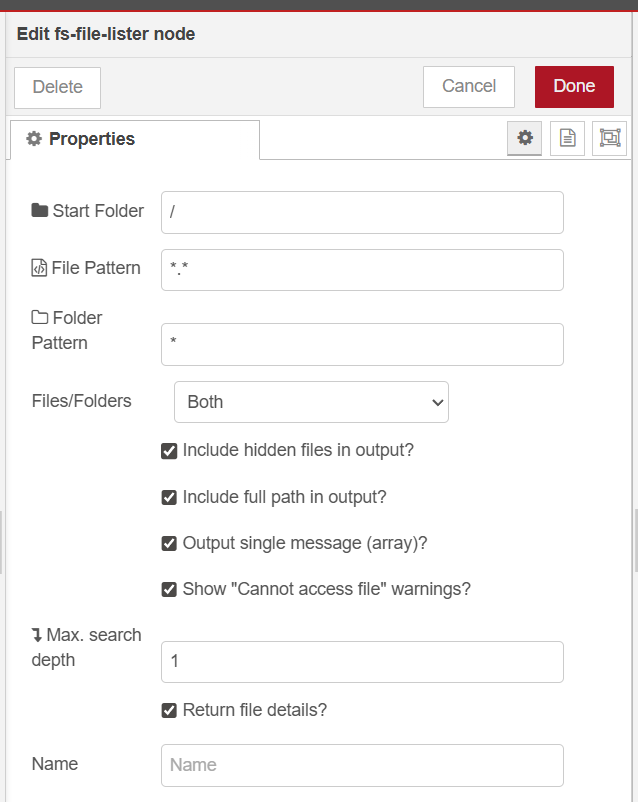
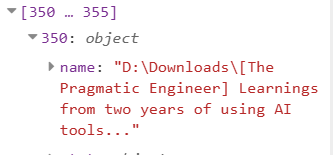
And got a LOT of entries back including from sub-folders:


---
### Author:  [@GiovanniG](https://discourse.nodered.org/u/GiovanniG)
#### Post date: [13 September 2025 12:26 UTC](https://discourse.nodered.org/t/node-red-contrib-fs-doesnt-scan-on-subdirectories/99025/7 "2025-09-13T12:26:42Z")
Thank you mate, the trick is to put \* on Folder pattern instead of \
It would be lovely to add a note on it as “use \* to include all subfolders”, or let user specify a path and add down an option “search also in all subfolders”.
Thank you for your kind support!
---
### Author:  [@ThingsTinkerer](https://discourse.nodered.org/u/ThingsTinkerer)
#### Post date: [13 September 2025 18:16 UTC](https://discourse.nodered.org/t/node-red-contrib-fs-doesnt-scan-on-subdirectories/99025/8 "2025-09-13T18:16:32Z")
Isn’t that just standard glob?
---
### Author:  [@TotallyInformation](https://discourse.nodered.org/u/TotallyInformation)
#### Post date: [13 September 2025 21:12 UTC](https://discourse.nodered.org/t/node-red-contrib-fs-doesnt-scan-on-subdirectories/99025/9 "2025-09-13T21:12:50Z")
Yes, it uses glob under the covers. 😃
---
### Author:  [@system](https://discourse.nodered.org/u/system)
#### Post date: [27 September 2025 21:12 UTC](https://discourse.nodered.org/t/node-red-contrib-fs-doesnt-scan-on-subdirectories/99025/10 "2025-09-27T21:12:55Z")
This topic was automatically closed 14 days after the last reply. New replies are no longer allowed.