# Node-red-dashboard-2-table-tabulator help
**URL:** https://discourse.nodered.org/t/node-red-dashboard-2-table-tabulator-help/98892
**Category:** Dashboard
**Tags:** dashboard-2
**Created:** [30 August 2025 17:01 UTC](https://discourse.nodered.org/t/node-red-dashboard-2-table-tabulator-help/98892 "2025-08-30T17:01:30Z")
**Posts on this page:** 4
**Page:** 1
### Author:  [@Jean-Rem](https://discourse.nodered.org/u/Jean-Rem)
#### Post date: [30 August 2025 17:01 UTC](https://discourse.nodered.org/t/node-red-dashboard-2-table-tabulator-help/98892/1 "2025-08-30T17:01:30Z")
Hello,
I search to make some changes in the appearence of the ui-tabulator table I work with. As you can see below a get filters in some columns of my table. This message is comming from the table configuration "headerFilterPlaceholder": "Filter..." .
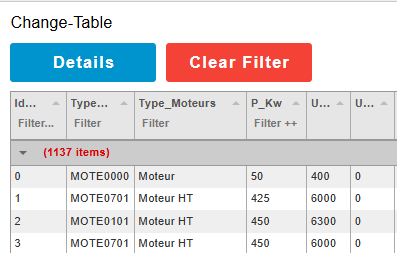

However, I would like the border that appears when you enter a filter value to be visible at all times. Or, visible as long as the filter is applied to a dedicated column. Could someone tell me how to achieve this?
Regards
Jean-Rem
---
### Author:  [@omrid](https://discourse.nodered.org/u/omrid)
#### Post date: [30 August 2025 17:21 UTC](https://discourse.nodered.org/t/node-red-dashboard-2-table-tabulator-help/98892/2 "2025-08-30T17:21:59Z")
It's a tabulator behavior, transparent to the node.
You can add CSS (e.g. 'border') which overrides the built-in tabulator class `tabulator-header-filter`.
```auto
.tabulator-header-filter {
border: 1px solid blue;
}
```

---
### Author:  [@Jean-Rem](https://discourse.nodered.org/u/Jean-Rem)
#### Post date: [1 September 2025 16:13 UTC](https://discourse.nodered.org/t/node-red-dashboard-2-table-tabulator-help/98892/3 "2025-09-01T16:13:17Z")
Hello,
Thanks for the answer. Here is the code I use in my template.

And here is the result:

Regards
Jean-Rem
---
### Author:  [@system](https://discourse.nodered.org/u/system)
#### Post date: [15 September 2025 16:14 UTC](https://discourse.nodered.org/t/node-red-dashboard-2-table-tabulator-help/98892/4 "2025-09-15T16:14:11Z")
This topic was automatically closed 14 days after the last reply. New replies are no longer allowed.