# Node red how to change the nodered dashboard layout fonts
**URL:** https://discourse.nodered.org/t/node-red-how-to-change-the-nodered-dashboard-layout-fonts/9178
**Category:** General
**Created:** [19 March 2019 13:11 UTC](https://discourse.nodered.org/t/node-red-how-to-change-the-nodered-dashboard-layout-fonts/9178 "2019-03-19T13:11:38Z")
**Posts on this page:** 2
**Page:** 1
### Author:  [@VIKRAMAS](https://discourse.nodered.org/u/VIKRAMAS)
#### Post date: [19 March 2019 13:11 UTC](https://discourse.nodered.org/t/node-red-how-to-change-the-nodered-dashboard-layout-fonts/9178/1 "2019-03-19T13:11:38Z")
In nodered I have used the theme-tomorrow which I have got in node red forum. But in nodered flow editor having dashboard layout font color I have to change. In the below snap I have shared it has the property `--nr-db-dark-text:#444` it is working but which file I have to modify. I tried to add the style `:root { --nr-db-dark-text: #444; --nr-db-light-text: #eeeeee; --nr-db-disabled-text: #999; }` in theme-tomorrow CSS file but it is not overriding.
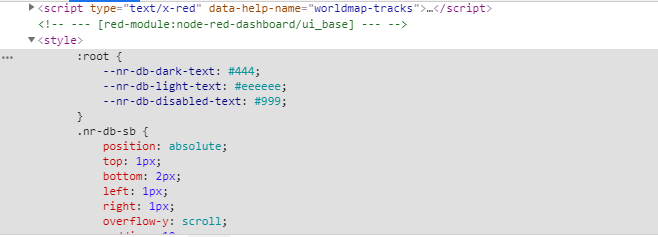
---
### Author:  [@VIKRAMAS](https://discourse.nodered.org/u/VIKRAMAS)
#### Post date: [19 March 2019 14:05 UTC](https://discourse.nodered.org/t/node-red-how-to-change-the-nodered-dashboard-layout-fonts/9178/2 "2019-03-19T14:05:14Z")
By changing ui\_base.html I configured the above css properties.