# Node-Red IR Receiver on Raspberry Pi 3
**URL:** https://discourse.nodered.org/t/node-red-ir-receiver-on-raspberry-pi-3/20691
**Category:** General
**Created:** [21 January 2020 17:16 UTC](https://discourse.nodered.org/t/node-red-ir-receiver-on-raspberry-pi-3/20691 "2020-01-21T17:16:40Z")
**Posts on this page:** 13
**Page:** 1
### Author:  [@emerichrv](https://discourse.nodered.org/u/emerichrv)
#### Post date: [21 January 2020 17:16 UTC](https://discourse.nodered.org/t/node-red-ir-receiver-on-raspberry-pi-3/20691/1 "2020-01-21T17:16:40Z")
Hello,
I'm trying to make a node-red program wich switch a raspberry pi GPIO when a defined ir code is received.
It's really easy to switch GPIO with the RPI GPIO OUT node, but how can I receive IR codes ?
Best Regards,
---
### Author:  [@cymplecy](https://discourse.nodered.org/u/cymplecy)
#### Post date: [21 January 2020 18:27 UTC](https://discourse.nodered.org/t/node-red-ir-receiver-on-raspberry-pi-3/20691/2 "2020-01-21T18:27:25Z")
I setup a PiZero a few years ago to receive/decode IR signals using LIRC and then sending them on via MQTT to other devices.
It was quite a bit of trouble to goto as LIRC is not a friendly project but did work evetunally.
The other problem is that LIRC has been neglected in recent years and I've seen lots of posts on the PI forum about problems running with Stretch and Buster (mine was setup back in the Jessie days)
They may all be fixed - but just warning you
---
### Author:  [@kuema](https://discourse.nodered.org/u/kuema)
#### Post date: [21 January 2020 18:49 UTC](https://discourse.nodered.org/t/node-red-ir-receiver-on-raspberry-pi-3/20691/3 "2020-01-21T18:49:23Z")
I setup LIRC on my Pi. The get the button events in Node-RED, I use netcat to get the data from LIRC's unix socket. Just issue `nc -U /var/run/lirc/lircd` from an exec node (spawn mode) and parse the data from stdout.
The only tricky part was to get LIRC up and running with my remote. Lots of hours spent there 😣
---
### Author:  [@cymplecy](https://discourse.nodered.org/u/cymplecy)
#### Post date: [21 January 2020 19:09 UTC](https://discourse.nodered.org/t/node-red-ir-receiver-on-raspberry-pi-3/20691/4 "2020-01-21T19:09:44Z")
> [@kuema](#):
>
> I use netcat to get the data
That's cool 🙂

My present setup uses the LIRC irexec method and then I listen out for stuff coming from it in a python prog (copy and pasted from Google - never really understood what I was doing!)
I might switch to your method 🙂
---
### Author:  [@kuema](https://discourse.nodered.org/u/kuema)
#### Post date: [22 January 2020 05:23 UTC](https://discourse.nodered.org/t/node-red-ir-receiver-on-raspberry-pi-3/20691/5 "2020-01-22T05:23:31Z")
If I remember correctly, it is the same thing that `irw` does, a tool that comes with LIRC.
Originally I wanted to get rid of the exec node and use one of Node-RED's "network in" nodes, which I _thought_ was able to handle Unix sockets as well. But none of them did... or I missed something. 🤓 I used netcat for testing, so I kept using that in the exec node instead of `irw`.
---
### Author:  [@cymplecy](https://discourse.nodered.org/u/cymplecy)
#### Post date: [22 January 2020 10:43 UTC](https://discourse.nodered.org/t/node-red-ir-receiver-on-raspberry-pi-3/20691/6 "2020-01-22T10:43:23Z")
Switched to using irw 🙂
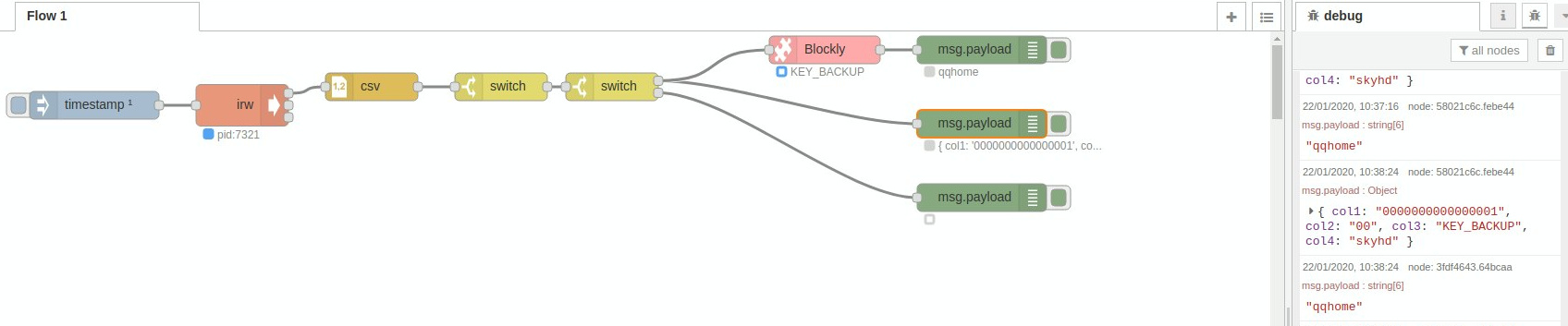
I'm using this to transcode from old Sky remote controller to SkyQ
Sorry to @emerichrv for high-jacking your thread but hopefully will prove useful if you can get LIRC working on the latest Pi OS versions
---
### Author:  [@krambriw](https://discourse.nodered.org/u/krambriw)
#### Post date: [23 January 2020 08:20 UTC](https://discourse.nodered.org/t/node-red-ir-receiver-on-raspberry-pi-3/20691/7 "2020-01-23T08:20:17Z")
I'm using the lirc\_node package from here: [https://github.com/alexbain/lirc\_node](https://github.com/alexbain/lirc_node)
It is working fine but as mentioned, biggest challenge is to get a correct lirc config file that supports your remotes. As receiver I have a USB-UIRT device
If you decide to try out you need also to install lirc
In NR settings.js I have:
`lirc_node:require('/home/pi/lirc_node'),`
My test flow below:

```auto
[{"id":"24ac8a19.af69e6","type":"function","z":"6f8c5e85.2ba45","name":"IR receiver","func":"flow.set('lirc_node', global.get('lirc_node'));\nflow.get('lirc_node').init();\n\n// Listening for commands\nvar listenerId = flow.get('lirc_node').addListener(function(data) {\n node.warn(\"Received IR keypress '\" + data.key + \"'' from remote '\" + data.remote +\"'\");\n});\n","outputs":"0","noerr":0,"x":510,"y":80,"wires":[]},{"id":"51d87d9f.9328e4","type":"inject","z":"6f8c5e85.2ba45","name":"","topic":"","payload":"Init","payloadType":"str","repeat":"","crontab":"","once":false,"onceDelay":"","x":110,"y":80,"wires":[["24ac8a19.af69e6"]]},{"id":"fa089aac.5df178","type":"function","z":"6f8c5e85.2ba45","name":"IR transmitter","func":"var command = msg.payload.split(',');\n\nflow.get('lirc_node').irsend.send_once(command[0], command[1], function() {\n node.warn(\"Sent command!\");\n});\n\n//return msg;\n","outputs":1,"noerr":0,"x":520,"y":160,"wires":[["c485f3fa.13c78"]]},{"id":"c485f3fa.13c78","type":"debug","z":"6f8c5e85.2ba45","name":"","active":true,"console":"false","complete":"false","x":790,"y":160,"wires":[]},{"id":"be5d5816.e75dc8","type":"inject","z":"6f8c5e85.2ba45","name":"","topic":"","payload":"SAMSUNG,KEY_VOLUMEUP","payloadType":"str","repeat":"","crontab":"","once":false,"x":180,"y":160,"wires":[["fa089aac.5df178"]]},{"id":"6aa42621.9f8378","type":"inject","z":"6f8c5e85.2ba45","name":"","topic":"","payload":"SAMSUNG,KEY_VOLUMEDOWN","payloadType":"str","repeat":"","crontab":"","once":false,"x":190,"y":210,"wires":[["fa089aac.5df178"]]},{"id":"402cc09e.0d246","type":"comment","z":"6f8c5e85.2ba45","name":"Demo & test using Lirc with a USB-UIRT","info":"","x":220,"y":40,"wires":[]}]
```
---
### Author:  [@kuema](https://discourse.nodered.org/u/kuema)
#### Post date: [23 January 2020 09:11 UTC](https://discourse.nodered.org/t/node-red-ir-receiver-on-raspberry-pi-3/20691/8 "2020-01-23T09:11:48Z")
I had a quick look at the code. Seems like the [receive function](https://github.com/alexbain/lirc_node/blob/master/lib/irreceive.js) is just spawning an `irw` process as well.
So as long as you just need to react on IR events, everything can be achieved by using Node-RED core nodes without any further dependencies. 🙂
---
### Author:  [@cymplecy](https://discourse.nodered.org/u/cymplecy)
#### Post date: [23 January 2020 20:32 UTC](https://discourse.nodered.org/t/node-red-ir-receiver-on-raspberry-pi-3/20691/9 "2020-01-23T20:32:02Z")
I've just tried setting up LIRC on a Pi using Buster
A. I haven't managed to get it working
B. Even if I did, the experts say it won't let me receive and transmit at the same time ☹
Either LIRC needs to be fixed or we need another way of rx and tx IR codes
---
### Author:  [@cymplecy](https://discourse.nodered.org/u/cymplecy)
#### Post date: [24 January 2020 18:15 UTC](https://discourse.nodered.org/t/node-red-ir-receiver-on-raspberry-pi-3/20691/10 "2020-01-24T18:15:03Z")
I heard about a thing called ir-keytable so I decided to give that a go
Although it installed on the SD card I was using to test out LIRC on Buster - it didn't work
So after a nights sleep, I started with a fresh Buster install and followed these instructions and just stopped after step 2
> **[IR Remote Control Support on Raspbian Buster - JustBoom • Pi Supply Maker Zone](https://learn.pi-supply.com/make/ir-remote-control-support-on-raspbian-buster-justboom/)**
>
> IR Remote Control Support on Raspbian Buster – JustBoom This guide will show you how to get your IR remote control working with the Raspberry Pi using the latest Raspbian Buster OS. Since the release of Buster there have been some significant changes...
And yippee - I can see it receiving IR codes from both my samsung TV remote and my old SkyHD one
So I think if you just run
`ir-keytable -t`
in an exec node in spawn mode (like irw above) then just need to parse the messages to be able to get Node-RED to respond to ir events 🙂
---
### Author:  [@kuema](https://discourse.nodered.org/u/kuema)
#### Post date: [25 January 2020 08:32 UTC](https://discourse.nodered.org/t/node-red-ir-receiver-on-raspberry-pi-3/20691/11 "2020-01-25T08:32:13Z")
> [@cymplecy](#):
>
> I heard about a thing called ir-keytable so I decided to give that a go
I didn't know that either. It's always nice to have multiple working solutions available, thanks. 🕶
---
### Author:  [@emerichrv](https://discourse.nodered.org/u/emerichrv)
#### Post date: [31 January 2020 14:06 UTC](https://discourse.nodered.org/t/node-red-ir-receiver-on-raspberry-pi-3/20691/12 "2020-01-31T14:06:17Z")
Thanks for this solution, how did you set your exec node ??
When I use `ir-keytable -t` in a Terminal I see my IR codes, but when I use the exec node I see nothing...
My flow :
```auto
[{"id":"430454a6.defe8c","type":"tab","label":"IR","disabled":false,"info":""},{"id":"48fded4a.dad1e4","type":"inject","z":"430454a6.defe8c","name":"","topic":"","payload":"ir-keytable -t","payloadType":"env","repeat":"","crontab":"","once":true,"onceDelay":"","x":190,"y":140,"wires":[["13fc799d.c346f6"]]},{"id":"b43e34c4.b9bb48","type":"debug","z":"430454a6.defe8c","name":"","active":true,"tosidebar":true,"console":false,"tostatus":false,"complete":"true","targetType":"full","x":430,"y":120,"wires":[]},{"id":"13fc799d.c346f6","type":"exec","z":"430454a6.defe8c","command":"ir-keytable -t","addpay":true,"append":"","useSpawn":"true","timer":"","oldrc":false,"name":"","x":200,"y":280,"wires":[["b43e34c4.b9bb48"],["2d666623.32805a"],["da398730.80a918"]]},{"id":"2d666623.32805a","type":"debug","z":"430454a6.defe8c","name":"","active":true,"tosidebar":true,"console":false,"tostatus":false,"complete":"true","targetType":"full","x":430,"y":260,"wires":[]},{"id":"da398730.80a918","type":"debug","z":"430454a6.defe8c","name":"","active":true,"tosidebar":true,"console":false,"tostatus":false,"complete":"true","targetType":"full","x":450,"y":360,"wires":[]}]
```
---
### Author:  [@kuema](https://discourse.nodered.org/u/kuema)
#### Post date: [31 January 2020 15:14 UTC](https://discourse.nodered.org/t/node-red-ir-receiver-on-raspberry-pi-3/20691/13 "2020-01-31T15:14:51Z")
> [@emerichrv](#):
>
> Thanks for this solution, how did you set your exec node ??
It's set to "spawn mode", append msg.payload is off. You get one message per line on the output.