# Nodered flows.json comparator
**URL:** https://discourse.nodered.org/t/nodered-flows-json-comparator/64208
**Category:** General
**Created:** [21 June 2022 13:20 UTC](https://discourse.nodered.org/t/nodered-flows-json-comparator/64208 "2022-06-21T13:20:34Z")
**Posts on this page:** 6
**Page:** 1
### Author:  [@KarolisL](https://discourse.nodered.org/u/KarolisL)
#### Post date: [21 June 2022 13:20 UTC](https://discourse.nodered.org/t/nodered-flows-json-comparator/64208/1 "2022-06-21T13:20:34Z")
Is there a way to compare flows.json by removing "x": and "y": coordinates?
Nodes might be moved in development and it generates unnecessary differences in comparator.
Right now I bookmark the lines with

and then remove those lines as it is described in here
> **[How to remove lines containing specific text in Notepad++ using the Bookmarks...](https://www.technical-recipes.com/2018/how-to-remove-lines-containing-specific-text-in-notepad-using-the-bookmarks-method/)**
>
> How to use Notepad++ to remove all lines containing a specific text. First install Notepad++ if you have not already done so, given that it really is a powerful piece of software: https://notepad-plus-plus.org/download/ Now we can demonstrate an...
Then I use Notepad++ Compare plugin to find differences.
But in the end I have to come back and align flows of .json with removed coordinates and original one
Is there a way to run a comparison with conditions?
---
### Author:  [@HaroldPetersInskipp](https://discourse.nodered.org/u/HaroldPetersInskipp)
#### Post date: [21 June 2022 14:44 UTC](https://discourse.nodered.org/t/nodered-flows-json-comparator/64208/2 "2022-06-21T14:44:46Z")
I don't have anything to add, but thank you for this. I've been looking for a way to compare them as well, and this is better than what I had.
---
### Author:  [@KarolisL](https://discourse.nodered.org/u/KarolisL)
#### Post date: [22 June 2022 07:40 UTC](https://discourse.nodered.org/t/nodered-flows-json-comparator/64208/3 "2022-06-22T07:40:13Z")
After some time of searching and experimenting I stopped at WinMerge.
Another option from which I've started is:
BeyondCompare is a powerful tool which allows everything beyond my skills, also it is not free software.
But maybe it will help to somebody:
> **[Beyond Compare Technical Support](https://www.scootersoftware.com/support.php?zz=kb_unimportantv3)**
>
> Beyond Compare is a multi-platform utility that combines directory compare and file compare functions in one package. Use it to manage source code, keep directories in sync, compare program output, etc.
As for WinMerge:
[https://alternativeto.net/software/winmerge/about/](https://alternativeto.net/software/winmerge/about/)
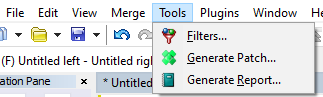
after creating filters

it does everything I need for now
---
### Author:  [@dceejay](https://discourse.nodered.org/u/dceejay)
#### Post date: [22 June 2022 07:59 UTC](https://discourse.nodered.org/t/nodered-flows-json-comparator/64208/4 "2022-06-22T07:59:46Z")
There is also Meld - [http://meldmerge.org/](http://meldmerge.org/)
you can set a text filter like `"[xy]":.*` to ignore simple x y node placement changes if you like.
---
### Author:  [@shrickus](https://discourse.nodered.org/u/shrickus)
#### Post date: [22 June 2022 18:09 UTC](https://discourse.nodered.org/t/nodered-flows-json-comparator/64208/5 "2022-06-22T18:09:37Z")
+1 for using [BeyondCompare](https://scootersoftware.com/) -- true, it's not free... but it's the best $40 I've ever spent on software!
I assume you've already enabled the "pretty: true" option in your `settings.js` file... that really helps avoid having to do any JSON re-formatting inside the comparison tool. Unfortunately, JSON does not allow newlines inside of strings, so long blocks of text found in `function` text, `template` body, and `change` node JSONata expressions all appear on 1 line.
To get around those limitations -- and to allow for fine-grained `git` change reporting -- there are several solutions I've seen over the years. I had even started my own file-based [storageModule](https://nodered.org/docs/api/storage/) implementation that decomposes the flows into individual node "files", laid out in a tree according to the tab/group/node structure of my flows. I would have finished it by now, if I hadn't switched jobs recently... and no longer use node-red in my day job. However, I would still like to finish it and add it to the flows library as a plug-in, if there is wider interest.
---
### Author:  [@system](https://discourse.nodered.org/u/system)
#### Post date: [6 July 2022 18:10 UTC](https://discourse.nodered.org/t/nodered-flows-json-comparator/64208/6 "2022-07-06T18:10:29Z")
This topic was automatically closed 14 days after the last reply. New replies are no longer allowed.