# Oh great! Now my MQTT is not working!
**URL:** https://discourse.nodered.org/t/oh-great-now-my-mqtt-is-not-working/7652
**Category:** General
**Created:** [6 February 2019 11:47 UTC](https://discourse.nodered.org/t/oh-great-now-my-mqtt-is-not-working/7652 "2019-02-06T11:47:34Z")
**Posts on this page:** 20
**Page:** 1
### Author:  [@Trying\_to\_learn](https://discourse.nodered.org/u/Trying_to_learn)
#### Post date: [6 February 2019 11:47 UTC](https://discourse.nodered.org/t/oh-great-now-my-mqtt-is-not-working/7652/1 "2019-02-06T11:47:35Z")
After the recent thing about the `ui_LED` and the dashboard layout being fixed, I was about to go to bed then I noticed......
None of the MQTT nodes are connected.
All set to `MQTT HOST` as the name, rather than the IP address, to reduce the _squillions_ of entries that would show up in the list.
They cycle from **off-line** to **connecting** but just fall back to **off-line**.
Sorry, correction: They show **connected** for about 1 or two seconds.
That is on that RPI.
(That is the only MQTT server I have running.)
On **this** machine the MQTT nodes in NR are connected, and it is the same server as on the RPI.
(Ok, I can't capture the menu on screen shots)
Weirdly, looking around other nodes **are** connected, but opening them their `server` is the IP address.
The `server` is .99 (Named `MQTT host`)
The NUC (this machine) is .146
It's MQTT nodes are working.
The ones on .99 only work if the IP address is entered rather than the name.
**BUT!** on the NUC the server is entered with the name as it is on .99. Not the IP address.
Thoughts?
 
---
### Author:  [@Trying\_to\_learn](https://discourse.nodered.org/u/Trying_to_learn)
#### Post date: [6 February 2019 11:53 UTC](https://discourse.nodered.org/t/oh-great-now-my-mqtt-is-not-working/7652/2 "2019-02-06T11:53:27Z")
Just as an update:
Picture 2.
I edited the WAP MQTT RX node.
Changed it from MQTT host to 192.168.0.99
Deploy.
That node is now working/connected.
---
### Author:  [@Colin](https://discourse.nodered.org/u/Colin)
#### Post date: [6 February 2019 12:01 UTC](https://discourse.nodered.org/t/oh-great-now-my-mqtt-is-not-working/7652/3 "2019-02-06T12:01:13Z")
If they work when you put an ip address in but don't when you put a name then your name resolution is not working for some reason. You can test that on the machine running node red, in a terminal, run
`ping the_mqtt_host_name`
then you will see if there is a problem. Replace the\_mqtt\_host\_name with the actual name obviously.
---
### Author:  [@Trying\_to\_learn](https://discourse.nodered.org/u/Trying_to_learn)
#### Post date: [6 February 2019 19:49 UTC](https://discourse.nodered.org/t/oh-great-now-my-mqtt-is-not-working/7652/4 "2019-02-06T19:49:57Z")
Dumb question (just got up), but how do I ping my broker if the broker name is `MQTT host` and has a space in it?
Sorry, remembered.
This is what I get/see:
```auto
pi@TimePi:~ $ ping MQTT\ host
ping: MQTT host: No address associated with hostname
pi@TimePi:~ $
```
---
### Author:  [@Trying\_to\_learn](https://discourse.nodered.org/u/Trying_to_learn)
#### Post date: [6 February 2019 19:53 UTC](https://discourse.nodered.org/t/oh-great-now-my-mqtt-is-not-working/7652/5 "2019-02-06T19:53:13Z")
But this is the MQTT node settings:
The IP address is specified.

And this is the ping result from the IP address:
```auto
pi@TimePi:~ $ ping 192.168.0.99
PING 192.168.0.99 (192.168.0.99) 56(84) bytes of data.
64 bytes from 192.168.0.99: icmp_seq=1 ttl=64 time=0.322 ms
64 bytes from 192.168.0.99: icmp_seq=2 ttl=64 time=0.267 ms
^C
--- 192.168.0.99 ping statistics ---
2 packets transmitted, 2 received, 0% packet loss, time 1001ms
rtt min/avg/max/mdev = 0.267/0.294/0.322/0.032 ms
pi@TimePi:~ $
```
---
### Author:  [@Trying\_to\_learn](https://discourse.nodered.org/u/Trying_to_learn)
#### Post date: [6 February 2019 19:59 UTC](https://discourse.nodered.org/t/oh-great-now-my-mqtt-is-not-working/7652/6 "2019-02-06T19:59:31Z")
(Not because I like doing this)
Something else I just noticed:
This problem happened to me about a month ago - so it seems.
(I was searching for MQTT problems and found my post from then.)
This is worrying to me on several levels:
1 - being I don't remember this.
I'll read that thread and see if I can work it out.
---
### Author:  [@knolleary](https://discourse.nodered.org/u/knolleary)
#### Post date: [6 February 2019 20:02 UTC](https://discourse.nodered.org/t/oh-great-now-my-mqtt-is-not-working/7652/7 "2019-02-06T20:02:26Z")
> [@Trying\_to\_learn](#):
>
> but how do I ping my broker if the broker name is `MQTT host` and has a space in it?
You ping a machine by either its ip address or dns name (like '[google.com](http://google.com)'). DNS names do not have spaces in them.
You have given your broker-config node the name 'MQTT host' - that is just a label to help you identify the node in a list. It isn't something that has any meaning outside of Node-RED.
---
### Author:  [@Trying\_to\_learn](https://discourse.nodered.org/u/Trying_to_learn)
#### Post date: [6 February 2019 20:16 UTC](https://discourse.nodered.org/t/oh-great-now-my-mqtt-is-not-working/7652/8 "2019-02-06T20:16:08Z")
Yes all the nodes have "MQTT host" in their name filed.
They were working from about 5 Jan.
I sat down and went through the flows and added that name.
I saw the list of IP addresses slowly decreasing as I did it more and more.
I can't say 100% I did them all, but suffice to say all the nodes which are now not working were changed.
I've read the thread I posted from 5 Jan and alas I'm still stuck.
It seems that that problem was because the list of IP addresses was (something like) getting too big and I wasn't always selecting the right one.
By adding the name I was selecting the right one and so it was happy.
Now, suddenly, all that is _kakput_ and they just don't want to connect.
This is a bit of the mqtt log file where I think the error happened:
```auto
1549481888: New client connected from 192.168.0.146 as mqtt_339ddb71.0e2c74 (c1, k20).
1549481888: New client connected from 192.168.0.146 as mqtt_b4a55bd9.0b8e88 (c1, k20).
1549481888: New client connected from 192.168.0.146 as mqtt_aed904d7.a35cb8 (c1, k20).
1549481888: New connection from 192.168.0.146 on port 1883.
1549481888: New connection from 192.168.0.146 on port 1883.
1549481888: New client connected from 192.168.0.146 as mqtt_a39443dd.e9fde (c1, k60).
1549481888: New client connected from 192.168.0.146 as mqtt_393218a2.1c2b98 (c1, k60).
1549481905: New connection from 192.168.0.99 on port 1883.
1549481905: New client connected from 192.168.0.99 as mqtt_670c547.98099ac (c1, k60).
1549481909: Socket error on client mqtt_670c547.98099ac, disconnecting.
1549481925: New connection from 192.168.0.99 on port 1883.
1549481925: New client connected from 192.168.0.99 as mqtt_670c547.98099ac (c1, k60).
1549481925: Socket error on client mqtt_670c547.98099ac, disconnecting.
1549481940: New connection from 192.168.0.99 on port 1883.
1549481940: New client connected from 192.168.0.99 as mqtt_670c547.98099ac (c1, k60).
1549481940: Socket error on client mqtt_670c547.98099ac, disconnecting.
1549481955: New connection from 192.168.0.99 on port 1883.
1549481955: New client connected from 192.168.0.99 as mqtt_670c547.98099ac (c1, k60).
1549481955: Socket error on client mqtt_670c547.98099ac, disconnecting.
1549481970: New connection from 192.168.0.99 on port 1883.
1549481970: New client connected from 192.168.0.99 as mqtt_670c547.98099ac (c1, k60).
1549481970: Socket error on client mqtt_670c547.98099ac, disconnecting.
1549481985: New connection from 192.168.0.99 on port 1883.
1549481985: New client connected from 192.168.0.99 as mqtt_670c547.98099ac (c1, k60).
1549481985: Socket error on client mqtt_670c547.98099ac, disconnecting.
1549482003: New connection from 192.168.0.99 on port 1883.
1549482003: New client connected from 192.168.0.99 as mqtt_670c547.98099ac (c1, k60).
1549482004: Socket error on client mqtt_670c547.98099ac, disconnecting.
1549482019: New connection from 192.168.0.99 on port 1883.
1549482019: New client connected from 192.168.0.99 as mqtt_670c547.98099ac (c1, k60).
1549482019: Socket error on client mqtt_670c547.98099ac, disconnecting.
```
At the top you can see how .146 (this machine) connected to the broker.
A few lines as the nodes connected.
The suddenly errors.
Indulging me digging, maybe this is the problem:
```auto
1549481905: New connection from 192.168.0.99 on port 1883.
1549481905: New client connected from 192.168.0.99 as mqtt_670c547.98099ac (c1, k60).
1549481909: Socket error on client mqtt_670c547.98099ac, disconnecting.
```
That seems to be repeated a lot.
---
### Author:  [@Trying\_to\_learn](https://discourse.nodered.org/u/Trying_to_learn)
#### Post date: [6 February 2019 20:38 UTC](https://discourse.nodered.org/t/oh-great-now-my-mqtt-is-not-working/7652/10 "2019-02-06T20:38:10Z")
ARGH!
This is just not fun.
Quick summary:
Out of desperation I rebooted and the MQTT nodes came to life.
(Alas only for about 5 minutes. Then they all went off-line again.)
While in the 5 minutes, I posted all is ok. (Now deleted.)
Now they are down again and looking at the log I see this:
```auto
1549484700: New client connected from 192.168.0.99 as mqtt_913bfa1c.795e08 (c1, k20).
1549484706: Socket error on client mqtt_a3f215c5.4a11a8, disconnecting.
1549484706: Socket error on client mqtt_5ff1eb17.dc5a24, disconnecting.
1549484722: New connection from 192.168.0.99 on port 1883.
1549484722: New connection from 192.168.0.99 on port 1883.
1549484722: New client connected from 192.168.0.99 as mqtt_a3f215c5.4a11a8 (c1, k60).
1549484722: New client connected from 192.168.0.99 as mqtt_5ff1eb17.dc5a24 (c1, k20).
1549484993: Socket error on client mqtt_a3f215c5.4a11a8, disconnecting.
1549485009: New connection from 192.168.0.99 on port 1883.
```
Where `a3f215c5.4a11a8` seems to be the problematic node.
I'm open for ideas
---
### Author:  [@Colin](https://discourse.nodered.org/u/Colin)
#### Post date: [6 February 2019 21:01 UTC](https://discourse.nodered.org/t/oh-great-now-my-mqtt-is-not-working/7652/11 "2019-02-06T21:01:01Z")
Sorry, when you were talking about names and IP addresses I thought you meant you were using host names vs IP addresses. I see now I was mistaken.
---
### Author:  [@Colin](https://discourse.nodered.org/u/Colin)
#### Post date: [6 February 2019 21:05 UTC](https://discourse.nodered.org/t/oh-great-now-my-mqtt-is-not-working/7652/12 "2019-02-06T21:05:45Z")
Are you sure you have not got a dodgy ethernet cable or something. If they are wired then check all the cables are plugged in properly.
Otherwise, while node-red is running, in a terminal run the ping command and leave it running while node-red is running. See if it shows any hangups or slowdown when the mqtt comms starts dropping out. I presume the mqtt server is not on the same machine as node-red.
If still no joy then in a terminal run
`tail -f /var/log/syslog`
and see if there are any network related messages when the mqtt starts failing. Or any other interesting looking messages for that matter.
---
### Author:  [@Trying\_to\_learn](https://discourse.nodered.org/u/Trying_to_learn)
#### Post date: [6 February 2019 21:14 UTC](https://discourse.nodered.org/t/oh-great-now-my-mqtt-is-not-working/7652/13 "2019-02-06T21:14:06Z")
As requested:
```auto
Feb 7 08:13:14 TimePi Node-RED[220]: 7 Feb 08:13:14 - [info] [mqtt-broker:MQTT host] Connected to broker: mqtt://192.168.0.99:1883
Feb 7 08:13:15 TimePi Node-RED[220]: 7 Feb 08:13:15 - [info] [mqtt-broker:MQTT host] Disconnected from broker: mqtt://192.168.0.99:1883
Feb 7 08:13:30 TimePi Node-RED[220]: 7 Feb 08:13:30 - [info] [mqtt-broker:MQTT host] Connected to broker: mqtt://192.168.0.99:1883
Feb 7 08:13:30 TimePi Node-RED[220]: 7 Feb 08:13:30 - [info] [mqtt-broker:MQTT host] Disconnected from broker: mqtt://192.168.0.99:1883
^C
```
---
### Author:  [@Trying\_to\_learn](https://discourse.nodered.org/u/Trying_to_learn)
#### Post date: [6 February 2019 21:24 UTC](https://discourse.nodered.org/t/oh-great-now-my-mqtt-is-not-working/7652/14 "2019-02-06T21:24:51Z")
(Dumb question)
Getting the **syslog** was "easy":
```auto
pi@TimePi:~/.node-red $ tail -f /var/log/syslog
Feb 7 08:18:03 TimePi Node-RED[220]: 7 Feb 08:18:03 - [info] [mqtt-broker:MQTT host] Connected to broker: mqtt://192.168.0.99:1883
Feb 7 08:18:03 TimePi Node-RED[220]: 7 Feb 08:18:03 - [info] [mqtt-broker:MQTT host] Disconnected from broker: mqtt://192.168.0.99:1883
Feb 7 08:18:28 TimePi Node-RED[220]: 7 Feb 08:18:28 - [info] [mqtt-broker:MQTT host] Connected to broker: mqtt://192.168.0.99:1883
Feb 7 08:18:32 TimePi Node-RED[220]: 7 Feb 08:18:32 - [info] [mqtt-broker:MQTT host] Disconnected from broker: mqtt://192.168.0.99:1883
Feb 7 08:18:47 TimePi Node-RED[220]: 7 Feb 08:18:47 - [info] [mqtt-broker:MQTT host] Connected to broker: mqtt://192.168.0.99:1883
Feb 7 08:18:47 TimePi Node-RED[220]: 7 Feb 08:18:47 - [info] [mqtt-broker:MQTT host] Disconnected from broker: mqtt://192.168.0.99:1883
Feb 7 08:19:02 TimePi Node-RED[220]: 7 Feb 08:19:02 - [info] [mqtt-broker:MQTT host] Connected to broker: mqtt://192.168.0.99:1883
Feb 7 08:19:02 TimePi Node-RED[220]: 7 Feb 08:19:02 - [info] [mqtt-broker:MQTT host] Disconnected from broker: mqtt://192.168.0.99:1883
Feb 7 08:19:17 TimePi Node-RED[220]: 7 Feb 08:19:17 - [info] [mqtt-broker:MQTT host] Connected to broker: mqtt://192.168.0.99:1883
Feb 7 08:19:17 TimePi Node-RED[220]: 7 Feb 08:19:17 - [info] [mqtt-broker:MQTT host] Disconnected from broker: mqtt://192.168.0.99:1883
^C
pi@TimePi:~/.node-red $
```
Note the command:
`pi@TimePi:~/.node-red $ tail -f /var/log/syslog`
No sudo.
If I want to look at the mosquitto log (and using the same thinking):
```auto
pi@TimePi:~/.node-red $ tail /var/log/mosquitto/mosquitto.log
tail: cannot open '/var/log/mosquitto/mosquitto.log' for reading: Permission denied
```
But if I do this:
```auto
pi@TimePi:~/.node-red $ sudo tail /var/log/mosquitto/mosquitto.log
1549487988: New client connected from 192.168.0.99 as mqtt_4d748ed6.0a543 (c1, k60).
1549487988: Socket error on client mqtt_4d748ed6.0a543, disconnecting.
1549488003: New connection from 192.168.0.99 on port 1883.
1549488003: New client connected from 192.168.0.99 as mqtt_4d748ed6.0a543 (c1, k60).
1549488003: Socket error on client mqtt_4d748ed6.0a543, disconnecting.
1549488019: New connection from 192.168.0.99 on port 1883.
1549488022: New client connected from 192.168.0.99 as mqtt_4d748ed6.0a543 (c1, k60).
1549488023: Socket error on client mqtt_4d748ed6.0a543, disconnecting.
1549488039: New connection from 192.168.0.99 on port 1883.
1549488042: New client connected from 192.168.0.99 as mqtt_4d748ed6.0a543 (c1, k60).
pi@TimePi:~/.node-red $
```
It works.
Why is it the mosquitto log needs `sudo` to access yet the **syslog** doesn't?
---
### Author:  [@Trying\_to\_learn](https://discourse.nodered.org/u/Trying_to_learn)
#### Post date: [6 February 2019 21:28 UTC](https://discourse.nodered.org/t/oh-great-now-my-mqtt-is-not-working/7652/15 "2019-02-06T21:28:39Z")
While looking.
On a "page" (tab) in NR, I saw an unused MQTT node. Just beside a used one.
Both the same channel.
I opened one and looked. Nothing "exciting" to see.
So I opened the other one. Same.
I was about to delete the unused one and I saw that now the used one is connected.
See this from the flow.
```auto
[{"id":"72e9aefc.a8642","type":"mqtt in","z":"e2bd5a4e.5597e8","name":"COMMAND","topic":"DO_THIS/#","qos":"2","broker":"931f34a.34a47c8","x":220,"y":700,"wires":[[]]},{"id":"accc9e21.3a9e8","type":"mqtt in","z":"e2bd5a4e.5597e8","name":"COMMAND","topic":"DO_THIS/#","qos":"2","broker":"1dec8cfe.06c313","x":420,"y":700,"wires":[["b4d26267.cc63b8","ee133a0f.a059b8"]]},{"id":"931f34a.34a47c8","type":"mqtt-broker","z":"","name":"MQTT host","broker":"192.168.0.99","port":"1883","clientid":"","usetls":false,"compatmode":true,"keepalive":"60","cleansession":true,"birthTopic":"","birthQos":"2","birthPayload":"","closeTopic":"","closePayload":"","willTopic":"","willQos":"0","willPayload":""},{"id":"1dec8cfe.06c313","type":"mqtt-broker","z":"","name":"MQTT host","broker":"192.168.0.99","port":"1883","clientid":"","usetls":false,"compatmode":true,"keepalive":"20","cleansession":true,"birthTopic":"SOM","birthQos":"2","birthPayload":"'Awaiting Time Pi'","closeTopic":"","closePayload":"","willTopic":"EOM","willQos":"0","willPayload":"'TimePi telemetry failure'"}]
```
The one on the RIGHT (from the GUI viewpoint) is connected. The one on the left isn't.
---
### Author:  [@Steve-Mcl](https://discourse.nodered.org/u/Steve-Mcl)
#### Post date: [6 February 2019 21:34 UTC](https://discourse.nodered.org/t/oh-great-now-my-mqtt-is-not-working/7652/16 "2019-02-06T21:34:29Z")
I had an issue with MQTT disconnecting. I found there was an unused old (not sure how) MQTT config node hanging around. That was connecting and kicking the original connection. I removed it & sent flows. Solved.
What I checked before this was that all devices connecting to MQTT broker have unique names (same client name causes this problem) - they were ok so that led me to hunt down another cause.
---
### Author:  [@dceejay](https://discourse.nodered.org/u/dceejay)
#### Post date: [6 February 2019 21:34 UTC](https://discourse.nodered.org/t/oh-great-now-my-mqtt-is-not-working/7652/17 "2019-02-06T21:34:40Z")
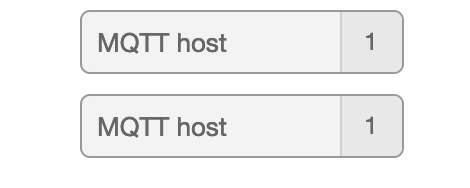
As I recall the idea of you adding names was so that you could identify one broker connection from another... as you only really need one connection to each broker - which is then shared by all the MQTT nodes that connect to that broker.
Your two nodes you have posted each have a config node - set to the same name...

or in the menu config nodes sidebar
---
### Author:  [@Trying\_to\_learn](https://discourse.nodered.org/u/Trying_to_learn)
#### Post date: [6 February 2019 21:43 UTC](https://discourse.nodered.org/t/oh-great-now-my-mqtt-is-not-working/7652/18 "2019-02-06T21:43:51Z")
dceejay.
Thanks for that.
Believe me what I say I didn't do it on purpose.
I am sure you can agree that sometimes you just "can't see the wood for the trees".
Weirdly it sort of fixed the problem.
Doing as you say and opening the node-config window, I see I still have a few using the _wrong_ node. ie: the IP address rather than the name.
Is there an easy way to find them?
So, back to the problem.
I did what you said and opened the node to the right.
Sure enough I had ticked/selected the second MQTT host, rather than the first one.
Dunno how that happened - as said.
I selected the first one, deployed and it worked...... for about 1 _cycle_ then all the nodes dropped out.
Oh I also deleted the one which wasn't doing anything. Just to be sure.
---
### Author:  [@Colin](https://discourse.nodered.org/u/Colin)
#### Post date: [6 February 2019 21:58 UTC](https://discourse.nodered.org/t/oh-great-now-my-mqtt-is-not-working/7652/19 "2019-02-06T21:58:06Z")
Firstly how many mqtt servers have you got (that you reference from this node-red instance)?
How many mqtt config nodes have you got? You can see by clicking the drop down arrow in one of the mqtt nodes.
If you have more config nodes than servers then got to Configuration Nodes from the hamburger menu and decide which mqtt config nodes you want to remove. You can see there how many nodes are using each one. Then open the unwanted ones and delete them.
Then you can find the mqtt nodes that now show invalid config and assign the correct server to them.
---
### Author:  [@dceejay](https://discourse.nodered.org/u/dceejay)
#### Post date: [6 February 2019 22:06 UTC](https://discourse.nodered.org/t/oh-great-now-my-mqtt-is-not-working/7652/20 "2019-02-06T22:06:52Z")
best case - if you only have one mqtt broker to connect to - then delete all but one mqtt config node... make sure that is configured correctly... then any mqtt nodes without a config will have a red triangle... which you can then open and set to use the same config node.
---
### Author:  [@Trying\_to\_learn](https://discourse.nodered.org/u/Trying_to_learn)
#### Post date: [6 February 2019 22:13 UTC](https://discourse.nodered.org/t/oh-great-now-my-mqtt-is-not-working/7652/21 "2019-02-06T22:13:05Z")
> [@Colin](#):
>
> Firstly how many mqtt servers have you got (that you reference from this node-red instance)?
> How many mqtt config nodes have you got? You can see by clicking the drop down arrow in one of the mqtt nodes.
> If you have more config nodes than servers then got to Configuration Nodes from the hamburger menu and decide which mqtt config nodes you want to remove. You can see there how many nodes are using each one. Then open the unwanted ones and delete them.
> Then you can find the mqtt nodes that now show invalid config and assign the correct server to them.
To the best of my knowledge I have one MQTT broker/server. 192.168.0.99
91 (88 + 3) 88 using the name, 3 for whom I am searching.
I think I am doing what you say in the second part of your post.
(Alas I am going to have to end soon as other things are calling and this is a lower priority.) :frown:
DCJ,
Thanks.
I am _nearl_ done going through the tabs and checking the config nodes.
But as just said, I am going to have to venture out into the day shortly as other things need attention too.
I shall have to get back at it this evening.
Just on the "deleting unused nodes"......
I see the list. (see attached) but I can't resolve how to delete them.
I have read that in an upcoming NR there will be a function to delete unused nodes/things.
Seems I will have to search google this evening on how to do that.

[Next page](https://discourse.nodered.org/t/oh-great-now-my-mqtt-is-not-working/7652.md?page=2)