# Omron CJ2M CPU33 Connected! Cannot read data
**URL:** https://discourse.nodered.org/t/omron-cj2m-cpu33-connected-cannot-read-data/51604
**Category:** Industrial
**Created:** [28 September 2021 07:54 UTC](https://discourse.nodered.org/t/omron-cj2m-cpu33-connected-cannot-read-data/51604 "2021-09-28T07:54:52Z")
**Posts on this page:** 20
**Page:** 1
### Author:  [@DonCube](https://discourse.nodered.org/u/DonCube)
#### Post date: [28 September 2021 07:54 UTC](https://discourse.nodered.org/t/omron-cj2m-cpu33-connected-cannot-read-data/51604/1 "2021-09-28T07:54:52Z")

when i run the flow, it is connected to the plc but when i try to read data, timeout occur.
Anyone have encounter this issue? Your help is highly appreciated..
---
### Author:  [@Steve-Mcl](https://discourse.nodered.org/u/Steve-Mcl)
#### Post date: [28 September 2021 08:04 UTC](https://discourse.nodered.org/t/omron-cj2m-cpu33-connected-cannot-read-data/51604/2 "2021-09-28T08:04:58Z")
It is likely the FINS parameters are incorrect on the config node or your PLC or the PLC routing table.
Did you follow the info on the [readme](https://flows.nodered.org/node/node-red-contrib-omron-fins)?
Also, read through the [closed issues](https://github.com/Steve-Mcl/node-red-contrib-omron-fins/issues?q=is%3Aissue+is%3Aclosed) on github
If you still have an issue, let me know your PLC settings (IP address+subnet mask, TCP or UDP, port number, FINS Node Number setting on front dials, Routing table details AND a screenshot of the config node settings)
---
### Author:  [@DonCube](https://discourse.nodered.org/u/DonCube)
#### Post date: [29 September 2021 07:09 UTC](https://discourse.nodered.org/t/omron-cj2m-cpu33-connected-cannot-read-data/51604/3 "2021-09-29T07:09:08Z")


---
### Author:  [@DonCube](https://discourse.nodered.org/u/DonCube)
#### Post date: [29 September 2021 07:09 UTC](https://discourse.nodered.org/t/omron-cj2m-cpu33-connected-cannot-read-data/51604/4 "2021-09-29T07:09:49Z")


---
### Author:  [@Steve-Mcl](https://discourse.nodered.org/u/Steve-Mcl)
#### Post date: [29 September 2021 07:15 UTC](https://discourse.nodered.org/t/omron-cj2m-cpu33-connected-cannot-read-data/51604/5 "2021-09-29T07:15:29Z")
You have protocol set incorrectly. Should be UDP
---
### Author:  [@DonCube](https://discourse.nodered.org/u/DonCube)
#### Post date: [29 September 2021 07:16 UTC](https://discourse.nodered.org/t/omron-cj2m-cpu33-connected-cannot-read-data/51604/6 "2021-09-29T07:16:35Z")

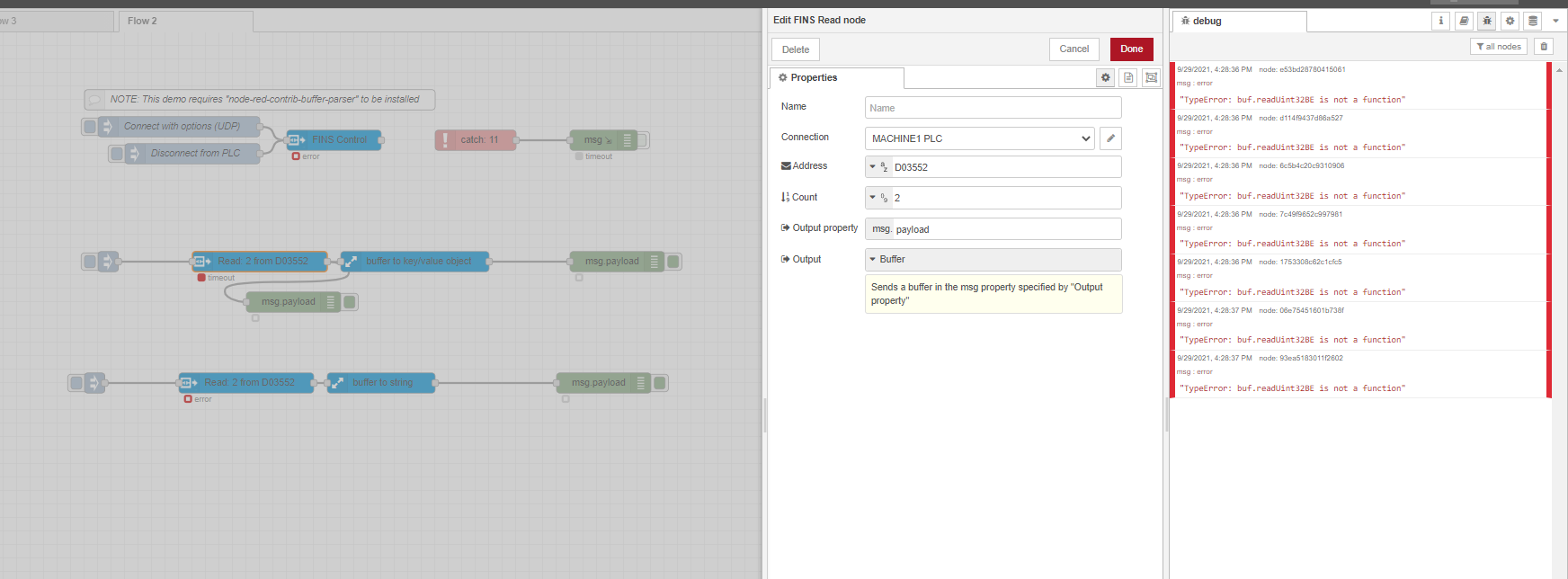
I want to read the D03552, 32bit and this error occur
---
### Author:  [@Steve-Mcl](https://discourse.nodered.org/u/Steve-Mcl)
#### Post date: [29 September 2021 07:18 UTC](https://discourse.nodered.org/t/omron-cj2m-cpu33-connected-cannot-read-data/51604/7 "2021-09-29T07:18:05Z")
32bit is 2 WORDs. You are only asking for 1 WORD
Did you change connection protocol to UDP?
---
### Author:  [@Steve-Mcl](https://discourse.nodered.org/u/Steve-Mcl)
#### Post date: [29 September 2021 07:19 UTC](https://discourse.nodered.org/t/omron-cj2m-cpu33-connected-cannot-read-data/51604/8 "2021-09-29T07:19:49Z")
For 32bit numbers, set the output to Buffer & use buffer parser to convert to 32bit.
I'm sure there is a demo in the import examples (CTRL+I)
---
### Author:  [@Steve-Mcl](https://discourse.nodered.org/u/Steve-Mcl)
#### Post date: [29 September 2021 07:20 UTC](https://discourse.nodered.org/t/omron-cj2m-cpu33-connected-cannot-read-data/51604/9 "2021-09-29T07:20:53Z")
Lastly, what are the node number dials on the front of the PLC set to? Show me a photo of the 2 node number dials.
---
### Author:  [@DonCube](https://discourse.nodered.org/u/DonCube)
#### Post date: [29 September 2021 07:24 UTC](https://discourse.nodered.org/t/omron-cj2m-cpu33-connected-cannot-read-data/51604/10 "2021-09-29T07:24:34Z")

i got this error when i change to udp, what do i need to set in the PLC side? i use CX one programmer
---
### Author:  [@Steve-Mcl](https://discourse.nodered.org/u/Steve-Mcl)
#### Post date: [29 September 2021 07:51 UTC](https://discourse.nodered.org/t/omron-cj2m-cpu33-connected-cannot-read-data/51604/11 "2021-09-29T07:51:33Z")
Is your version of fins node up to date?
I seem to remember a bug.
Also, what version of nodejs is on your node-red machine?
---
### Author:  [@DonCube](https://discourse.nodered.org/u/DonCube)
#### Post date: [29 September 2021 07:52 UTC](https://discourse.nodered.org/t/omron-cj2m-cpu33-connected-cannot-read-data/51604/12 "2021-09-29T07:52:10Z")
Steve, how can i find the node number?
---
### Author:  [@Steve-Mcl](https://discourse.nodered.org/u/Steve-Mcl)
#### Post date: [29 September 2021 07:52 UTC](https://discourse.nodered.org/t/omron-cj2m-cpu33-connected-cannot-read-data/51604/13 "2021-09-29T07:52:48Z")
Physical rotary dials on front of plc. Take photo. Show me.
---
### Author:  [@DonCube](https://discourse.nodered.org/u/DonCube)
#### Post date: [29 September 2021 07:54 UTC](https://discourse.nodered.org/t/omron-cj2m-cpu33-connected-cannot-read-data/51604/14 "2021-09-29T07:54:35Z")

---
### Author:  [@DonCube](https://discourse.nodered.org/u/DonCube)
#### Post date: [29 September 2021 07:57 UTC](https://discourse.nodered.org/t/omron-cj2m-cpu33-connected-cannot-read-data/51604/15 "2021-09-29T07:57:36Z")

---
### Author:  [@DonCube](https://discourse.nodered.org/u/DonCube)
#### Post date: [29 September 2021 08:25 UTC](https://discourse.nodered.org/t/omron-cj2m-cpu33-connected-cannot-read-data/51604/16 "2021-09-29T08:25:40Z")

his is the dial setup
---
### Author:  [@Steve-Mcl](https://discourse.nodered.org/u/Steve-Mcl)
#### Post date: [29 September 2021 08:28 UTC](https://discourse.nodered.org/t/omron-cj2m-cpu33-connected-cannot-read-data/51604/17 "2021-09-29T08:28:57Z")
You mode number is set incorrectly. It should be the same as the last octet of the IP address.
2 options...
- change dials to read `0 B`
Or
- Change PLC IP to `a.b.c.10` to match current node number setting.
Then power off/on plc.
---
### Author:  [@DonCube](https://discourse.nodered.org/u/DonCube)
#### Post date: [29 September 2021 08:29 UTC](https://discourse.nodered.org/t/omron-cj2m-cpu33-connected-cannot-read-data/51604/18 "2021-09-29T08:29:44Z")
---
### Author:  [@DonCube](https://discourse.nodered.org/u/DonCube)
#### Post date: [29 September 2021 08:30 UTC](https://discourse.nodered.org/t/omron-cj2m-cpu33-connected-cannot-read-data/51604/19 "2021-09-29T08:30:19Z")
Ok i will try it, on production line..
---
### Author:  [@DonCube](https://discourse.nodered.org/u/DonCube)
#### Post date: [30 September 2021 03:32 UTC](https://discourse.nodered.org/t/omron-cj2m-cpu33-connected-cannot-read-data/51604/20 "2021-09-30T03:32:11Z")
Steve, i have already change the dials to 0B and still i cannot read data. I have observe also that when i Inject using the UDP connect error is occur see image below..but when i use TCP it tell that it is connected. What can i change in the PLC setting?

Do i need to change something in this setting?

[Next page](https://discourse.nodered.org/t/omron-cj2m-cpu33-connected-cannot-read-data/51604.md?page=2)