# Password in Node-RED
**URL:** https://discourse.nodered.org/t/password-in-node-red/50288
**Category:** General
**Created:** [27 August 2021 17:13 UTC](https://discourse.nodered.org/t/password-in-node-red/50288 "2021-08-27T17:13:24Z")
**Posts on this page:** 20
**Page:** 1
### Author:  [@fsaavedra](https://discourse.nodered.org/u/fsaavedra)
#### Post date: [27 August 2021 17:13 UTC](https://discourse.nodered.org/t/password-in-node-red/50288/1 "2021-08-27T17:13:24Z")
Hello everyone, hoping that you are all very well, I wanted to enter a password myself to node red by the "Username/password based authentication " and then enter them in node-red it throws me “Login failed”.
To create the password in bcrypt format I am using this website “[BCrypt | Password Hashing](https://passwordhashing.com/BCrypt)”
Greetings and thanks.
---
### Author:  [@rko](https://discourse.nodered.org/u/rko)
#### Post date: [27 August 2021 18:13 UTC](https://discourse.nodered.org/t/password-in-node-red/50288/2 "2021-08-27T18:13:34Z")
I wouldn't share a password with a 3rd party. Did you see the instructions [here](https://nodered.org/docs/user-guide/runtime/securing-node-red#generating-the-password-hash).
---
### Author:  [@fsaavedra](https://discourse.nodered.org/u/fsaavedra)
#### Post date: [27 August 2021 18:24 UTC](https://discourse.nodered.org/t/password-in-node-red/50288/3 "2021-08-27T18:24:05Z")
Thanks for the answer, yes, I have seen the instructions but I have no results.
I have put the 3 commands and nothing happens.
You can see that in this screenshot.

I have Node-Red installed on an Onion Omega controller and that's why it's hard for me to find documentation.
Thanks in advance and greetings.
---
### Author:  [@rko](https://discourse.nodered.org/u/rko)
#### Post date: [27 August 2021 18:32 UTC](https://discourse.nodered.org/t/password-in-node-red/50288/4 "2021-08-27T18:32:01Z")
I think `node-red admin hash-pw` only works with recent versions. What version are you using?
Alternative:
`bcrypt` seems to be missing, try:
```auto
npm install -g bcrypt
```
and then
```auto
node -e "console.log(require('bcrypt').hashSync(process.argv[1], 8));" your password
```
then copy the hash to the settings.js file in the adminAuth section.
and then clear the terminal history
```auto
history -c
```
Also you need to restart Node-RED after this.
---
### Author:  [@fsaavedra](https://discourse.nodered.org/u/fsaavedra)
#### Post date: [27 August 2021 18:46 UTC](https://discourse.nodered.org/t/password-in-node-red/50288/5 "2021-08-27T18:46:40Z")
I can´t install bcrypt

I have v1.2.9 of Node-Red
Thanks in advance and greetings.
---
### Author:  [@rko](https://discourse.nodered.org/u/rko)
#### Post date: [27 August 2021 18:56 UTC](https://discourse.nodered.org/t/password-in-node-red/50288/6 "2021-08-27T18:56:11Z")
Just checked, the first command `node-red admin hash-pw` should work with your Node-RED version.
Maybe the path to `node-red` is not known. Do you know the location?
---
### Author:  [@fsaavedra](https://discourse.nodered.org/u/fsaavedra)
#### Post date: [27 August 2021 18:58 UTC](https://discourse.nodered.org/t/password-in-node-red/50288/7 "2021-08-27T18:58:02Z")
I am not very clear about the location but I know that I can enter the settings.js file with this address:
vi /root/.node-red/settings.js
---
### Author:  [@rko](https://discourse.nodered.org/u/rko)
#### Post date: [27 August 2021 19:01 UTC](https://discourse.nodered.org/t/password-in-node-red/50288/8 "2021-08-27T19:01:57Z")
Unfortunately, I don't know the mentioned controller. How do you start/restart Node-RED usually?
---
### Author:  [@LosinIt](https://discourse.nodered.org/u/LosinIt)
#### Post date: [27 August 2021 19:13 UTC](https://discourse.nodered.org/t/password-in-node-red/50288/9 "2021-08-27T19:13:05Z")
Hello, @fsaavedra and welcome to the community.
I don't know anything about the issue you're having but I see that npm is telling you that your node.js it too old. Version 16 is current but I don't think you can use it with NR v 1.x. I suggest you update your node package to v12 or maybe v14 and try again.
---
### Author:  [@knolleary](https://discourse.nodered.org/u/knolleary)
#### Post date: [27 August 2021 19:29 UTC](https://discourse.nodered.org/t/password-in-node-red/50288/10 "2021-08-27T19:29:13Z")
Whilst the advice from @LosinIt is well intentioned, it is not the cause of the issue here.
The `node-red admin hash-pw` command will work once you identify where exactly the `node-red` command it.
To figure that out, the question is as @rko asked - how do you start Node-RED?
---
### Author:  [@fsaavedra](https://discourse.nodered.org/u/fsaavedra)
#### Post date: [27 August 2021 21:48 UTC](https://discourse.nodered.org/t/password-in-node-red/50288/11 "2021-08-27T21:48:14Z")
Hi everyone and thanks!!
Nodered I start it from a web ui that provides a device called IoT Edge computer from [NCD.io](http://NCD.io), I am really interested in solving this problem and I have read a lot but I have not found the solution

On the top of image you can see Node-Red.
Thanks.
---
### Author:  [@rko](https://discourse.nodered.org/u/rko)
#### Post date: [28 August 2021 02:51 UTC](https://discourse.nodered.org/t/password-in-node-red/50288/12 "2021-08-28T02:51:13Z")
Can you show us the `Node RED` tab. Maybe there are hints there.
---
### Author:  [@fsaavedra](https://discourse.nodered.org/u/fsaavedra)
#### Post date: [28 August 2021 06:03 UTC](https://discourse.nodered.org/t/password-in-node-red/50288/13 "2021-08-28T06:03:11Z")
Here I show you some screenshots that are from: Web UI - Nodered - Shell in a box.

Greetings!
---
### Author:  [@Steve-Mcl](https://discourse.nodered.org/u/Steve-Mcl)
#### Post date: [28 August 2021 06:10 UTC](https://discourse.nodered.org/t/password-in-node-red/50288/14 "2021-08-28T06:10:26Z")
As Nick said earlier...
> The node-red admin hash-pw command will work once you identify where exactly the node-red command is
Try linux find..
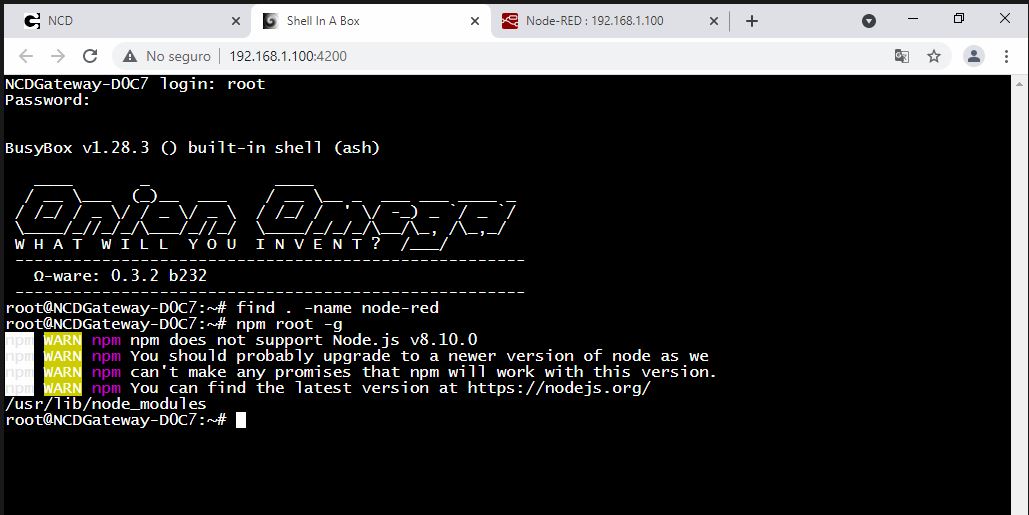
`find . -name node-red`
Also, what does `npm root -g` tell you?
Once you find the path to node-red, then you can `cd` to it's path.
---
### Author:  [@fsaavedra](https://discourse.nodered.org/u/fsaavedra)
#### Post date: [28 August 2021 12:18 UTC](https://discourse.nodered.org/t/password-in-node-red/50288/15 "2021-08-28T12:18:21Z")
This shows me the commands that I enter
---
### Author:  [@knolleary](https://discourse.nodered.org/u/knolleary)
#### Post date: [28 August 2021 12:20 UTC](https://discourse.nodered.org/t/password-in-node-red/50288/16 "2021-08-28T12:20:48Z")
Try running `node /usr/lib/node_modules/node-red/red.js admin hash-pw`
---
### Author:  [@fsaavedra](https://discourse.nodered.org/u/fsaavedra)
#### Post date: [28 August 2021 14:03 UTC](https://discourse.nodered.org/t/password-in-node-red/50288/17 "2021-08-28T14:03:43Z")
Thanks for the support, I managed to enter the command and then enter a password, then copy that password in the settings.js.
But after trying to enter with the entered password, it tells me an error.
I repeated the procedure 3 times
.

Greetings!
---
### Author:  [@rko](https://discourse.nodered.org/u/rko)
#### Post date: [28 August 2021 14:53 UTC](https://discourse.nodered.org/t/password-in-node-red/50288/18 "2021-08-28T14:53:23Z")
Did you restart Node-RED after you changed the settings.js file?
---
### Author:  [@fsaavedra](https://discourse.nodered.org/u/fsaavedra)
#### Post date: [28 August 2021 15:22 UTC](https://discourse.nodered.org/t/password-in-node-red/50288/19 "2021-08-28T15:22:14Z")
Yes, I restart the device and I can verify that Node-red restarted because the display to enter user appears.( before it was commented)
---
### Author:  [@rko](https://discourse.nodered.org/u/rko)
#### Post date: [28 August 2021 15:41 UTC](https://discourse.nodered.org/t/password-in-node-red/50288/20 "2021-08-28T15:41:03Z")
Can you try a very simple password like 123 first? I saw that your terminal is an emulation in the browser - maybe some special signs are not translated correctly.
Or just type the password in the browser terminal to verify it's the expected password.
[Next page](https://discourse.nodered.org/t/password-in-node-red/50288.md?page=2)