# Populate Data from Database into UI Dropdown
**URL:** https://discourse.nodered.org/t/populate-data-from-database-into-ui-dropdown/62647
**Category:** General
**Tags:** node-red-dashboard, database
**Created:** [15 May 2022 14:07 UTC](https://discourse.nodered.org/t/populate-data-from-database-into-ui-dropdown/62647 "2022-05-15T14:07:34Z")
**Posts on this page:** 6
**Page:** 1
### Author:  [@devittobk](https://discourse.nodered.org/u/devittobk)
#### Post date: [15 May 2022 14:07 UTC](https://discourse.nodered.org/t/populate-data-from-database-into-ui-dropdown/62647/1 "2022-05-15T14:07:34Z")
Hello!
I am just getting started with Node-RED and Node-RED Dashboard and wondering whether it is possible to populate the UI Dropdown with data retrieved from Google Firebase.
Below is my very simple flow using just an http request node and my google firebase URL:

I have created some dummy items and below is the output:
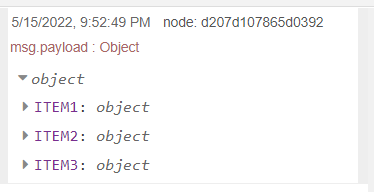
If 'ITEM1' is expanded, it will show the item information

Now, what I want to achieve is for the dropdown list to automatically populate itself with options from the database, for example:

And let's say I select **ITEM1** , I would then want the information regarding **ITEM1** to be shown in the dashboard as well. Something like this:

I am pretty clueless on how to proceed from here onwards so any help and tips would be appreciated.
Thanks in advance!
---
### Author:  [@Steve-Mcl](https://discourse.nodered.org/u/Steve-Mcl)
#### Post date: [15 May 2022 14:16 UTC](https://discourse.nodered.org/t/populate-data-from-database-into-ui-dropdown/62647/2 "2022-05-15T14:16:54Z")
There are quite a few threads on the forum that cover this.
Here are the basics...
1. Read the built in help
2. Your data is currently in `msg.payload` (as shown in your screenshot) BUT it needs to be in (according to the built in help) in `msg.options`
3. Wire the output of the dropdown to text nodes
* * *
### Canned text...
#### `copy path` / `copy value`
There’s a great page in the docs ([Working with messages : Node-RED](https://nodered.org/docs/user-guide/messages)) that will explain how to use the debug panel to find the right path to any data item.
Pay particular attention to the part about the buttons that appear under your mouse pointer when you over hover a debug message property in the sidebar.

#### Recommendation for new users
I recommend watching this playlist: [Node-RED Essentials](https://www.youtube.com/playlist?list=PLyNBB9VCLmo1hyO-4fIZ08gqFcXBkHy-6). The videos are done by the developers of node-red. They're nice & short and to the point. You will understand a whole lot more in about 1 hour. A small investment for a lot of gain.
---
### Author:  [@dynamicdave](https://discourse.nodered.org/u/dynamicdave)
#### Post date: [15 May 2022 14:29 UTC](https://discourse.nodered.org/t/populate-data-from-database-into-ui-dropdown/62647/3 "2022-05-15T14:29:30Z")
I know it's not quite what you are after - but it might give you a starting point.
This flow sets a 'set' of dropdowns from an MQTT message.
I'm sure it can be adapted to accept an output from a dB.

```auto
[{"id":"e41067e6.0e18c8","type":"tab","label":"Set dropdown via MQTT ","disabled":false,"info":"","env":[]},{"id":"7ae33f1e.e621","type":"mqtt in","z":"e41067e6.0e18c8","name":"","topic":"mqtt/option/dropdown","qos":"0","datatype":"json","broker":"818a8500.e122b8","nl":false,"rap":false,"inputs":0,"x":280,"y":180,"wires":[["882ca384.63ba4"]]},{"id":"882ca384.63ba4","type":"change","z":"e41067e6.0e18c8","name":"","rules":[{"t":"move","p":"payload","pt":"msg","to":"options","tot":"msg"}],"action":"","property":"","from":"","to":"","reg":false,"x":510,"y":180,"wires":[["7c1ff520.5afc8c","38e66698.730a6a"]]},{"id":"7c1ff520.5afc8c","type":"ui_dropdown","z":"e41067e6.0e18c8","name":"","label":"","tooltip":"","place":"Select option","group":"2d4fe667.28f8ba","order":17,"width":0,"height":0,"passthru":true,"multiple":false,"options":[{"label":"","value":"","type":"str"}],"payload":"","topic":"topic","topicType":"msg","className":"","x":700,"y":240,"wires":[["430aa46b.7d2c9c"]]},{"id":"38e66698.730a6a","type":"debug","z":"e41067e6.0e18c8","name":"","active":true,"tosidebar":true,"console":false,"tostatus":false,"complete":"options","targetType":"msg","statusVal":"","statusType":"auto","x":710,"y":180,"wires":[]},{"id":"2ee35ba9.33de2c","type":"inject","z":"e41067e6.0e18c8","name":"option set 1","props":[{"p":"payload"},{"p":"topic","vt":"str"}],"repeat":"","crontab":"","once":false,"onceDelay":0.1,"topic":"mqtt/option/dropdown","payload":"[{\"Choice 1\":\"1\"},{\"Choice 2\":\"2\"},{\"Choice 3\":\"3\"}]","payloadType":"json","x":310,"y":300,"wires":[["c365a7b9.3873a"]]},{"id":"43d6edb1.e5c1ac","type":"inject","z":"e41067e6.0e18c8","name":"option set 2","props":[{"p":"payload"},{"p":"topic","vt":"str"}],"repeat":"","crontab":"","once":false,"onceDelay":0.1,"topic":"mqtt/option/dropdown","payload":"[{\"Choice 4\":\"4\"},{\"Choice 5\":\"5\"},{\"Choice 6\":\"6\"}]","payloadType":"json","x":310,"y":340,"wires":[["c365a7b9.3873a"]]},{"id":"c365a7b9.3873a","type":"mqtt out","z":"e41067e6.0e18c8","name":"","topic":"","qos":"","retain":"","respTopic":"","contentType":"","userProps":"","correl":"","expiry":"","broker":"818a8500.e122b8","x":470,"y":320,"wires":[]},{"id":"3d4c2855.43ab3","type":"comment","z":"e41067e6.0e18c8","name":"Setting dropdown options via MQTT","info":"","x":500,"y":120,"wires":[]},{"id":"1502d4ef.fe0b6b","type":"comment","z":"e41067e6.0e18c8","name":"Click to TEST","info":"","x":320,"y":260,"wires":[]},{"id":"430aa46b.7d2c9c","type":"debug","z":"e41067e6.0e18c8","name":"","active":true,"tosidebar":true,"console":false,"tostatus":false,"complete":"false","statusVal":"","statusType":"auto","x":870,"y":240,"wires":[]},{"id":"818a8500.e122b8","type":"mqtt-broker","name":"Broker_152_Use_Me","broker":"192.168.1.152","port":"1883","clientid":"","autoConnect":true,"usetls":false,"compatmode":false,"protocolVersion":"4","keepalive":"60","cleansession":true,"birthTopic":"","birthQos":"0","birthPayload":"","birthMsg":{},"closeTopic":"","closeQos":"0","closePayload":"","closeMsg":{},"willTopic":"","willQos":"0","willPayload":"","willMsg":{},"sessionExpiry":""},{"id":"2d4fe667.28f8ba","type":"ui_group","name":"demo","tab":"1caa8458.b17814","order":1,"disp":true,"width":"12","collapse":false},{"id":"1caa8458.b17814","type":"ui_tab","name":"Demo","icon":"dashboard","disabled":false,"hidden":false}]
```
---
### Author:  [@devittobk](https://discourse.nodered.org/u/devittobk)
#### Post date: [16 May 2022 04:00 UTC](https://discourse.nodered.org/t/populate-data-from-database-into-ui-dropdown/62647/4 "2022-05-16T04:00:42Z")
After using a change node to convert from msg.payload to msg.options and connecting it to the UI dropdown, I notice that the dropdown list is still not populated.
I suppose it is because my database outputs an object containing objects and I need to convert it to an array containing objects instead.
I noticed that the dropdown list will populate itself when using a dummy DB output containing an array of objects, as shown below:

While my DB output is an object containing objects:

Is there a way to convert an object containing objects to an array of objects?
I know that I need to use a function node and perhaps a loop of some sorts, correct me if I'm wrong.
Thanks!
---
### Author:  [@Steve-Mcl](https://discourse.nodered.org/u/Steve-Mcl)
#### Post date: [16 May 2022 06:34 UTC](https://discourse.nodered.org/t/populate-data-from-database-into-ui-dropdown/62647/5 "2022-05-16T06:34:58Z")
> [@devittobk](#):
>
> I know that I need to use a function node and perhaps a loop of some sorts,
Yes, you can use a loop but I prefer `map`...
```auto
msg.payload = Object.values(msg.payload).map(e => {return {[e.Name]: e}} )
return msg;
```
To break that down, `Object.values(msg.payload)` turns your object into an array, then `.map(e => {return {[e.Name]: e}} )` runs through the array returning an object with `e.Name` as the key and the original object as the value - for each entry in the array.

---
### Author:  [@system](https://discourse.nodered.org/u/system)
#### Post date: [15 July 2022 06:35 UTC](https://discourse.nodered.org/t/populate-data-from-database-into-ui-dropdown/62647/6 "2022-07-15T06:35:52Z")
This topic was automatically closed 60 days after the last reply. New replies are no longer allowed.