# {Problem}Bigtimer
**URL:** https://discourse.nodered.org/t/problem-bigtimer/16863
**Category:** General
**Created:** [18 October 2019 16:48 UTC](https://discourse.nodered.org/t/problem-bigtimer/16863 "2019-10-18T16:48:02Z")
**Posts on this page:** 18
**Page:** 2
### Author:  [@TotallyInformation](https://discourse.nodered.org/u/TotallyInformation)
#### Post date: [20 October 2019 10:46 UTC](https://discourse.nodered.org/t/problem-bigtimer/16863/21 "2019-10-20T10:46:00Z")
No, it wasn't you that was boring me. I did go on to take my example further:
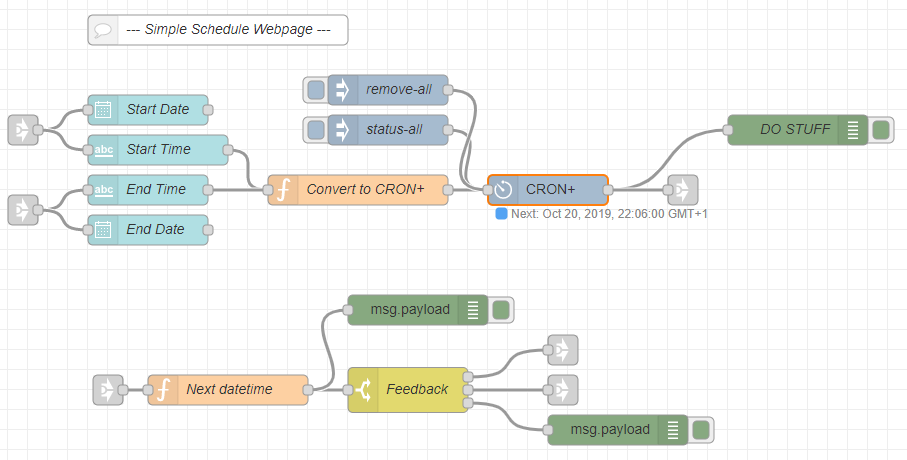
It doesn't quite work how I wanted it to but at least I got rid of the subflow & I added in the cron-plus node & a bit of feedback - which is the bit that isn't quite working correctly. Still, you get the idea.
Also, my CRON syntax, while correct for some versions of CRON, were not correct for cron-plus. Here is a more suitable function:
```auto
const dt = new Date(msg.payload)
msg.payload = [
{
'command': 'add',
'name': msg.topic,
'expression': `0 ${dt.getUTCMinutes()} ${dt.getUTCHours()} * * *`,
'payload': msg.topic,
'type': 'str',
},
{
'command': 'status',
'name': msg.topic,
},
]
return msg
```
That will replace any previous cron entries with the matching topic name. So you can send both the start and end times to it. It will also output the status for the updated cron entry so that you can attach a flow to the output of cron-plus that can be fed back to your page or anywhere else. When cron-plus fires, you can also take a copy of the output and feed the next trigger time back to your webpage.
---
### Author:  [@Steve-Mcl](https://discourse.nodered.org/u/Steve-Mcl)
#### Post date: [20 October 2019 14:13 UTC](https://discourse.nodered.org/t/problem-bigtimer/16863/22 "2019-10-20T14:13:19Z")
Hi all, I finally got around to creating a reasonable demo...
[Dynamic cron schedules / timers via dashboard control](https://flows.nodered.org/flow/79a66966a6cc655a827872a4af794b94)

Hope its of some use to people.
---
### Author:  [@TotallyInformation](https://discourse.nodered.org/u/TotallyInformation)
#### Post date: [20 October 2019 21:58 UTC](https://discourse.nodered.org/t/problem-bigtimer/16863/23 "2019-10-20T21:58:48Z")
And for reference, I've started to build a uibuilder equivalent to this - though got sidetracked by some issues - the code is in [this thread](https://discourse.nodered.org/t/cron-plus-not-showing-entries-in-config/16921/15) at the moment, I will post to a flow once it is completed.
---
### Author:  [@Michelelac](https://discourse.nodered.org/u/Michelelac)
#### Post date: [22 October 2019 17:42 UTC](https://discourse.nodered.org/t/problem-bigtimer/16863/24 "2019-10-22T17:42:28Z")
thank you very much to both of you you have been very kind, thanks to you I was able to solve.
There is only one problem @Steve-Mcl : when I enter every minute, for example, the timer starts from January 2000. I would like to know if it is a problem or I have to set the date ...
---
### Author:  [@Steve-Mcl](https://discourse.nodered.org/u/Steve-Mcl)
#### Post date: [22 October 2019 17:52 UTC](https://discourse.nodered.org/t/problem-bigtimer/16863/25 "2019-10-22T17:52:52Z")
I don't understand?
There is no need to set a start time (thats not how CRON works)

What you makes you think it starts from January 2000? How is that you came to that conclusion?
EDIT...
TBH: This thread was hijacked and should have been new thread long ago - would probably be good netiquette to start a new thread if you have problems with a node or flow.
---
### Author:  [@Michelelac](https://discourse.nodered.org/u/Michelelac)
#### Post date: [22 October 2019 18:04 UTC](https://discourse.nodered.org/t/problem-bigtimer/16863/26 "2019-10-22T18:04:34Z")

sorry for not making myself understood, I have attached a photo to you.
---
### Author:  [@Steve-Mcl](https://discourse.nodered.org/u/Steve-Mcl)
#### Post date: [22 October 2019 18:06 UTC](https://discourse.nodered.org/t/problem-bigtimer/16863/27 "2019-10-22T18:06:17Z")
I think this was a bug that @TotallyInformation and @afelix pointed out (fixed in latest version)
Can you verify if your install of cron-plus is up to date? V0.4.0 is current
---
### Author:  [@Michelelac](https://discourse.nodered.org/u/Michelelac)
#### Post date: [22 October 2019 18:13 UTC](https://discourse.nodered.org/t/problem-bigtimer/16863/28 "2019-10-22T18:13:37Z")
thank you very much, I solved by doing the update. One last thing and then I leave you in peace (I swear to God): how do I connect the "rpi gpio" output to the flow you gave me?
---
### Author:  [@Steve-Mcl](https://discourse.nodered.org/u/Steve-Mcl)
#### Post date: [22 October 2019 18:16 UTC](https://discourse.nodered.org/t/problem-bigtimer/16863/29 "2019-10-22T18:16:59Z")
The same as you would if you used an inject node.
It's pretty much the same! A topic and payload is output when the time arrives. Use that (via a switch node to filter to correct topic if need be) to trigger your gpio
---
### Author:  [@Michelelac](https://discourse.nodered.org/u/Michelelac)
#### Post date: [22 October 2019 18:18 UTC](https://discourse.nodered.org/t/problem-bigtimer/16863/30 "2019-10-22T18:18:25Z")
Thanks for all!
---
### Author:  [@Michelelac](https://discourse.nodered.org/u/Michelelac)
#### Post date: [28 October 2019 16:40 UTC](https://discourse.nodered.org/t/problem-bigtimer/16863/31 "2019-10-28T16:40:56Z")
Hi @Steve-Mcl, I tried to connect rgpio output to the cronplus stream, but I didn't succeed ... Could you do me a screen of the right procedure?I really apologize for the trouble, but I tried with poor results ..
---
### Author:  [@Colin](https://discourse.nodered.org/u/Colin)
#### Post date: [28 October 2019 16:56 UTC](https://discourse.nodered.org/t/problem-bigtimer/16863/32 "2019-10-28T16:56:44Z")
First get your gpio out working using a Inject node to drive it. When that is going you will know what you need to get out of the bigtimer node to make it go. So put a debug on the output of the timer node and see what you are getting. Then if you still can't make it go then show us what you are getting out of the timer and tell us what you want to get.
Watch in particular for things like sending string "1" and "0" for example when it may be that what you actually want is number 1 and 0.
---
### Author:  [@Michelelac](https://discourse.nodered.org/u/Michelelac)
#### Post date: [28 October 2019 17:01 UTC](https://discourse.nodered.org/t/problem-bigtimer/16863/33 "2019-10-28T17:01:12Z")
@Colin the title indicates "bigtimer", but if you read above they recommended a cronplus, so I would need the scheme to connect gpio to the flow of the cronplus
---
### Author:  [@Colin](https://discourse.nodered.org/u/Colin)
#### Post date: [28 October 2019 17:30 UTC](https://discourse.nodered.org/t/problem-bigtimer/16863/34 "2019-10-28T17:30:51Z")
> [@Michelelac](#):
>
> so I would need the scheme to connect gpio to the flow of the cronplus
What difference does that make? My logic still applies, get the gpio pin going with an inject node then check that you are getting that from the cron node. As for the actual connection between the nodes I think you will be able to connect the cron node output directly to the gpio node.
---
### Author:  [@Steve-Mcl](https://discourse.nodered.org/u/Steve-Mcl)
#### Post date: [28 October 2019 18:59 UTC](https://discourse.nodered.org/t/problem-bigtimer/16863/35 "2019-10-28T18:59:15Z")
Hi, regardless of Cron-plus or bigtimer, as @Colin rightly says, you need to get the GPIO to work first.
---
### Author:  [@Michelelac](https://discourse.nodered.org/u/Michelelac)
#### Post date: [29 October 2019 18:52 UTC](https://discourse.nodered.org/t/problem-bigtimer/16863/36 "2019-10-29T18:52:47Z")
The Gpio works! I just have to connect the Cronplus to it ..
---
### Author:  [@Colin](https://discourse.nodered.org/u/Colin)
#### Post date: [29 October 2019 20:35 UTC](https://discourse.nodered.org/t/problem-bigtimer/16863/37 "2019-10-29T20:35:01Z")
> [@Michelelac](#):
>
> I just have to connect the Cronplus to it
I already suggested what to do next. You know now what you have to get out of the timer node, so configure the timer with your best guess at what you need and put a debug on it's output and see what you are getting. Adjust the timer node setting till it shows the same as you are getting out of the inject node. Then connect the two together and it will work.
---
### Author:  [@Colin](https://discourse.nodered.org/u/Colin)
#### Post date: [1 November 2019 13:57 UTC](https://discourse.nodered.org/t/problem-bigtimer/16863/38 "2019-11-01T13:57:44Z")
If the advice above does not help then we probably don't understand exactly what bit of the problem you are having difficulty with. Please try again to explain which part of the problem you need help with. You keep saying you don't know how to connect the gpio node to the timer node, but to do that you just have to join the output of the timer to the input of the gpio. So please explain _exactly_ what you don't know how to do.
[Previous page](https://discourse.nodered.org/t/problem-bigtimer/16863.md?page=1)