# Python Script into .JSON file for node red?
**URL:** https://discourse.nodered.org/t/python-script-into-json-file-for-node-red/45535
**Category:** Developing Nodes
**Created:** [12 May 2021 10:49 UTC](https://discourse.nodered.org/t/python-script-into-json-file-for-node-red/45535 "2021-05-12T10:49:48Z")
**Posts on this page:** 20
**Page:** 2
### Author:  [@Beginner96](https://discourse.nodered.org/u/Beginner96)
#### Post date: [12 May 2021 14:58 UTC](https://discourse.nodered.org/t/python-script-into-json-file-for-node-red/45535/21 "2021-05-12T14:58:45Z")
I can start the Skricpt with python and with python3, i get the same outprint

The reports are showing because i interrupted the program with ^C otherwise the program will keep running.
> [@krambriw](#):
>
> EDIT: Maybe we are hitting the usb port too hard, we can eventually put in a delay between the readings. How frequent do we have to read it?
How do I find this out ? 😃
I set the exec node like so.

But still no reports in the debug window
---
### Author:  [@cymplecy](https://discourse.nodered.org/u/cymplecy)
#### Post date: [12 May 2021 15:07 UTC](https://discourse.nodered.org/t/python-script-into-json-file-for-node-red/45535/22 "2021-05-12T15:07:30Z")
You don't seem to have a space between python3 and /home/pi....
---
### Author:  [@krambriw](https://discourse.nodered.org/u/krambriw)
#### Post date: [12 May 2021 15:09 UTC](https://discourse.nodered.org/t/python-script-into-json-file-for-node-red/45535/23 "2021-05-12T15:09:54Z")
If I look at the result you show it seems the script is not connecting to your MQTT broker
I would expect the first line on top like this

---
### Author:  [@Beginner96](https://discourse.nodered.org/u/Beginner96)
#### Post date: [12 May 2021 15:10 UTC](https://discourse.nodered.org/t/python-script-into-json-file-for-node-red/45535/24 "2021-05-12T15:10:07Z")
Thanks ! I changed that.
But still no data in the debug window..
---
### Author:  [@krambriw](https://discourse.nodered.org/u/krambriw)
#### Post date: [12 May 2021 15:10 UTC](https://discourse.nodered.org/t/python-script-into-json-file-for-node-red/45535/25 "2021-05-12T15:10:59Z")
Do you have 127.0.0.1 for the broker? Is it running in the same RPi?
---
### Author:  [@Beginner96](https://discourse.nodered.org/u/Beginner96)
#### Post date: [12 May 2021 15:13 UTC](https://discourse.nodered.org/t/python-script-into-json-file-for-node-red/45535/26 "2021-05-12T15:13:01Z")
Yes it is running on the same RP.
> [@krambriw](#):
>
> Do you have 127.0.0.1 for the broker?
where do i see that ?
---
### Author:  [@krambriw](https://discourse.nodered.org/u/krambriw)
#### Post date: [12 May 2021 15:19 UTC](https://discourse.nodered.org/t/python-script-into-json-file-for-node-red/45535/27 "2021-05-12T15:19:13Z")
Check setting for MQTT nodes and check the script (actually, it should be ok since the nodes are all indicating "Verbunden"
I will make a short test script just to verify the MQTT connection
If you see the text "Subscribed: None 1 (0,)" in the command prompt, it is working (like it does here for me)
---
### Author:  [@Beginner96](https://discourse.nodered.org/u/Beginner96)
#### Post date: [12 May 2021 15:26 UTC](https://discourse.nodered.org/t/python-script-into-json-file-for-node-red/45535/28 "2021-05-12T15:26:09Z")
> [@krambriw](#):
>
> Check setting for MQTT nodes and check the script (actually, it should be ok since the nodes are all indicating "Verbunden"
Yes the adress here ist like you said.
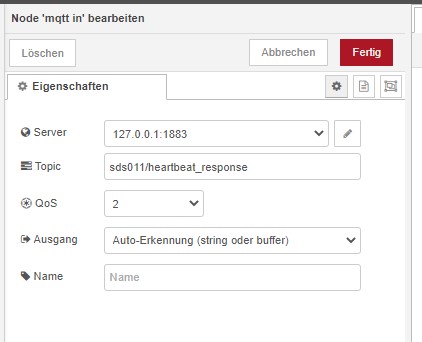
Sorry but I still don't get it.😃 what do i have to type in the command box to check if this report is showing ?
> [@krambriw](#):
>
> Subscribed: None 1 (0,)
---
### Author:  [@krambriw](https://discourse.nodered.org/u/krambriw)
#### Post date: [12 May 2021 15:31 UTC](https://discourse.nodered.org/t/python-script-into-json-file-for-node-red/45535/29 "2021-05-12T15:31:43Z")
It shall be shown when the script starts if it is able to connect to your MQTT broker. But I think it does not connect correctly or not at all
But try to run this script from the command prompt. It is just connecting to the broker and sends a simple message to NR (you can then kill it with ctrl+c)
[mqtt\_test.txt](https://discourse.nodered.org/uploads/short-url/ayMCwnurkYz3VEn404MJ4VWP9kX.txt) (727 Bytes)
---
### Author:  [@krambriw](https://discourse.nodered.org/u/krambriw)
#### Post date: [12 May 2021 15:32 UTC](https://discourse.nodered.org/t/python-script-into-json-file-for-node-red/45535/30 "2021-05-12T15:32:36Z")
For me it works, I see a message in debug with the test script

---
### Author:  [@Beginner96](https://discourse.nodered.org/u/Beginner96)
#### Post date: [12 May 2021 15:45 UTC](https://discourse.nodered.org/t/python-script-into-json-file-for-node-red/45535/31 "2021-05-12T15:45:28Z")
So i copied the script from mqtt\_test.txt and paste it into a new data in /home/pi/mqtt\_test.py and then i tried to run it but i get this report.

The script looks like this.

Added: with "sudo python /home/pi/mqtt\_test.py" i get the same report
Added: Do i have to change the exec node also to mqtt\_test.py ?
---
### Author:  [@krambriw](https://discourse.nodered.org/u/krambriw)
#### Post date: [12 May 2021 15:58 UTC](https://discourse.nodered.org/t/python-script-into-json-file-for-node-red/45535/32 "2021-05-12T15:58:49Z")
> [@Beginner96](#):
>
> Added: Do i have to change the exec node also to mqtt\_test.py ?
No, this is a separate test
When you do the copy & pasting you seem to lose the important spaces that is required as indents in python. Instead of doing that, download my script and rename it to .py
---
### Author:  [@Beginner96](https://discourse.nodered.org/u/Beginner96)
#### Post date: [12 May 2021 16:15 UTC](https://discourse.nodered.org/t/python-script-into-json-file-for-node-red/45535/33 "2021-05-12T16:15:37Z")
Oh yea sorry i tried so many things today, that I don't know a single thing about, that makes me confused 😃
i started it and this is what i'm getting

I also get the report in the debug node, so the test is working!
But still, when i start the script of the flow you send, only the script in the console starts and nothing appears in the debug window....
---
### Author:  [@krambriw](https://discourse.nodered.org/u/krambriw)
#### Post date: [12 May 2021 16:28 UTC](https://discourse.nodered.org/t/python-script-into-json-file-for-node-red/45535/34 "2021-05-12T16:28:36Z")
That is good,,,let me think a while about why the other script is not working, it does basically the same but there must be something I have missed
---
### Author:  [@krambriw](https://discourse.nodered.org/u/krambriw)
#### Post date: [12 May 2021 16:36 UTC](https://discourse.nodered.org/t/python-script-into-json-file-for-node-red/45535/35 "2021-05-12T16:36:12Z")
Could you try to add a delay, time.sleep, in the script code like below (I suspect I'm calling the usb port too fast)
```auto
data = array.array('B',(0,)*4)
while data[0] != 3 and th_abort == False:
try:
data = device.read(endpoint.bEndpointAddress, endpoint.wMaxPacketSize)
print(data)
result, mid = client.publish("sds011/data", str(data), 0)
time.sleep(1)
except usb.core.USBError as e:
if e.args == ('Operation timed out',):
print("timeout)")
continue
```
---
### Author:  [@Beginner96](https://discourse.nodered.org/u/Beginner96)
#### Post date: [12 May 2021 17:06 UTC](https://discourse.nodered.org/t/python-script-into-json-file-for-node-red/45535/36 "2021-05-12T17:06:25Z")
I added it into the script:

But still nothing in the debug window..
maybe my script ins't correct ?
EDIT:
I forget to tell you that i get this report.

---
### Author:  [@krambriw](https://discourse.nodered.org/u/krambriw)
#### Post date: [12 May 2021 19:14 UTC](https://discourse.nodered.org/t/python-script-into-json-file-for-node-red/45535/37 "2021-05-12T19:14:55Z")
If that is the script you are runnning, it is not the script I did share
Let me think until tomorrow
---
### Author:  [@krambriw](https://discourse.nodered.org/u/krambriw)
#### Post date: [13 May 2021 05:38 UTC](https://discourse.nodered.org/t/python-script-into-json-file-for-node-red/45535/38 "2021-05-13T05:38:19Z")
Let's see if this works better. Try this new script. I have re-arranged it a bit, now running the MQTT and SDS011 data readings in separate so called threads. Download it and run it from the console and check what is written to the console and the debug in NR
In this first test I am interested to know
1. does it connect and subscribe to the MQTT broker correctly
2. does it start reading data from the SDS011 device correctly
The script is not yet sending SDS011 data via MQTT, it should just print it once per second to the console
If this works we can do the next steps and process the data you would like to send to NR via MQTT and try that. I guess you are interested in data[2] to data [5], the PM2.5 and PM10 values
[sds011.txt](https://discourse.nodered.org/uploads/short-url/1xoPIfYdjRgyzEtT73s4cfUbCGR.txt) (3.0 KB)
---
### Author:  [@Beginner96](https://discourse.nodered.org/u/Beginner96)
#### Post date: [13 May 2021 08:15 UTC](https://discourse.nodered.org/t/python-script-into-json-file-for-node-red/45535/39 "2021-05-13T08:15:46Z")
Wow ! Thank you very much, I appreciate the work you've done ! 🙂
I copied the new script and ran it, i get the following.


> [@krambriw](#):
>
> I guess you are interested in data[2] to data [5], the PM2.5 and PM10 values
Yes thats correct! I have already prepared to continue calculating with the values
---
### Author:  [@krambriw](https://discourse.nodered.org/u/krambriw)
#### Post date: [13 May 2021 09:36 UTC](https://discourse.nodered.org/t/python-script-into-json-file-for-node-red/45535/40 "2021-05-13T09:36:51Z")
Did you break the script or did it crash??
EDIT: You shall delete the following two lines in the script, they are wrong, should not be there
```auto
print ("sds011 script stopped...")
exit()
```
[Previous page](https://discourse.nodered.org/t/python-script-into-json-file-for-node-red/45535.md?page=1)
[Next page](https://discourse.nodered.org/t/python-script-into-json-file-for-node-red/45535.md?page=3)