# Read outdoor temperature with alexa
**URL:** https://discourse.nodered.org/t/read-outdoor-temperature-with-alexa/71700
**Category:** General
**Created:** [5 December 2022 08:18 UTC](https://discourse.nodered.org/t/read-outdoor-temperature-with-alexa/71700 "2022-12-05T08:18:09Z")
**Posts on this page:** 11
**Page:** 1
### Author:  [@franz](https://discourse.nodered.org/u/franz)
#### Post date: [5 December 2022 08:18 UTC](https://discourse.nodered.org/t/read-outdoor-temperature-with-alexa/71700/1 "2022-12-05T08:18:09Z")
good morning,
i use NodeRED3.0.2 on docker
i installed node-red-contrib-alexa-cakebaked
i have mosquitto and domoticz
How do I make an alexa logger, that is, make alexa upon receiving the word 'external', activate the (working) procedure below?
> **Summary**
>
> ```auto
> [
> {
> "id": "fdedac607f20a384",
> "type": "tab",
> "label": "Flow 2",
> "disabled": false,
> "info": "",
> "env": []
> },
> {
> "id": "5253a127667fc9a5",
> "type": "alexa-remote-event",
> "z": "fdedac607f20a384",
> "name": "",
> "account": "47f699050b265e92",
> "event": "ws-device-activity",
> "x": 630,
> "y": 660,
> "wires": [
> [
> "11bffad747f3f612"
> ]
> ]
> },
> {
> "id": "f8efa717343628cc",
> "type": "mqtt in",
> "z": "fdedac607f20a384",
> "name": "temperatura esterna",
> "topic": "tele/wemos/SENSOR",
> "qos": "2",
> "datatype": "json",
> "broker": "22f544be.780a3c",
> "nl": false,
> "rap": false,
> "inputs": 0,
> "x": 630,
> "y": 500,
> "wires": [
> [
> "baf5fe3e71a1b2fc",
> "d3a282d36b3d0d32"
> ]
> ]
> },
> {
> "id": "11bffad747f3f612",
> "type": "switch",
> "z": "fdedac607f20a384",
> "name": "Filter",
> "property": "payload.alexaResponse",
> "propertyType": "msg",
> "rules": [
> {
> "t": "cont",
> "v": "temperatura è",
> "vt": "str"
> }
> ],
> "checkall": "true",
> "repair": false,
> "outputs": 1,
> "x": 830,
> "y": 660,
> "wires": [
> [
> "59a455c2845c1f98",
> "e56b1b4bfdd3e432"
> ]
> ]
> },
> {
> "id": "f3af5c6c1ae94823",
> "type": "alexa-remote-routine",
> "z": "fdedac607f20a384",
> "name": "",
> "account": "47f699050b265e92",
> "routineNode": {
> "type": "speak",
> "payload": {
> "type": "announcement",
> "text": {
> "type": "msg",
> "value": "payload"
> },
> "devices": [
> "G090XG07936518WL"
> ]
> }
> },
> "x": 1440,
> "y": 660,
> "wires": [
> []
> ]
> },
> {
> "id": "e56b1b4bfdd3e432",
> "type": "function",
> "z": "fdedac607f20a384",
> "name": "Read variable(s) and format message for Alexa",
> "func": "// Get the flow variable(s) to be used in the message\nvar temperature = flow.get(\"temperature\") || 0;\n\n// Convert them to a string\ntemperature = temperature.toString();\n\n// Start building the message\nvar message = \"Ciao,\";\n\nmessage += \"la temperatura esterna è di \"+temperature+ \"gradi celsius \";\n\n// This the footer for the message\nmessage += \" timeout tra un minuto \";\n\nmsg.payload = message;\nreturn msg;\n",
> "outputs": 1,
> "noerr": 0,
> "initialize": "",
> "finalize": "",
> "libs": [],
> "x": 1120,
> "y": 660,
> "wires": [
> [
> "f3af5c6c1ae94823",
> "7f88b08aed61d571"
> ]
> ]
> },
> {
> "id": "baf5fe3e71a1b2fc",
> "type": "debug",
> "z": "fdedac607f20a384",
> "name": "6",
> "active": false,
> "tosidebar": true,
> "console": false,
> "tostatus": false,
> "complete": "payload",
> "targetType": "msg",
> "statusVal": "",
> "statusType": "auto",
> "x": 590,
> "y": 460,
> "wires": []
> },
> {
> "id": "59a455c2845c1f98",
> "type": "debug",
> "z": "fdedac607f20a384",
> "name": "7",
> "active": true,
> "tosidebar": true,
> "console": false,
> "tostatus": false,
> "complete": "payload",
> "targetType": "msg",
> "statusVal": "",
> "statusType": "auto",
> "x": 830,
> "y": 720,
> "wires": []
> },
> {
> "id": "7f88b08aed61d571",
> "type": "debug",
> "z": "fdedac607f20a384",
> "name": "11",
> "active": true,
> "tosidebar": true,
> "console": false,
> "tostatus": false,
> "complete": "payload",
> "targetType": "msg",
> "statusVal": "",
> "statusType": "auto",
> "x": 1090,
> "y": 720,
> "wires": []
> },
> {
> "id": "d3a282d36b3d0d32",
> "type": "function",
> "z": "fdedac607f20a384",
> "name": "",
> "func": "// Save the reading(s) in a flow variable\n\nflow.set(\"temperature\",msg.payload.BMP280.Temperature);\n\nreturn null;\n",
> "outputs": 0,
> "noerr": 0,
> "initialize": "",
> "finalize": "",
> "libs": [],
> "x": 800,
> "y": 500,
> "wires": []
> },
> {
> "id": "08b43918836be61e",
> "type": "function",
> "z": "fdedac607f20a384",
> "name": "Prova di impostazione della temperatura a 21",
> "func": "flow.set(\"temperature\",msg.payload);\nreturn msg;",
> "outputs": 1,
> "noerr": 0,
> "initialize": "",
> "finalize": "",
> "libs": [],
> "x": 910,
> "y": 560,
> "wires": [
> []
> ]
> },
> {
> "id": "84d618598d0b0934",
> "type": "inject",
> "z": "fdedac607f20a384",
> "name": "",
> "props": [
> {
> "p": "payload"
> }
> ],
> "repeat": "",
> "crontab": "",
> "once": false,
> "onceDelay": 0.1,
> "topic": "",
> "payload": "21",
> "payloadType": "num",
> "x": 610,
> "y": 560,
> "wires": [
> [
> "08b43918836be61e"
> ]
> ]
> },
> {
> "id": "c9173e06c5b4a993",
> "type": "inject",
> "z": "fdedac607f20a384",
> "name": "Fare clic per verificare il testo inviato ad Alexa",
> "props": [
> {
> "p": "payload"
> },
> {
> "p": "topic",
> "vt": "str"
> }
> ],
> "repeat": "",
> "crontab": "",
> "once": false,
> "onceDelay": 0.1,
> "topic": "",
> "payload": "",
> "payloadType": "date",
> "x": 730,
> "y": 620,
> "wires": [
> [
> "e56b1b4bfdd3e432"
> ]
> ]
> },
> {
> "id": "47f699050b265e92",
> "type": "alexa-remote-account",
> "name": "opt",
> "authMethod": "proxy",
> "proxyOwnIp": "10.0.0.202",
> "proxyPort": "3456",
> "cookieFile": "authFile",
> "refreshInterval": "3",
> "alexaServiceHost": "alexa.amazon.it",
> "amazonPage": "amazon.it",
> "acceptLanguage": "it-IT",
> "userAgent": "",
> "useWsMqtt": "on",
> "autoInit": "on"
> },
> {
> "id": "22f544be.780a3c",
> "type": "mqtt-broker",
> "name": "Mosquitto",
> "broker": "10.0.0.202",
> "port": "1883",
> "clientid": "",
> "autoConnect": true,
> "usetls": false,
> "compatmode": false,
> "protocolVersion": "4",
> "keepalive": "60",
> "cleansession": true,
> "birthTopic": "",
> "birthQos": "0",
> "birthPayload": "",
> "birthMsg": {},
> "closeTopic": "",
> "closeQos": "0",
> "closePayload": "",
> "closeMsg": {},
> "willTopic": "",
> "willQos": "0",
> "willPayload": "",
> "willMsg": {},
> "userProps": "",
> "sessionExpiry": ""
> }
> ]
>
> ```
---
### Author:  [@Sean-McG](https://discourse.nodered.org/u/Sean-McG)
#### Post date: [7 December 2022 01:25 UTC](https://discourse.nodered.org/t/read-outdoor-temperature-with-alexa/71700/2 "2022-12-07T01:25:21Z")
To do this you need to either create a "virtual" thermostat device, or make use of the Q&A Skill, so that Alexa knows what you are asking it for.
I see your flow comes from this post [trying-to-get-alexa-to-read-out-a-temperature](https://discourse.nodered.org/t/trying-to-get-alexa-to-read-out-a-temperature/56974)
Did you read it all ?
It provides solutions and also links to another thread about the Q&A skill [pure-fun-with-alexa-and-alexa-skills](https://discourse.nodered.org/t/pure-fun-with-alexa-and-alexa-skills/46867)
---
### Author:  [@franz](https://discourse.nodered.org/u/franz)
#### Post date: [7 December 2022 08:44 UTC](https://discourse.nodered.org/t/read-outdoor-temperature-with-alexa/71700/3 "2022-12-07T08:44:12Z")
ok thanks for the info. i solved it with the directions in this post [Trying to get Alexa to read out a temperature - #41 by dynamicdave](https://discourse.nodered.org/t/trying-to-get-alexa-to-read-out-a-temperature/56974/41) . Basically , it reads the mqtt info from the sensor, turns it into a voice command for alexa which announces it from echo device you are querying it from. I would also like to make it work from smartphone but I am not able to do that.
---
### Author:  [@franz](https://discourse.nodered.org/u/franz)
#### Post date: [11 December 2022 08:03 UTC](https://discourse.nodered.org/t/read-outdoor-temperature-with-alexa/71700/5 "2022-12-11T08:03:36Z")
I have this problem ie, when the temperature is below zero , alexa does not read the
indication - (ex: -3.3grades) I think there is some problem in the function node:
```auto
// Get the flow variable(s) to be used in the message
var temperature = flow.get("temperature") || 0;
// Convert them to a string
temperature = temperature.toString();
//whisper message
var k, l;
if (msg.payload.Quiet == "On") {
k = ' '
l = ' '
}
else {
k = ""
l = ""
}
var message = k+"la temperatura esterna è di "+ temperature + "gradi celsius "+l;
msg.payload = message;
return msg;
```
the debug output is correct and reports the minus sign but alexa does not pronounce it .
```auto
payload: "la temperatura esterna è di -2.7gradi celsius "
_msgid: "dd4492cd56ff7d98"
```
---
### Author:  [@TotallyInformation](https://discourse.nodered.org/u/TotallyInformation)
#### Post date: [11 December 2022 12:32 UTC](https://discourse.nodered.org/t/read-outdoor-temperature-with-alexa/71700/6 "2022-12-11T12:32:35Z")
Does it need the word rather than the symbol?
---
### Author:  [@franz](https://discourse.nodered.org/u/franz)
#### Post date: [11 December 2022 13:56 UTC](https://discourse.nodered.org/t/read-outdoor-temperature-with-alexa/71700/8 "2022-12-11T13:56:49Z")
in the way I wrote above the temperature announced by alexa is always positive, this morning for example we were the thermometer read -5 degrees but alexa announced 5 degrees above zero. I tried to write just so: `var message = temperature ;` and alexa correctly announces the temperature.
Of course , I would also like it to announce all the part of the message "the temperature is of " but it doesn't seem to work adding it.
---
### Author:  [@dynamicdave](https://discourse.nodered.org/u/dynamicdave)
#### Post date: [11 December 2022 14:34 UTC](https://discourse.nodered.org/t/read-outdoor-temperature-with-alexa/71700/9 "2022-12-11T14:34:48Z")
> [@franz](#):
>
> ```auto
> var message = k+"la temperatura esterna è di "+ temperature + " gradi celsius "+l;
>
> ```
Just tried this out and can agree with you it ignores 'saying' the minus.
If you insert a 'space' after temperature and before " gradi celsius........"
I think you will find it works correctly and says the word 'minus'.
I've modified the statement at the top of this post, so you can cut-n-paste it in to your code.
Please let me know if it works for you?
---
### Author:  [@franz](https://discourse.nodered.org/u/franz)
#### Post date: [11 December 2022 16:38 UTC](https://discourse.nodered.org/t/read-outdoor-temperature-with-alexa/71700/11 "2022-12-11T16:38:26Z")
* * *
thanks dave ; i modified as you said so it seems to work:
```auto
var temperature = flow.get("temperature") || 0;
temperature = temperature.toString();
var a = " la temperatura esterna è di ";
var b = " gradi celsius ";
//whisper message
var k, l;
if (msg.payload.Quiet == "On") {
k = ' '
l = ' '
}
else {
k = ""
l = ""
}
var message = k+a+temperature+b+l;
msg.payload = message;
return msg;
```
here we are below zero and now alexa announces the temperature correctly !! 💪
---
### Author:  [@franz](https://discourse.nodered.org/u/franz)
#### Post date: [13 December 2022 10:29 UTC](https://discourse.nodered.org/t/read-outdoor-temperature-with-alexa/71700/12 "2022-12-13T10:29:53Z")
To read the daily power consumption always with a flow similar to the one above I had to round the _today_ variable like this below.
> **Function**
>
> ```auto
> var today = flow.get("today") || 0;
>
> var today = (today).toFixed(2);
>
> today = today.toString();
>
> var message = " i consumi giornalieri sono di "+ today + " kilovattora ";
>
> msg.payload = message;
> return msg;
>
> ```
This is because if alexa is given a variable with three decimal places it announces a number without the decimal point (ex: 5.436----\> 5436) .It seems to work ,I would like to find information about it.
---
### Author:  [@franz](https://discourse.nodered.org/u/franz)
#### Post date: [13 December 2022 12:00 UTC](https://discourse.nodered.org/t/read-outdoor-temperature-with-alexa/71700/13 "2022-12-13T12:00:59Z")
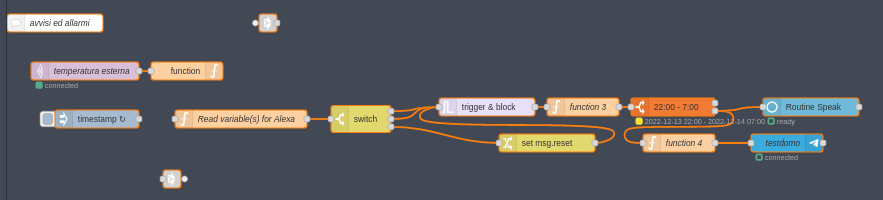
I'm continuing to refine the flow of external temperatures of Dave, I made alarm flow, which based on a certain temperature sends a voice alert with alexa and a telegram message, it all works. But I have an annoying effect, that is timing the 'iniect every 2 seconds, when I do a deploy or reboot the raspberry triggers the alarm; I've seen examples that use _link in and link out_ but how can I use it if I'm using input values taken via MQTT ?
---
### Author:  [@system](https://discourse.nodered.org/u/system)
#### Post date: [11 February 2023 12:01 UTC](https://discourse.nodered.org/t/read-outdoor-temperature-with-alexa/71700/14 "2023-02-11T12:01:19Z")
This topic was automatically closed 60 days after the last reply. New replies are no longer allowed.