# Send CSV file from Rockwell HMI Optix
**URL:** https://discourse.nodered.org/t/send-csv-file-from-rockwell-hmi-optix/87096
**Category:** Industrial
**Created:** [9 April 2024 07:22 UTC](https://discourse.nodered.org/t/send-csv-file-from-rockwell-hmi-optix/87096 "2024-04-09T07:22:40Z")
**Posts on this page:** 6
**Page:** 1
### Author:  [@Jan121](https://discourse.nodered.org/u/Jan121)
#### Post date: [9 April 2024 07:22 UTC](https://discourse.nodered.org/t/send-csv-file-from-rockwell-hmi-optix/87096/1 "2024-04-09T07:22:40Z")
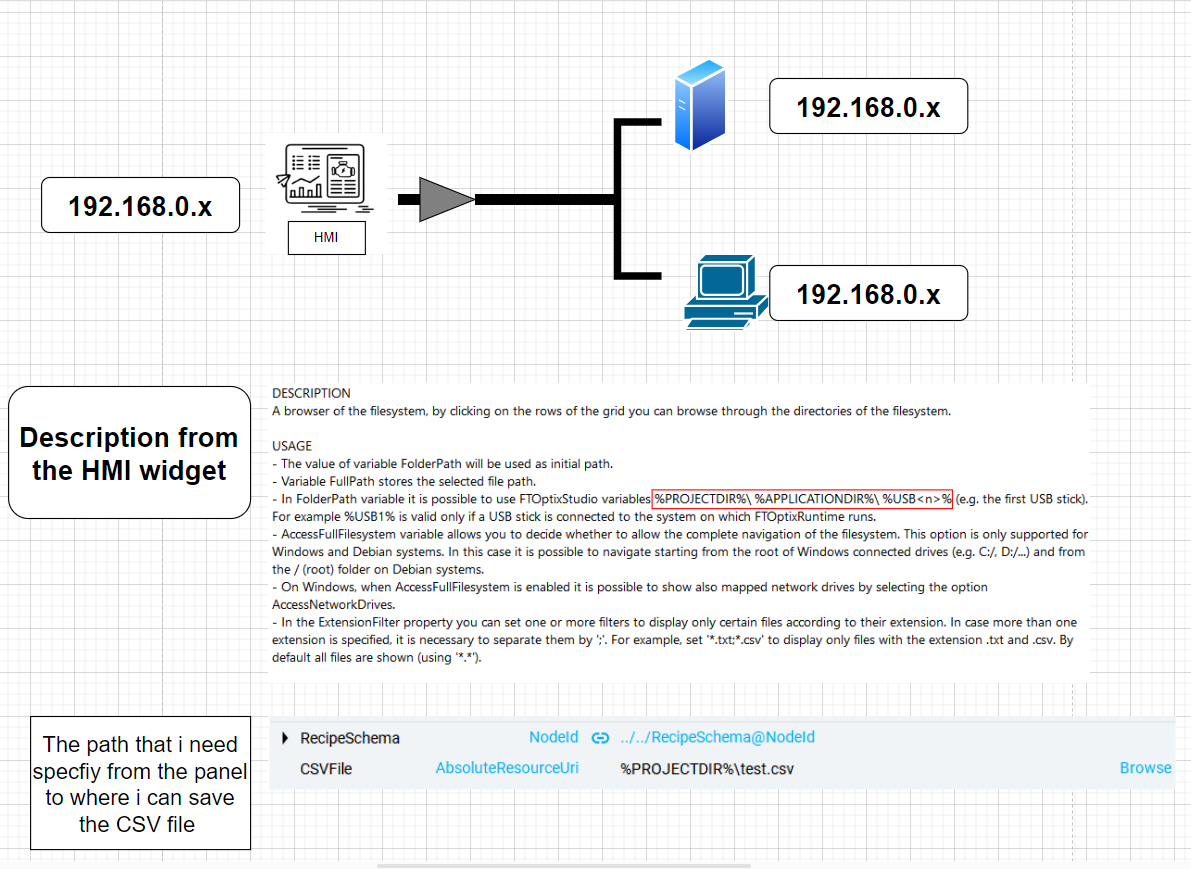
Hello, I am new here. I am programming Rockwell HMI Optix, which has a Linux-based OS. I can't access the Linux interface from the HMI. I have created logic that generates a CSV file for the report I've created. I want to send the file to either my server or PC. The HMI supports OPC UA, but my problem is that I am limited to where I can save the CSV file on the panel and can't use Windows addresses. Is there a way to create an OPC UA folder and pull the data through Node-RED into my PC or server, or do you have any other solutions?
---
### Author:  [@Steve-Mcl](https://discourse.nodered.org/u/Steve-Mcl)
#### Post date: [9 April 2024 09:04 UTC](https://discourse.nodered.org/t/send-csv-file-from-rockwell-hmi-optix/87096/2 "2024-04-09T09:04:45Z")
I am not familiar with "Optix" but a quick search reveals you can do MQTT - that greatly simplifies things.
REF: [Configure an application as an MQTT client](https://www.rockwellautomation.com/docs/en/factorytalk-optix/1-03/contents-ditamap/developing-solutions/application-examples/netlogic-tutorial/configure-an-application-as-an-mqtt-client.html)
REF: [https://www.youtube.com/watch?v=8vJHNyP5P68](https://www.youtube.com/watch?v=8vJHNyP5P68)
* * *
ALTERNATIVE:
I assume behind the HMI is a PLC (where the data is coming from). If yes, then the (arguably) better solution is to connect Node-RED to the PLC, collect the data, write it to where it needs to go - bypassing CSV altogether if possible (CSV is a poor, non extensible format data exchange format)
---
### Author:  [@Jan121](https://discourse.nodered.org/u/Jan121)
#### Post date: [9 April 2024 10:52 UTC](https://discourse.nodered.org/t/send-csv-file-from-rockwell-hmi-optix/87096/3 "2024-04-09T10:52:48Z")
Is it possible to send file with MQTT? like making a folder in node red, the alternative solution wont work because i have alread local variable from the hmi combined with the plc tags
---
### Author:  [@Steve-Mcl](https://discourse.nodered.org/u/Steve-Mcl)
#### Post date: [9 April 2024 12:11 UTC](https://discourse.nodered.org/t/send-csv-file-from-rockwell-hmi-optix/87096/4 "2024-04-09T12:11:25Z")
> [@Jan121](#):
>
> the alternative solution wont work because i have alread local variable from the hmi combined with the plc tags
That doesn't really make sense. PLCs are capable of multiple connections.
> [@Jan121](#):
>
> possible to send file with MQTT
If you can read the file, you can send it (it's just a string after all).
If you go down with "better" solution, all of this becomes moot anyway.
---
### Author:  [@Jan121](https://discourse.nodered.org/u/Jan121)
#### Post date: [10 April 2024 06:23 UTC](https://discourse.nodered.org/t/send-csv-file-from-rockwell-hmi-optix/87096/5 "2024-04-10T06:23:42Z")
I've already built the logic in the panel. I need to have the recipe CSV file from the panel, not from the PLC. There is a certain event where they want to save a CSV, and the only way to build a recipe and CSV for this purpose is through this panel.
---
### Author:  [@system](https://discourse.nodered.org/u/system)
#### Post date: [9 July 2024 06:24 UTC](https://discourse.nodered.org/t/send-csv-file-from-rockwell-hmi-optix/87096/6 "2024-07-09T06:24:34Z")
This topic was automatically closed 90 days after the last reply. New replies are no longer allowed.