# Serial Port RS485 question
**URL:** https://discourse.nodered.org/t/serial-port-rs485-question/37817
**Category:** General
**Created:** [20 December 2020 22:01 UTC](https://discourse.nodered.org/t/serial-port-rs485-question/37817 "2020-12-20T22:01:51Z")
**Posts on this page:** 13
**Page:** 1
### Author:  [@Becker](https://discourse.nodered.org/u/Becker)
#### Post date: [20 December 2020 22:01 UTC](https://discourse.nodered.org/t/serial-port-rs485-question/37817/1 "2020-12-20T22:01:52Z")
Hello,
I wanted to update my Raspberry Pi to the newest Buster + Node RED, but I have a problem to activate the "NibePi Master" ([https://github.com/anerdins/node-red-contrib-nibepi/](https://github.com/anerdins/node-red-contrib-nibepi/) ) in Node RED using a RS485 hat:
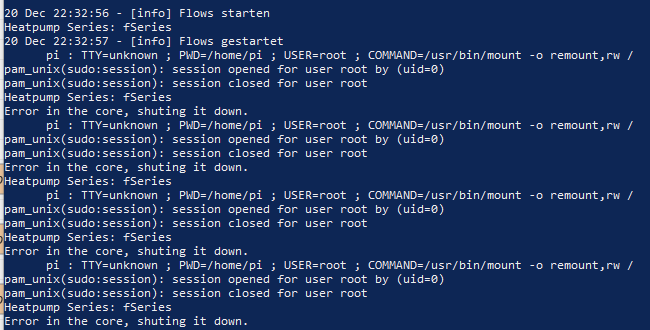
--\> /dev/ttyAMA0 is not reachable
I think for my friend @Steve-Mcl or @UnborN is easy to help me.
I activated the serial port and then I read I have to deactivate the bluetooth service (RPi3B)
```auto
echo "dtoverlay=disable-bt" | sudo tee -a /boot/config.txt
sudo systemctl disable hciuart
sudo reboot
```
or "...bt3". Not sure !
**I just have to know how to activate the RS485 Hat on Buster so that NibePi can find it at all.**
On desktop config there are many options "I2C", "GPIO Remote", ... don´t know whats right to activate.
thats my:
> **[RPI RS485 - Raspberry Pi Shield - RS485-Schnittstelle](https://www.reichelt.de/de/de/raspberry-pi-shield-rs485-schnittstelle-rpi-rs485-p162304.html?r=1)**
>
> Mit diesem Adapter fügen Sie Ihrem Raspberry Pi eine RS485-Schnittstelle hinzu.Die POIs werden durchgeschleift und können somit weiterhin benutzt werden.Maße (BxTxH): 35 x 55 x 25 mmLieferung oh \[...\]
Please help, even if it is only indirectly related to Node Red.
---
### Author:  [@UnborN](https://discourse.nodered.org/u/UnborN)
#### Post date: [20 December 2020 23:56 UTC](https://discourse.nodered.org/t/serial-port-rs485-question/37817/2 "2020-12-20T23:56:35Z")
Hi Becker,
1. Is this the same Raspberry Pi you had working before ?
2. I thought there was an Image from NibePi that pre-installed everything needed.
Did you start a clean install with a 2nd SD card for testing ?
There not much information on the RS-485 Hat from the link you sent us.
Its just from an online shop and no useful information regarding installation in the Datasheet on that page.
I have no experience in these Hats since i use a cheap ebay USB to RS485 for my modbus tests.
but i found an article from a similar RS485 Hat that i hope you may find useful.
```
sudo raspi-config
goto '5 Interfacing Options'
goto 'P6 Serial'
'Would you like a login shell to be accessible over serial?' --> NO
'Would you like the serial port hardware to be enabled?' --> YES
Finish raspi-config
reboot the Raspberry Pi
```
Now you can access the UART via **/dev/serial0**
[LINK TO ARTICLE](https://www.hackster.io/hartmut-wendt/node-red-rs485-raspberry-pi-tutorial-7cde1a)
---
### Author:  [@Becker](https://discourse.nodered.org/u/Becker)
#### Post date: [21 December 2020 06:38 UTC](https://discourse.nodered.org/t/serial-port-rs485-question/37817/3 "2020-12-21T06:38:25Z")
1. yes
2. yes
So I can look everything in the pre-installed Image (stretch).
I just put the RS485 hat on, and it works immediately @ /dev/ttyAMA0
---
### Author:  [@Steve-Mcl](https://discourse.nodered.org/u/Steve-Mcl)
#### Post date: [21 December 2020 09:01 UTC](https://discourse.nodered.org/t/serial-port-rs485-question/37817/4 "2020-12-21T09:01:37Z")
Did you do as @UnborN suggested on your new installation? Does it work?
---
### Author:  [@Becker](https://discourse.nodered.org/u/Becker)
#### Post date: [21 December 2020 09:53 UTC](https://discourse.nodered.org/t/serial-port-rs485-question/37817/5 "2020-12-21T09:53:15Z")
I can't go back until this evening..
I´m confused: on the pre-installed image it is ttyAMA0 and now on Buster it is ttyS0.
🤪
I´ll try.
The developer wrote:
> Now I remembered that The serialport might be /dev/ttyS0
---
### Author:  [@Becker](https://discourse.nodered.org/u/Becker)
#### Post date: [21 December 2020 11:31 UTC](https://discourse.nodered.org/t/serial-port-rs485-question/37817/6 "2020-12-21T11:31:39Z")
I tried:
ttyS0 & serial0
always the same:

I found this about tty:
> TtyAMA0 becomes ttyS0
> But only when using a Raspberry Pi 3, since the Bluetooth interface is addressed with ttyAMA0. The
> name of the UART interface is now ttyS0. If you continue to use a previous model, you can continue to
> use ttyAMA0 for the UART interface.
-\> I disabled bluetooth, so I think AMA0 is correct
P.S.

so it looks on the other SD-card
---
### Author:  [@Steve-Mcl](https://discourse.nodered.org/u/Steve-Mcl)
#### Post date: [21 December 2020 11:53 UTC](https://discourse.nodered.org/t/serial-port-rs485-question/37817/7 "2020-12-21T11:53:26Z")
is SPI enabled in raspi-config? SPI might be used for data transfer between PI and board.
See this documentation for example [this board](https://www.waveshare.com/w/upload/2/29/RS485-CAN-HAT-user-manuakl-en.pdf)
Also,
Can you show us a close up picture of the HAT - we might be able to spot something from the writings on the BOARD and CHIPS that lead to documentation.
Lastly, you might want to list your current `/boot/config.txt` and your working `/boot/config.txt` - to compare & see what is enabled / disabled
(you can do this with `sudo nano /boot/config.txt`)
---
### Author:  [@Becker](https://discourse.nodered.org/u/Becker)
#### Post date: [21 December 2020 11:56 UTC](https://discourse.nodered.org/t/serial-port-rs485-question/37817/8 "2020-12-21T11:56:11Z")

this is from the working - I think enable uart1 is missing
SPI:


all from the working SD-card
---
### Author:  [@Steve-Mcl](https://discourse.nodered.org/u/Steve-Mcl)
#### Post date: [21 December 2020 12:08 UTC](https://discourse.nodered.org/t/serial-port-rs485-question/37817/10 "2020-12-21T12:08:31Z")
> [@Becker](#):
>
> this is from the working - I think enable uart1 is missing
Did you actually do what @UnborN said?
> [@UnborN](#):
>
> ```auto
> sudo raspi-config
> goto '5 Interfacing Options'
> goto 'P6 Serial'
> 'Would you like a login shell to be accessible over serial?' --> NO
> 'Would you like the serial port hardware to be enabled?' --> YES
> Finish raspi-config
> reboot the Raspberry Pi
>
> ```
>
> Now you can access the UART via **/dev/serial0**
I asked this very question some time back
> [@Steve-Mcl](#):
>
> Did you do as @UnborN suggested on your new installation
---
### Author:  [@UnborN](https://discourse.nodered.org/u/UnborN)
#### Post date: [21 December 2020 12:33 UTC](https://discourse.nodered.org/t/serial-port-rs485-question/37817/11 "2020-12-21T12:33:23Z")
> [@Becker](#):
>
> this is from the working - I think enable uart1 is missing
the line `enable_uart=1` is missing from the boot/config.txt of the new SD card ?
so that must be the problem .. add it, reboot and try again either of the following
**/dev/ttyS0**
**/dev/serial0**
**/dev/ttyAMA0**
---
### Author:  [@Becker](https://discourse.nodered.org/u/Becker)
#### Post date: [21 December 2020 17:04 UTC](https://discourse.nodered.org/t/serial-port-rs485-question/37817/12 "2020-12-21T17:04:03Z")
it works with serial0
enable\_uart=1 was already in config.
I tried and changed so much, I will make a new clean SD-card and write a manual for me (and others).

but it still says: "TTY=unkown"
😟
---
### Author:  [@Becker](https://discourse.nodered.org/u/Becker)
#### Post date: [21 December 2020 18:43 UTC](https://discourse.nodered.org/t/serial-port-rs485-question/37817/13 "2020-12-21T18:43:54Z")
New fresh start.
What I did:
sudo nano /boot/config.txt
add:
dtoverlay=pi3-disable-wifi
dtoverlay=pi3-disable-bt
save & exit
sudo systemctl disable hciuart
sudo raspi-config
--\> 'Interfacing Options'
'P6 Serial'
'Would you like a login shell to be accessible over serial?' --\> NO
'Would you like the serial port hardware to be enabled?' --\> YES
Finish raspi-config
reboot the Raspberry Pi
again
sudo nano /boot/config.txt
enable\_uart=1 should be added
ls -l /dev --\> looking if serial0 -\> ttyAMA0
helpfull:
> **[How to setup the UART on Raspberry Pi 3 • Circuits](https://www.circuits.dk/setup-raspberry-pi-3-gpio-uart/)**
>
> Tips and tricks about configuring the UART on the Raspberry Pi 3 and Pi Zero W. The introduced bluetooth module makes this a little bit different.....
> **[Teach, Learn, and Make with Raspberry Pi – Raspberry Pi](https://www.raspberrypi.org/documentation/configuration/uart.md)**
>
> The Raspberry Pi is a tiny and affordable computer that you can use to learn programming through fun, practical projects. Join the global Raspberry Pi community.
---
### Author:  [@system](https://discourse.nodered.org/u/system)
#### Post date: [4 January 2021 18:44 UTC](https://discourse.nodered.org/t/serial-port-rs485-question/37817/14 "2021-01-04T18:44:13Z")
This topic was automatically closed 14 days after the last reply. New replies are no longer allowed.