# Shelly relay status
**URL:** https://discourse.nodered.org/t/shelly-relay-status/99360
**Category:** General
**Created:** [12 October 2025 10:13 UTC](https://discourse.nodered.org/t/shelly-relay-status/99360 "2025-10-12T10:13:06Z")
**Posts on this page:** 5
**Page:** 1
### Author:  [@Herbert](https://discourse.nodered.org/u/Herbert)
#### Post date: [12 October 2025 10:13 UTC](https://discourse.nodered.org/t/shelly-relay-status/99360/1 "2025-10-12T10:13:06Z")
Hello,
I´m using more shellies first gen in NodeRed with MQTT.
Asking if online, show state of relay and turn on and off relay. That works great.
I bought a new Shelly, but its name is Shellyplus and the commands are different to old ones and I couldn´t read the Relay status
In MQTT Explorer I found the status for the Relay in a string line. See here in the right area with name "output": true and false (Relay active and inactive)

In NodeRed it show so with Relay active and incative:
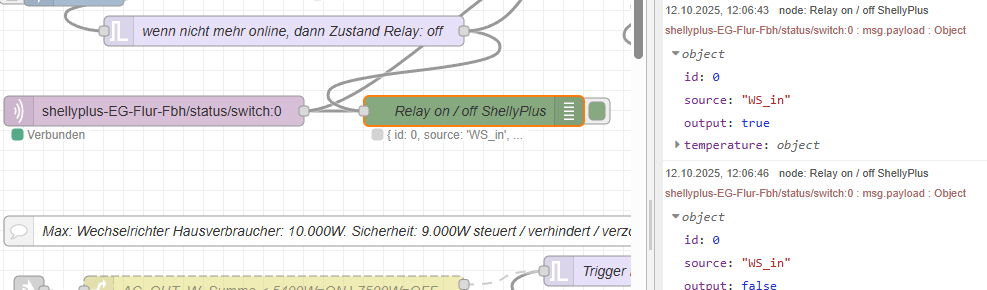
How I can use the output: false or true?
Thanks in front for your good support for a beginner.
Here the 2 relevant Nodes:
```auto
[
{
"id": "11d33bc2981ea199",
"type": "mqtt in",
"z": "04e8334d68490e82",
"g": "f648527053dcebe4",
"name": "",
"topic": "shellyplus-EG-Flur-Fbh/status/switch:0",
"qos": "0",
"datatype": "auto-detect",
"broker": "33ed6bdd892c405a",
"nl": false,
"rap": true,
"rh": 0,
"inputs": 0,
"x": 190,
"y": 1800,
"wires": [
[
"d48b2387b3a5326a",
"d63097921d6f1d99"
]
]
},
{
"id": "d48b2387b3a5326a",
"type": "debug",
"z": "04e8334d68490e82",
"g": "f648527053dcebe4",
"name": "Relay on / off ShellyPlus",
"active": true,
"tosidebar": true,
"console": false,
"tostatus": true,
"complete": "payload",
"targetType": "msg",
"statusVal": "payload",
"statusType": "auto",
"x": 510,
"y": 1800,
"wires": []
},
{
"id": "33ed6bdd892c405a",
"type": "mqtt-broker",
"name": "MQTT von PV Holzkeller",
"broker": "192.168.2.5",
"port": "1883",
"clientid": "",
"autoConnect": true,
"usetls": false,
"protocolVersion": "4",
"keepalive": "60",
"cleansession": true,
"autoUnsubscribe": true,
"birthTopic": "",
"birthQos": "0",
"birthPayload": "",
"birthMsg": {},
"closeTopic": "",
"closeQos": "0",
"closePayload": "",
"closeMsg": {},
"willTopic": "",
"willQos": "0",
"willPayload": "",
"willMsg": {},
"userProps": "",
"sessionExpiry": ""
}
]
```
---
### Author:  [@Steve-Mcl](https://discourse.nodered.org/u/Steve-Mcl)
#### Post date: [12 October 2025 10:29 UTC](https://discourse.nodered.org/t/shelly-relay-status/99360/2 "2025-10-12T10:29:24Z")
> [@Herbert](#):
>
> How I can use the output: false or true?
Just use in a switch node. Get the path using the copy path button and then have the switch node compare it to boolean true.
* * *
There’s a great page in the docs ([Working with messages : Node-RED](https://nodered.org/docs/user-guide/messages)) that will explain how to use the debug panel to find the right path/value for any data item.
Pay particular attention to the part about the buttons that appear under your mouse pointer when you over hover a debug message property in the sidebar.

---
### Author:  [@Steve-Mcl](https://discourse.nodered.org/u/Steve-Mcl)
#### Post date: [12 October 2025 10:30 UTC](https://discourse.nodered.org/t/shelly-relay-status/99360/3 "2025-10-12T10:30:30Z")
> [@Herbert](#):
>
> Thanks in front for your good support for a beginner.
For all beginners, I strongly recommend watching this playlist: [Node-RED Essentials](https://www.youtube.com/playlist?list=PLyNBB9VCLmo1hyO-4fIZ08gqFcXBkHy-6). The videos are done by the developers of node-red. They're nice & short and to the point. You will understand a whole lot more in about 1 hour. A small investment for a lot of gain.
---
### Author:  [@Herbert](https://discourse.nodered.org/u/Herbert)
#### Post date: [12 October 2025 11:41 UTC](https://discourse.nodered.org/t/shelly-relay-status/99360/4 "2025-10-12T11:41:26Z")
Thank you very much. The videos are great and very helpful. All the best for you.
---
### Author:  [@system](https://discourse.nodered.org/u/system)
#### Post date: [26 October 2025 11:42 UTC](https://discourse.nodered.org/t/shelly-relay-status/99360/5 "2025-10-26T11:42:25Z")
This topic was automatically closed 14 days after the last reply. New replies are no longer allowed.