# TTS-ultimate in a docker container
**URL:** https://discourse.nodered.org/t/tts-ultimate-in-a-docker-container/51448
**Category:** General
**Created:** [23 September 2021 17:45 UTC](https://discourse.nodered.org/t/tts-ultimate-in-a-docker-container/51448 "2021-09-23T17:45:09Z")
**Posts on this page:** 20
**Page:** 1
### Author:  [@jaeti01](https://discourse.nodered.org/u/jaeti01)
#### Post date: [23 September 2021 17:45 UTC](https://discourse.nodered.org/t/tts-ultimate-in-a-docker-container/51448/1 "2021-09-23T17:45:09Z")
Anyone using node-red-contrib-tts-ultimate inside a docker container?
I have assigned ports 1400 and 1980 to the docker container but I still get the error
"Sonos down ECONNREFUSED:1400".
Any hint?
thanks!
---
### Author:  [@ager](https://discourse.nodered.org/u/ager)
#### Post date: [17 November 2021 11:05 UTC](https://discourse.nodered.org/t/tts-ultimate-in-a-docker-container/51448/2 "2021-11-17T11:05:53Z")
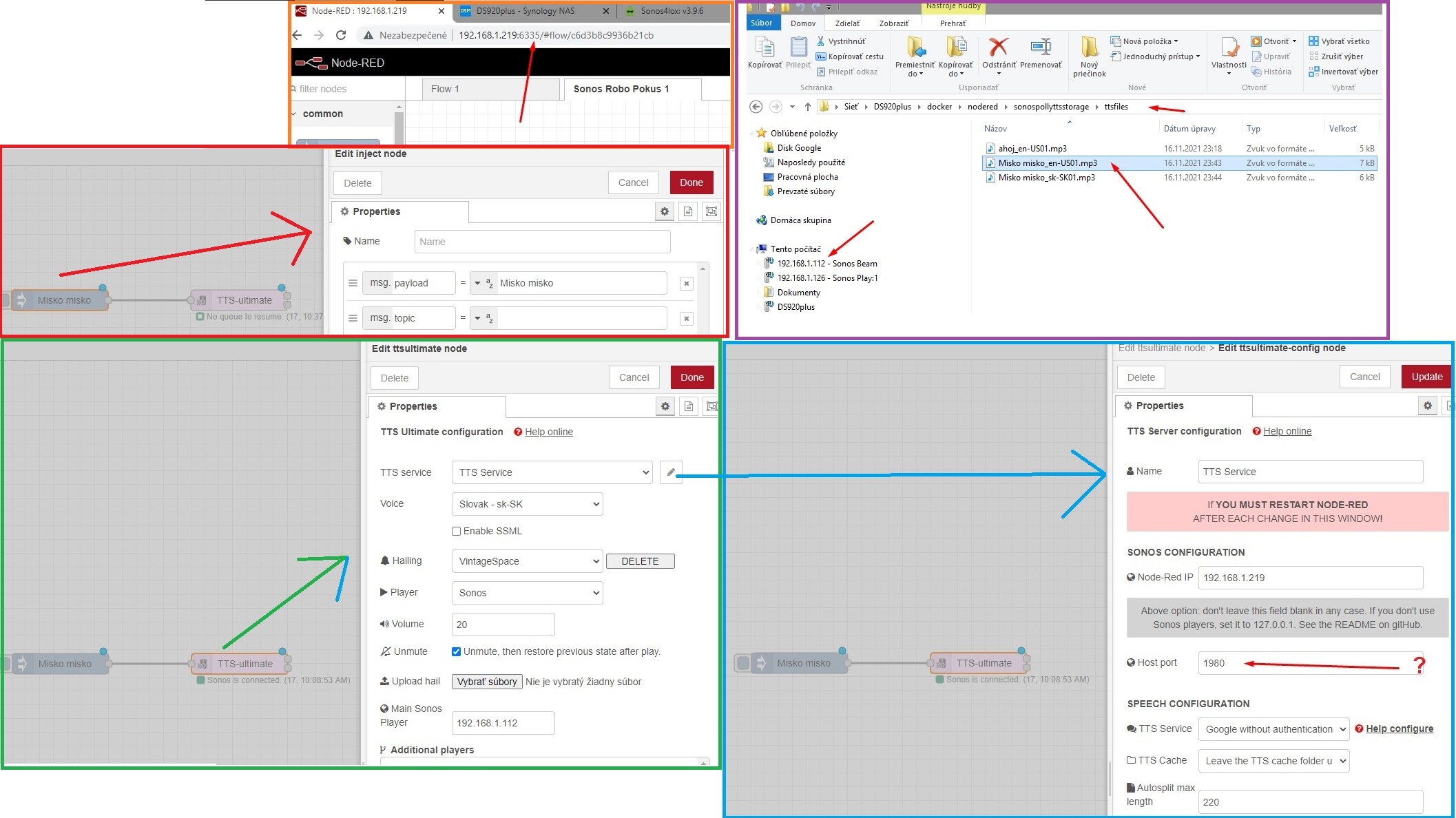
Hi.I am using node-red inside docker container in synology DS920+ and sonos is connected but I can see always some meassages in Sonos app as you can see in below pictures.
Default Host port **1980** in **ttsultimate-config node** should be port of node-red becasue I have nodered running on port 6335 please?
Thanks for any help...

---
### Author:  [@jaeti01](https://discourse.nodered.org/u/jaeti01)
#### Post date: [17 November 2021 15:10 UTC](https://discourse.nodered.org/t/tts-ultimate-in-a-docker-container/51448/3 "2021-11-17T15:10:23Z")
Hey! What kind of networking are you using?
I didn't get it working inside a docker with forwarded ports as it seems to require Multicast as well which you cannot easily forward into the container.
So I changed my container to use host networking and now it works.
---
### Author:  [@ager](https://discourse.nodered.org/u/ager)
#### Post date: [17 November 2021 19:54 UTC](https://discourse.nodered.org/t/tts-ultimate-in-a-docker-container/51448/4 "2021-11-17T19:54:09Z")
Helo jaeti01. Thanks for reply and help!
As you can see in attached picture in nodered is **Bridge** and same in Docker is **Bridge**.
These both I have to change to host or? How to change please?
Manty thanks for each help

---
### Author:  [@jaeti01](https://discourse.nodered.org/u/jaeti01)
#### Post date: [18 November 2021 08:36 UTC](https://discourse.nodered.org/t/tts-ultimate-in-a-docker-container/51448/5 "2021-11-18T08:36:07Z")
Sorry, I don't know anything about that UI.
I run mine on commandline:
```auto
docker run \
-dit --restart unless-stopped \
-v /var/lib/nodered:/data \
--network host \
--name nodered nodered/node-red
```
---
### Author:  [@ager](https://discourse.nodered.org/u/ager)
#### Post date: [18 November 2021 13:41 UTC](https://discourse.nodered.org/t/tts-ultimate-in-a-docker-container/51448/6 "2021-11-18T13:41:26Z")
I am lost in comandline ☹
So I have to change to host in docker and also in nodered ?
Or if I change in docker it will automaticaly change in nodered?
Any idea how to do it please?
Thanks a lot
---
### Author:  [@jaeti01](https://discourse.nodered.org/u/jaeti01)
#### Post date: [18 November 2021 14:12 UTC](https://discourse.nodered.org/t/tts-ultimate-in-a-docker-container/51448/7 "2021-11-18T14:12:07Z")
It’s a pure docker config thing. Nothing needs to be done on nodered side for that change.
---
### Author:  [@ager](https://discourse.nodered.org/u/ager)
#### Post date: [18 November 2021 19:06 UTC](https://discourse.nodered.org/t/tts-ultimate-in-a-docker-container/51448/8 "2021-11-18T19:06:38Z")
Ok Thanks. So I have to change only in docker side. Do you have any idea how to do it please?
---
### Author:  [@jaeti01](https://discourse.nodered.org/u/jaeti01)
#### Post date: [22 November 2021 09:53 UTC](https://discourse.nodered.org/t/tts-ultimate-in-a-docker-container/51448/9 "2021-11-22T09:53:44Z")
re-create the container with a different network type
---
### Author:  [@xx\_Nexus\_xx](https://discourse.nodered.org/u/xx_Nexus_xx)
#### Post date: [23 November 2021 00:47 UTC](https://discourse.nodered.org/t/tts-ultimate-in-a-docker-container/51448/10 "2021-11-23T00:47:15Z")
I'm running TTS-Ultimate and Node-Red in docker and it works fine. The network mode is HOST and the used port is 1880 (Defined in Docker-setup)
I had a similar problem as you have, but mine was access related. I had to setup the shared folder in Node-Red settings.js
```auto
// By default, all user data is stored in a directory called `.node-red` under
// the user's home directory. To use a different location, the following
// property can be used
userDir: '/data',
```
The same directory I use in my flow and point the TTS directory to it


The easiest way is to check is to access your "Hailing\_VintageSpace.mp3" via a browser. Only if you can play the file via the browser than it will work with TTS-Ultimate.
Just a few more comments:
- I have disabled the hailing-feature on my system (it was anoying)
- Add a debug node to both outputs of your TTS-Ultimate node

- The debug nodes will tell you:
---\> if a TTS file was successfully generated
---\> what the name of the TTS file is
---\> where the TTS file has been stored (= full path)
- with the above information you should try to access your TTS file via browser and play it

I hope this helps a bit 😉
---
### Author:  [@ager](https://discourse.nodered.org/u/ager)
#### Post date: [30 November 2021 22:28 UTC](https://discourse.nodered.org/t/tts-ultimate-in-a-docker-container/51448/11 "2021-11-30T22:28:21Z")
Finally I reinstal nodered and have to setup in advanced settings during instalation : **use same network as host** and it is working and nodered run as host network.
Before reinstal I was able to see all TTS mp3 files in shared folder docker in folder nodered as you can see:

But now after reinstal me shared docker folder is empty:

Can you please help me where I can find where it is installed and where all mp3 files are?
Many thanks
---
### Author:  [@xx\_Nexus\_xx](https://discourse.nodered.org/u/xx_Nexus_xx)
#### Post date: [1 December 2021 01:28 UTC](https://discourse.nodered.org/t/tts-ultimate-in-a-docker-container/51448/12 "2021-12-01T01:28:20Z")
Please check you log details when node-red is starting .. the log details will tell you where the user-data folder is located.
the folder of "sonospollyttsstorage" should be located within your user-data folder
---
### Author:  [@ager](https://discourse.nodered.org/u/ager)
#### Post date: [1 December 2021 07:40 UTC](https://discourse.nodered.org/t/tts-ultimate-in-a-docker-container/51448/13 "2021-12-01T07:40:04Z")
Thanks a lot **xx\_Nexus\_xx** for help!
I have stoped nodered and start and I suppose you mean log as terminal in docker and I can see this:

looks like path is: **/usr/src/node-red**
But where I can see/find it in **synology filestation** please?
Many thanks
---
### Author:  [@xx\_Nexus\_xx](https://discourse.nodered.org/u/xx_Nexus_xx)
#### Post date: [1 December 2021 09:35 UTC](https://discourse.nodered.org/t/tts-ultimate-in-a-docker-container/51448/14 "2021-12-01T09:35:20Z")
You can see in your log-file
1. your user-directory is /data ==\> it looks like you have maped the /data drive to _/var/lib/nodered:_ ..pls check there .. this should point to your Synology drive
2. TTS log is showing that all TTS files are located in /data/sonospolyttsstorage
in my docker setup I have mounted the /data directory to a qnap share drive... but you have to check how that works with your docker and Synology.
independant to your file location .. you should be able to access your files via the browser

only if it works in the browser ..it will work with sonos itself
BUT .. it is saying that your TTS endpoint is [http://192.168.1.219:1980/tts](http://192.168.1.219:1980/tts) ... try this in your browser .. you should be able to copy mp3 files there (/data/sonospolyttsstorage) and play via browser 😉
Comment:
your log file is showing that you have not defined a TTS service
 ... that might be a reason your TTS file is not generated ... check with file-browser what is in that /data/sonospolyttsstorage
---
### Author:  [@ager](https://discourse.nodered.org/u/ager)
#### Post date: [1 December 2021 12:16 UTC](https://discourse.nodered.org/t/tts-ultimate-in-a-docker-container/51448/15 "2021-12-01T12:16:33Z")
Thanks xx\_Nexus\_xx for help!
How I can check _/var/lib/nodered_ ?
Problem is I didnt mapped anything I just did instalation and looks like it did automatically somehow during instalation but I have no idea where all folders and files are ? 🙂
I cant see any folder or anything in filestation in synology where it should be:

Regarding TTS it is interesting that all is working and I can hear TTS from my sonos Beam but I have no idea where all mp3 files are saved...
If I try with browser as you send:

Thanks
---
### Author:  [@ager](https://discourse.nodered.org/u/ager)
#### Post date: [1 December 2021 12:30 UTC](https://discourse.nodered.org/t/tts-ultimate-in-a-docker-container/51448/16 "2021-12-01T12:30:43Z")
Maybe this is telling something (nodered detailed information in docker) 🙂

I am really lost, no idea where is all files and mp3....
---
### Author:  [@xx\_Nexus\_xx](https://discourse.nodered.org/u/xx_Nexus_xx)
#### Post date: [1 December 2021 22:56 UTC](https://discourse.nodered.org/t/tts-ultimate-in-a-docker-container/51448/17 "2021-12-01T22:56:41Z")
Yes, as per the log info it should be setup properly ... but I don't know where your /data folder is .. all conte nt should be in there.
How did you generate your docker ... there must be the volume definition for /data .... on command line it is done with the _-v_ parameter
docker run
-dit --restart unless-stopped
\*-v / **YOUR\_DATA\_FOLDER** /data \*
--network host
--name nodered nodered/node-red
The path you are showing in you screenshots are the Node-Red path and location but does not show where the /data path or volume is ... there must be a section in your docker config where you can configure the volumes .. sorry your UI is not English/German so I cannot read the details
---
### Author:  [@ager](https://discourse.nodered.org/u/ager)
#### Post date: [2 December 2021 12:07 UTC](https://discourse.nodered.org/t/tts-ultimate-in-a-docker-container/51448/18 "2021-12-02T12:07:15Z")
Exactly all content should be there but there is nothing...
**I have change language of my synology to English for you to understand 🙂**
If you asking how I genarate docker, I have instaled in synology package center just download and thats all...no setup option is there for instalation as you can see in below picture:

If you asking how I genarate nodered container in docker, I have tried many of them due to always some problem (some of them was old, some was network bridge instead of host, some was not compatible with node node-red-contrib-sonos-plus, some have no options to manage palette...)
Best working for me was installed exactly based on this tutorial:
> **[How to Install Node-RED on Your Synology NAS](https://mariushosting.com/how-to-install-node-red-on-your-synology-nas/)**
>
> Trustworthy expert guide to your Synology NAS.
But it was also bridge network after instalation so I have to delete it and install again from downloaded image to setup host network in advanced configuration during instalation.
I am not familiar with command line ☹
Here is my docker and nodered in English but looks like there is no option to configure volume even if nodered is off:

So as you can see I have change and instaled many times so maybe it is good option to uninstall all and install again from the begining.What do you think?
Do I need to also uninstal docker in synology and start instalation again from docker or only uninstal all nodered versions I have and reinstal nodered only?
---
### Author:  [@ager](https://discourse.nodered.org/u/ager)
#### Post date: [2 December 2021 13:58 UTC](https://discourse.nodered.org/t/tts-ultimate-in-a-docker-container/51448/19 "2021-12-02T13:58:30Z")
More info interesting...I have found how to edit nodered.
1. If I start nodered in configuration **WITHOUT** volume ( **no defined folder and path for data** ):
2. If I start nodered in configuration **WITH** volume (Defined folder **docker/nodered/data** and path **/data** ):
There are some errors so maybe you can see there something to help me 🙂 Thanks a lot
---
### Author:  [@janvda](https://discourse.nodered.org/u/janvda)
#### Post date: [2 December 2021 14:25 UTC](https://discourse.nodered.org/t/tts-ultimate-in-a-docker-container/51448/20 "2021-12-02T14:25:32Z")
The error says that is doesn't have the permission to copy the settings.js to `/data/settings.js`.
I see that you have mounted your `docker/nodered/data` folder to `/data`.
So I am guessing that `docker/nodered/data` folder already has a settings.js file and node-red container user doesn't have permissions to overwrite this settings.js file.
So I suggest that you move the file `docker/nodered/data/settings.js` to another location and restart the container.
[Next page](https://discourse.nodered.org/t/tts-ultimate-in-a-docker-container/51448.md?page=2)