### Author:  [@hotNipi](https://discourse.nodered.org/u/hotNipi)
#### Post date: [1 October 2021 17:50 UTC](https://discourse.nodered.org/t/uibuilder-the-next-step-3rd-party-comms-with-a-uibuilder-front-end/51684/3 "2021-10-01T17:50:29Z")
Tihis sounds promising 👍. Can somebody buy me some time to play with it ...
---
### Author:  [@TotallyInformation](https://discourse.nodered.org/u/TotallyInformation)
#### Post date: [16 October 2021 13:11 UTC](https://discourse.nodered.org/t/uibuilder-the-next-step-3rd-party-comms-with-a-uibuilder-front-end/51684/4 "2021-10-16T13:11:16Z")
Another round of changes pushed to the GitHub vNext branch today.
- A couple of annoying bugs got squashed.
- Package Management is now almost completely rewritten - still some work to do to allow you to install local packages though. But installing from npmjs and from GitHub both work and you can add tag/version/branch specifiers as well. Useful if you want a specific version or branch.
- The Editor panel has been extensively rewritten as well.
- Behind the scenes, the ExpressJS route handling has been extensively reworked and now uses Express's Router capabilities. This greatly simplifies how routes are created and removed. Especially when instances of uibuilder have their URL changed or when an instance is removed from the flows.
Still left to do is simplifying and tidying up the security feature - I fear it won't have all the features I'd hoped for in this release. Also I want to include @shrickus's [idea to allow a custom middleware](https://discourse.nodered.org/t/can-i-host-stand-alone-nodejs-apps-inside-uibuilder-nodes-if-so-should-i/51813/6) to be added to an instance so that API's can be added.
A couple of other bugs to squash too.
The changelog file in the branch has details of the changes and a long todo list (not all of which will make it into this release) 🙂
Please do try it out if you have a chance and let me know of any bugs, issues or wishes.
---
### Author:  [@dczysz](https://discourse.nodered.org/u/dczysz)
#### Post date: [29 December 2021 17:58 UTC](https://discourse.nodered.org/t/uibuilder-the-next-step-3rd-party-comms-with-a-uibuilder-front-end/51684/5 "2021-12-29T17:58:17Z")
I'm trying to test out vNext but I can't seem to get NR to start successfully, not exactly sure what I'm doing wrong. I have the vNext branch installed with a github URL. But then upon starting NR, it crashes because it can't find `execa` (listed in uib's devDependencies, this should be regular dependencies, no?). So I installed `execa@5` to `` (using Docker for this so `/data`), then got a similar error with `socket.io` not being found. Did the same with that, now ending up with this and I'm not quite sure if it's a uibuilder error or node-red. I do see a mention of :3001 [here](https://github.com/TotallyInformation/node-red-contrib-uibuilder/blob/74fccb9ccb8602dea50e7463b7442ed94b5c2010/nodes/libs/uiblib.js#L688), but still not sure.
```auto
node-red_1 | Welcome to Node-RED
node-red_1 | ===================
node-red_1 |
node-red_1 | 29 Dec 17:31:47 - [info] Node-RED version: v2.1.4
node-red_1 | 29 Dec 17:31:47 - [info] Node.js version: v14.18.2
node-red_1 | 29 Dec 17:31:47 - [info] Linux 5.10.16.3-microsoft-standard-WSL2 x64 LE
node-red_1 | 29 Dec 17:31:47 - [info] Loading palette nodes
node-red_1 | 29 Dec 17:31:48 - [red] Uncaught Exception:
node-red_1 | 29 Dec 17:31:48 - [error] Error: connect ECONNREFUSED 127.0.0.1:3001
node-red_1 | at TCPConnectWrap.afterConnect [as oncomplete] (net.js:1159:16)
```
So clearly I'm doing something wrong here 😅
---
### Author:  [@TotallyInformation](https://discourse.nodered.org/u/TotallyInformation)
#### Post date: [29 December 2021 22:42 UTC](https://discourse.nodered.org/t/uibuilder-the-next-step-3rd-party-comms-with-a-uibuilder-front-end/51684/6 "2021-12-29T22:42:46Z")
> [@dczysz](#):
>
> But then upon starting NR, it crashes because it can't find `execa` (listed in uib's devDependencies, this should be regular dependencies, no?).
Oops! First bug found - thanks! 😬 - because I run with dev dependencies installed, I forgot that I had used execa in one of the new classes as well. I use it to support the new package management functions. That is now fixed in vNext.
> [@dczysz](#):
>
> got a similar error with `socket.io` not being found
That shouldn't happen and you shouldn't install it.
I've just done a clean installation and got no errors at all from the latest amendment:
```auto
C:\src\nrtest\data
> npm install totallyinformation/node-red-contrib-uibuilder#vNext
```
```plaintext
C:\src\nrtest
> npm start
> node-red-master@2.0.3 start
> node node_modules/node-red/red.js --userDir ./data
29 Dec 22:35:39 - [info]
Welcome to Node-RED
===================
29 Dec 22:35:39 - [info] Node-RED version: v2.1.4
29 Dec 22:35:39 - [info] Node.js version: v16.13.0
29 Dec 22:35:39 - [info] Windows_NT 10.0.19044 x64 LE
29 Dec 22:35:40 - [info] Loading palette nodes
29 Dec 22:35:44 - [info] Settings file : C:\src\nrtest\data\settings.js
29 Dec 22:35:44 - [info] Context store : 'default' [module=memory]
29 Dec 22:35:44 - [info] User directory : C:\src\nrtest\data
29 Dec 22:35:44 - [warn] Projects disabled : editorTheme.projects.enabled=false
29 Dec 22:35:44 - [info] Flows file : C:\src\nrtest\data\flows.json
29 Dec 22:35:44 - [info] Creating new flow file
29 Dec 22:35:44 - [warn]
---------------------------------------------------------------------
Your flow credentials file is encrypted using a system-generated key.
If the system-generated key is lost for any reason, your credentials
file will not be recoverable, you will have to delete it and re-enter
your credentials.
You should set your own key using the 'credentialSecret' option in
your settings file. Node-RED will then re-encrypt your credentials
file using your chosen key the next time you deploy a change.
---------------------------------------------------------------------
29 Dec 22:35:44 - [info] +-----------------------------------------------------
29 Dec 22:35:44 - [info] | uibuilder v5.0.0-dev initialised
29 Dec 22:35:44 - [info] | root folder: C:\src\nrtest\data\uibuilder
29 Dec 22:35:44 - [info] | Using Node-RED's webserver at:
29 Dec 22:35:44 - [info] | http://172.20.112.1:1881/ or http://localhost:1881/
29 Dec 22:35:44 - [info] | Installed packages:
29 Dec 22:35:44 - [info] +-----------------------------------------------------
29 Dec 22:35:44 - [info] Server now running at http://127.0.0.1:1881/
29 Dec 22:35:44 - [info] Starting flows
29 Dec 22:35:44 - [info] Started flows
```
Well, you are using WSL - I'll see if I can get that working. However, I'd say that you have something else trying to connect to port 3001, I don't think that would be anything to do with uibuilder since Node-RED hasn't even actually started at that point.
Hang on, you are using Docker - under WSL? Urm, that's about as complex as I can think of!
---
### Author:  [@dczysz](https://discourse.nodered.org/u/dczysz)
#### Post date: [29 December 2021 23:02 UTC](https://discourse.nodered.org/t/uibuilder-the-next-step-3rd-party-comms-with-a-uibuilder-front-end/51684/7 "2021-12-29T23:02:21Z")
> [@TotallyInformation](#):
>
> Hang on, you are using Docker - under WSL? Urm, that's about as complex as I can think of!
Well it _seemed_ like it would be the simplest way to have "throwaway" Node-RED installs and the target device will be running this in Docker on a Debian machine. But fair point 😄
---
### Author:  [@TotallyInformation](https://discourse.nodered.org/u/TotallyInformation)
#### Post date: [29 December 2021 23:02 UTC](https://discourse.nodered.org/t/uibuilder-the-next-step-3rd-party-comms-with-a-uibuilder-front-end/51684/8 "2021-12-29T23:02:41Z")
OK, I've reproduced the error. Obviously I was wrong. Seems to be something to do with WSL.

Will check now.
But I don't know why - that net.js isn't one of mine.
---
### Author:  [@dczysz](https://discourse.nodered.org/u/dczysz)
#### Post date: [29 December 2021 23:04 UTC](https://discourse.nodered.org/t/uibuilder-the-next-step-3rd-party-comms-with-a-uibuilder-front-end/51684/9 "2021-12-29T23:04:53Z")
Oh great, glad I'm not the only one. Thanks for taking the time to look into it!
Tomorrow I can try this with/without Docker on an actual linux machine to see if I have better luck.
---
### Author:  [@TotallyInformation](https://discourse.nodered.org/u/TotallyInformation)
#### Post date: [29 December 2021 23:07 UTC](https://discourse.nodered.org/t/uibuilder-the-next-step-3rd-party-comms-with-a-uibuilder-front-end/51684/10 "2021-12-29T23:07:58Z")
Certainly not Docker in this case. I don't get it on a local install on Windows as you saw. But do get it on WSL with a global Node-RED install and node.js v14. My Windows dev has v16. Node-RED itself started up OK without uibuiilder installed.
Oh poo! Not going to be easy to track down I don't think. I can't think what could be looking for something on port 3001 though. I'll do a manual code search. Let me also try the live version of uibuilder under WSL.
* * *
UPDATE: Doh! I'm a moron - I found something hard-coded that I'd obviously been working on for the security stuff. It was a mockup of an API. Let me get rid of it.
---
### Author:  [@TotallyInformation](https://discourse.nodered.org/u/TotallyInformation)
#### Post date: [29 December 2021 23:12 UTC](https://discourse.nodered.org/t/uibuilder-the-next-step-3rd-party-comms-with-a-uibuilder-front-end/51684/11 "2021-12-29T23:12:25Z")
OK, seems to be working now - sorry about that.
---
### Author:  [@dczysz](https://discourse.nodered.org/u/dczysz)
#### Post date: [29 December 2021 23:20 UTC](https://discourse.nodered.org/t/uibuilder-the-next-step-3rd-party-comms-with-a-uibuilder-front-end/51684/12 "2021-12-29T23:20:39Z")
Not a problem at all! Thanks for saving us from the impending dashboard/Angular deprecation!
I'll give this a shot tomorrow and let you know if I have any other issues. Thanks for the quick fix.
---
### Author:  [@dczysz](https://discourse.nodered.org/u/dczysz)
#### Post date: [30 December 2021 20:15 UTC](https://discourse.nodered.org/t/uibuilder-the-next-step-3rd-party-comms-with-a-uibuilder-front-end/51684/13 "2021-12-30T20:15:15Z")
I feel bad bringing more bad news, hopefully I'm not getting too annoying yet!
I'm a bit confused on the dependency installation process. I tried to install my uibuilder dependencies from the Dockerfile (`RUN npm install vue@2 bootstrap-vue --prefix /data/uibuilder`) but it looks like uibuilder overwrites the package.json file upon initialization. So even though these packages were present in `/data/uibuilder/node_modules`, since package.json was now blank uibuilder warned about the missing packages when attempting to load the bootstrap-vue template.
It would be nice to automate this part and have it all handled in the Dockerfile, but you provide the "Libraries" tab so I figured I'd try it that way instead. But I'm not having any luck with that either:

```auto
[error] [uibuilder:API:uibnpmmanage] uibuilder Admin API. No location provided for npm management.
```
Is there something new I need to configure for the "npm management location"?
If I manually run `npm install vue bootstrap-vue` inside `/data/uibuilder` then restart Node-RED, they come up just fine.

* * *
I'm also still getting the `socket.io` not found error, but messages are successfully getting passed back and forth just fine so maybe it's not actually an issue?
```auto
30 Dec 19:47:48 - [warn] [uibuilder:package-mgt:getPackagePath2] PACKAGE NOT FOUND socket.io at /data/node_modules/socket.io
30 Dec 19:47:48 - [error] [uibuilder:web.js:serveVendorSocketIo] Cannot find installation of Socket.IO. It should be in userDir (/data) but is not. Check that uibuilder is installed correctly. Run 'npm ls socket.io'.
```
* * *
I still managed to get it running fine as far as I can tell so I'll continue to do some more testing.
---
### Author:  [@TotallyInformation](https://discourse.nodered.org/u/TotallyInformation)
#### Post date: [30 December 2021 22:03 UTC](https://discourse.nodered.org/t/uibuilder-the-next-step-3rd-party-comms-with-a-uibuilder-front-end/51684/14 "2021-12-30T22:03:31Z")
> [@dczysz](#):
>
> I feel bad bringing more bad news, hopefully I'm not getting too annoying yet!
Not at all, it needs doing. Bring it on.
> [@dczysz](#):
>
> uibuilder overwrites the package.json file upon initialization
Doh! Again! Right, I obviously hadn't thought through the different paths through that process.
OK, so it needs to check whether the file exists and if it does, not destroy it! OK, added to the fixes list.
> [@dczysz](#):
>
> Is there something new I need to configure for the "npm management location"?
Nope, also my fault. In a previous dev update, I changed the way things work. Previously you had to specify whether you wanted the package from npm, github or local but I realised that wasn't needed since that is inferred from the name. But clearly I missed a parameter check in the API. (Line 674 of admin-api-v2.js).
I've pushed a fix for that to the repo so that should work. Just make sure that your `uibRoot` folder is writable in your Docker setup. It should be of course.
---
### Author:  [@TotallyInformation](https://discourse.nodered.org/u/TotallyInformation)
#### Post date: [30 December 2021 22:10 UTC](https://discourse.nodered.org/t/uibuilder-the-next-step-3rd-party-comms-with-a-uibuilder-front-end/51684/15 "2021-12-30T22:10:56Z")
> [@dczysz](#):
>
> I'm also still getting the `socket.io` not found error, but messages are successfully getting passed back and forth just fine so maybe it's not actually an issue?
That's strange. That is something different. Could you please, from a terminal, go to your userDir folder and run `npm ls socket.io`? You should get a result something like:

Let me know what yours shows please - most likely something weird due to a combination of Docker and npm I'm guessing.
---
### Author:  [@dczysz](https://discourse.nodered.org/u/dczysz)
#### Post date: [30 December 2021 22:25 UTC](https://discourse.nodered.org/t/uibuilder-the-next-step-3rd-party-comms-with-a-uibuilder-front-end/51684/16 "2021-12-30T22:25:21Z")
Well this took me a while to type up... I'll get back to your recent messages in a bit.
The `uib-sender` node seems to work well (almost, see below), but I'm not sure I understand when it should be used. Does it provide different functionality than the input to the main `uibuilder` node (or planned to in the future)? What's the `event-in` node mentioned in the help tab for `uib-sender`? I'm guessing this will all be more clear once the "Add a new template and example to demonstrate the sender node" TODO item is completed, so not really an issue, mostly just curious.
I did notice some weird behavior with the `uib-sender` node though. Here are a couple scenarios to reproduce slightly different bugs:
Setup:

1. Select "Pass input msg to output?" option, hook up an inject and debug node, deploy
2. Trigger the inject node, debug node logs the message, everything is working correctly
3. Double click to edit the `uib-sender` node
Bug 1:
1. Change nothing, click `Cancel`
2. Click somewhere else to remove focus on the `uib-sender` node
3. Output connection disappears but wire stays intact. There are no changes to deploy so it continues to work fine even though visually it looks broken

3a. Because there were no changes to deploy, reloading the page gets everything back to normal
4. Repeat 1-3 if you reloaded the page. Move the `uib-sender` node and deploy

5. This seems like the same as above, but now messages no longer pass through and reloading the page shows the wire is actually fully disconnected now
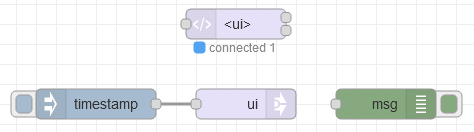
Bug 2:
1. Change "Name" or "Topic" or even don't do anything at all, click "Done"
2. Connection and wire both disappear, but since no changes to deploy everything still works (reloading the page shows the wires still intact)

3. If you didn't reload and now do something like move it to allow you to trigger a redeploy, now the wires are actually disconnected and no longer pass through
With both of these scenarios the "Pass input msg to output?" option stays selected the entire time. The only way to get the output connection to reappear is to deselect and select it again.
Hopefully all of this isn't too confusing, just trying to provide as much info as I can since it seems to have a few slightly different ways of behaving. Maybe next time a video will be a better idea 😅
---
### Author:  [@dczysz](https://discourse.nodered.org/u/dczysz)
#### Post date: [30 December 2021 22:39 UTC](https://discourse.nodered.org/t/uibuilder-the-next-step-3rd-party-comms-with-a-uibuilder-front-end/51684/17 "2021-12-30T22:39:55Z")
> [@TotallyInformation](#):
>
> That's strange. That is something different. Could you please, from a terminal, go to your userDir folder and run `npm ls socket.io` ? You should get a result something like:
>
> 
>
> Let me know what yours shows please - most likely something weird due to a combination of Docker and npm I'm guessing.
So it's a bit weird the way Node-RED works in Docker. I followed the [official instructions for installing extra nodes](https://nodered.org/docs/getting-started/docker#dockerfile-which-copies-in-local-resources). The line `COPY package.json .` copies it to `/usr/src/node-red` and installs the node\_modules in that directory. So that's where `socket.io` lives apparently.
```bash
bash-5.0$ pwd
/usr/src/node-red
bash-5.0$ npm ls socket.io
elite-node-red@ /usr/src/node-red
`-- node-red-contrib-uibuilder@5.0.0-dev (github:totallyinformation/node-red-contrib-uibuilder#76b1368ac127cc737dc8af64d424287f05cc911f)
`-- socket.io@4.4.0
```
And nothing is installed in what I believe would be the Docker version of Node-RED's `userDir`.
```bash
bash-5.0$ pwd
/data
bash-5.0$ npm ls socket.io
node-red-project@0.0.1 /data
`-- (empty)
bash-5.0$ cat package.json
{
"name": "node-red-project",
"description": "A Node-RED Project",
"version": "0.0.1",
"private": true
}
```
---
### Author:  [@TotallyInformation](https://discourse.nodered.org/u/TotallyInformation)
#### Post date: [30 December 2021 22:42 UTC](https://discourse.nodered.org/t/uibuilder-the-next-step-3rd-party-comms-with-a-uibuilder-front-end/51684/18 "2021-12-30T22:42:21Z")
> [@dczysz](#):
>
> The `uib-sender` node seems to work well (almost, see below), but I'm not sure I understand when it should be used. Does it provide different functionality than the input to the main `uibuilder` node (or planned to in the future)?
WIP, no docs as yet. But here is the text from the changelog:
> **New node `uib-sender`** - this node allows you to send a msg to any uibuilder instance's connected front-end clients.
> That means that it is pretty much the same as sending a message directly into a uibuilder node.
> You select the instance of uibuilder you want to use by selecting an existing uibuilder URL from the dropdown.
> You can also select whether you want input messages to go straight to the output port as well.
> Or, more usefully, you can allow "return messages". This allows a front-end client to send a message to node-red with some pre-defined metadata added that will route the message back to the `uib-sender` node. In this way, the sender node can be used as a semi-independent component.
> Note that this same method can be used by ANY custom node, check out the code to see how it works. It requires the use of an external, shared event module [`@TotallyInformation/ti-common-event-handler`](https://github.com/TotallyInformation/ti-common-event-handler). The msg metadata looks like: `{ _uib: {originator: }, payload: ... }`. The sender node id is just that, the Node-RED node id for the sender node instance.
> The `uibuilderfe.js` library has been updated to allow easy use of the `originator` property for `uibuilder.send()`. See below for details.
So you can use it as an alternative to link nodes if you want to send data into your uibuilder-powered front-end. Whereas a link node requires you to link an in and out link together manually, the sender node only needs to know what uibuilder url you want to use and everything gets routed automatically (it doesn't really, it uses JavaScript/Node.js EVENTs which is much more efficient).
> [@dczysz](#):
>
> What's the `event-in` node mentioned in the help tab for `uib-sender` ?
Ah, that needs removing. I realised late on that only the 1 node is needed. There were originally a matching pair. But instead, I built the return capability right into the uibuilder node so that it is trivial to get a message back to the sender simply by using the metadata in the msg you send:
```json
{
"payload": "OOH! A return message :-)",
"_uib": {
"originator": "85fee74096237ff3"
}
}
```
> [@dczysz](#):
>
> Bug 1
> [@dczysz](#):
>
> Bug 2
🙂 Added to the fix list, thanks.
> [@dczysz](#):
>
> Hopefully all of this isn't too confusing, just trying to provide as much info as I can since it seems to have a few slightly different ways of behaving.
No, not at all, the testing is much appreciated and is greatly helping me get back into working on the nodes.
> [@dczysz](#):
>
> Maybe next time a video will be a better idea
Hmm, maybe. I don't do videos though 🕶 Perhaps one day.
---
### Author:  [@TotallyInformation](https://discourse.nodered.org/u/TotallyInformation)
#### Post date: [30 December 2021 22:47 UTC](https://discourse.nodered.org/t/uibuilder-the-next-step-3rd-party-comms-with-a-uibuilder-front-end/51684/19 "2021-12-30T22:47:40Z")
> [@dczysz](#):
>
> So it's a bit weird the way Node-RED works in Docker. I followed the [official instructions for installing extra nodes](https://nodered.org/docs/getting-started/docker#dockerfile-which-copies-in-local-resources). The line `COPY package.json .` copies it to `/usr/src/node-red` and installs the node\_modules in that directory. So that's where `socket.io` lives apparently.
Oh poo! That is not good. But I probably should have thought of it. That's the problem with node.js and Node-RED, there are multiple locations things can be installed and npm has no robust way of finding things no matter where they are installed, you kind of have to know at least some things. A right pain!
> [@dczysz](#):
>
> And nothing is installed in what I believe would be the Docker version of Node-RED's `userDir` .
It would be interesting to see if Node-RED was happy with things installed there though - I think it would be. It is a pain in the butt to have things effectively installed globally which is what the instructions are doing.
Well, OK, thanks for the info. At least we know that things still work when installed that way. It is just a warning message really anyway so I can make some simple ammendments to it.
---
### Author:  [@dczysz](https://discourse.nodered.org/u/dczysz)
#### Post date: [30 December 2021 22:59 UTC](https://discourse.nodered.org/t/uibuilder-the-next-step-3rd-party-comms-with-a-uibuilder-front-end/51684/20 "2021-12-30T22:59:53Z")
> [@TotallyInformation](#):
>
> WIP, no docs as yet. But here is the text from the changelog:
Oh nice, I somehow missed that part.
> [@TotallyInformation](#):
>
> So you can use it as an alternative to link nodes
Got it, that seems like a much cleaner solution than link nodes.
> [@TotallyInformation](#):
>
> Hmm, maybe. I don't do videos though 🕶 Perhaps one day.
I meant _I_ should've done a video instead of spending an hour figuring out how to describe all that in words.
> [@TotallyInformation](#):
>
> It would be interesting to see if Node-RED was happy with things installed there though - I think it would be. It is a pain in the butt to have things effectively installed globally which is what the instructions are doing.
Hmm, I'll give it a shot.
[Next page](https://discourse.nodered.org/t/uibuilder-the-next-step-3rd-party-comms-with-a-uibuilder-front-end/51684.md?page=2)