# Use env or global variables in expression in change node
**URL:** https://discourse.nodered.org/t/use-env-or-global-variables-in-expression-in-change-node/98856
**Category:** Dashboard
**Tags:** jsonata, dashboard-2, change-node
**Created:** [27 August 2025 12:43 UTC](https://discourse.nodered.org/t/use-env-or-global-variables-in-expression-in-change-node/98856 "2025-08-27T12:43:49Z")
**Posts on this page:** 12
**Page:** 1
### Author:  [@grawsom](https://discourse.nodered.org/u/grawsom)
#### Post date: [27 August 2025 12:43 UTC](https://discourse.nodered.org/t/use-env-or-global-variables-in-expression-in-change-node/98856/1 "2025-08-27T12:43:50Z")
Found an old post by @E1cid where DB1 button was configured to change info on every press (toggle).
> [@Toggle Status Buttons](https://discourse.nodered.org/t/toggle-status-buttons/43822/4):
>
> something like this [{"id":"839b0fab.0972e8","type":"inject","z":"5a245aa1.510164","name":"Setup ","props":[{"p":"payload"},{"p":"topic","vt":"str"}],"repeat":"","crontab":"","once":true,"onceDelay":"","topic":"","payload":"","payloadType":"str","x":340,"y":3540,"wires":[["557c0081.636f88"]]},{"id":"557c0081.636f88","type":"change","z":"5a245aa1.510164","name":"","rules":[{"t":"set","p":"X","pt":"flow","to":"$exists($flowContext(\"X\")) ? \t$flowContext(\"X\") : 0","tot":"jsonata"},{"t":"set",…
I have changed that to DB2 and is working fine, my question now is.
In DB2 you use msg.ui\_update.label to set the name.
Is it possible to use an global variable or env. varibable, so you can configure the name else where.
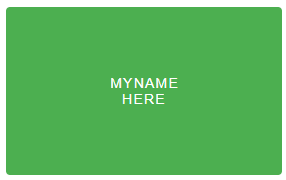
I my ex. I want to get the name "MYNAME" replaced with an variable or env.
```auto
[{"id":"67f659a2f96d63da","type":"ui-button","z":"69594495cf1ea8a1","group":"1579a21dbba7922e","name":"RBE Button y","label":"","order":3,"width":3,"height":3,"emulateClick":false,"tooltip":"","color":"{{feedback.fontClr}}","bgcolor":"{{feedback.colour}}","className":"","icon":"","iconPosition":"left","payload":"Y","payloadType":"flow","topic":"","topicType":"str","buttonColor":"","textColor":"","iconColor":"","enableClick":true,"enablePointerdown":false,"pointerdownPayload":"","pointerdownPayloadType":"str","enablePointerup":false,"pointerupPayload":"","pointerupPayloadType":"str","x":1200,"y":500,"wires":[["af2578664c101792"]]},{"id":"af2578664c101792","type":"change","z":"69594495cf1ea8a1","name":"","rules":[{"t":"set","p":"Y","pt":"flow","to":"payload = 1 ? 0 : 1","tot":"jsonata"},{"t":"set","p":"ui_update","pt":"msg","to":"payload = 1 ?\t{\"buttonColor\": \"green\",\t\"label\": \"MYNAME
HERE\",\t\"textColor\": \"white\"} \t:\t{\"buttonColor\": \"red\",\t\"label\": \"MYNAME
GONE\",\t\"textColor\": \"black\"}\t","tot":"jsonata"}],"action":"","property":"","from":"","to":"","reg":false,"x":1210,"y":550,"wires":[["67f659a2f96d63da"]]},{"id":"1579a21dbba7922e","type":"ui-group","name":"Button Test","page":"ab2cbf2599cace69","width":7,"height":"5","order":1,"showTitle":false,"className":"","visible":"true","disabled":"false","groupType":"default"},{"id":"ab2cbf2599cace69","type":"ui-page","name":"Buttons","ui":"a8dc4de17ff7d144","path":"/buttons","icon":"navigation","layout":"grid","theme":"970cbcc1aaf503af","breakpoints":[{"name":"Default","px":"0","cols":"3"},{"name":"Tablet","px":"576","cols":"6"},{"name":"Small Desktop","px":"768","cols":"9"},{"name":"Desktop","px":"1024","cols":"12"}],"order":3,"className":"","visible":"true","disabled":"false"},{"id":"a8dc4de17ff7d144","type":"ui-base","name":"UI Name","path":"/dashboard","appIcon":"","includeClientData":true,"acceptsClientConfig":["ui-control","ui-notification"],"showPathInSidebar":false,"headerContent":"page","navigationStyle":"default","titleBarStyle":"default","showReconnectNotification":false,"notificationDisplayTime":5,"showDisconnectNotification":false},{"id":"970cbcc1aaf503af","type":"ui-theme","name":"Theme Name","colors":{"surface":"#ffffff","primary":"#0094ce","bgPage":"#eeeeee","groupBg":"#ffffff","groupOutline":"#cccccc"}}]
```
---
### Author:  [@Colin](https://discourse.nodered.org/u/Colin)
#### Post date: [27 August 2025 14:05 UTC](https://discourse.nodered.org/t/use-env-or-global-variables-in-expression-in-change-node/98856/2 "2025-08-27T14:05:30Z")
For some reason there is an error in the flow and it won't import. Did you export it to the clipboard and paste it in here directly?
However, it looks as if you want to do it in a Change node. You can use an environment variable in almost any field in a node (in a change node or in the button directly) by entering `${ENV_VAR}` directly in the field.
See [Using environment variables : Node-RED](https://nodered.org/docs/user-guide/environment-variables)
Note, though, that it is the label that you are changing, not the name.
---
### Author:  [@omrid](https://discourse.nodered.org/u/omrid)
#### Post date: [27 August 2025 14:19 UTC](https://discourse.nodered.org/t/use-env-or-global-variables-in-expression-in-change-node/98856/3 "2025-08-27T14:19:24Z")
The flow won't import since it has double quotes within double quotes.
Anyway, you can retrieve context or env vars into your `ui_update` objects as follows:
```auto
{'buttonColor': 'green',
'label': $globalContext("myLabel1"),
'textColor': 'white'}
:
{'buttonColor': 'red',
'label': $globalContext("myLabel2"),
'textColor': 'black'}
```
---
### Author:  [@grawsom](https://discourse.nodered.org/u/grawsom)
#### Post date: [28 August 2025 06:23 UTC](https://discourse.nodered.org/t/use-env-or-global-variables-in-expression-in-change-node/98856/4 "2025-08-28T06:23:17Z")
@Colin @omrid
Code is edited, so it should import fine now.
@omrid I understand your code but i have some html code also, so I'm strugling with how or if it even is possibel.
My result should end in name with a linebreak.
Maybe i just need to change the global value to have the linebreak and line two
```json
"label": "MYNAME
HERE",
```
---
### Author:  [@E1cid](https://discourse.nodered.org/u/E1cid)
#### Post date: [28 August 2025 06:39 UTC](https://discourse.nodered.org/t/use-env-or-global-variables-in-expression-in-change-node/98856/5 "2025-08-28T06:39:16Z")
You can use $replace to add `
` where the space is.
```auto
payload = 1 ?
{"buttonColor": "green",
"label": $replace($globalContext("myLabel1"), " ", "
"),
"textColor": "white"}
:
{"buttonColor": "red",
"label": "",
"textColor": "black"}
```
---
### Author:  [@grawsom](https://discourse.nodered.org/u/grawsom)
#### Post date: [28 August 2025 07:16 UTC](https://discourse.nodered.org/t/use-env-or-global-variables-in-expression-in-change-node/98856/6 "2025-08-28T07:16:52Z")
This is cool, but still not quite done.
Maybe a little background on what I want to achieve.
I'm making a program where the button changes status - met / gone and their name above.
So the button should show the full name on the top line, and the status on the bottom line.
I'm thinking out loud.
I'm loading the vauels from a csv file, so it more easily to change when names are changing, also want to manipulate as little as posibel.
Can you have two "context after eachother, because I'm just struggling with some kind of concatenation of values.
Here I'm thinking have the value for name and have two values for status (MET/GONE), so
you take something like this.....
$globalContext("myLabel2")+$globalContext("myStatus1")

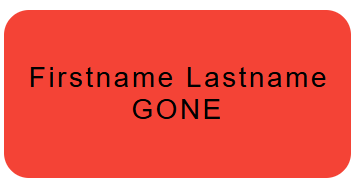
```auto
{"buttonColor": "green",
"label": "Firstname Lastname
MET",
"textColor": "white"}
:
{"buttonColor": "red",
"label": "Firstname Lastname
GONE",
"textColor": "black"}
```
---
### Author:  [@E1cid](https://discourse.nodered.org/u/E1cid)
#### Post date: [28 August 2025 07:26 UTC](https://discourse.nodered.org/t/use-env-or-global-variables-in-expression-in-change-node/98856/7 "2025-08-28T07:26:39Z")
An example of how if you give inputs and expected outputs, then we can get to the objective sooner.
Then something like this.
```auto
payload = 1 ?
{"buttonColor": "green",
"label": $globalContext("myLabel1") & "
MET",
"textColor": "white"}
:
{"buttonColor": "red",
"label": $globalContext("myLabel1") & "
GONE",
"textColor": "black"}
```
You may need to add some styling using CSS to centre the text.
---
### Author:  [@grawsom](https://discourse.nodered.org/u/grawsom)
#### Post date: [28 August 2025 07:35 UTC](https://discourse.nodered.org/t/use-env-or-global-variables-in-expression-in-change-node/98856/8 "2025-08-28T07:35:24Z")
@E1cid
Maybe your solution is just enough, if putting a semicolon after name in CSV file, and change you code a little I get the result.
But still like answeers to my previous question - just for info.
```json
{"buttonColor": "green",
"label": "$replace($globalContext("myLabel1"), ";", "
MET"),
"textColor": "white"}
:
{"buttonColor": "red",
"label": "$replace($globalContext("myLabel1"), ";", "
GONE"),
"textColor": "black"}
```
---
### Author:  [@grawsom](https://discourse.nodered.org/u/grawsom)
#### Post date: [28 August 2025 07:45 UTC](https://discourse.nodered.org/t/use-env-or-global-variables-in-expression-in-change-node/98856/9 "2025-08-28T07:45:25Z")
> [@E1cid](#):
>
> ```auto
> payload = 1 ?
> {"buttonColor": "green",
> "label": $globalContext("myLabel1") & "
MET"),
> "textColor": "white"}
> :
> {"buttonColor": "red",
> "label": $globalContext("myLabel1") & "
GONE"),
> "textColor": "black"}
>
> ```
INFO - Had to remove the last ) so you get ..
Only if someone like me with little coding experience sees this post and could use this example 😉
```auto
payload = 1 ?
{"buttonColor": "green",
"label": $globalContext("myLabel1") & "
MET",
"textColor": "white"}
:
{"buttonColor": "red",
"label": $globalContext("myLabel1") & "
GONE",
"textColor": "black"}
```
---
### Author:  [@E1cid](https://discourse.nodered.org/u/E1cid)
#### Post date: [28 August 2025 07:57 UTC](https://discourse.nodered.org/t/use-env-or-global-variables-in-expression-in-change-node/98856/10 "2025-08-28T07:57:51Z")
Fixed typo in previous post, cheers for pointing it out.
---
### Author:  [@grawsom](https://discourse.nodered.org/u/grawsom)
#### Post date: [28 August 2025 09:41 UTC](https://discourse.nodered.org/t/use-env-or-global-variables-in-expression-in-change-node/98856/11 "2025-08-28T09:41:23Z")
@E1cid
Also learned out from your feedback, that I can concatenate the flowContext with the sign &
Node-red is just fun, you learn something new every day
---
### Author:  [@system](https://discourse.nodered.org/u/system)
#### Post date: [11 September 2025 09:41 UTC](https://discourse.nodered.org/t/use-env-or-global-variables-in-expression-in-change-node/98856/12 "2025-09-11T09:41:37Z")
This topic was automatically closed 14 days after the last reply. New replies are no longer allowed.