# Use of HTML Table in Template

**URL:** <https://discourse.nodered.org/t/use-of-html-table-in-template/21682>\
**Category:** Dashboard\
**Created:** [14 February 2020 07:36 UTC](https://discourse.nodered.org/t/use-of-html-table-in-template/21682 "2020-02-14T07:36:50Z")\
**Posts on this page:** 9\
**Page:** 1

<div class="post-metadata">

**Author:** ![karlbo](https://sea2.discourse-cdn.com/flex026/user_avatar/discourse.nodered.org/karlbo/32/68793_2.png) [@karlbo](https://discourse.nodered.org/u/karlbo)\
**Post date:** [14 February 2020 07:36 UTC](https://discourse.nodered.org/t/use-of-html-table-in-template/21682/1 "2020-02-14T07:36:50Z")

</div>

Hi there, i have been developing varius tables for storing data and system setting via the template node and eventually to be stored in some sort of sql. untill now i had to rely on adding a save button on the end of each row, and it has been ok so far. my next project will require to step it up a bit, so that i can save active row by clicking enter. so far i have been able to save first row only. please have a look at my code and give me suggestions how to progress, feel free to use my current code for whatever you might be able to

`[{"id":"d273f858.444768","type":"ui_template","z":"1c7978bb.3c8757","group":"774c7a89.4f6d54","name":"sample","order":3,"width":"32","height":"10","format":"<style>\ntable.table-hover tr:hover {\n background:lightblue;\n } \n md-switch {\nposition: center; \nheight: 5px;\n}\nmd-switch .md-thumb {\n background-color: red;\n}\nmd-switch.md-checked .md-thumb {\n background-color: #33CC00;\n}\n\nmd-switch.md-checked .md-bar {\n background-color: lightgreen;\n}\n</style>\n<div class=\"scrollmenu\">\n<table cellpadding=\"1\" border=\"1\" id=\"table-2\" class=\"table-hover\" style=\"width: 100%; border-collapse: collapse; border: 1px solid black\">\n <thead>\n <tr>\n <th title=\"\" bgcolor=gray>Modified date</th>\n <th title=\"\" bgcolor=gray>Modified Type</th>\n <th title=\"\" bgcolor=gray>Modified by</th>\n <th title=\"\" bgcolor=gray>Installation</th>\n \n <th title=\"\" bgcolor=gray>Lagre</th>\n \n \n \n \n </tr>\n </thead>\n <tbody>\n <tr ng-repeat=\"row in msg.payload | limitTo:500\">\n <td><center>{{row.shortdate}}</center></td>\n <td contenteditable=\"true\" onclick=\"document.execCommand('selectAll')\"><center>{{row.modtype}}</center></td>\n <td contenteditable=\"true\" onclick=\"document.execCommand('selectAll')\"><center>{{row.modby}}</center></td>\n <td contenteditable=\"true\" onclick=\"document.execCommand('selectAll')\"><center>{{row.rigname}}</center></td>\n \n \n <td>\n <md-button id=\"lagre\" tr ng-click=\"sendRow($index+1)\">Lagre</md-button>\n </tr>\n \n </tbody>\n</table>\n<script type=\"text/javascript\">\n window.onload = function() {\n document.getElementById(\"editable\").focus();\n };\n\n</script>\n<script>\n $('#table-2').keypress(function(e){\n if(e.which == 13 && !e.shiftKey){//Enter key pressed\n e.preventDefault();\n $(\"#lagre\").click();\n alert('Endringer lagret: Vent litt for nye beregninger, trykk ok');\n //alert(document.getElementById(\"table1\").rows[obj].innerText);\n }\n });\n</script>\n\n\n<script>\n(function($scope) {\n$scope.sendRow = function(obj) {\nvar tableCells = document.getElementById(\"table-2\").rows.item(obj).cells;\nvar cellsData = [];\nfor (var j = 0; j < tableCells.length; j++) {\n cellsData[j] = tableCells.item(j).innerText;\n cellsData[j] = cellsData[j].replace(\",\",\".\"); \n}\n$scope.send({ \"payload\": cellsData });\n};\n})(scope);\n</script>\n\n</div>","storeOutMessages":false,"fwdInMessages":false,"templateScope":"local","x":928,"y":219,"wires":[[]]},{"id":"774c7a89.4f6d54","type":"ui_group","z":"","name":"Grafer og tabeller","tab":"","order":1,"disp":true,"width":"32","collapse":false}]`

---

<div class="post-metadata">

**Author:** ![TotallyInformation](https://sea2.discourse-cdn.com/flex026/user_avatar/discourse.nodered.org/totallyinformation/32/31_2.png) [@TotallyInformation](https://discourse.nodered.org/u/TotallyInformation)\
**Post date:** [14 February 2020 12:50 UTC](https://discourse.nodered.org/t/use-of-html-table-in-template/21682/2 "2020-02-14T12:50:16Z")

</div>

Can you please post the template separately so that we don't have to import your flow to look at it.

---

<div class="post-metadata">

**Author:** ![zenofmud](https://sea2.discourse-cdn.com/flex026/user_avatar/discourse.nodered.org/zenofmud/32/316_2.png) [@zenofmud](https://discourse.nodered.org/u/zenofmud)\
**Post date:** [14 February 2020 13:05 UTC](https://discourse.nodered.org/t/use-of-html-table-in-template/21682/3 "2020-02-14T13:05:56Z")

</div>

@TotallyInformation actually that is just the template.

---

<div class="post-metadata">

**Author:** ![karlbo](https://sea2.discourse-cdn.com/flex026/user_avatar/discourse.nodered.org/karlbo/32/68793_2.png) [@karlbo](https://discourse.nodered.org/u/karlbo)\
**Post date:** [14 February 2020 15:31 UTC](https://discourse.nodered.org/t/use-of-html-table-in-template/21682/4 "2020-02-14T15:31:40Z")

</div>

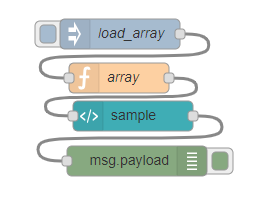
here is a more complete representation.  
 ![image](https://us1.discourse-cdn.com/flex026/uploads/nodered/original/3X/d/6/d6d05a6bc742c255b6ad77ccdca3228368c40243.png)

`[{"id":"d273f858.444768","type":"ui_template","z":"1c7978bb.3c8757","group":"ab6f9b75.0d4718","name":"sample","order":3,"width":"32","height":"10","format":"<style>\ntable.table-hover tr:hover {\n background:lightblue;\n } \n md-switch {\nposition: center; \nheight: 5px;\n}\nmd-switch .md-thumb {\n background-color: red;\n}\nmd-switch.md-checked .md-thumb {\n background-color: #33CC00;\n}\n\nmd-switch.md-checked .md-bar {\n background-color: lightgreen;\n}\n</style>\n<div class=\"scrollmenu\">\n<table cellpadding=\"1\" border=\"1\" id=\"table-4\" class=\"table-hover\" style=\"width: 100%; border-collapse: collapse; border: 1px solid black\">\n <thead>\n <tr>\n <th title=\"\" bgcolor=gray>Modified where</th>\n <th title=\"\" bgcolor=gray>Modified Type</th>\n <th title=\"\" bgcolor=gray>Modified by</th>\n <th title=\"\" bgcolor=gray>Installation</th>\n \n <th title=\"\" bgcolor=gray>Lagre</th>\n \n \n \n \n </tr>\n </thead>\n <tbody>\n <tr ng-repeat=\"row in msg.payload | limitTo:500\">\n <td><center>{{row.where}}</center></td>\n <td contenteditable=\"true\" onclick=\"document.execCommand('selectAll')\"><center>{{row.modtype}}</center></td>\n <td contenteditable=\"true\" onclick=\"document.execCommand('selectAll')\"><center>{{row.modby}}</center></td>\n <td contenteditable=\"true\" onclick=\"document.execCommand('selectAll')\"><center>{{row.rigname}}</center></td>\n \n \n <td>\n <center><md-button id=\"lagre4\" tr ng-click=\"sendRow($index+1)\">Lagre</md-button></center>\n </tr>\n \n </tbody>\n</table>\n<script type=\"text/javascript\">\n window.onload = function() {\n document.getElementById(\"editable\").focus();\n };\n\n</script>\n<script>\n $('#table-4').keypress(function(e){\n if(e.which == 13 && !e.shiftKey){//Enter key pressed\n e.preventDefault();\n $(\"#lagre4\").click();\n //alert('Endringer lagret: Vent litt for nye beregninger, trykk ok');\n //alert(document.getElementById(\"table1\").rows[obj].innerText);\n }\n });\n</script>\n\n\n<script>\n(function($scope) {\n$scope.sendRow = function(obj) {\nvar tableCells = document.getElementById(\"table-4\").rows.item(obj).cells;\nvar cellsData = [];\nfor (var j = 0; j < tableCells.length; j++) {\n cellsData[j] = tableCells.item(j).innerText;\n cellsData[j] = cellsData[j].replace(\",\",\".\"); \n}\n$scope.send({ \"payload\": cellsData });\n};\n})(scope);\n</script>\n\n</div>","storeOutMessages":false,"fwdInMessages":false,"templateScope":"local","x":928,"y":219,"wires":[["2361995a.679326"]]},{"id":"ee129eb.91f506","type":"inject","z":"1c7978bb.3c8757","name":"load_array","topic":"","payload":"","payloadType":"num","repeat":"","crontab":"","once":false,"onceDelay":0.1,"x":915,"y":137,"wires":[["8282a77b.1444a8"]]},{"id":"8282a77b.1444a8","type":"function","z":"1c7978bb.3c8757","name":"array","func":"var myArray =[{ \"where\": \"field1\", \"modtype\": \"software\", \"modby\": \"peter\", \"rigname\": \"drilling23\"},\n { \"where\": \"field2\", \"modtype\": \"software/hardware\", \"modby\": \"julius\", \"rigname\": \"drilling34\"},\n { \"where\": \"field3\", \"modtype\": \"hardware\", \"modby\": \"karl\", \"rigname\": \"drilling44\"},\n { \"where\": \"field4\", \"modtype\": \"none\", \"modby\": \"muhammed\", \"rigname\": \"drilling54\"},\n { \"where\": \"field5\", \"modtype\": \"welding\", \"modby\": \"alan\", \"rigname\": \"drilling64\"}];\nmsg.payload = myArray;\n\nreturn msg;","outputs":1,"noerr":0,"x":914,"y":181,"wires":[["d273f858.444768"]]},{"id":"2361995a.679326","type":"debug","z":"1c7978bb.3c8757","name":"","active":true,"tosidebar":true,"console":false,"tostatus":false,"complete":"false","x":932,"y":264,"wires":[]},{"id":"ab6f9b75.0d4718","type":"ui_group","z":"","name":"Inventory PLCPC Overview","tab":"4067421f.1778ec","order":1,"disp":true,"width":"35","collapse":false},{"id":"4067421f.1778ec","type":"ui_tab","z":"","name":"Rig Oversikt","icon":"dashboard","order":5}]`

---

<div class="post-metadata">

**Author:** ![karlbo](https://sea2.discourse-cdn.com/flex026/user_avatar/discourse.nodered.org/karlbo/32/68793_2.png) [@karlbo](https://discourse.nodered.org/u/karlbo)\
**Post date:** [14 February 2020 15:35 UTC](https://discourse.nodered.org/t/use-of-html-table-in-template/21682/5 "2020-02-14T15:35:53Z")

</div>

here is the hmi bit

 ![image](https://us1.discourse-cdn.com/flex026/uploads/nodered/original/3X/0/9/09f1aa5165e9c68c4b4818f4416781f2286107ee.png)  
and what it looks like when i click Lagre  
 ![image](https://us1.discourse-cdn.com/flex026/uploads/nodered/original/3X/7/6/767962d568fea6e14d40e591625ba6cbd1c4f107.png)  
and also what im in need of by hitting enter when in a row  
 ![image](https://us1.discourse-cdn.com/flex026/uploads/nodered/original/3X/2/a/2a4064eba0375ba9161c85784251969f3f2b02fe.png)  
except, so far i have only been able to make it catch row 1 when hitting enter  
my js power is not good enough 🙂

---

<div class="post-metadata">

**Author:** ![TotallyInformation](https://sea2.discourse-cdn.com/flex026/user_avatar/discourse.nodered.org/totallyinformation/32/31_2.png) [@TotallyInformation](https://discourse.nodered.org/u/TotallyInformation)\
**Post date:** [14 February 2020 16:51 UTC](https://discourse.nodered.org/t/use-of-html-table-in-template/21682/6 "2020-02-14T16:51:26Z")

</div>

Well, it might be but it is pretty much unreadable in current form - time is precious enough that I'll not be loading into Node-RED just to read it I'm afraid.

---

<div class="post-metadata">

**Author:** ![karlbo](https://sea2.discourse-cdn.com/flex026/user_avatar/discourse.nodered.org/karlbo/32/68793_2.png) [@karlbo](https://discourse.nodered.org/u/karlbo)\
**Post date:** [14 February 2020 16:59 UTC](https://discourse.nodered.org/t/use-of-html-table-in-template/21682/7 "2020-02-14T16:59:09Z")

</div>

think i misunderstood you earlier, you want to see my current JS?

belov is from the LAGRE/SAVE button and all the JS in my template file

````auto
            <center><md-button id="lagre4" tr ng-click="sendRow($index+1)">Lagre</md-button></center>
            </tr>
    
    </tbody>
</table>
<script type="text/javascript">
    window.onload = function() {
        document.getElementById("editable").focus();
    };

</script>
<script>
    $('#table-4').keypress(function(e){
        if(e.which == 13 && !e.shiftKey){//Enter key pressed
        e.preventDefault();
        $("#lagre4").click();
        //alert('Endringer lagret: Vent litt for nye beregninger, trykk ok');
        //alert(document.getElementById("table1").rows[obj].innerText);
      }
    });
</script>

<script>
(function($scope) {
$scope.sendRow = function(obj) {
var tableCells = document.getElementById("table-4").rows.item(obj).cells;
var cellsData = [];
for (var j = 0; j < tableCells.length; j++) {
                cellsData[j] = tableCells.item(j).innerText;
                cellsData[j] = cellsData[j].replace(",",".");            
}
$scope.send({ "payload": cellsData });
};
})(scope);
</script>```
````

---

<div class="post-metadata">

**Author:** ![karlbo](https://sea2.discourse-cdn.com/flex026/user_avatar/discourse.nodered.org/karlbo/32/68793_2.png) [@karlbo](https://discourse.nodered.org/u/karlbo)\
**Post date:** [14 February 2020 17:01 UTC](https://discourse.nodered.org/t/use-of-html-table-in-template/21682/8 "2020-02-14T17:01:39Z")

</div>

the entire code in template file below

````auto
<style>
table.table-hover tr:hover {
          background:lightblue;
          } 
    md-switch {
position: center;        
height: 5px;
}
md-switch .md-thumb {
  background-color: red;
}
md-switch.md-checked .md-thumb {
  background-color: #33CC00;
}

md-switch.md-checked .md-bar {
  background-color: lightgreen;
}
</style>
<div class="scrollmenu">
<table cellpadding="1" border="1" id="table-4" class="table-hover" style="width: 100%; border-collapse: collapse; border: 1px solid black">
    <thead>
        <tr>
    <th title="" bgcolor=gray>Modified where</th>
    <th title="" bgcolor=gray>Modified Type</th>
    <th title="" bgcolor=gray>Modified by</th>
    <th title="" bgcolor=gray>Installation</th>
    
    <th title="" bgcolor=gray>Lagre</th>


        </tr>
    </thead>
    <tbody>
       <tr ng-repeat="row in msg.payload | limitTo:500">
           <td><center>{{row.where}}</center></td>
            <td contenteditable="true" onclick="document.execCommand('selectAll')"><center>{{row.modtype}}</center></td>
            <td contenteditable="true" onclick="document.execCommand('selectAll')"><center>{{row.modby}}</center></td>
            <td contenteditable="true" onclick="document.execCommand('selectAll')"><center>{{row.rigname}}</center></td>
            
            
            <td>
            <center><md-button id="lagre4" tr ng-click="sendRow($index+1)">Lagre</md-button></center>
            </tr>
    
    </tbody>
</table>
<script type="text/javascript">
    window.onload = function() {
        document.getElementById("editable").focus();
    };

</script>
<script>
    $('#table-4').keypress(function(e){
        if(e.which == 13 && !e.shiftKey){//Enter key pressed
        e.preventDefault();
        $("#lagre4").click();
        //alert('Endringer lagret: Vent litt for nye beregninger, trykk ok');
        //alert(document.getElementById("table1").rows[obj].innerText);
      }
    });
</script>

<script>
(function($scope) {
$scope.sendRow = function(obj) {
var tableCells = document.getElementById("table-4").rows.item(obj).cells;
var cellsData = [];
for (var j = 0; j < tableCells.length; j++) {
                cellsData[j] = tableCells.item(j).innerText;
                cellsData[j] = cellsData[j].replace(",",".");            
}
$scope.send({ "payload": cellsData });
};
})(scope);
</script>

</div>```
````

---

<div class="post-metadata">

**Author:** ![system](https://us1.discourse-cdn.com/flex026/uploads/nodered/original/1X/d073cd938eafa2e558d7c2cd59003b3ef4963033.png) [@system](https://discourse.nodered.org/u/system)\
**Post date:** [15 March 2020 17:01 UTC](https://discourse.nodered.org/t/use-of-html-table-in-template/21682/9 "2020-03-15T17:01:40Z")

</div>

This topic was automatically closed 30 days after the last reply. New replies are no longer allowed.
