# Vue VideoJS in UIBuilder
**URL:** https://discourse.nodered.org/t/vue-videojs-in-uibuilder/40380
**Category:** Dashboard
**Tags:** uibuilder
**Created:** [4 February 2021 14:32 UTC](https://discourse.nodered.org/t/vue-videojs-in-uibuilder/40380 "2021-02-04T14:32:53Z")
**Posts on this page:** 20
**Page:** 1
### Author:  [@j2l](https://discourse.nodered.org/u/j2l)
#### Post date: [4 February 2021 14:32 UTC](https://discourse.nodered.org/t/vue-videojs-in-uibuilder/40380/1 "2021-02-04T14:32:53Z")
I tried many different ways but I can't make this VueJS doc example to work within the uibuilder vue setup (after adding videojs and vue-video-player libraries): [Vue and Video.js](https://docs.videojs.com/tutorial-vue.html)
I tried with both a `VideoPlayer.vue` file, and `import VideoPlayer from "@/components/VideoPlayer.vue";` or some stuff in MyComponent.vue and some in index.js but it throws errors in console.
@TotallyInformation to the rescue!
How would mycomponent.vue, index.js and index.html look like to embed VideoJS player?
Thank you again 🙂
---
### Author:  [@TotallyInformation](https://discourse.nodered.org/u/TotallyInformation)
#### Post date: [4 February 2021 18:13 UTC](https://discourse.nodered.org/t/vue-videojs-in-uibuilder/40380/2 "2021-02-04T18:13:28Z")
What errors are you getting?
Are you using the CDN version or the npm version (which you would install via the uibuilder library manager)?
Have you tried getting something to work without Vue first? The Vue documentation you reference is especially poor so getting it to work with a simple example without Vue would at least let you know that you are able to load everything without error.
In the given example, you would translate the 2nd set of code into your index.html and index.js files.
Place the 1st set of code into a file in the src folder called `VideoPlayer.vue` to match their naming.
Then use the http vue loader to dynamically load that file. Refer to the uibuilder WIKI for examples.
To reference media files, you can place them in the same src folder as well, reference them as `./whatever.mp4` urls to load them. There are other places you can use if that isn't convenient.
---
### Author:  [@j2l](https://discourse.nodered.org/u/j2l)
#### Post date: [6 February 2021 14:32 UTC](https://discourse.nodered.org/t/vue-videojs-in-uibuilder/40380/3 "2021-02-06T14:32:09Z")
Thank you so much.
Sorry for not beinf verbose the first time. I was pretty upset 🙂
OK, so yeah, everything is local:

An I tested VideoJS without Node-Red.
Following your reply, I pasted the first set within `src/VideoPlayer.vue` (but I wonder if `import videojs from 'video.js';` is working, see error below.
Then I added the video-player part of the 2nd set into src/index.html:
```auto
```
and finally tried to glue them using src/index.js
```auto
var app1 = new Vue({
el: '#app',
components: {
'video-player': httpVueLoader('VideoPlayer.vue'),
}, // --- End of components --- //
data: {
videoOptions: {
autoplay: true,
controls: true,
sources: [
{
src:
"./video.webm"
}
]
}
},
mounted: function(){
uibuilder.start()
this.player = videojs(this.$refs.videoPlayer, this.options, function onPlayerReady() {
console.log('onPlayerReady', this);
})
var vueApp = this
...
```
Video is playing when called alone.
Errors I get:
```auto
[Vue warn]: Error in mounted hook: "ReferenceError: videojs is not defined"
(found in ) vue.js:634:17
VueJS 11
http://192.168.1.236:1880/vue-file/index.js:24
ReferenceError: videojs is not defined
mounted http://192.168.1.236:1880/vue-file/index.js:62
VueJS 7
http://192.168.1.236:1880/vue-file/index.js:24
vue.js:1897:15
Requesting search results.. search_results.js:1:9
[Vue warn]: Failed to resolve async component: function() {
```
I don't get why Video.js is not loaded
while uibuilder details says
```auto
"http-vue-loader": {
"loaded": true,
"folder": "/data/node_modules/http-vue-loader",
"url": "../uibuilder/vendor/http-vue-loader",
"version": "1.4.2",
"main": "./src/httpVueLoader.js",
"browser": "",
"homepage": "https://github.com/FranckFreiburger/http-vue-loader#readme"
},
"video.js": {
"loaded": true,
"folder": "/data/node_modules/video.js",
"url": "../uibuilder/vendor/video.js",
"version": "7.10.2",
"main": "./dist/video.cjs.js",
"browser": "",
"homepage": "https://videojs.com"
}
```
---
### Author:  [@TotallyInformation](https://discourse.nodered.org/u/TotallyInformation)
#### Post date: [6 February 2021 15:03 UTC](https://discourse.nodered.org/t/vue-videojs-in-uibuilder/40380/4 "2021-02-06T15:03:57Z")
OK, so breaking this down to find out where the problem lies. Firstly, can we get video.js to work at all?
Answer - yes.
```auto
Node-RED UI Builder - Video.JS Tests
Dynamic Data
Uses Vue to dynamically update in response to messages from Node-RED.
Check out the mounted function in index.js to See
how easy it is to update Vue data from Node-RED.
The received message is from the input to the uibuilder node.
The send message will appear out of port #1 of the node.
Control Messages: Received={{msgsControl}}, Sent={{msgsCtrlSent}}
Control messages always appear out of port #2 of the uibuilder node
whether they are from the server or the client. The from property
of the message tells you where it came from.
```
This works fine on my PC.
* * *
Then adding this to the `mounted` section of index.js:
```auto
var player = videojs('my-video')
console.log(player)
```
Shows that I can access the player as expected.
---
### Author:  [@j2l](https://discourse.nodered.org/u/j2l)
#### Post date: [6 February 2021 15:31 UTC](https://discourse.nodered.org/t/vue-videojs-in-uibuilder/40380/5 "2021-02-06T15:31:40Z")
> [@TotallyInformation](#):
>
> ```auto
> var player = videojs('my-video')
> console.log(player)
>
> ```
Thank you again, but how can I pass the video file from the payload?
I only replaced the mounted part with yours and got:
```auto
Vue warn]: Failed to resolve async component: function() {
return new Component(name).load(url)
.then(function(component) {
return component.normalize();
})
.then(function(component) {
return component.compile();
})
.then(function(component) {
var exports = component.script !== null ? component.script.module.exports : {};
if ( component.template !== null )
exports.template = component.template.getContent();
if ( exports.name === undefined )
if ( component.name !== undefined )
exports.name = component.name;
exports._baseURI = component.baseURI;
return exports;
});
}
Reason: ReferenceError: responseText is not defined vue.js:634:1
```
---
### Author:  [@TotallyInformation](https://discourse.nodered.org/u/TotallyInformation)
#### Post date: [6 February 2021 15:39 UTC](https://discourse.nodered.org/t/vue-videojs-in-uibuilder/40380/6 "2021-02-06T15:39:16Z")
One step at a time.
First, lets find out why the vue component isn't working. By replacing the .min versions of the scripts in index.html with the non-min versions, you will get debugging information from VueJS.


In your .vue file, comment out the `import` statement. That isn't needed because the act of adding the library as a script has already effectively imported the code. `import` will only work if you have a build step that translates the code.
Also replace the line that says `export default {` with a line that says `module.exports = {`. This is for the same reason. You cannot use `export` in a browser unless you are using an HTML component which requires a different method of loading (also documented in the uibuilder WIKI). A build step would replace that line. As we are using the http loader, we can simply use the older form of `module.exports`.
That now will work absolutely fine.
> [@j2l](#):
>
> how can I pass the video file from the payload?
You can simply pass the new URL into the player I think. Not tried that yet.
---
### Author:  [@j2l](https://discourse.nodered.org/u/j2l)
#### Post date: [6 February 2021 15:48 UTC](https://discourse.nodered.org/t/vue-videojs-in-uibuilder/40380/7 "2021-02-06T15:48:37Z")
My other tests with uibuilder loaded httpLoader fine but pasting your example I get:
`Uncaught ReferenceError: httpVueLoader is not defined`
Could you please paste your working Node-Red JSON export?
---
### Author:  [@TotallyInformation](https://discourse.nodered.org/u/TotallyInformation)
#### Post date: [6 February 2021 15:55 UTC](https://discourse.nodered.org/t/vue-videojs-in-uibuilder/40380/8 "2021-02-06T15:55:36Z")
The flow on its own wouldn't help because it doesn't include the source code for the index.(html|js) nor the .vue file.
Here is a working example with the player loaded directly with no video. And an inject that sends the video url then starts the playback when the video has loaded - all standard code taken from the videojs website and adjusted into the standard uibuilder template.
It also has a working example of the .vue file dynamically loaded via the http loader. I haven't bothered to do anything with it though as I don't think that a vue component is warranted unless you want to do more complex things.

```auto
[{"id":"dfcd2046.f0d35","type":"inject","z":"ff1a7711.244f48","name":"","props":[{"p":"payload"},{"p":"topic","vt":"str"}],"repeat":"","crontab":"","once":false,"onceDelay":0.1,"topic":"","payload":"{\"src\": \"//vjs.zencdn.net/v/oceans.mp4\", \"type\": \"video/mp4\"}","payloadType":"json","x":130,"y":1060,"wires":[["de3ed4a5.ddb688"]]},{"id":"de3ed4a5.ddb688","type":"uibuilder","z":"ff1a7711.244f48","name":"","topic":"","url":"videojs","fwdInMessages":false,"allowScripts":false,"allowStyles":false,"copyIndex":true,"showfolder":false,"useSecurity":false,"sessionLength":432000,"tokenAutoExtend":false,"x":330,"y":1060,"wires":[["b9248f71.f5d22"],["b3f325aa.1ea888"]]},{"id":"b9248f71.f5d22","type":"debug","z":"ff1a7711.244f48","name":"","active":true,"tosidebar":true,"console":false,"tostatus":false,"complete":"false","statusVal":"","statusType":"auto","x":630,"y":1040,"wires":[]},{"id":"b3f325aa.1ea888","type":"debug","z":"ff1a7711.244f48","name":"","active":true,"tosidebar":true,"console":false,"tostatus":false,"complete":"false","statusVal":"","statusType":"auto","x":630,"y":1080,"wires":[]}]
```
index.html
```auto
Node-RED UI Builder - Video.JS Tests
Dynamic Data
Uses Vue to dynamically update in response to messages from Node-RED.
Check out the mounted function in index.js to See
how easy it is to update Vue data from Node-RED.
The received message is from the input to the uibuilder node.
The send message will appear out of port #1 of the node.
Control Messages: Received={{msgsControl}}, Sent={{msgsCtrlSent}}
Control messages always appear out of port #2 of the uibuilder node
whether they are from the server or the client. The from property
of the message tells you where it came from.
```
index.js
```auto
'use strict'
new Vue({
el: '#app',
components: {
'video-player': httpVueLoader('video-player.vue'),
}, // --- End of components --- //
data: {
player: null,
videoOptions: {
autoplay: false,
controls: true,
sources: [
{
src:
'//vjs.zencdn.net/v/oceans.mp4',
type: 'video/mp4'
}
]
},
videoUrl: '',
startMsg : 'Vue has started, waiting for messages',
feVersion : '',
counterBtn : 0,
inputText : null,
inputChkBox : false,
socketConnectedState : false,
serverTimeOffset : '[unknown]',
imgProps : { width: 75, height: 75 },
msgRecvd : '[Nothing]',
msgsReceived: 0,
msgCtrl : '[Nothing]',
msgsControl : 0,
msgSent : '[Nothing]',
msgsSent : 0,
msgCtrlSent : '[Nothing]',
msgsCtrlSent: 0,
isLoggedOn : false,
userId : null,
userPw : null,
inputId : '',
}, // --- End of data --- //
computed: {
hLastRcvd: function() {
var msgRecvd = this.msgRecvd
if (typeof msgRecvd === 'string') return 'Last Message Received = ' + msgRecvd
else return 'Last Message Received = ' + this.syntaxHighlight(msgRecvd)
},
hLastSent: function() {
var msgSent = this.msgSent
if (typeof msgSent === 'string') return 'Last Message Sent = ' + msgSent
else return 'Last Message Sent = ' + this.syntaxHighlight(msgSent)
},
hLastCtrlRcvd: function() {
var msgCtrl = this.msgCtrl
if (typeof msgCtrl === 'string') return 'Last Control Message Received = ' + msgCtrl
else return 'Last Control Message Received = ' + this.syntaxHighlight(msgCtrl)
},
hLastCtrlSent: function() {
var msgCtrlSent = this.msgCtrlSent
if (typeof msgCtrlSent === 'string') return 'Last Control Message Sent = ' + msgCtrlSent
//else return 'Last Message Sent = ' + this.callMethod('syntaxHighlight', [msgCtrlSent])
else return 'Last Control Message Sent = ' + this.syntaxHighlight(msgCtrlSent)
},
}, // --- End of computed --- //
methods: {
increment: function(event) {
console.log('Button Pressed. Event Data: ', event)
// Increment the count by one
this.counterBtn = this.counterBtn + 1
var topic = this.msgRecvd.topic || 'uibuilder/vue'
uibuilder.send( {
'topic': topic,
'payload': {
'type': 'counterBtn',
'btnCount': this.counterBtn,
'message': this.inputText,
'inputChkBox': this.inputChkBox
}
} )
}, // --- End of increment --- //
doLogon: function() {
uibuilder.logon( {
'id': this.inputId,
} )
}, // --- End of doLogon --- //
doLogoff: function() {
uibuilder.logoff()
}, // --- End of doLogon --- //
// return formatted HTML version of JSON object
syntaxHighlight: function(json) {
json = JSON.stringify(json, undefined, 4)
json = json.replace(/&/g, '&').replace(//g, '>')
json = json.replace(/("(\\u[a-zA-Z0-9]{4}|\\[^u]|[^\\"])*"(\s*:)?|\b(true|false|null)\b|-?\d+(?:\.\d*)?(?:[eE][+\-]?\d+)?)/g, function (match) {
var cls = 'number'
if (/^"/.test(match)) {
if (/:$/.test(match)) {
cls = 'key'
} else {
cls = 'string'
}
} else if (/true|false/.test(match)) {
cls = 'boolean'
} else if (/null/.test(match)) {
cls = 'null'
}
return '' + match + ''
})
return json
}, // --- End of syntaxHighlight --- //
}, // --- End of methods --- //
// Available hooks: beforeCreate,created,beforeMount,mounted,beforeUpdate,updated,beforeDestroy,destroyed, activated,deactivated, errorCaptured
/** Called after the Vue app has been created. A good place to put startup code */
created: function() {
// Example of retrieving data from uibuilder
this.feVersion = uibuilder.get('version')
/ **** REQUIRED** Start uibuilder comms with Node-RED @since v2.0.0-dev3
* Pass the namespace and ioPath variables if hosting page is not in the instance root folder
* e.g. If you get continual `uibuilderfe:ioSetup: SOCKET CONNECT ERROR` error messages.
* e.g. uibuilder.start('/uib', '/uibuilder/vendor/socket.io') // change to use your paths/names
* @param {Object=|string=} namespace Optional. Object containing ref to vueApp, Object containing settings, or String IO Namespace override. changes self.ioNamespace from the default.
* @param {string=} ioPath Optional. changes self.ioPath from the default
* @param {Object=} vueApp Optional. Reference to the VueJS instance. Used for Vue extensions.
*/
uibuilder.start(this) // Single param passing vue app to allow Vue extensions to be used.
//console.log(this)
},
/** Called once all Vue component instances have been loaded and the virtual DOM built */
mounted: function(){
//console.debug('[indexjs:Vue.mounted] app mounted - setting up uibuilder watchers')
var app = this // Reference to `this` in case we need it for more complex functions
app.player = videojs('my-video')
console.log(app.player)
// If msg changes - msg is updated when a standard msg is received from Node-RED over Socket.IO
// newVal relates to the attribute being listened to.
uibuilder.onChange('msg', function(msg){
//console.info('[indexjs:uibuilder.onChange] msg received from Node-RED server:', msg)
app.msgRecvd = msg
app.msgsReceived = uibuilder.get('msgsReceived')
if ( msg.payload.src ) {
app.player.src(msg.payload)
app.player.ready(function() {
app.player.play();
})
}
})
//#region ---- Debug info, can be removed for live use ---- //
/** You can use the following to help trace how messages flow back and forth.
* You can then amend this processing to suite your requirements.
*/
// If we receive a control message from Node-RED, we can get the new data here - we pass it to a Vue variable
uibuilder.onChange('ctrlMsg', function(msg){
//console.info('[indexjs:uibuilder.onChange:ctrlMsg] CONTROL msg received from Node-RED server:', msg)
app.msgCtrl = msg
app.msgsControl = uibuilder.get('msgsCtrl')
})
/** You probably only need these to help you understand the order of processing
* If a message is sent back to Node-RED, we can grab a copy here if we want to
*/
uibuilder.onChange('sentMsg', function(msg){
//console.info('[indexjs:uibuilder.onChange:sentMsg] msg sent to Node-RED server:', msg)
app.msgSent = msg
app.msgsSent = uibuilder.get('msgsSent')
})
/** If we send a control message to Node-RED, we can get a copy of it here */
uibuilder.onChange('sentCtrlMsg', function(msg){
//console.info('[indexjs:uibuilder.onChange:sentCtrlMsg] Control message sent to Node-RED server:', msg)
app.msgCtrlSent = msg
app.msgsCtrlSent = uibuilder.get('msgsSentCtrl')
})
/** If Socket.IO connects/disconnects, we get true/false here */
uibuilder.onChange('ioConnected', function(connected){
//console.info('[indexjs:uibuilder.onChange:ioConnected] Socket.IO Connection Status Changed to:', connected)
app.socketConnectedState = connected
})
/** If Server Time Offset changes */
uibuilder.onChange('serverTimeOffset', function(serverTimeOffset){
//console.info('[indexjs:uibuilder.onChange:serverTimeOffset] Offset of time between the browser and the server has changed to:', serverTimeOffset)
app.serverTimeOffset = serverTimeOffset
})
/** If user is logged on/off */
uibuilder.onChange('isAuthorised', function(isAuthorised){
//console.info('[indexjs:uibuilder.onChange:isAuthorised] isAuthorised changed. User logged on?:', isAuthorised)
//console.log('authData: ', uibuilder.get('authData'))
//console.log('authTokenExpiry: ', uibuilder.get('authTokenExpiry'))
app.isLoggedOn = isAuthorised
})
//#endregion ---- Debug info, can be removed for live use ---- //
} // --- End of mounted hook --- //
}) // --- End of app1 --- //
// EOF
```
video-player.vue
```auto
```
---
### Author:  [@j2l](https://discourse.nodered.org/u/j2l)
#### Post date: [6 February 2021 16:04 UTC](https://discourse.nodered.org/t/vue-videojs-in-uibuilder/40380/9 "2021-02-06T16:04:48Z")
I'm getting closer to the solution but sorry, I'm still getting an error pasting your flow and files above (in src/):
```auto
[Vue warn]: Error in mounted hook: "ReferenceError: videojs is not defined"
(found in )
```
Indeed, if we don't import it in the .vue file, what `mounted() {this.player = videojs(this.$refs.videoPlayer...` could call?
Or how `app.player = videojs('my-video')` in index.js could be interpreted?
---
### Author:  [@TotallyInformation](https://discourse.nodered.org/u/TotallyInformation)
#### Post date: [6 February 2021 16:25 UTC](https://discourse.nodered.org/t/vue-videojs-in-uibuilder/40380/10 "2021-02-06T16:25:35Z")
You haven't used my index.html code. You haven't actually loaded the VideoJS library.
Two lines are needed in index.html
In the \ section, you need
```auto
```
Towards the end of the \ section, you need
```auto
```
You can replace those with `../uibuilder/vendor/video.js/dist/video-js.min.css` and `../uibuilder/vendor/video.js/dist/video.min.js` to use your local versions.
* * *
BTW, for reference, I've added this example to the uibuilder WIKI for other people's convenience.
[Using Video.js with uibuilder and VueJS · TotallyInformation/node-red-contrib-uibuilder Wiki (github.com)](https://github.com/TotallyInformation/node-red-contrib-uibuilder/wiki/Using-Video.js-with-uibuilder-and-VueJS)
---
### Author:  [@j2l](https://discourse.nodered.org/u/j2l)
#### Post date: [6 February 2021 16:51 UTC](https://discourse.nodered.org/t/vue-videojs-in-uibuilder/40380/11 "2021-02-06T16:51:30Z")
Actually, I did use your index.html code

I have no idea why it's not working for me
---
### Author:  [@TotallyInformation](https://discourse.nodered.org/u/TotallyInformation)
#### Post date: [6 February 2021 16:53 UTC](https://discourse.nodered.org/t/vue-videojs-in-uibuilder/40380/12 "2021-02-06T16:53:07Z")
Please post your full code.
---
### Author:  [@j2l](https://discourse.nodered.org/u/j2l)
#### Post date: [6 February 2021 16:59 UTC](https://discourse.nodered.org/t/vue-videojs-in-uibuilder/40380/13 "2021-02-06T16:59:36Z")
OK, meanwhile, I tried with local versions using your details page:
| http-vue-loader | 1.4.2 | ../uibuilder/vendor/http-vue-loader | ../uibuilder/vendor/http-vue-loader/./src/httpVueLoader.js | /data/node\_modules/http-vue-loader |
| --- | --- | --- | --- | --- |
| video.js | 7.10.2 | ../uibuilder/vendor/video.js | ../uibuilder/vendor/video.js/./dist/video.cjs.js | /data/node\_modules/video.js |
Now I get a new error:
Uncaught ReferenceError: require is not defined
[http://192.168.1.236:1880/uibuilder/vendor/video.js/dist/video.cjs.js:17](http://192.168.1.236:1880/uibuilder/vendor/video.js/dist/video.cjs.js:17)
```auto
Node-RED UI Builder - Video.JS Tests
Dynamic Data
Uses Vue to dynamically update in response to messages from Node-RED.
Check out the mounted function in index.js to See
how easy it is to update Vue data from Node-RED.
The received message is from the input to the uibuilder node.
The send message will appear out of port #1 of the node.
Control Messages: Received={{msgsControl}}, Sent={{msgsCtrlSent}}
Control messages always appear out of port #2 of the uibuilder node
whether they are from the server or the client. The from property
of the message tells you where it came from.
```
```auto
'use strict'
new Vue({
el: '#app',
components: {
'video-player': httpVueLoader('video-player.vue'),
}, // --- End of components --- //
data: {
player: null,
videoOptions: {
autoplay: false,
controls: true,
sources: [
{
src:
'//vjs.zencdn.net/v/oceans.mp4',
type: 'video/mp4'
}
]
},
videoUrl: '',
startMsg : 'Vue has started, waiting for messages',
feVersion : '',
counterBtn : 0,
inputText : null,
inputChkBox : false,
socketConnectedState : false,
serverTimeOffset : '[unknown]',
imgProps : { width: 75, height: 75 },
msgRecvd : '[Nothing]',
msgsReceived: 0,
msgCtrl : '[Nothing]',
msgsControl : 0,
msgSent : '[Nothing]',
msgsSent : 0,
msgCtrlSent : '[Nothing]',
msgsCtrlSent: 0,
isLoggedOn : false,
userId : null,
userPw : null,
inputId : '',
}, // --- End of data --- //
computed: {
hLastRcvd: function() {
var msgRecvd = this.msgRecvd
if (typeof msgRecvd === 'string') return 'Last Message Received = ' + msgRecvd
else return 'Last Message Received = ' + this.syntaxHighlight(msgRecvd)
},
hLastSent: function() {
var msgSent = this.msgSent
if (typeof msgSent === 'string') return 'Last Message Sent = ' + msgSent
else return 'Last Message Sent = ' + this.syntaxHighlight(msgSent)
},
hLastCtrlRcvd: function() {
var msgCtrl = this.msgCtrl
if (typeof msgCtrl === 'string') return 'Last Control Message Received = ' + msgCtrl
else return 'Last Control Message Received = ' + this.syntaxHighlight(msgCtrl)
},
hLastCtrlSent: function() {
var msgCtrlSent = this.msgCtrlSent
if (typeof msgCtrlSent === 'string') return 'Last Control Message Sent = ' + msgCtrlSent
//else return 'Last Message Sent = ' + this.callMethod('syntaxHighlight', [msgCtrlSent])
else return 'Last Control Message Sent = ' + this.syntaxHighlight(msgCtrlSent)
},
}, // --- End of computed --- //
methods: {
increment: function(event) {
console.log('Button Pressed. Event Data: ', event)
// Increment the count by one
this.counterBtn = this.counterBtn + 1
var topic = this.msgRecvd.topic || 'uibuilder/vue'
uibuilder.send( {
'topic': topic,
'payload': {
'type': 'counterBtn',
'btnCount': this.counterBtn,
'message': this.inputText,
'inputChkBox': this.inputChkBox
}
} )
}, // --- End of increment --- //
doLogon: function() {
uibuilder.logon( {
'id': this.inputId,
} )
}, // --- End of doLogon --- //
doLogoff: function() {
uibuilder.logoff()
}, // --- End of doLogon --- //
// return formatted HTML version of JSON object
syntaxHighlight: function(json) {
json = JSON.stringify(json, undefined, 4)
json = json.replace(/&/g, '&').replace(//g, '>')
json = json.replace(/("(\\u[a-zA-Z0-9]{4}|\\[^u]|[^\\"])*"(\s*:)?|\b(true|false|null)\b|-?\d+(?:\.\d*)?(?:[eE][+\-]?\d+)?)/g, function (match) {
var cls = 'number'
if (/^"/.test(match)) {
if (/:$/.test(match)) {
cls = 'key'
} else {
cls = 'string'
}
} else if (/true|false/.test(match)) {
cls = 'boolean'
} else if (/null/.test(match)) {
cls = 'null'
}
return '' + match + ''
})
return json
}, // --- End of syntaxHighlight --- //
}, // --- End of methods --- //
// Available hooks: beforeCreate,created,beforeMount,mounted,beforeUpdate,updated,beforeDestroy,destroyed, activated,deactivated, errorCaptured
/** Called after the Vue app has been created. A good place to put startup code */
created: function() {
// Example of retrieving data from uibuilder
this.feVersion = uibuilder.get('version')
/ **** REQUIRED** Start uibuilder comms with Node-RED @since v2.0.0-dev3
* Pass the namespace and ioPath variables if hosting page is not in the instance root folder
* e.g. If you get continual `uibuilderfe:ioSetup: SOCKET CONNECT ERROR` error messages.
* e.g. uibuilder.start('/uib', '/uibuilder/vendor/socket.io') // change to use your paths/names
* @param {Object=|string=} namespace Optional. Object containing ref to vueApp, Object containing settings, or String IO Namespace override. changes self.ioNamespace from the default.
* @param {string=} ioPath Optional. changes self.ioPath from the default
* @param {Object=} vueApp Optional. Reference to the VueJS instance. Used for Vue extensions.
*/
uibuilder.start(this) // Single param passing vue app to allow Vue extensions to be used.
//console.log(this)
},
/** Called once all Vue component instances have been loaded and the virtual DOM built */
mounted: function(){
//console.debug('[indexjs:Vue.mounted] app mounted - setting up uibuilder watchers')
var app = this // Reference to `this` in case we need it for more complex functions
app.player = videojs('my-video')
console.log(app.player)
// If msg changes - msg is updated when a standard msg is received from Node-RED over Socket.IO
// newVal relates to the attribute being listened to.
uibuilder.onChange('msg', function(msg){
//console.info('[indexjs:uibuilder.onChange] msg received from Node-RED server:', msg)
app.msgRecvd = msg
app.msgsReceived = uibuilder.get('msgsReceived')
if ( msg.payload.src ) {
app.player.src(msg.payload)
app.player.ready(function() {
app.player.play();
})
}
})
//#region ---- Debug info, can be removed for live use ---- //
/** You can use the following to help trace how messages flow back and forth.
* You can then amend this processing to suite your requirements.
*/
// If we receive a control message from Node-RED, we can get the new data here - we pass it to a Vue variable
uibuilder.onChange('ctrlMsg', function(msg){
//console.info('[indexjs:uibuilder.onChange:ctrlMsg] CONTROL msg received from Node-RED server:', msg)
app.msgCtrl = msg
app.msgsControl = uibuilder.get('msgsCtrl')
})
/** You probably only need these to help you understand the order of processing
* If a message is sent back to Node-RED, we can grab a copy here if we want to
*/
uibuilder.onChange('sentMsg', function(msg){
//console.info('[indexjs:uibuilder.onChange:sentMsg] msg sent to Node-RED server:', msg)
app.msgSent = msg
app.msgsSent = uibuilder.get('msgsSent')
})
/** If we send a control message to Node-RED, we can get a copy of it here */
uibuilder.onChange('sentCtrlMsg', function(msg){
//console.info('[indexjs:uibuilder.onChange:sentCtrlMsg] Control message sent to Node-RED server:', msg)
app.msgCtrlSent = msg
app.msgsCtrlSent = uibuilder.get('msgsSentCtrl')
})
/** If Socket.IO connects/disconnects, we get true/false here */
uibuilder.onChange('ioConnected', function(connected){
//console.info('[indexjs:uibuilder.onChange:ioConnected] Socket.IO Connection Status Changed to:', connected)
app.socketConnectedState = connected
})
/** If Server Time Offset changes */
uibuilder.onChange('serverTimeOffset', function(serverTimeOffset){
//console.info('[indexjs:uibuilder.onChange:serverTimeOffset] Offset of time between the browser and the server has changed to:', serverTimeOffset)
app.serverTimeOffset = serverTimeOffset
})
/** If user is logged on/off */
uibuilder.onChange('isAuthorised', function(isAuthorised){
//console.info('[indexjs:uibuilder.onChange:isAuthorised] isAuthorised changed. User logged on?:', isAuthorised)
//console.log('authData: ', uibuilder.get('authData'))
//console.log('authTokenExpiry: ', uibuilder.get('authTokenExpiry'))
app.isLoggedOn = isAuthorised
})
//#endregion ---- Debug info, can be removed for live use ---- //
} // --- End of mounted hook --- //
}) // --- End of app1 --- //
// EOF
```
```auto
```
---
### Author:  [@TotallyInformation](https://discourse.nodered.org/u/TotallyInformation)
#### Post date: [6 February 2021 17:02 UTC](https://discourse.nodered.org/t/vue-videojs-in-uibuilder/40380/14 "2021-02-06T17:02:53Z")
> [@j2l](#):
>
> ` `
As it says on the details page, that page can only show you what the module author has put into the module's package.json. It is showing you that in order to give you some clues, you cannot simply take it at face value I'm afraid. I've put the exact code into posts above. The cjs version you have referenced requires a build step.
---
### Author:  [@j2l](https://discourse.nodered.org/u/j2l)
#### Post date: [6 February 2021 17:05 UTC](https://discourse.nodered.org/t/vue-videojs-in-uibuilder/40380/15 "2021-02-06T17:05:04Z")
I get why I had the previous error but not locally: NoScript in Firefox was blocking unpkg.
After switching back to remote libraries and allowing everything, I still get an error:
```auto
[Vue warn]: Failed to resolve async component: function() {
return new Component(name).load(url)
.then(function(component) {
return component.normalize();
})
.then(function(component) {
return component.compile();
})
.then(function(component) {
var exports = component.script !== null ? component.script.module.exports : {};
if ( component.template !== null )
exports.template = component.template.getContent();
if ( exports.name === undefined )
if ( component.name !== undefined )
exports.name = component.name;
exports._baseURI = component.baseURI;
return exports;
});
}
Reason: ReferenceError: responseText is not defined vue.js:634:17
```
BTW, I found the local version: ../uibuilder/vendor/video.js/dist/video.js
---
### Author:  [@UnborN](https://discourse.nodered.org/u/UnborN)
#### Post date: [6 February 2021 17:10 UTC](https://discourse.nodered.org/t/vue-videojs-in-uibuilder/40380/16 "2021-02-06T17:10:21Z")
> [@j2l](#):
>
> ```javascript
> mounted() {
> //this.player = videojs(this.$refs.videoPlayer, this.options, function onPlayerReady() {
> // console.log('onPlayerReady', this);
> })
>
> ```
In your video-player.vue file .. i believe that last closing **parentheses** is not needed
---
### Author:  [@TotallyInformation](https://discourse.nodered.org/u/TotallyInformation)
#### Post date: [6 February 2021 17:12 UTC](https://discourse.nodered.org/t/vue-videojs-in-uibuilder/40380/17 "2021-02-06T17:12:51Z")
Make sure you don't have any other extensions blocking things.
Take out the `` and `` lines in index.html
From index.js, t take out the components section and the data.videoOptions and data.videoUrl variables.
Your page should now be ignoring the .vue file and the rest should work.
---
### Author:  [@j2l](https://discourse.nodered.org/u/j2l)
#### Post date: [6 February 2021 17:14 UTC](https://discourse.nodered.org/t/vue-videojs-in-uibuilder/40380/18 "2021-02-06T17:14:49Z")
Thank you @UnborN , actually it turned my eyes to something else I changed because of the previous videojs issue: I commented the this.player
Should be as @TotallyInformation wrote before:
```auto
mounted() {
this.player = videojs(this.$refs.videoPlayer, this.options, function onPlayerReady() {
console.log('onPlayerReady', this);
})
```
Now, it's working!
Thank you, thank you so much.
Main message from @TotallyInformation is the solution but thank you @UnborN for double checking my code.
---
### Author:  [@j2l](https://discourse.nodered.org/u/j2l)
#### Post date: [6 February 2021 17:18 UTC](https://discourse.nodered.org/t/vue-videojs-in-uibuilder/40380/19 "2021-02-06T17:18:06Z")
No more errors!
Do you also have 2 players?
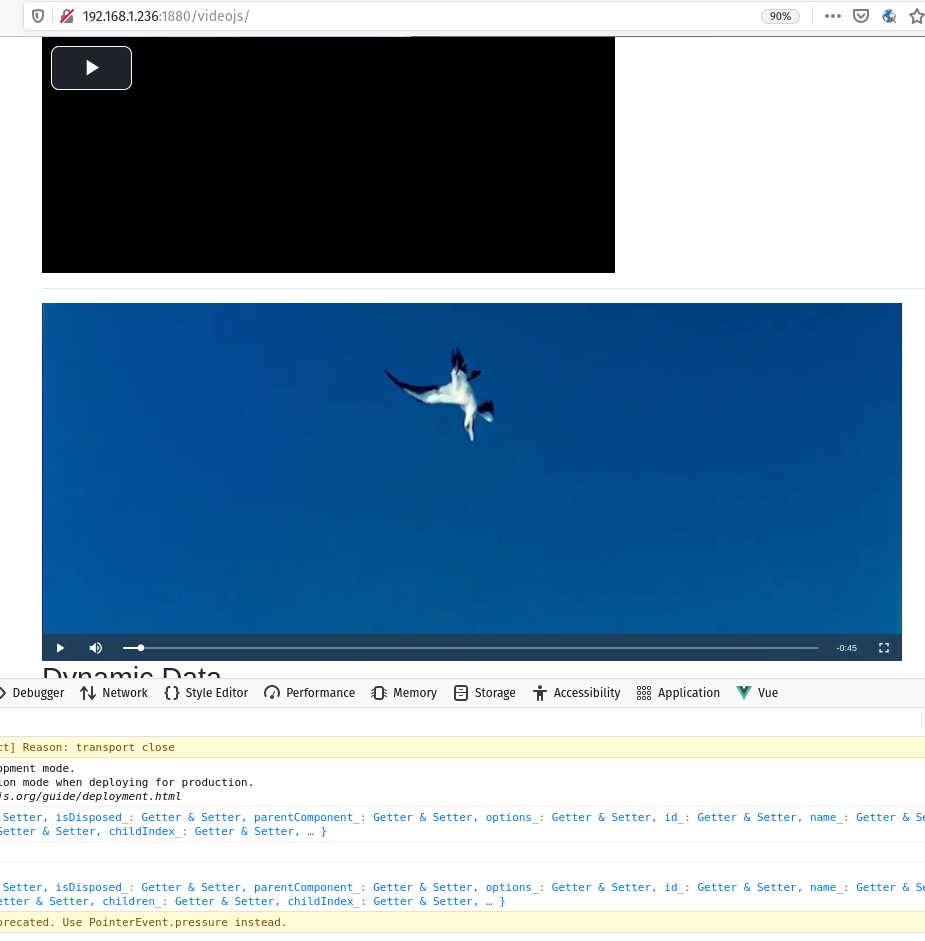
I wonder because sometimes Firefox on Linux has some issues with codecs, maybe that's the cause.
In the source, there are 2 players:

---
### Author:  [@TotallyInformation](https://discourse.nodered.org/u/TotallyInformation)
#### Post date: [6 February 2021 17:22 UTC](https://discourse.nodered.org/t/vue-videojs-in-uibuilder/40380/20 "2021-02-06T17:22:10Z")
Some lessons here that may be useful to others in the future.
- Take things one step at a time.
- When using a library or framework, try with the simplest configuration first. Making sure that the framework isn't tripping you up.
- JavaScript is currently a MESS! It is moving too fast for its own good which leaves multiple, overlapping technologies that none of us fully understand. Components, CJS, Require, Import, Export, Module.Exports, .... - Urgh!
- Components are worthwhile only if you plan to make something reusable. Otherwise they are likely to just get in the way.
- While VueJS is generally **very** nice to work with, it too has too many ways of doing things and unless component authors are good, disciplined and know what they are doing, it leaves the rest of us scratching our heads if something doesn't quite work right.
> [@j2l](#):
>
> Do you also have 2 players?
I have said that the example shows you 2 ways, you are seeing both ways. That's why I said to remove the component because I don't believe you need it.
* * *
However, good news is that we now have a working example of an embedded video player on the uibuilder WIKI.
[Next page](https://discourse.nodered.org/t/vue-videojs-in-uibuilder/40380.md?page=2)