# Yet another dashboard - node-red-contrib-component-dashboard
**URL:** https://discourse.nodered.org/t/yet-another-dashboard-node-red-contrib-component-dashboard/6453
**Category:** Share Your Nodes
**Created:** [6 January 2019 13:12 UTC](https://discourse.nodered.org/t/yet-another-dashboard-node-red-contrib-component-dashboard/6453 "2019-01-06T13:12:33Z")
**Posts on this page:** 17
**Page:** 1
### Author:  [@cinhcet](https://discourse.nodered.org/u/cinhcet)
#### Post date: [6 January 2019 13:12 UTC](https://discourse.nodered.org/t/yet-another-dashboard-node-red-contrib-component-dashboard/6453/1 "2019-01-06T13:12:33Z")
Hi,
some while ago I started a dashboard alternative, which is something between node-red-dashboard and node-red-contrib-uibuilder.
For details look at [https://github.com/cinhcet/node-red-contrib-component-dashboard](https://github.com/cinhcet/node-red-contrib-component-dashboard)
The idea is that the dashboard widgets are web-components, i.e. custom html-tags with their own look and functionality. Each of these widgets can then also be accompanied by their own Node-RED node.
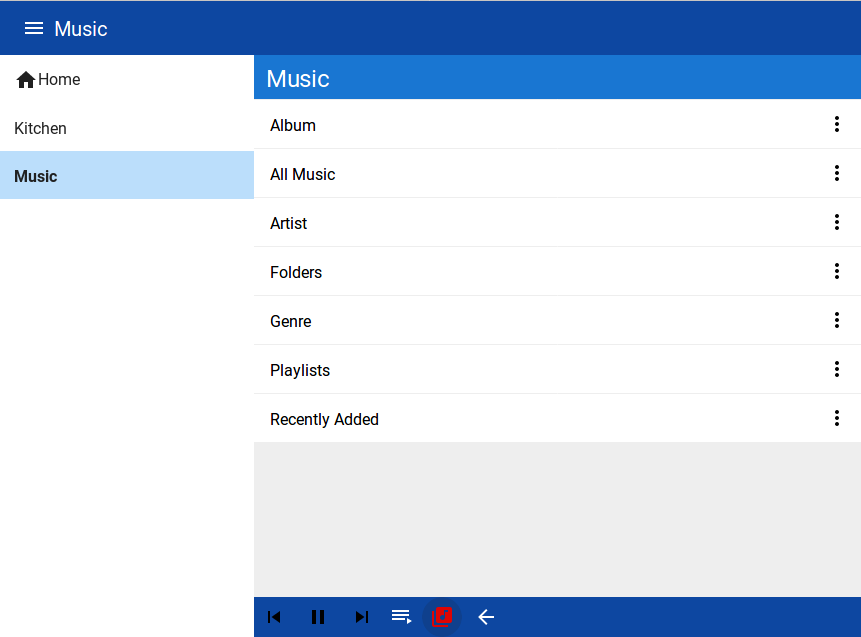
Creating the dashboard then means to write html, but adding a widget like a button or even more complicated things like a gauge or a music browser means just inserting for example
`I am a button`.
Then you can add a node to Node-RED which has an elementId parameter set to `paperButton`. As soon as you press the button, this node will inject a message into the flow.
You have complete freedom of your dashboard, you could use your favorite css framework etc etc.
Creating new widgets means writing web-components. At the moment, the provided ones are created with polymer 3.
Now I finally found a convenient way of installing/bundling it, so that users could create new widgets and make them installable via npm. This was realized by the [parceljs.org](http://parceljs.org) bundler, which is a html/js/css.... bundler that is able to resolve node\_module paths. Therefore I decided to publish a first version to npm.
A few features:
- you can create as many separate dashboards as you want
- messages can be replayed
- widgets can not only communicate via websockts with NR, but also via ajax. This is helpful if you want for example to create a widget that browses a database or a music library or graphs.
- creating new widgets is actually relatively easy, since I tried to hide away a lot of complexity in the communication with NR.
At the moment, not many widgets are published. The biggest question I have is how to provide a good basic css grid structure layout, such that not everyone has to start from scratch. If someone wants to discuss that with me, I would be happy.
Let me know what you think!
Here some very basic pictures

---
### Author:  [@cinhcet](https://discourse.nodered.org/u/cinhcet)
#### Post date: [7 January 2019 11:09 UTC](https://discourse.nodered.org/t/yet-another-dashboard-node-red-contrib-component-dashboard/6453/2 "2019-01-07T11:09:36Z")
version 0.0.2 published.
- switch widget
- text widget
- basic css flex layout for groups
- better example flow

somehow neither npm not the flows library is showing this package?!? maybe I have to be more patient.
---
### Author:  [@knolleary](https://discourse.nodered.org/u/knolleary)
#### Post date: [7 January 2019 11:44 UTC](https://discourse.nodered.org/t/yet-another-dashboard-node-red-contrib-component-dashboard/6453/3 "2019-01-07T11:44:18Z")
> [@cinhcet](#):
>
> somehow neither npm not the flows library is showing this package?!? maybe I have to be more patient.
Have you published it to npm?
---
### Author:  [@cinhcet](https://discourse.nodered.org/u/cinhcet)
#### Post date: [7 January 2019 11:48 UTC](https://discourse.nodered.org/t/yet-another-dashboard-node-red-contrib-component-dashboard/6453/4 "2019-01-07T11:48:48Z")
yes, although I cannot find it there. [https://www.npmjs.com/search?q=node-red-contrib-component-dashboard](https://www.npmjs.com/search?q=node-red-contrib-component-dashboard) returns nothing. However, "npm view node-red-contrib-component-dashboard" shows it (install also works)
---
### Author:  [@knolleary](https://discourse.nodered.org/u/knolleary)
#### Post date: [7 January 2019 12:10 UTC](https://discourse.nodered.org/t/yet-another-dashboard-node-red-contrib-component-dashboard/6453/5 "2019-01-07T12:10:44Z")
If it doesn't show up in the search results then the node-red flow library won't find it. You may need to follow up on [https://npm.community](https://npm.community)
---
### Author:  [@cinhcet](https://discourse.nodered.org/u/cinhcet)
#### Post date: [7 January 2019 12:12 UTC](https://discourse.nodered.org/t/yet-another-dashboard-node-red-contrib-component-dashboard/6453/6 "2019-01-07T12:12:11Z")
I will wait for another 24 hours and then ask there. Thanks!
Strange, never had this before with a npm package...
Edit: This link works [https://www.npmjs.com/package/node-red-contrib-component-dashboard](https://www.npmjs.com/package/node-red-contrib-component-dashboard) as normal
---
### Author:  [@cinhcet](https://discourse.nodered.org/u/cinhcet)
#### Post date: [8 January 2019 11:27 UTC](https://discourse.nodered.org/t/yet-another-dashboard-node-red-contrib-component-dashboard/6453/7 "2019-01-08T11:27:43Z")
now it is appearing on [npmjs.com](http://npmjs.com) and also on the flows page 🙂
---
### Author:  [@dynamicdave](https://discourse.nodered.org/u/dynamicdave)
#### Post date: [11 January 2019 14:14 UTC](https://discourse.nodered.org/t/yet-another-dashboard-node-red-contrib-component-dashboard/6453/8 "2019-01-11T14:14:27Z")
Could you suggest an IDE or HTML-editor that I could use to adjust/develop further web pages?
---
### Author:  [@cinhcet](https://discourse.nodered.org/u/cinhcet)
#### Post date: [11 January 2019 15:03 UTC](https://discourse.nodered.org/t/yet-another-dashboard-node-red-contrib-component-dashboard/6453/9 "2019-01-11T15:03:26Z")
[https://atom.io/](https://atom.io/) or [https://code.visualstudio.com/](https://code.visualstudio.com/)
Actually I like visual studio code with the atom theme 🙂
A few tips:
- if you look at the bundle.js file, you will find the option "watch". If you set it to true, the bundler will automatically watch for changes and update your dashboard. Although it claims that you even do not have to refresh your browser, you sometimes have to do so.
- if you want to create your own widgets, look at the existing ones. If you have questions, ask.
Note that this is still a beta version, I try to make improvements. At the moment I want to come up with some kind of style guide so that if one creates a widget and adheres to this style guide, the complete dashboard could be themed with custom colors.
What "core" widgets do you miss most?
---
### Author:  [@dynamicdave](https://discourse.nodered.org/u/dynamicdave)
#### Post date: [11 January 2019 16:07 UTC](https://discourse.nodered.org/t/yet-another-dashboard-node-red-contrib-component-dashboard/6453/10 "2019-01-11T16:07:32Z")
Thanks for your swift response and the links.
I'll try-out your suggestions later this evening.
I've used Dreamweaver and WebPlus (from Serif) for a number of websites I've built.
I just wanted to try using YAD to enhance the dashboard for my Home Automation system.
---
### Author:  [@cinhcet](https://discourse.nodered.org/u/cinhcet)
#### Post date: [11 January 2019 16:12 UTC](https://discourse.nodered.org/t/yet-another-dashboard-node-red-contrib-component-dashboard/6453/11 "2019-01-11T16:12:09Z")
maybe I misunderstood you, the editors I mentioned are not html editors like Dreamweaver, they are code editors.
If you want to use YAD, then you have to write html/css (and javascript for new widgets) yourself.
---
### Author:  [@dynamicdave](https://discourse.nodered.org/u/dynamicdave)
#### Post date: [11 January 2019 16:14 UTC](https://discourse.nodered.org/t/yet-another-dashboard-node-red-contrib-component-dashboard/6453/12 "2019-01-11T16:14:40Z")
Yes I think you did misunderstand me - but no bother I'm sure I can cope with hand-crafting some html/css.
---
### Author:  [@shrickus](https://discourse.nodered.org/u/shrickus)
#### Post date: [11 January 2019 17:17 UTC](https://discourse.nodered.org/t/yet-another-dashboard-node-red-contrib-component-dashboard/6453/13 "2019-01-11T17:17:16Z")
I've been using VSCode as of late -- there are extensions that help edit HTML, CSS, YAML, etc.
Plus, you can use it to step through your custom node when it is running, using the techniques outlined on the old Google groups forum, like [this one from Julian](https://discourse.nodered.org/t/how-to-test-bug-fix-on-local-node-red-installation/1345/7)...
---
### Author:  [@TotallyInformation](https://discourse.nodered.org/u/TotallyInformation)
#### Post date: [11 January 2019 18:34 UTC](https://discourse.nodered.org/t/yet-another-dashboard-node-red-contrib-component-dashboard/6453/14 "2019-01-11T18:34:20Z")
Cool, you've managed to solve a number of design issues I've been struggling with in uibuilder. Partly through lack of experience and partly through lack of time.
I'd always planned to overlay a set of components over uibuilder to provide an intermediate way of working.
> [@cinhcet](#):
>
> basic css grid structure layout
I've been back working with VueJS recently and discovered that bootstrap-vue is really good. However, I realise that is somewhat away from your use of Polymer.
---
### Author:  [@diramazioni](https://discourse.nodered.org/u/diramazioni)
#### Post date: [11 February 2019 20:54 UTC](https://discourse.nodered.org/t/yet-another-dashboard-node-red-contrib-component-dashboard/6453/15 "2019-02-11T20:54:40Z")
> [@cinhcet](#):
>
> What "core" widgets do you miss most?
gauge / chart.
But most importantly how to develop your own that is not just a button/switch?
---
### Author:  [@cinhcet](https://discourse.nodered.org/u/cinhcet)
#### Post date: [11 February 2019 21:18 UTC](https://discourse.nodered.org/t/yet-another-dashboard-node-red-contrib-component-dashboard/6453/16 "2019-02-11T21:18:48Z")
I have already created a widget with the same gauge as node-red-dashboard uses.
I also played with charts, there the problem is how I should expose all possible options to the user in a convenient way.
Unfortunately, I am extremely busy at the moment, so it will take some weeks from now until I can publish them. I also plan to do a proper 1.0.0 release with some (little) changes in the next months. There is always this gap between developing something for yourself and polishing it such that it is usable for others....
> But most importantly how to develop your own that is not just a button/switch?
Best way is to learn about web-components. You can use the native syntax, or use polymer 3 or use the new lit-element from the polymer team. It is really not difficult, if you know html, CSS and javascript. As long as you can develop your own widget as such a web-component, then interfacing it with node-red is very easy with the functions this dashboard provides. If you have specific questions, please ask here, I will try to answer them.
Thanks for the interest!
---
### Author:  [@cinhcet](https://discourse.nodered.org/u/cinhcet)
#### Post date: [11 February 2019 21:23 UTC](https://discourse.nodered.org/t/yet-another-dashboard-node-red-contrib-component-dashboard/6453/17 "2019-02-11T21:23:43Z")
> Cool, you've managed to solve a number of design issues I've been struggling with in uibuilder. Partly through lack of experience and partly through lack of time.
Thanks Julian, uibuilder was a great inspiration!
With respect to using bootstrap, as for vue, the libraries somehow have to be compatible with web-components, some are, some not. There is a lot of development here lately with the new polymer web-component library, which they call lit-element, especially how you can share CSS between different web-components.