CSS Styling in Dashboard 2.0: Table Node

Nostalgic for Dashboard 1.0, I'd like to recreate the look of a table in Dashboard 2.0.

To start, I'd like the rows to change color depending on whether the rows change color to even or odd.

To begin:
image

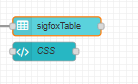
I added a Template Node "CSS" to my Flow:

And a table :

I applied a dark theme:

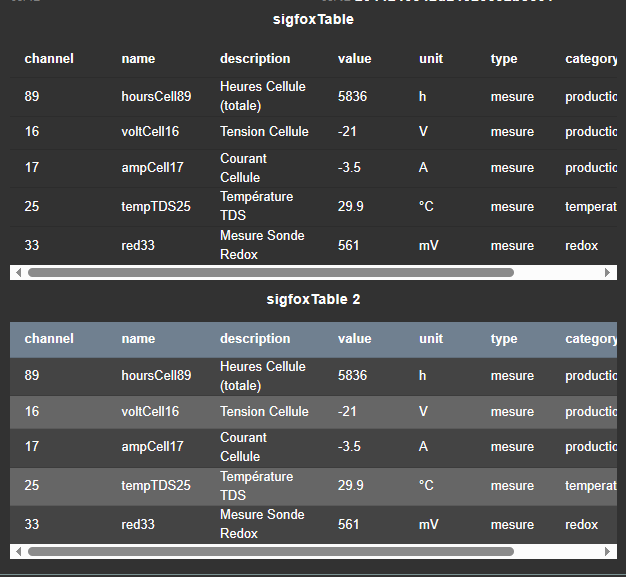
And the result isn't like the old DASHBOARD 1.0


My rows are all black.

Is there anything I've forgotten?

Take out the <style> </style> lines from the template node. You just need the raw CSS. I don't know if that is the problem though.


I removed the <style> tags and nothing else changed except that I can see my code in the Group.

Export the table node, the css template and an inject node to feed data to the table and paste the flow here.

This is the flow with inject :

[{"id":"9c3c92985184e811","type":"inject","z":"707595eff9a54cc2","name":"","props":[{"p":"payload"}],"repeat":"","crontab":"","once":false,"onceDelay":0.1,"topic":"","payload":"[{\"channel\":89,\"name\":\"hoursCell89\",\"description\":\"Heures Cellule (totale)\",\"value\":5836,\"unit\":\"h\",\"type\":\"mesure\",\"category\":\"production\",\"raw\":5836},{\"channel\":16,\"name\":\"voltCell16\",\"description\":\"Tension Cellule\",\"value\":-21,\"unit\":\"V\",\"type\":\"mesure\",\"category\":\"production\",\"raw\":722},{\"channel\":17,\"name\":\"ampCell17\",\"description\":\"Courant Cellule\",\"value\":-3.5,\"unit\":\"A\",\"type\":\"mesure\",\"category\":\"production\",\"raw\":547},{\"channel\":25,\"name\":\"tempTDS25\",\"description\":\"Température TDS\",\"value\":29.9,\"unit\":\"°C\",\"type\":\"mesure\",\"category\":\"temperature\",\"raw\":299},{\"channel\":33,\"name\":\"red33\",\"description\":\"Mesure Sonde Redox\",\"value\":561,\"unit\":\"mV\",\"type\":\"mesure\",\"category\":\"redox\",\"raw\":561}]","payloadType":"json","x":1500,"y":2340,"wires":[["651f5a8e5d7a8225"]]},{"id":"651f5a8e5d7a8225","type":"ui-table","z":"707595eff9a54cc2","group":"85392caa4e7f203f","name":"","label":"sigfoxTable","order":4,"width":0,"height":0,"maxrows":0,"passthru":false,"autocols":false,"showSearch":false,"deselect":false,"selectionType":"none","columns":[{"title":"channel","key":"channel","keyType":"key","type":"text","width":"10","align":"start"},{"title":"name","key":"name","keyType":"key","type":"text","width":"10","align":"start"},{"title":"description","key":"description","keyType":"key","type":"text","width":"10","align":"start"},{"title":"value","key":"value","keyType":"key","type":"text","width":"10","align":"start"},{"title":"unit","key":"unit","keyType":"key","type":"text","width":"10","align":"start"},{"title":"type","key":"type","keyType":"key","type":"text","width":"10","align":"start"},{"title":"category","key":"category","keyType":"key","type":"text","width":"10","align":"start"},{"title":"raw","key":"raw","keyType":"key","type":"text","width":"10","align":"start"}],"mobileBreakpoint":"sm","mobileBreakpointType":"defaults","action":"replace","className":"","x":1750,"y":2340,"wires":[[]]},{"id":"35d4a8e37c4f34a7","type":"ui-template","z":"707595eff9a54cc2","group":"","page":"d86f49ea355a8b97","ui":"","name":"CSS","order":4,"width":0,"height":0,"head":"","format":"\n/*==================== TABLE ==============*/\n\n.custom-table tbody tr:nth-child(odd) {\n    background-color: #444444;\n}\n\n.custom-table tbody tr:nth-child(even) {\n    background-color: #666666;\n}\n\n","storeOutMessages":true,"passthru":false,"resendOnRefresh":true,"templateScope":"widget:page","className":"","x":1730,"y":2380,"wires":[[]]},{"id":"85392caa4e7f203f","type":"ui-group","name":"DECODE trame","page":"d86f49ea355a8b97","width":6,"height":1,"order":1,"showTitle":true,"className":"","visible":"true","disabled":"false","groupType":"default"},{"id":"d86f49ea355a8b97","type":"ui-page","name":"MODUL Local","ui":"0c190d7ab5bc3c4b","path":"/page1","icon":"home","layout":"grid","theme":"8b4760c21512dfc2","breakpoints":[{"name":"Default","px":"0","cols":"3"},{"name":"Tablet","px":"576","cols":"6"},{"name":"Small Desktop","px":"768","cols":"9"},{"name":"Desktop","px":"1024","cols":"12"}],"order":1,"className":"","visible":"true","disabled":"false"},{"id":"0c190d7ab5bc3c4b","type":"ui-base","name":"My Dashboard","path":"/dashboard","appIcon":"","includeClientData":true,"acceptsClientConfig":["ui-notification","ui-control"],"showPathInSidebar":false,"headerContent":"page","navigationStyle":"default","titleBarStyle":"default","showReconnectNotification":true,"notificationDisplayTime":1,"showDisconnectNotification":true,"allowInstall":true},{"id":"8b4760c21512dfc2","type":"ui-theme","name":"DARK Theme","colors":{"surface":"#097479","primary":"#097479","bgPage":"#323232","groupBg":"#323232","groupOutline":"#7b9393"},"sizes":{"density":"compact","pagePadding":"12px","groupGap":"12px","groupBorderRadius":"4px","widgetGap":"12px"}},{"id":"a85eeba67ad56603","type":"global-config","env":[],"modules":{"@flowfuse/node-red-dashboard":"1.29.0"}}]
The first problem is that you have not set the template to Type CSS.
The second is that you have not specified the class custom-table on the table node.

That is as far as I have got so far, it may need someone with more CSS experience to take it from here.

Experiment with the CSS with more simple selectors and get that working first.

I tried applying the custom-table class in the Table node parameters, but when I click Done, it doesn't save: I can't deploy the change !?

BUT


I added the class to the "DECODE Trame" group on the "MODUL Local" page and now it works!

So the Class should not be applied to the Widget but to the Group... how then can a Class be applied only to the Widget? Since it has this property.

You are right, there seems to be a bug in the table node. The class has disappeared again if the table node is re-opened. Please submit a bug report.

1 Like

Does it work if you send in a message with msg.class set to 'custom-table`?


The two tables are identical. I inject msg.class="custom-table" into the second table, and it correctly applies the CSS.

Note: I removed the custom-table class from the Class property of the group.
The <style> tags must be kept in the CSS template.
The flow:

[{"id":"86b8d9a5861f5570","type":"inject","z":"707595eff9a54cc2","name":"msg.class=\"custom-table\"","props":[{"p":"class","v":"custom-table","vt":"str"}],"repeat":"","crontab":"","once":false,"onceDelay":0.1,"topic":"","x":1530,"y":2470,"wires":[["81e53ad3f5387b6e"]]},{"id":"81e53ad3f5387b6e","type":"ui-table","z":"707595eff9a54cc2","group":"85392caa4e7f203f","name":"","label":"sigfoxTable 2","order":6,"width":0,"height":0,"maxrows":0,"passthru":false,"autocols":true,"showSearch":false,"deselect":false,"selectionType":"none","columns":[],"mobileBreakpoint":"sm","mobileBreakpointType":"defaults","action":"replace","className":"","x":1730,"y":2470,"wires":[[]]},{"id":"35d4a8e37c4f34a7","type":"ui-template","z":"707595eff9a54cc2","group":"","page":"d86f49ea355a8b97","ui":"","name":"CSS","order":5,"width":0,"height":0,"head":"","format":"<style>\n    /*==================== TABLE ==============*/\n    .custom-table thead {\n        background-color: #708090;\n        border-collapse: collapse;\n        border: 1px solid green;\n    }\n\n    .custom-table thead tr:{\n\n        border: 1px solid green;\n    }\n\n\n    .custom-table tbody tr:nth-child(odd) {\n        background-color: #444444;\n    }\n\n    .custom-table tbody tr:nth-child(even) {\n        background-color: #666666;\n    }\n</style>","storeOutMessages":true,"passthru":false,"resendOnRefresh":true,"templateScope":"widget:page","className":"","x":1720,"y":2430,"wires":[[]]},{"id":"85392caa4e7f203f","type":"ui-group","name":"DECODE trame","page":"d86f49ea355a8b97","width":6,"height":1,"order":1,"showTitle":true,"className":"","visible":"true","disabled":"false","groupType":"default"},{"id":"d86f49ea355a8b97","type":"ui-page","name":"MODUL Local","ui":"0c190d7ab5bc3c4b","path":"/page1","icon":"home","layout":"grid","theme":"8b4760c21512dfc2","breakpoints":[{"name":"Default","px":"0","cols":"3"},{"name":"Tablet","px":"576","cols":"6"},{"name":"Small Desktop","px":"768","cols":"9"},{"name":"Desktop","px":"1024","cols":"12"}],"order":1,"className":"","visible":true,"disabled":false},{"id":"0c190d7ab5bc3c4b","type":"ui-base","name":"My Dashboard","path":"/dashboard","appIcon":"","includeClientData":true,"acceptsClientConfig":["ui-notification","ui-control"],"showPathInSidebar":false,"headerContent":"page","navigationStyle":"default","titleBarStyle":"default","showReconnectNotification":true,"notificationDisplayTime":1,"showDisconnectNotification":true,"allowInstall":true},{"id":"8b4760c21512dfc2","type":"ui-theme","name":"DARK Theme","colors":{"surface":"#097479","primary":"#097479","bgPage":"#323232","groupBg":"#323232","groupOutline":"#7b9393"},"sizes":{"density":"compact","pagePadding":"12px","groupGap":"12px","groupBorderRadius":"4px","widgetGap":"12px"}},{"id":"a631751f0266a432","type":"global-config","env":[],"modules":{"@flowfuse/node-red-dashboard":"1.29.0"}}]

Good, so there is no fundamental problem with class name in the table node, it is just that it is not saved in the config. At least you have a good workaround now until it is fixed.

The table node in dashboard-1 is based on the Tabulator package, whereas the native table node of dashboard-2 is based on the v-table Vuetify class.
If you are nostalgic for the d-1 table, you can try @omrid01/node-red-dashboard-2-table-tabulator, which is based on the latest Tabulator version, and also offers a quantum leap of additional new functionality.

1 Like