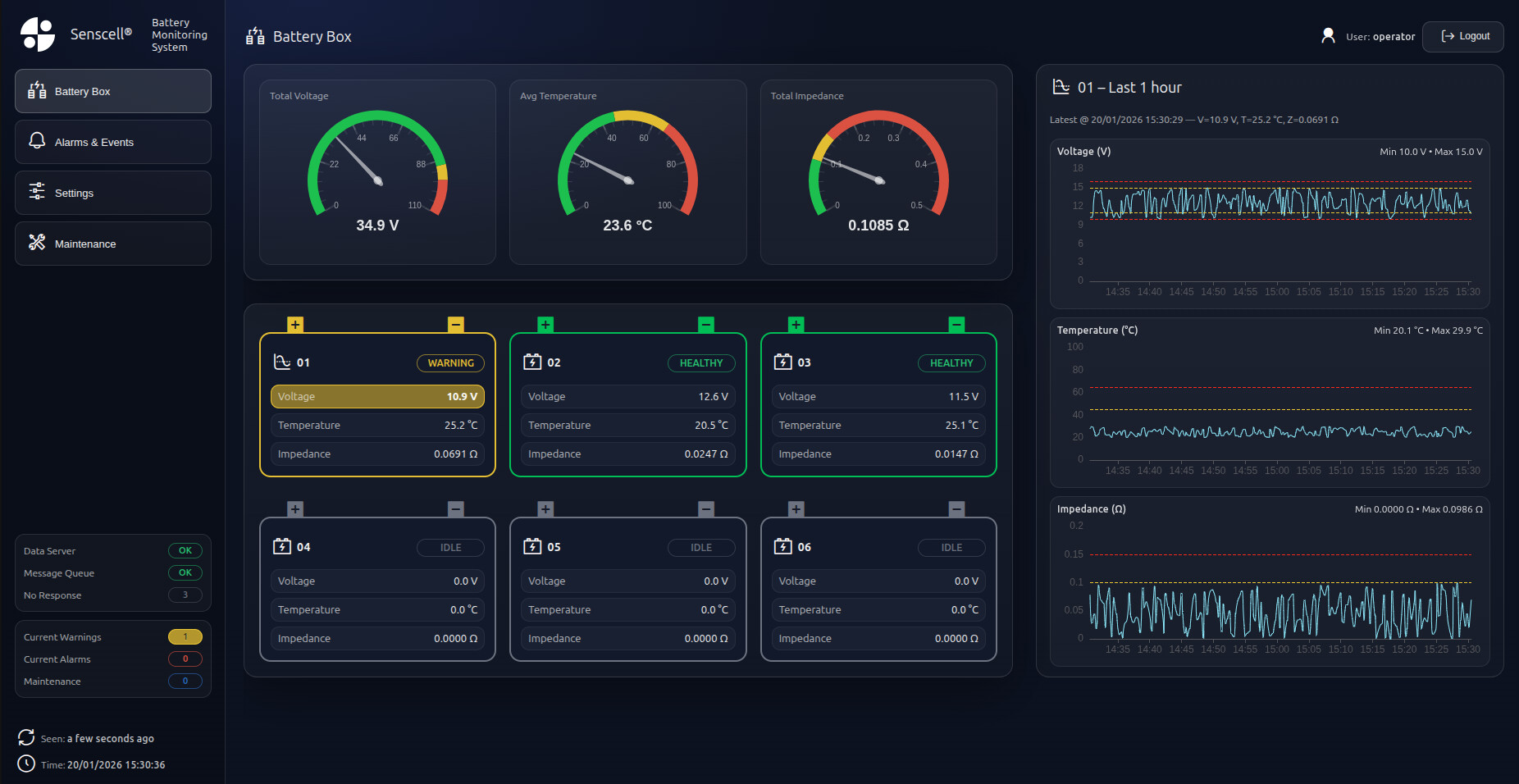
This is my latest creation with uibuilder, which just keeps getting better. Now, with your favourite (mine, Codex) built into VSCode, just describe what you want and magically a script.js, index.html and style.css appear. I import Echarts and subscribe to hugeicons to give the final polish. The client is happy. (p.s. it's an industrial battery condition monitor  )
)
Nice one.
I am working on Flex Boxes at the moment. I have them, they just don't flex the way I expect!! I am enjoying the journey of adapting my D1 Dashboard to UIBUILDER and learning lots along the way. No rush, D1 still works and there is a ton of other stuff going on at the moment, so play as and when I can.
Looks great! Very neat and tidy.
I'll admit that I find grid a somewhat easier to work with in general. 
But flex is good for those times where you need nested items to flex as you change viewport sizes.
One way to remember the differences between flexbox and grids is: flexbox is for one direction/dimension, grid for 2 directions/dimensions - or put in another way: grid for layout, flex for content.
Would highly recommend to use tailwind for this, it takes all the heavy lifting away, especially for responsive layouts and as a bonus, all AI models are very well versed to produce beautiful tailwind based layouts in seconds.
At the moment, I feel happy with uib-brand-css, basically, because my 'Tech Support' is familiar with it and the Documentation I am using supports it!! 
Once I get my head around the stuff and know at least what I might be doing rather than try, try, try, try, try again and hope for the best. I might be confident enough to give it a go. CSS of 20 yrs ago was far simpler!! Thank you for the suggestion though. Had a look and, at least, to me at the moment, it looks much the same as I am doing now!
My homework is now Flex and Grid!! The rest is done.
Great description.
I'm afraid that we will have to agree to differ on this one. I personally very much dislike such complex CSS frameworks. If for no other reason that it makes your HTML almost unreadable some times.
Don't get me wrong, like JS frameworks, CSS frameworks have their place - usually in big shops with dedicated dev teams. Of course, that is just my opinion.
When I started doing the 2nd gen default CSS for UIBUILDER - what is now uib-brand.css - the idea was to provide an absolute minimal reset, a minimal set of convenience styles and some (hopefully) sensible defaults. The other requirement was that it should cater for light/dark and follow browser settings for that as well as allowing manual override.
Of course, the baseline for the uibuilder css is different to something like Tailwind. It is primarily aimed at people who want to minimise the CSS they have to mess with. Ideally, people may not need to deal with any CSS for simple projects.
and yet your own 'ui-brand.css' is a 'framework' that you first need to digest :')
.warning-intense, .warn-intense, .surface1, surface2, etc.. what does this all mean, you could write: `class="bg-red-500 light:text-black dark:text-white".
I think you are missing the point of tailwind, it is not a framework, they are utility classes. You can write tailwind 10x faster than css, as you can do it immediately inline. p-<num> sets a padding around an element, px-<num> sets it only horizontally etc. and you never have to leave your html (ie. no back/forth to css, reload, check, modify etc). Don't like so many inline classes ? wrap them in a single class.
Anyway, it is clear you have your preference and never actually used tailwind, it would suit uibuilder very much instead of reinventing the wheel.
One of the challenges I faced here was that this is a multi-client HMI, which means that Node Red has to keep track of all alarms, events, last 1 hour history, logon credentials etc. That means when I view the alarms page I need to update it, albeit lazy loaded every 10 lines, then when I acknowledge an alarm I need to send a command back to Node Red. Ends up having a huge if cmd = " ... in a function block and another if msg.topic=== "... in script.js. There's probably a more efficient way but I didn't have the hours to develop a slick library. Does anyone have suggestions, maybe I could look into it?

Hard to say without more info. However, at a guess, I'd say that you simply need a lookup table instead of a monster if statement. I do that for a number of data processes.
As a BTW, and this doesn't answer your question, see above instead, however, if you've more than about 3 or 4 if/else sections, a switch/case structure will be far more efficient and readable.
When.... an A.I. can consistently correctly generate CSS files without me having to tweak them... I will use CSS (extensively) more. But for now, it is still a bit of a black art to me... just like regular expressions.
Haha, don't beat yourself up over it. Even real CSS experts get tripped up quite regularly. (and I'm not one of those by the way).
There is a lot of trial and error when using CSS and a lot of rapid experiments.
But that's why I tried to create something that mostly works for most people most of the time. Best thing for most people is use a friendly starting stylesheet and not fret too much about getting things too exact. You can always come back and improve things later, but I find that whenever I spend too long trying for perfection up front, I always regret the time wasted later.
And, what was hard yesterday, might be easy tomorrow. Since CSS is still changing rapidly. I try to mostly target browsers from early 2019 for uibuilder css since that will take you back to iOS Safari 12'ish. And iOS devices from several years prior to that should still be upgradable to 12. I use a build tool - LightningCSS to achieve that. Which is why you should generally use the minimised CSS file for UIBUILDER. The un-minimised version may only work for browsers from the last couple of years.
Indeed, and I still have to use an online regex tool to get them right, very often.
Thankfully, CSS isn't quite as obscure as CSS as, for the most part, the properties kind of make sense. Even though I can never remember them - that's what VSCode is for!
LOL... yeah websites like JSON validator, and few for testing REs help. But I have yet to find, not that I have looked for, a CSS validator site. But the time is coming when I think I need it. A.I. comments above not withstanding of course.
Well, they certainly exist. Not sure how useful they are though. Certainly I don't know of any way you could validate CSS against what visual you were hoping for.
But if you are using normal web development tools, you should certainly be looking to use CSS linting. That will help you ensure that your CSS is at least valid even though it won't necessarily help you deliver CSS that looks like what you had in mind.
Going back to CSS frameworks for a second, I don't find those any better either - they all have the same issue - they are too complex to remember, at least unless you are using them continuously. In my view, you shouldn't NEED to use CSS continuously, if you have a decent base CSS, your HTML should mostly look right in the first place without hundreds of classes littered everywhere in the HTML. That was always my aim with the uib-brand.css file.
It is different, of course, if you are constantly building web sites/apps for customers. Then something like Tailwind may make sense.
Most of us really don't need to do that though and are likely happy with a general look and feel. The uibuilder brand CSS gives you something that at least aims to look "OK". And gives you a bunch of CSS variables to play with so that you can adjust things like colours and whitespace without needing to reinvent things or resort to hundreds of classes each time.
It is different, of course, if you are constantly building web sites/apps for customers. Then something like Tailwind may make sense.
Why would you have to create 'apps' to use it ? It always makes sense to use it, because you will be developing faster - 10-fold. You have a strong opinion on something you have never used, you are missing out on the speed and convenience of development.
ie:

The uibuilder brand CSS gives you something that at least aims to look "OK"
It should not look 'ok' - it should look good - in my opinion, ie. the defaults in tailwind are based on a design system, not arbitrary. Anyway, I digress.
Sorry, you've made an assumption that I've never used it - I have, and other design systems too.
It does not provide me with a x10 faster development though, far from it, it massively slows me down because I have to wade through loads of completely unnecessary classes clogging up my HTML.
In most of my web development, I never have to add any classes. And where I do, it is only usually a single utility class to produce an effect.
Your shared image illustrates the point exactly. Loads of confusing classes just for a button that should be a standard look and feel for your site. At worse, mine would be <button class="primary">Click Me</button> and probably not even that since primary may be the default anyway.
As for the CSS. That's a one-and-done affair - a good baseline with maybe some CSS variable overrides for the site if I need to alter something.
Absolutely in keeping with the "low code" premise of Node-RED.
Tailwind and similar CSS frameworks are the antithesis of low-code in my opinion.
The defaults in the uibuilder base CSS are also not arbitrary. They are largely based on best practice taken from experts across the Internet.
Of course, and as always with UIBUILDER, you, the creator, have the choice of whether to use my baseline CSS or not. You can use Tailwind if that suits you or not if you want to keep clean, minimalist HTML code. Either way, you are never forced to use a specific framework or design system.
If that is confusing, I now understand why you prefer to suffer in css :')

I am a very simple bear!
