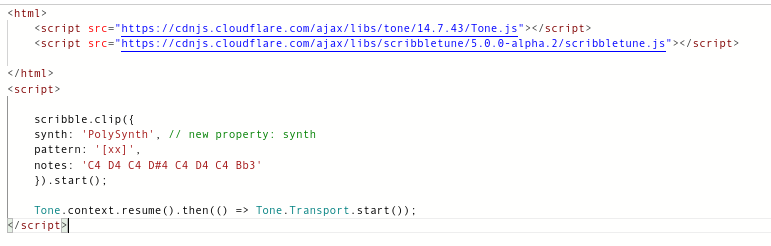
I'm trying to generate audio using Scribbletune & Tone.js through node-red and have it play on a webpage via Tone...
I found this tutorial but not sure how can I integrate webpack, and import scribbletune/browser and tone in template node/ Dashboard template node...
I only managed to successfully create a MIDI file with base scribbletune integration that is not of much use...
You could simply import the scribbletune package in a function node (setup tab, add import) then build a dashboard to automate it.
NPM Link: scribbletune - npm
Yes but i also want to integrate tone to convert the midi data to hearable audio...
to play where?
In the browser? or to generate audio data for saving to file / for later download links etc?
As you are probably aware, tone requires a browser (since it uses Web audio API) so it all depends how you want to architecture this.
For example,
- you can do it all in a browser e.g.
- use template nodes to generate a dashboard page
- write a web app for ui-builder
- you could generate midi notes in node-red (server side) and transmit them to the browser where the sound can be generated using tone (client side)
- you could generate midi notes and use tone + web-audio-api all at server side
What is your intended use and application?
Okay, the initial idea is to use inject node to pass in the notes, and on the webpage (from HTTP nodes) play it...
I used a template node to import Tone and scribbletune
And from firefox console managed to play a sound...

but i want something like this to work...
But I get some errors from scribble back
Managed to get something playing entirely from template node, I think I can work myself from here thank you @Steve-Mcl for trying to help!
For anyone who wants to play with this here is a really simple flow that just loops through note sequence!
[
    {
        "id": "99af1fd06d2a33d3",
        "type": "http in",
        "z": "1b804b1f26de6b42",
        "name": "",
        "url": "/play",
        "method": "get",
        "upload": false,
        "swaggerDoc": "",
        "x": 220,
        "y": 440,
        "wires": [
            [
                "ede6737adda30f0f"
            ]
        ]
    },
    {
        "id": "7a6bf8a198a8ff07",
        "type": "http response",
        "z": "1b804b1f26de6b42",
        "name": "",
        "statusCode": "",
        "headers": {},
        "x": 530,
        "y": 440,
        "wires": []
    },
    {
        "id": "ede6737adda30f0f",
        "type": "template",
        "z": "1b804b1f26de6b42",
        "name": "",
        "field": "payload",
        "fieldType": "msg",
        "format": "html",
        "syntax": "mustache",
        "template": "<html>\n    <script src=\"https://cdnjs.cloudflare.com/ajax/libs/tone/14.7.43/Tone.js\"></script>\n    <script src=\"https://cdnjs.cloudflare.com/ajax/libs/scribbletune/4.1.1/scribbletune.js\"></script>\n\n</html>\n<script>\n   \n    scribble.clip({\n    synth: 'PolySynth', // new property: synth\n    pattern: '[xx]',\n    notes: 'C4 D4 C4 D#4 C4 D4 C4 Bb3'\n    },{}).start();\n\n    Tone.context.resume().then(() => Tone.Transport.start());\n</script>",
        "output": "str",
        "x": 360,
        "y": 440,
        "wires": [
            [
                "7a6bf8a198a8ff07"
            ]
        ]
    }
]
ok, so to pass something from node-red to a web page you need a mechanism - e.g. websocket or polling an endpoint etc.
You could of course use a dashboard ui-template (then watch scope for incoming messages)
OR
use uibuilder to host your web page then use the vue hooks to receive incoming msgs
Basic structure of dashboard version...
inject --> function (import and use scribbletune to generate notes) --> ui-template (watch scope for msg then call Tone with msg.payload)
Basic structure of ui-builder version...
inject --> function (import and use scribbletune to generate notes) --> uibuilder (use vue hook to watch for msg then call Tone with msg.payload)