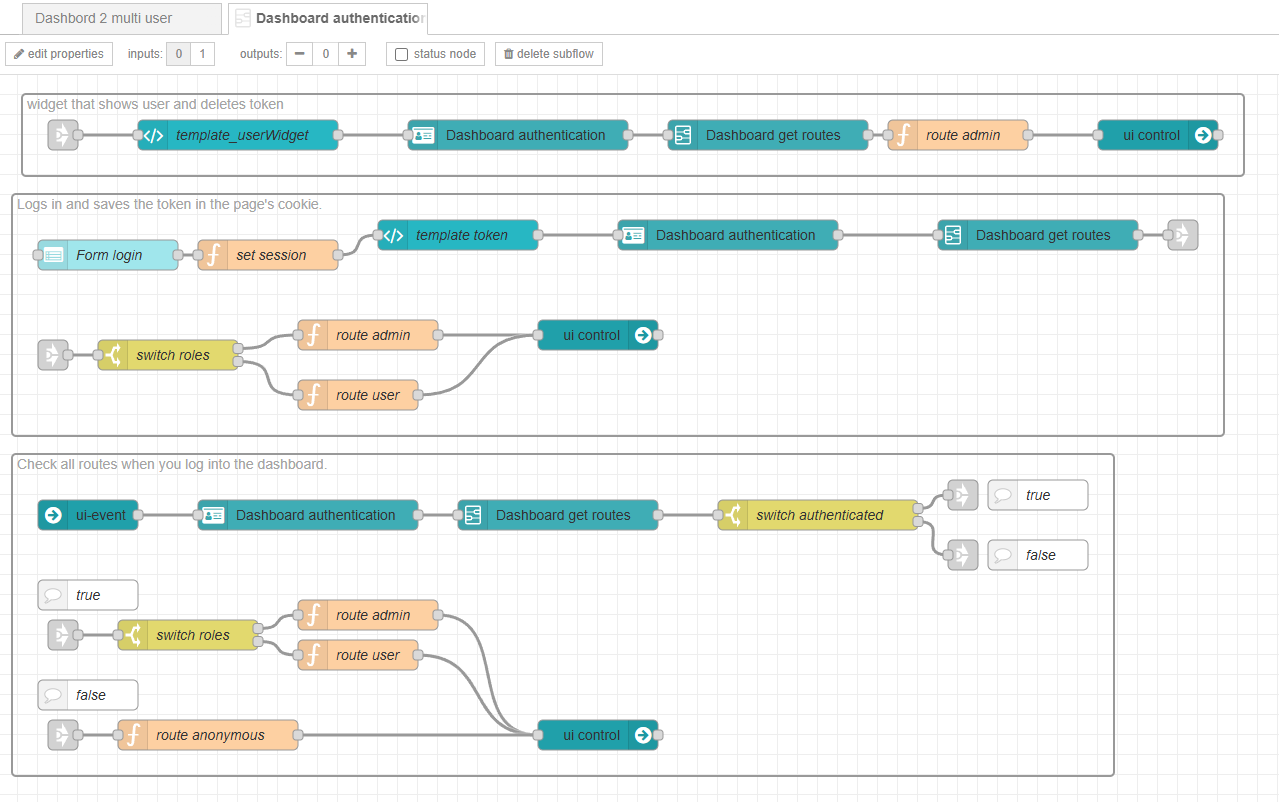
Recently, I created a model that appears to be easy to implement and does not rely on external plugins to enable Multi-User support with Permissions in Dashboard 2. It uses the Client Data feature along with a template that injects a token via cookie into each dashboard section.
If anyone has suggestions for improvements, please feel free to comment.
This model provides:
- Multi-user support with permission control;
- Route-level authentication;
- Authentication for simple actions, such as button clicks.
Example flow with authentication message:
code:
Good work. But have you checked the front-end security? Generally in single-page apps, there will always be information that cannot be completely isolated by "page", since all virtual pages are, of course, actually part of a single page.
So, in other words, an SPA cannot be fully secure for multi-users.
The only way to have a more secure SPA is to ensure that no information is even sent to the front-end except for the authenticated and authorised user.
As I don't use D2 for anything, I cannot say whether you can achieve such multi-user security safely with it. I'd be interested to find out.
Dashboard 2 can be configured to be Multi-Tenant with the Client Data feature, where each client on the dashboard has a unique socketId. This allows information to be sent exclusively to the specific socketId of each client.
In my framework, I implemented the addition of a token via cookie, which allows the user to validate when a client enters a specific page on the dashboard. This is done through the UI-Event, which retrieves the user's token and performs the validation on Node-RED. Based on this validation, the system decides whether or not to display the data on the front-end, similar to how data is sent to Node-RED.
It's important to note that the user would need to program all route and action validations within the system.
Yes, I know this. Though note that the socketId is actually rather too weak to safely have an ongoing conversation. If the client has a temporary blip in connectivity, that will change. So you cannot rely on it for any length of time. This is why UIBUILDER has a separate clientId which is stable while the browser is open.
This misses the point though. While this will indeed help avoid private data messages being sent to the wrong client, it would not help if, for example, you absolutely MUST prevent a client from accessing some part of the UI until they are authenticated and authorised. For example, if part of the UI allowed data to be sent back to Node-RED that should only be allowed if authenticated and authorised.
This is an easy mistake to make and can all too easily undermine security. Of course, if you have programmed everything absolutely correctly, you will have additional checks to prevent such things. But we all know how easy it is for code to drift over time. In many SPA's, additional pages are hidden but still exist in the browser, a determined bad actor could still access that.
Not saying this is the case for you, however, for the sake of others reading this in the future, it is an important factor to take into account and something that should be checked for carefully.
This has its own potential security issues, depending on what is included in the token and how you validate it (and where - validation in the browser is not security of course). Also what is the lifespan of the token? Could it be hijacked by a man-in-the-middle attack and replayed elsewhere?
Anyway, important to point out the potential issues. You may well have accounted for all of this but others may not be aware.
Very well noted regarding the security concerns, especially the need to continuously verify whether the client is still authenticated before sending data to Node-RED.
In the code example, the user must validate all actions sent to Node-RED.
The token used is a UUID with a 7-day validity period. No validation is performed on the client side; all validation happens in Node-RED, where sessions are stored and checked. After the session is validated, a new object msg._dashboardSession is added containing the session information.
The flow still needs several improvements, but it already serves as a good starting point for implementing multi-user security in Dashboard 2 without relying on external libraries.
This code was designed for use in a private network, mainly as an HMI in an industrial environment, which is my primary use case with Node-RED.
For internet-facing use, there are certainly several additional points that would need to be reviewed. Thanks for the insights!